The Search Box That Killed MySQL
performance databases scalability
System Design Scenario
The Search Box That Killed MySQL
When full-text search turns your database into a 45-second timeout machine
Tuesday, 2:47 PM. Sarah hits Enter on the user search box, typing “john” to find a customer account. The page shows a spinner. Thirty seconds pass. Then forty. At 45 seconds, the request times out. She tries again - same result. The support team Slack explodes with similar complaints.
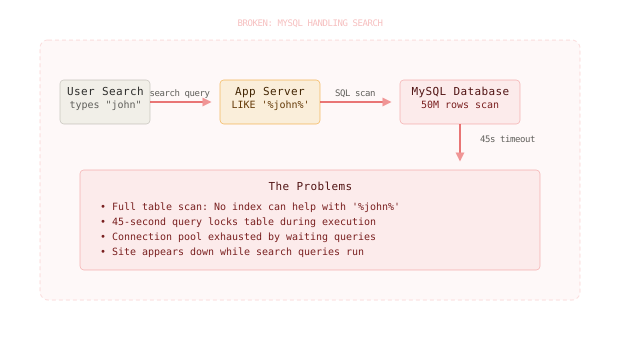
What’s happening? A simple LIKE '%john%' query against the users table. In development with 1,000 user records, this query returns in 50 milliseconds. In production with 50 million records, it’s scanning every single row, character by character, looking for the substring “john” anywhere in the name field. It’s like reading through 50 million books page by page to find every mention of a word, instead of using an index.
MySQL is doing exactly what it was asked to do - but at scale, this becomes a table-locking, connection-pool-exhausting nightmare. While the query runs, it holds locks that block other operations. The application server spawns more connections to handle timeouts, quickly exhausting the connection pool. Within minutes, the entire application appears down.
This is the full-text search problem. Relational databases excel at structured queries with indexes, but they weren’t built for the fuzzy, substring-heavy queries that modern search requires.
Why This Happens
The root cause lies in a fundamental mismatch between what search engines need and what relational databases provide. When you run LIKE '%query%', MySQL has no choice but to examine every row because the wildcard at the beginning prevents it from using any index.
Here’s the failure chain:
User types "john"
  -> SELECT * FROM users WHERE name LIKE '%john%'
    -> Full table scan of 50M rows (no index possible)
      -> 45-second query execution
        -> Table locks during scan
          -> Connection pool exhaustion
            -> Application appears down
The non-obvious insight most engineers miss: adding a database index won’t fix this. A B-tree index on the name column helps with queries like name LIKE 'john%' (prefix matching) but is useless for LIKE '%john%' (substring matching). The database literally cannot avoid reading every row.
Wildcard searches that start with ’%’ force a full table scan because no database index can help with arbitrary substring matching - the index structure requires knowing the prefix.
The Naive Solution (and where it breaks)
Most engineers reach for one of two approaches when this happens: optimize the SQL query or add more database resources. Both miss the fundamental problem.
The “optimize SQL” path leads to tricks like:
- Adding
LIMITclauses (helps response time but breaks search completeness) - Creating multiple columns with different search variations (explosive data duplication)
- Using
FULLTEXTindexes withMATCH() AGAINST()(better, but still locks tables and doesn’t handle typos)
The “add resources” path means:
- Bigger database instances (expensive, doesn’t solve the algorithmic problem)
- Read replicas (search queries still crush each replica)
- Connection pooling (helps connection management but not query performance)
Here’s where each breaks:
Small scale: 1K users -> LIKE '%query%' runs in 50ms, no problem
Large scale: 50M users -> LIKE '%query%' runs in 45 seconds, locks table, exhausts poolMySQL’s FULLTEXT indexes seem like the answer but they’re still table-level operations that can lock during updates and don’t handle fuzzy matching, synonyms, or ranking well.
The Better Solution: Dedicated Search Infrastructure
Here’s what actually fixes this: separate your search concerns from your transactional concerns. Use MySQL for what it’s great at (ACID transactions, consistent writes, relational queries) and use a search engine for what it’s great at (full-text search, fuzzy matching, relevance ranking).
Elasticsearch: Built for Search
Elasticsearch approaches search with inverted indexes - data structures specifically designed for text search. Instead of storing rows and scanning them linearly, it pre-processes text into tokens and builds indexes that point from terms back to documents.
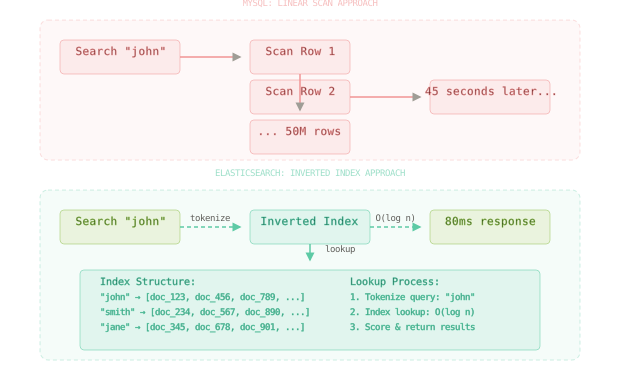
An inverted index works like a book’s index - instead of reading every page to find “john,” you look up “john” in the index and jump directly to the relevant pages. When a user searches for “john,” Elasticsearch:
- Tokenizes the query into searchable terms
- Looks up “john” in the inverted index (O(log n) operation)
- Returns document IDs that contain the term
- Scores and ranks results by relevance
# Instead of this MySQL query that kills performance
cursor.execute("""
    SELECT user_id, name, email
    FROM users
    WHERE name LIKE %s
    OR email LIKE %s
    LIMIT 20
""", (f'%{query}%', f'%{query}%'))

# Use Elasticsearch for fast, fuzzy search
es_query = {
    "query": {
        "multi_match": {
            "query": query,
            "fields": ["name^2", "email"],
            "fuzziness": "AUTO",
            "type": "best_fields"
        }
    },
    "size": 20
}
results = es.search(index="users", body=es_query)GitHub replaced their MySQL-based search with Elasticsearch and reduced search response times from 2-45 seconds down to under 100ms, even as their codebase grew from millions to billions of lines.
Data Synchronization Strategy
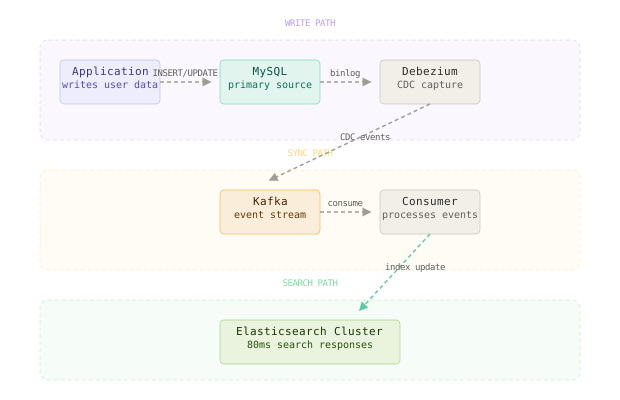
The challenge becomes keeping your search index synchronized with your primary database. Here’s the robust approach using change data capture:
# Debezium CDC configuration for MySQL -> Kafka
debezium_config = {
    "connector.class": "io.debezium.connector.mysql.MySqlConnector",
    "database.hostname": "mysql.prod.example.com",
    "database.port": "3306",
    "database.user": "debezium",
    "database.password": "***",
    "database.server.id": "184054",
    "database.server.name": "mysql-server",
    "database.include.list": "userdb",
    "table.include.list": "userdb.users,userdb.user_profiles",
    "database.history.kafka.bootstrap.servers": "kafka:9092",
    "database.history.kafka.topic": "schema-changes.userdb"
}

# Kafka consumer that updates Elasticsearch
from kafka import KafkaConsumer
import json

consumer = KafkaConsumer(
    'mysql-server.userdb.users',
    bootstrap_servers=['kafka:9092'],
    value_deserializer=lambda m: json.loads(m.decode('utf-8'))
)

for message in consumer:
    event = message.value

    if event['op'] == 'c':  # Create
        user_data = event['after']
        es.index(
            index='users',
            id=user_data['user_id'],
            document={
                'name': user_data['name'],
                'email': user_data['email'],
                'created_at': user_data['created_at']
            }
        )

    elif event['op'] == 'u':  # Update
        user_data = event['after']
        es.update(
            index='users',
            id=user_data['user_id'],
            document={
                'name': user_data['name'],
                'email': user_data['email']
            }
        )

    elif event['op'] == 'd':  # Delete
        user_id = event['before']['user_id']
        es.delete(index='users', id=user_id)
This approach provides eventual consistency - writes go to MySQL first (ensuring ACID guarantees), then propagate to Elasticsearch within seconds.
The winning pattern is dual-write to transactional store first, then asynchronously sync to search engine - never make the search engine your source of truth.
The Full Architecture
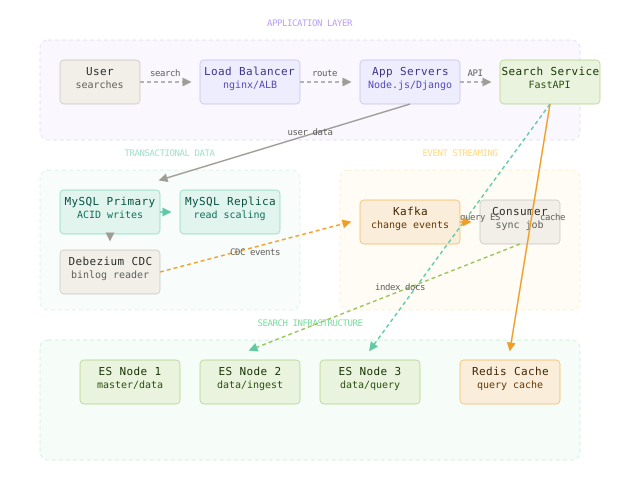
The full system separates concerns cleanly:
Write Path: Applications write user data to MySQL first. This ensures referential integrity, triggers, and ACID compliance remain intact. Debezium captures changes from the MySQL binlog and publishes them to Kafka topics.
Search Path: Search queries go directly to Elasticsearch, which returns results in under 100ms. The search service enriches results by joining back to MySQL for full user details, but only for the 20 results being displayed.
Sync Path: Kafka consumers read change events and update Elasticsearch indexes. This happens asynchronously, typically with 1-5 second delay. The lag is acceptable because search doesn’t need immediate consistency.
The beauty of this architecture: MySQL queries went from 45 seconds back to 20ms (because they’re only fetching by primary key), search queries run in 80ms, and each system does what it does best.
The most important design decision is treating search as a read-optimized view of your data, not a different way to query the same data.
Component Deep Dives
Elasticsearch Cluster Configuration
Elasticsearch’s job is to provide fast, relevant search results across millions of documents. Here’s a production-ready cluster setup:
# elasticsearch.yml - optimized for search workload
cluster.name: "user-search-cluster"
node.name: "search-node-${HOSTNAME}"
path.data: ["/var/lib/elasticsearch"]
path.logs: "/var/log/elasticsearch"

# Memory settings - never exceed 50% of available RAM
bootstrap.memory_lock: true
# Set in jvm.options: -Xms8g -Xmx8g (for 16GB RAM)

# Cluster discovery for multi-node setup
discovery.seed_hosts: ["search-1", "search-2", "search-3"]
cluster.initial_master_nodes: ["search-1", "search-2", "search-3"]

# Index optimization
indices.memory.index_buffer_size: "30%"
indices.fielddata.cache.size: "40%"
# User index mapping optimized for search
user_mapping = {
"mappings": {
"properties": {
"name": {
"type": "text",
"analyzer": "standard",
"fields": {
"exact": {"type": "keyword"},
"ngram": {
"type": "text",
"analyzer": "ngram_analyzer"
}
}
},
"email": {
"type": "text",
"analyzer": "email_analyzer"
},
"created_at": {"type": "date"},
"last_active": {"type": "date"},
"user_id": {"type": "long"}
}
},
"settings": {
"number_of_shards": 3,
"number_of_replicas": 1,
"refresh_interval": "30s", # Batch updates for better performance
"analysis": {
"analyzer": {
"ngram_analyzer": {
"tokenizer": "standard",
"filter": ["lowercase", "ngram_filter"]
},
"email_analyzer": {
"tokenizer": "uax_url_email",
"filter": ["lowercase"]
}
},
"filter": {
"ngram_filter": {
"type": "ngram",
"min_gram": 2,
"max_gram": 3
}
}
}
}
}This configuration handles fuzzy matching through n-grams (matching partial words) and provides both exact keyword matching and analyzed text search. The refresh interval is set to 30 seconds to batch updates for better indexing performance.
Debezium Change Data Capture
Debezium’s job is to reliably capture every change in MySQL and publish it to Kafka. It reads the MySQL binlog, which means zero impact on application performance:
-- MySQL configuration for Debezium (my.cnf)
server-id = 1
log-bin = mysql-bin
binlog_format = ROW
binlog_row_image = FULL
expire_logs_days = 10
{
"connector.class": "io.debezium.connector.mysql.MySqlConnector",
"tasks.max": "1",
"database.hostname": "mysql.prod.example.com",
"database.port": "3306",
"database.user": "debezium",
"database.password": "***",
"database.server.id": "184054",
"database.server.name": "mysql-server",
"database.include.list": "userdb",
"table.include.list": "userdb.users,userdb.user_profiles",
"database.history.kafka.bootstrap.servers": "kafka:9092",
"database.history.kafka.topic": "schema-changes.userdb",
"include.schema.changes": "true",
"transforms": "unwrap",
"transforms.unwrap.type": "io.debezium.transforms.ExtractNewRecordState",
"key.converter": "org.apache.kafka.connect.json.JsonConverter",
"value.converter": "org.apache.kafka.connect.json.JsonConverter",
"key.converter.schemas.enable": "false",
"value.converter.schemas.enable": "false"
}This setup captures inserts, updates, and deletes from the specified tables. The ExtractNewRecordState transform simplifies the message format, making it easier for downstream consumers to process.
Search Service Implementation
The search service’s job is to abstract Elasticsearch complexity and provide a clean API for applications:
from elasticsearch import Elasticsearch
from typing import List, Dict, Optional
import logging

class UserSearchService:
    def __init__(self, es_hosts: List[str]):
        self.es = Elasticsearch(
            hosts=es_hosts,
            retry_on_timeout=True,
            max_retries=3,
            timeout=30
        )

    def search_users(self, query: str, filters: Optional[Dict] = None, size: int = 20) -> Dict:
        """
        Search users with fuzzy matching and filters
        Returns: {'users': [...], 'total': int, 'took_ms': int}
        """

        # Build the Elasticsearch query
        es_query = {
            "query": {
                "bool": {
                    "must": [
                        {
                            "multi_match": {
                                "query": query,
                                "fields": [
                                    "name^3",        # Boost name matches
                                    "name.ngram^2",  # Partial name matches
                                    "email"          # Email matches
                                ],
                                "fuzziness": "AUTO",
                                "type": "best_fields",
                                "minimum_should_match": "75%"
                            }
                        }
                    ]
                }
            },
            "sort": [
                {"_score": {"order": "desc"}},
                {"last_active": {"order": "desc"}}
            ],
            "size": size,
            "_source": ["user_id", "name", "email", "created_at"]
        }

        # Add filters if provided
        if filters:
            filter_clauses = []
            if filters.get('created_after'):
                filter_clauses.append({
                    "range": {"created_at": {"gte": filters['created_after']}}
                })
            if filters.get('active_within_days'):
                filter_clauses.append({
                    "range": {"last_active": {"gte": f"now-{filters['active_within_days']}d"}}
                })

            if filter_clauses:
                es_query["query"]["bool"]["filter"] = filter_clauses

        try:
            response = self.es.search(index="users", body=es_query)

            return {
                "users": [hit["_source"] for hit in response["hits"]["hits"]],
                "total": response["hits"]["total"]["value"],
                "took_ms": response["took"]
            }

        except Exception as e:
            logging.error(f"Search failed for query '{query}': {e}")
            # Graceful degradation - return empty results rather than crash
            return {"users": [], "total": 0, "took_ms": 0}

    def suggest_users(self, partial_query: str, size: int = 5) -> List[str]:
        """
        Provide autocomplete suggestions as user types
        """
        es_query = {
            "suggest": {
                "user_suggest": {
                    "prefix": partial_query,
                    "completion": {
                        "field": "name_suggest",
                        "size": size
                    }
                }
            }
        }

        try:
            response = self.es.search(index="users", body=es_query)
            suggestions = response["suggest"]["user_suggest"][0]["options"]
            return [suggestion["text"] for suggestion in suggestions]
        except Exception as e:
            logging.error(f"Suggestion failed for query '{partial_query}': {e}")
            return []
This implementation provides fuzzy search, filters, sorting, and graceful error handling. The scoring algorithm boosts name matches and considers recency, providing better user experience than raw substring matching.
Stack Overflow uses a similar approach - searches go to Elasticsearch for fast results, but voting, editing, and other transactions stay in SQL Server where ACID guarantees matter.
Comparison Table
| Approach | Write Complexity | Read Complexity | Latency | Storage Cost | Failure Mode | Best Use Case |
|---|---|---|---|---|---|---|
| MySQL LIKE queries | Very Low | Low | 45+ seconds at scale | Low | Table locks, timeout cascades | Small datasets (under 100K rows) |
| MySQL FULLTEXT | Medium | Medium | 2-10 seconds | Medium | Still locks during updates | Text-heavy content, exact matching |
| Elasticsearch + CDC | High | Low | 50-200ms | High (2x storage) | Sync lag, cluster complexity | Large-scale user search |
| Elasticsearch dual-write | Medium | Low | 50-200ms | High (2x storage) | Consistency issues | Real-time requirements |
| Hybrid (search + SQL) | High | Medium | 100-300ms | High | Network calls, complexity | Rich search with transactional data |
For most applications handling user search at scale, the Elasticsearch + CDC approach wins despite its complexity. The performance gain (from 45 seconds to 100ms) and the elimination of database locks justifies the operational overhead. I’d only consider alternatives if the team lacks Elasticsearch expertise or the search volume is very low.
Key Takeaways
-
Relational databases vs. search engines: MySQL excels at ACID transactions and structured queries, but substring matching forces full table scans that don’t scale. Use the right tool for each job.
-
Inverted indexes: The core difference between search engines and databases. Elasticsearch pre-processes text into searchable tokens, enabling O(log n) lookups instead of O(n) scans.
-
Eventual consistency trade-off: Search doesn’t need immediate consistency. A 1-5 second delay between write and search visibility is acceptable and enables much better architecture separation.
-
Change data capture: Debezium-style CDC is superior to dual-writes because it’s guaranteed to capture every change and doesn’t slow down application writes.
-
Graceful degradation: Search services should never crash the application. Return empty results rather than throw exceptions when Elasticsearch is unavailable.
-
Index optimization: Elasticsearch performance depends heavily on proper analyzers, field mappings, and refresh intervals. Default settings rarely work for production.
-
Connection pooling still matters: Even with fast queries, manage database connections carefully. Search might be fast, but connection exhaustion can still kill your application.
-
Monitoring lag: Track the delay between MySQL writes and Elasticsearch availability. High lag indicates problems in your CDC pipeline that need immediate attention.
The counter-intuitive lesson: the best database optimization for search is often not using the database for search at all. Embrace specialized tools and eventual consistency rather than forcing SQL to handle every use case.
Frequently Asked Questions
Q: Why not just use database indexes to speed up LIKE queries?
A: Database indexes only help with prefix matching (LIKE 'john%'), not substring matching (LIKE '%john%'). B-tree indexes require knowing the prefix to navigate the tree structure. For arbitrary substring matching, the database has no choice but to scan every row.
Q: What about PostgreSQL’s full-text search capabilities? Is it better than MySQL?
A: PostgreSQL’s tsvector and tsquery are significantly better than MySQL’s FULLTEXT indexes. They support ranking, stemming, and faster updates. However, they still don’t match dedicated search engines for fuzzy matching, synonyms, or complex relevance scoring. PostgreSQL full-text is a good middle ground for simple use cases.
Q: How do you handle the lag between MySQL writes and Elasticsearch updates? A: Most applications can tolerate 1-5 seconds of search lag. For cases requiring immediate consistency (like searching for something you just created), implement a fallback that queries MySQL directly if the item isn’t found in Elasticsearch within a reasonable time window.
Q: Why use Kafka instead of writing directly from the application to both MySQL and Elasticsearch? A: Direct dual-writes create consistency problems - what happens if MySQL succeeds but Elasticsearch fails? You’d need distributed transactions or complex retry logic. CDC via Kafka guarantees that every MySQL change eventually reaches Elasticsearch, with built-in retry and dead letter queue handling.
Q: What’s the biggest operational challenge with this architecture? A: Managing Elasticsearch cluster health and capacity planning. Unlike databases with well-understood scaling patterns, Elasticsearch performance depends on shard distribution, heap usage, and garbage collection tuning. Budget time for learning Elasticsearch operations, not just development.
Q: Can you avoid the storage duplication cost of keeping data in both MySQL and Elasticsearch? A: You could store only searchable fields in Elasticsearch and join back to MySQL for full details, but this creates latency and complexity. The 2x storage cost is usually worth it for the operational simplicity of having complete documents in the search index.
Interview Questions
Q: Walk through what happens when a user types “john smith” into a search box in this architecture. Expected depth: Trace the request from browser through load balancer to search service, Elasticsearch query execution with scoring, result enrichment from MySQL, and response assembly. Mention query parsing, fuzzy matching, and field boosting.
Q: Your Elasticsearch cluster is showing high CPU usage and slow queries. How do you diagnose and fix this? Expected depth: Check heap usage, garbage collection patterns, shard distribution, and query patterns. Discuss field data cache, filter vs query contexts, and when to add nodes vs optimize queries. Mention monitoring tools like Marvel/X-Pack.
Q: Design a system that handles both user search and order search, where orders have relationships to users and products. Expected depth: Discuss index design (separate vs unified indexes), denormalization strategies, handling updates that affect multiple document types, and query federation patterns. Address consistency challenges with related data.
Q: How would you migrate from the existing MySQL LIKE-based search to Elasticsearch without downtime? Expected depth: Parallel run strategy, feature flags for gradual rollout, backfill strategies for existing data, monitoring for performance comparisons, and rollback plans. Discuss handling the data sync lag during migration.
Q: What changes when your user base grows from 50 million to 500 million users? Expected depth: Elasticsearch shard scaling, index lifecycle management, query optimization at massive scale, CDC pipeline scaling, and potential need for search result caching. Discuss cost implications and architectural evolution patterns.
Premium Content
Unlock the full article along with everything else in the archive — all in one place.