Build Google Photos Duplicate Detection Pipeline
data-engineering scalability performance
System Design Deep Dive
Google Photos Duplicate Detection
Detecting near-duplicate images at 28 billion uploads per day without storing a full copy of every photo
Imagine a library where every new book donation is compared against every existing book in the collection before being shelved - but the collection has 4 trillion books, the donations arrive at a rate of 28 billion per day, and “same book” includes not just identical copies but also slightly worn copies, cropped copies, and photocopies of select pages. That is roughly the challenge Google Photos faces with duplicate detection. The goal is not to refuse storage - users expect every photo they upload to be accessible - but to avoid storing redundant bytes for content that is functionally identical, and to present users with deduplicated views of their library.
The first wrong instinct is byte-level hashing (MD5, SHA-256). Two JPEGs of the same physical photograph taken five minutes apart, or the same photo saved at two different quality settings, will produce completely different hashes despite representing the same image. Screenshots of the same meme shared across messaging apps are compressed differently by each platform. Photos burst-shot on a phone look nearly identical but differ in pixel values due to motion blur and focus variance. Byte hashing catches only literal duplicates - the same file uploaded twice. It misses the 95% of “duplicates” that matter.
Perceptual hashing solves this by transforming an image into a fingerprint that is robust to minor changes. Two perceptually similar images (same subject, slightly different crop, brightness, or compression) will produce the same or similar fingerprints. But perceptual hashing alone at Google Photos scale - 4 trillion stored photos, 28 billion new uploads per day - creates a matching problem. You can’t compare each incoming photo’s hash against 4 trillion stored hashes in constant time. The hash comparison space is astronomically large.
This is where Locality-Sensitive Hashing (LSH) enters. LSH is a probabilistic technique that organizes similar fingerprints into the same “bucket” with high probability, while dissimilar fingerprints land in different buckets. Instead of comparing one incoming hash against 4 trillion hashes, you only compare it against the hashes in its LSH bucket - typically a few thousand. This makes approximate nearest-neighbor search tractable at billion-scale without sacrificing too much recall.
The core architectural decisions we need to solve for simultaneously: how to generate perceptual fingerprints that are robust to real-world image variations; how to implement LSH bucketing that achieves acceptable precision and recall at 4 trillion scale; how to tune the similarity threshold to avoid both over-deduplication (merging non-duplicate photos) and under-deduplication (storing redundant copies); and how to reclaim storage for detected duplicates without making photos inaccessible to their owners.
Requirements and Constraints
Functional Requirements
- Detect near-duplicate photos at upload time and link them to an existing canonical copy
- Support perceptual similarity (not just byte-level) - same image at different resolutions, crops, quality settings
- Present users with a deduplicated view of their library (show one copy, not N copies)
- Allow users to access their original upload even when deduplication has occurred
- Reclaim storage for true duplicates: multiple users uploading the same stock photo or viral meme
- Detect duplicates within a single user’s library (burst photos, accidental re-uploads)
Non-Functional Requirements
- 28 billion uploads per day (peak: 5x average = ~1.6 million uploads per second)
- 4 trillion total stored images as the index to search against
- Duplicate detection latency: under 2 seconds per upload (asynchronous, not blocking storage)
- False positive rate (incorrectly merging non-duplicate photos): under 0.001%
- False negative rate (missing actual duplicates): under 5%
- Index storage: must not exceed 2x the storage of the photos themselves
- Similarity search p99 latency: under 100ms
- System availability: 99.99%
Constraints and Assumptions
- We focus on photographic images (JPEG, PNG, HEIC) - not videos, GIFs, or documents
- “Duplicate” is defined as visual similarity above a tunable threshold, not semantic similarity
- Cross-user deduplication (two users uploading the same photo) is handled at the storage layer, not the index layer
- We assume photos are stored in object storage (GCS equivalent) after upload
- Hash computation happens on a decoded image thumbnail, not the raw file
- We do not handle adversarial attacks (images designed to collide in the hash space)
High-Level Architecture
The pipeline has five major stages that form an assembly line: Image Ingestion, Feature Extraction, LSH Indexing, Similarity Search, and Storage Reclamation.
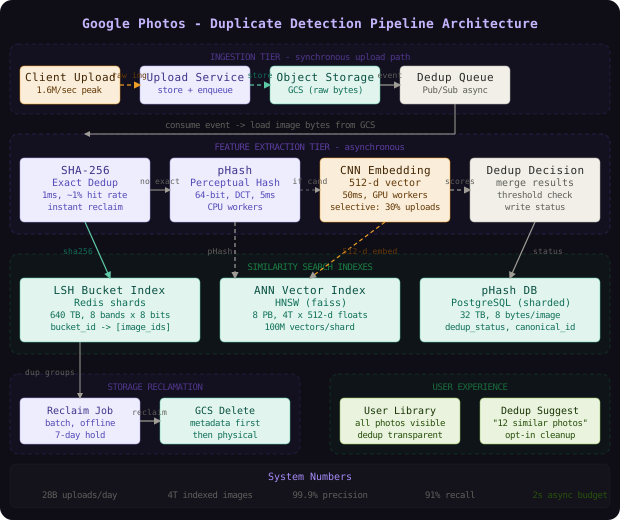
Image Ingestion receives the raw upload, stores it durably in object storage, and places a processing job on a distributed queue. This stage is synchronous to the user - they see the photo in their library immediately. Everything downstream is asynchronous.
Feature Extraction consumes from the queue, decodes the image, resizes it to a standard thumbnail (typically 32x32 for pHash), and computes the perceptual hash. For higher-accuracy matching, it also runs a CNN-based feature extractor that produces a 512-dimensional embedding vector. The hash is a 64-bit integer; the embedding is 512 floats.
Premium Content
Unlock the full article along with everything else in the archive — all in one place.