Build a QR Code Generation and Analytics Service
scalability data-engineering performance
System Design Deep Dive
QR Code Generation and Analytics
Dynamic QR codes that never need reprinting - change the destination, keep the image
A restaurant prints 5,000 table tents with a QR code linking to their lunch menu. A month later, they switch menu platforms. The QR codes are already on every table, in every photo on Instagram, and embossed on 200 branded items. If the QR code encodes the destination URL directly, the entire physical print run is now worthless. Every QR code would need to be reprinted.
This is the fundamental insight behind dynamic QR codes: the image should encode a stable redirect URL that you control, not the final destination. Think of it like a hotel room key card system - the keycard does not contain the room combination baked into its physical form. It contains a reference number, and the front desk computer decides what that reference opens today. You can change what the key opens without reissuing the card.
The engineering challenge is that “dynamic” adds significant complexity. The QR image must be CDN-cacheable (it never changes), but the redirect target must be instantly updatable (zero propagation delay). You need per-scan analytics capturing device type, geolocation, and timestamp without adding latency to the scan-to-website transition. And you need rate limiting at the QR level, because a single QR code on a Times Square billboard can receive millions of scans during a live event with zero notice.
We need to solve for static image with dynamic destination, sub-5ms redirect performance, real-time scan analytics, and destination update with instant consistency simultaneously.
Requirements and Constraints
Functional Requirements
- Generate a QR code image encoding a stable redirect URL
- Redirect scans to the current destination URL (302 redirect)
- Allow updating the destination URL without regenerating the QR image
- Track every scan with: timestamp, IP, country, city, device type, OS, browser, referrer
- Provide analytics dashboard showing scans over time, by device, by geography
- Support link expiry with an explicit expiry date
- Support custom slug for the redirect URL (vanity codes)
- Allow deactivating a QR code (scans return 410 Gone)
Non-Functional Requirements
- Scan-to-redirect latency: p99 under 5ms (CDN/Redis cache hit)
- Scan throughput: 50,000 scans per second sustained, 500,000 peak (viral/event scenarios)
- QR generation throughput: 1,000 new QR codes per second
- Destination update propagation: under 1 second after API call
- Analytics freshness: scan counts visible within 30 seconds
- Availability: 99.99% uptime for the redirect path
- Storage: 500 million QR codes, image storage in S3, metadata in Postgres
- Analytics retention: 2 years of raw scan events
Constraints and Assumptions
- QR images are PNG or SVG, stored in S3, served via CDN - never re-generated per request
- The redirect URL encoded in the QR points to our infrastructure (
r.example.com/{qr_id}) - not the final destination - We generate multiple image sizes (100px, 300px, 600px) at creation time
- Analytics pipeline has eventual consistency up to 30 seconds
- Bot/crawler scans are filtered from analytics but counted in a separate bot_scans metric
- Rate limiting is per-QR-code and per-IP, not per-user
High-Level Architecture
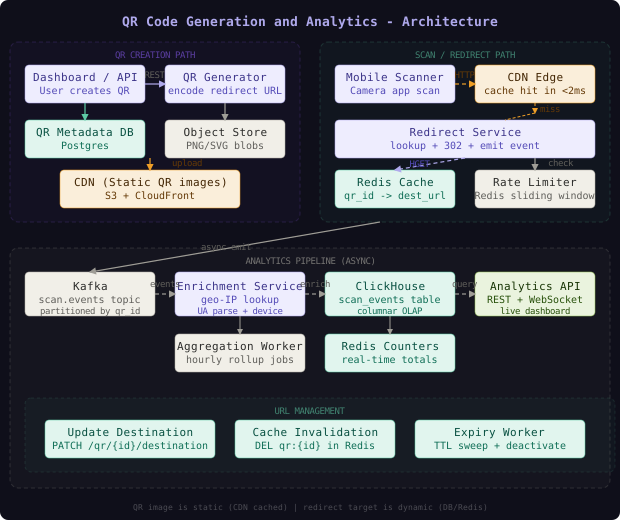
The system separates into three completely independent paths that share only the Postgres metadata database and the Redis cache. The creation path generates the QR image, stores it in S3, and writes metadata to Postgres. The scan/redirect path resolves a QR ID to a destination URL from Redis (or Postgres on cache miss) and issues a 302 redirect. The analytics path asynchronously enriches and stores scan events in ClickHouse for querying.
The key architectural decision is what the QR image encodes. The image contains https://r.example.com/{qr_id} where qr_id is a stable, permanent identifier for this QR code. The image never needs to change. All dynamism lives in the mapping from qr_id to destination_url, which is stored in Redis and Postgres and can be updated in under 1 second.
The QR image is entirely static - it is just a PNG encoding a stable URL. This means the image is perfectly CDN-cacheable with infinite TTL. The “dynamic” part is not the image, it is the server-side redirect that the URL points to. This separation is what makes updating the destination without reprinting possible.
The QR Generator Service
The QR Generator Service turns a user’s request into a permanent, CDN-cached QR image and a database record linking the QR ID to the current destination.
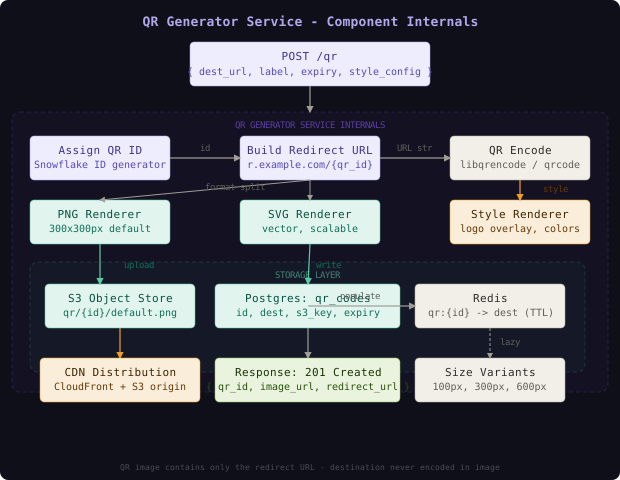
The generation process has four stages. First, we assign a stable QR ID using a Snowflake-style distributed ID generator. The ID is globally unique, time-sortable, and requires no database round-trip to generate. Second, we construct the redirect URL: https://r.example.com/{qr_id} - this is the string that will be encoded into the QR image. Third, we encode that URL string into a QR code matrix using a standard QR encoding library (qrcode in Python, boombuler/barcode in Go). Fourth, we render the matrix into PNG and SVG images at multiple resolutions, applying any user-specified style customization (logo overlay, custom colors) in a separate Style Renderer step.
# QR Generator Service - core generation flow
import qrcode
import qrcode.image.svg
from qrcode.image.styledpil import StyledPilImage
from qrcode.image.styles.moduledrawers import RoundedModuleDrawer
from io import BytesIO
import boto3

def generate_qr_code(
    qr_id: str,
    redirect_base_url: str = "https://r.example.com",
    logo_path: str = None,
    error_correction: int = qrcode.constants.ERROR_CORRECT_H,
) -> dict:
    """
    Generate QR code images for a given QR ID.
    Returns S3 keys for each generated variant.
    """
    redirect_url = f"{redirect_base_url}/{qr_id}"

    qr = qrcode.QRCode(
        version=None,   # auto-select minimum size
        error_correction=error_correction,  # H = 30% recovery (for logo overlay)
        box_size=10,
        border=4,
    )
    qr.add_data(redirect_url)
    qr.make(fit=True)

    s3_keys = {}

    # Generate PNG at 300x300 (default), 600x600 (print quality), 100x100 (thumbnail)
    for size_px in [100, 300, 600]:
        box_size = size_px // (qr.modules_count + 8)  # account for border
        if box_size < 1:
            box_size = 1

        if logo_path:
            img = qr.make_image(
                image_factory=StyledPilImage,
                module_drawer=RoundedModuleDrawer(),
                embeded_image_path=logo_path,
            )
        else:
            img = qr.make_image(fill_color="black", back_color="white")

        img = img.resize((size_px, size_px))

        buffer = BytesIO()
        img.save(buffer, format="PNG", optimize=True)
        buffer.seek(0)

        s3_key = f"qr/{qr_id}/{size_px}.png"
        s3_keys[f"png_{size_px}"] = s3_key
        upload_to_s3(s3_key, buffer, content_type="image/png")

    # Generate SVG (vector, infinitely scalable)
    svg_factory = qrcode.image.svg.SvgImage
    svg_img = qr.make_image(image_factory=svg_factory)
    svg_buffer = BytesIO()
    svg_img.save(svg_buffer)
    svg_buffer.seek(0)

    s3_key = f"qr/{qr_id}/default.svg"
    s3_keys["svg"] = s3_key
    upload_to_s3(s3_key, svg_buffer, content_type="image/svg+xml")

    return s3_keys

def upload_to_s3(key: str, data: BytesIO, content_type: str) -> None:
    s3 = boto3.client("s3")
    s3.upload_fileobj(
        data,
        "qr-images-bucket",
        key,
        ExtraArgs={
            "ContentType": content_type,
            "CacheControl": "public, max-age=31536000, immutable",  # 1 year - images never change
            "ACL": "public-read",
        },
    )
The CacheControl: immutable header on S3 objects is critical. CloudFront and browser caches will hold the image for up to a year without re-validating. This is safe because the QR image truly never changes - the content is permanently tied to a stable redirect URL.
Error correction level H (30% recovery) is used by default when logo overlays are requested. The logo covers part of the QR matrix, so higher error correction ensures the code remains scannable. For standard codes without logos, level M (15% recovery) is sufficient and produces a slightly smaller/cleaner image.
QR Tiger and Flowcode, two of the largest dynamic QR platforms, both encode a short redirect URL in the QR image rather than the destination directly. They report that their QR generation pipeline handles over 1 million QR codes created per day. The generation itself is cheap - the expensive part is the redirect infrastructure that serves the scans, which can be 10,000x higher volume than creations.
The Redirect Layer
The Redirect Layer is the performance-critical path. It is the component that a user’s phone hits the instant they scan a QR code, and it must return an HTTP redirect in under 5ms.
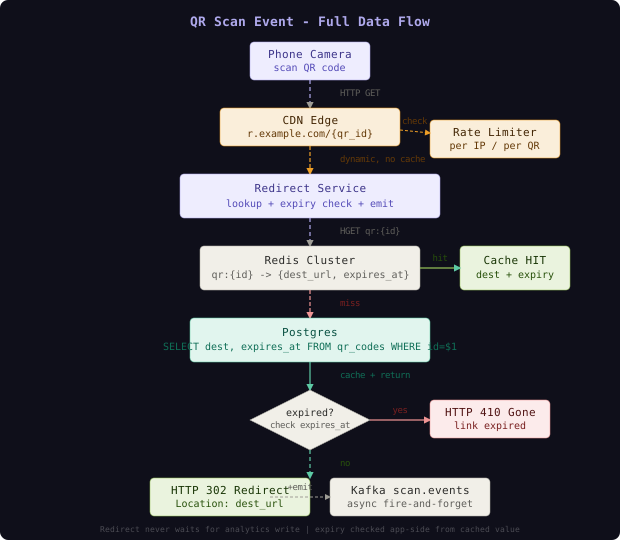
The redirect service does four things on every scan: check rate limits, look up the destination URL from Redis, check if the QR code has expired, and emit a Kafka event for analytics. Only the rate limit check and Redis lookup are on the critical latency path.
// Redirect Service - QR scan handler (Go)
package redirect

import (
    "context"
    "fmt"
    "net/http"
    "strconv"
    "time"

    "github.com/redis/go-redis/v9"
)

type ScanHandler struct {
    redis    *redis.ClusterClient
    db       QRRepository
    ratelim  RateLimiter
    producer KafkaProducer
    localCache *HotQRCache
}

// QRRecord holds the cached redirect info
type QRRecord struct {
    DestURL   string
    ExpiresAt int64 // Unix timestamp, 0 = no expiry
    IsActive  bool
}

func (h *ScanHandler) ServeHTTP(w http.ResponseWriter, r *http.Request) {
    qrID := r.URL.Path[1:] // strip leading /
    clientIP := extractClientIP(r)

    // Rate limit: 100 scans/sec per IP, 10K scans/sec per QR code
    if !h.ratelim.Allow(r.Context(), clientIP, qrID) {
        http.Error(w, "Rate limit exceeded", http.StatusTooManyRequests)
        return
    }

    // Check local in-process cache first (hot QR codes)
    if rec, ok := h.localCache.Get(qrID); ok {
        h.serveRedirect(w, r, qrID, rec, clientIP)
        return
    }

    // Redis lookup
    ctx, cancel := context.WithTimeout(r.Context(), 4*time.Millisecond)
    defer cancel()

    rec, err := h.lookupFromRedis(ctx, qrID)
    if err == redis.Nil {
        // Cache miss - go to DB
        rec, err = h.db.GetQRRecord(r.Context(), qrID)
        if err != nil {
            http.NotFound(w, r)
            return
        }
        // Repopulate cache asynchronously
        go h.populateCache(qrID, rec)
    } else if err != nil {
        // Redis degraded - fall back to DB
        rec, err = h.db.GetQRRecord(r.Context(), qrID)
        if err != nil {
            http.Error(w, "Service unavailable", http.StatusServiceUnavailable)
            return
        }
    }

    h.serveRedirect(w, r, qrID, rec, clientIP)
}

func (h *ScanHandler) serveRedirect(
    w http.ResponseWriter, r *http.Request,
    qrID string, rec *QRRecord, clientIP string,
) {
    // Check if deactivated
    if !rec.IsActive {
        http.Error(w, "QR code deactivated", http.StatusGone)
        return
    }

    // Check expiry (done in app code, not Redis TTL)
    if rec.ExpiresAt > 0 && time.Now().Unix() > rec.ExpiresAt {
        http.Error(w, "QR code expired", http.StatusGone)
        // Async: mark as inactive in DB to avoid repeat checks
        go h.db.MarkExpired(qrID)
        return
    }

    // Emit scan event - fire and forget, NEVER blocks redirect
    go h.emitScanEvent(qrID, r, clientIP)

    // 302 redirect (not 301 - we need to track every scan)
    http.Redirect(w, r, rec.DestURL, http.StatusFound)
}

func (h *ScanHandler) lookupFromRedis(ctx context.Context, qrID string) (*QRRecord, error) {
    // Store as hash for efficient partial reads
    result, err := h.redis.HGetAll(ctx, "qr:"+qrID).Result()
    if err != nil || len(result) == 0 {
        return nil, redis.Nil
    }

    expiresAt, _ := strconv.ParseInt(result["expires_at"], 10, 64)
    isActive := result["is_active"] == "1"

    return &QRRecord{
        DestURL:   result["dest_url"],
        ExpiresAt: expiresAt,
        IsActive:  isActive,
    }, nil
}
The HGETALL command on a Redis hash lets us retrieve dest_url, expires_at, and is_active in a single network round-trip. This is preferable to separate GET calls for each field. The total Redis round-trip including network latency within a VPC is typically under 0.5ms.
Expiry logic must live in application code, not Redis TTL. If Redis TTL expires the cache entry, the redirect service falls back to the database where it finds the record with a past expiry date and returns 410 Gone. If you rely on Redis TTL to “expire” the link, cache misses after expiry will still hit the DB unnecessarily and Redis re-population logic becomes unclear.
Destination Update with Instant Consistency
When a user updates the destination URL via PATCH /qr/{id}/destination, the update must propagate to all redirect service instances within 1 second. The sequence is:
- Update
destination_urlin Postgres (UPDATE qr_codes SET dest_url=$1 WHERE id=$2) - Delete the Redis key (
DEL qr:{id}) - this invalidates the cache immediately - Return
200 OKto the user
The next scan after the DEL will get a Redis miss, fall back to Postgres, read the new destination, and repopulate Redis with the updated value. Since Redis replication is asynchronous, we use DEL to the primary and accept that Redis replicas may serve the old value for up to the replica lag (typically under 100ms). For most use cases this is acceptable.
# Destination update handler - Python/FastAPI
from fastapi import FastAPI, HTTPException
import asyncpg
import aioredis

async def update_destination(qr_id: str, new_dest_url: str, user_id: str):
    """
    Update the destination URL for a QR code.
    Invalidates cache immediately after DB update.
    """
    async with db_pool.acquire() as conn:
        result = await conn.fetchrow(
            """
            UPDATE qr_codes
            SET dest_url = $1, updated_at = NOW()
            WHERE id = $2 AND owner_user_id = $3 AND is_active = TRUE
            RETURNING id, dest_url
            """,
            new_dest_url, qr_id, user_id
        )

        if not result:
            raise HTTPException(status_code=404, detail="QR code not found or not owned by user")

    # Invalidate Redis cache across all cluster nodes
    # Pipeline ensures both delete commands are batched
    pipe = redis_client.pipeline()
    pipe.delete(f"qr:{qr_id}")
    # Also clear any local in-process cache via pub/sub notification
    pipe.publish("qr:invalidate", qr_id)
    await pipe.execute()

    # Log update event for audit trail
    await log_qr_event(qr_id, "destination_updated", {
        "new_dest": new_dest_url,
        "user_id": user_id
    })

    return {"qr_id": qr_id, "dest_url": new_dest_url, "updated": True}
The PUBLISH qr:invalidate {qr_id} Pub/Sub notification is sent to a channel that all Redirect Service instances subscribe to. When they receive it, they evict qrID from their local in-process LRU cache. This ensures that even the hot-path in-process cache (which we add for viral QR codes) is invalidated within milliseconds of a destination update, rather than waiting for the 1-second TTL to expire.
If you update Postgres and then the Redis DEL fails (Redis unavailable), your cache will continue serving the old destination for up to the cache TTL (typically 24 hours). To prevent this, use a write-through strategy: always write to Redis first with the new value (SET rather than DEL), then update Postgres. A stale-read window of seconds is acceptable; a stale window of hours is not.
The Analytics Pipeline
The Analytics Pipeline transforms raw scan events into the engagement metrics that QR code owners see in their dashboards. The design priority is zero added latency to redirects and high-throughput enrichment of scan events.
Every scan emits a minimal ScanEvent to Kafka:
# Minimal scan event schema - emitted synchronously on redirect (in goroutine)
from dataclasses import dataclass
import time

@dataclass
class ScanEvent:
    qr_id: str           # partition key
    scan_id: str         # UUID for deduplication
    timestamp_ms: int    # milliseconds since epoch
    ip_hash: int         # FNV hash of IP for privacy
    raw_ip: str          # stored separately, 30-day retention
    user_agent: str      # raw UA string
    referrer: str        # HTTP Referer header
    country_code: str    # pre-populated from local GeoIP db if available

    def to_kafka_payload(self) -> dict:
        return {
            "qr_id": self.qr_id,
            "scan_id": self.scan_id,
            "ts": self.timestamp_ms,
            "ip_hash": self.ip_hash,
            "ua": self.user_agent[:512],  # truncate oversized UA strings
            "ref": self.referrer[:256],
            "cc": self.country_code,
        }
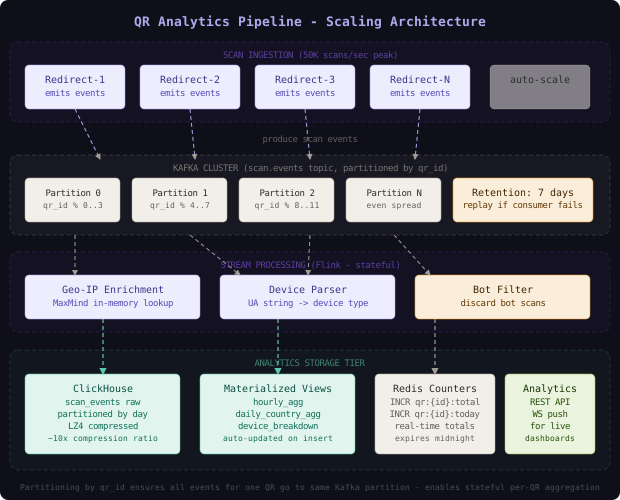
The Kafka topic scan.events is partitioned by qr_id. This is critical: by routing all scans for the same QR code to the same partition, a stateful Flink job can maintain per-QR aggregation state in memory without distributed coordination. A QR code that receives 100,000 scans per second has all its events processed by a single Flink task instance, which maintains running totals and flushes them to ClickHouse every 5 seconds.
-- ClickHouse: scan_events table (raw storage)
-- MergeTree engine with LZ4 compression, partitioned by day
CREATE TABLE scan_events
(
    qr_id        String,
    scan_id      UUID,
    scanned_at   DateTime64(3),
    country_code LowCardinality(String),  -- LowCardinality for strings with < 1000 distinct values
    city         LowCardinality(String),
    device_type  LowCardinality(String),  -- mobile, desktop, tablet, smarttv
    os           LowCardinality(String),  -- iOS, Android, Windows, macOS, Linux
    browser      LowCardinality(String),
    is_bot       UInt8,                   -- 0/1 flag
    referrer     String
)
ENGINE = MergeTree()
PARTITION BY toYYYYMMDD(scanned_at)
ORDER BY (qr_id, scanned_at)
SETTINGS index_granularity = 8192;

-- Materialized view: hourly aggregates (auto-maintained by ClickHouse)
CREATE MATERIALIZED VIEW scan_hourly_mv
ENGINE = SummingMergeTree()
PARTITION BY toYYYYMMDD(hour)
ORDER BY (qr_id, hour, country_code, device_type, is_bot)
POPULATE
AS SELECT
    qr_id,
    toStartOfHour(scanned_at) AS hour,
    country_code,
    device_type,
    is_bot,
    count()       AS scan_count,
    uniq(scan_id) AS unique_scanners
FROM scan_events
GROUP BY qr_id, hour, country_code, device_type, is_bot;
For real-time counters shown on the dashboard (scans today, scans this hour), we bypass ClickHouse entirely and use Redis counters updated by the Flink job every 5 seconds:
# Flink job: update Redis counters after each micro-batch
# Runs every 5 seconds per QR code with activity
import redis
from datetime import datetime, timezone

def update_redis_counters(redis_client: redis.Redis, qr_id: str, scan_count: int):
    today = datetime.now(timezone.utc).strftime("%Y%m%d")
    pipe = redis_client.pipeline()

    # Lifetime total
    pipe.incrby(f"qr:{qr_id}:total", scan_count)

    # Today's count (expires at midnight UTC)
    today_key = f"qr:{qr_id}:day:{today}"
    pipe.incrby(today_key, scan_count)
    pipe.expireat(today_key, next_midnight_unix())

    # Current hour count (expires in 2 hours)
    hour_key = f"qr:{qr_id}:hour:{datetime.now(timezone.utc).strftime('%Y%m%d%H')}"
    pipe.incrby(hour_key, scan_count)
    pipe.expire(hour_key, 7200)

    pipe.execute()
The Analytics API for the dashboard has two query strategies. For recent aggregates (last 7 days), it reads from the ClickHouse scan_hourly_mv materialized view - queries complete in under 10ms. For historical analysis (last 2 years), it queries the raw scan_events table with partition pruning by date. For the “live” scan count widget on the dashboard, it reads from the Redis counter.
Bitly uses a similar two-tier analytics architecture: Redis for real-time counters that feed live dashboards, and a columnar store (reportedly similar to Druid or ClickHouse) for historical deep-dives. They found that 95% of dashboard queries are for data within the last 30 days, which fits entirely in the “hot” materialized view layer without touching compressed archive storage.
Data Model
-- Primary QR code metadata
CREATE TABLE qr_codes (
    id              VARCHAR(20) PRIMARY KEY,   -- Snowflake ID as base62 string
    owner_user_id   BIGINT REFERENCES users(id) ON DELETE CASCADE,
    dest_url        TEXT NOT NULL,
    label           VARCHAR(255),              -- human-readable name
    created_at      TIMESTAMPTZ NOT NULL DEFAULT NOW(),
    updated_at      TIMESTAMPTZ NOT NULL DEFAULT NOW(),
    expires_at      TIMESTAMPTZ,               -- NULL = no expiry
    is_active       BOOLEAN NOT NULL DEFAULT TRUE,
    custom_slug     VARCHAR(50) UNIQUE,        -- optional vanity URL
    style_config    JSONB,                     -- logo_s3_key, fg_color, bg_color, shape
    error_correction CHAR(1) NOT NULL DEFAULT 'M'  -- L, M, Q, H
);

-- Index for fast redirects by QR ID (primary hot path)
CREATE INDEX CONCURRENTLY idx_qr_codes_id_active ON qr_codes (id)
    WHERE is_active = TRUE;

-- Index for custom slug lookups
CREATE INDEX CONCURRENTLY idx_qr_codes_slug ON qr_codes (custom_slug)
    WHERE custom_slug IS NOT NULL;

-- Index for expiry sweep job
CREATE INDEX CONCURRENTLY idx_qr_codes_expires ON qr_codes (expires_at)
    WHERE expires_at IS NOT NULL AND is_active = TRUE;

-- Index for user dashboard listing
CREATE INDEX CONCURRENTLY idx_qr_codes_user ON qr_codes (owner_user_id, created_at DESC);

-- QR image variants (multiple sizes per QR code)
CREATE TABLE qr_images (
    id          BIGSERIAL PRIMARY KEY,
    qr_code_id  VARCHAR(20) REFERENCES qr_codes(id) ON DELETE CASCADE,
    format      VARCHAR(4) NOT NULL,    -- png, svg
    size_px     INTEGER,               -- 100, 300, 600, NULL for svg
    s3_key      VARCHAR(512) NOT NULL, -- qr/{id}/{size}.png
    cdn_url     TEXT NOT NULL,         -- https://cdn.example.com/qr/{id}/{size}.png
    file_size   INTEGER,               -- bytes
    created_at  TIMESTAMPTZ NOT NULL DEFAULT NOW()
);

CREATE INDEX idx_qr_images_qr_code ON qr_images (qr_code_id, format, size_px);

-- Audit log: tracks all destination changes
CREATE TABLE qr_destination_changes (
    id          BIGSERIAL PRIMARY KEY,
    qr_code_id  VARCHAR(20) REFERENCES qr_codes(id),
    old_dest    TEXT,
    new_dest    TEXT NOT NULL,
    changed_by  BIGINT REFERENCES users(id),
    changed_at  TIMESTAMPTZ NOT NULL DEFAULT NOW()
);
The style_config JSONB column stores configuration for custom-branded QR codes (logo overlay path in S3, foreground color, background color, module shape). This is stored as JSON rather than normalized columns because the schema evolves as new styling options are added, and JSONB with GIN indexing on specific keys is sufficient for querying.
The qr_destination_changes audit table is important for compliance and debugging. When a user changes their QR code destination, we append a row here. This also serves as the “history” feature that some platforms offer - showing when the link was changed and what it previously pointed to.
The qr_images table has separate rows per format and size, with the S3 key and CDN URL stored explicitly. This allows lazy generation - if a user requests a 600px PNG and one does not exist yet, the API can generate it on demand and write a new row. You do not need to pre-generate every size at creation time.
Key Algorithms and Protocols
Dynamic vs Static QR Codes
The core architectural distinction is what the QR matrix encodes. A static QR code encodes the final destination URL directly - the bits in the image matrix are a binary encoding of https://destination.com/page. Change the destination and the image must change. A dynamic QR code encodes a redirect URL: https://r.example.com/abc123. The image encodes your stable redirect URL, and a server maps abc123 to the current destination.
# Comparing static vs dynamic QR generation
import qrcode

def make_static_qr(destination_url: str) -> qrcode.image.base.BaseImage:
    """Static: destination baked into image. Cannot change after printing."""
    qr = qrcode.make(destination_url)  # encodes destination directly
    return qr

def make_dynamic_qr(qr_id: str, redirect_base: str = "https://r.example.com") -> qrcode.image.base.BaseImage:
    """Dynamic: redirect URL in image. Destination changeable via server."""
    redirect_url = f"{redirect_base}/{qr_id}"  # stable, never changes
    qr = qrcode.make(redirect_url)  # encodes only the redirect URL
    return qr

# Dynamic QR codes are slightly larger (more modules) because the redirect URL
# is typically longer than a direct domain. But this rarely matters in practice.
# The URL "https://r.example.com/abc123" at error level M fits in QR version 3 (29x29).
The tradeoff: static QR codes have one fewer network hop (scan -> destination directly), while dynamic QR codes always scan to your redirect server first. This adds approximately 5-30ms depending on the user’s proximity to your nearest edge PoP. For most use cases this is imperceptible.
Scan Event Pipeline and Analytics Aggregation
The analytics aggregation uses a sliding window approach in Flink that computes both real-time counters and windowed statistics. The key design is partitioning Kafka by qr_id so that all scans for a single QR code are processed in order by a single Flink task.
// Flink job: per-QR sliding window aggregation (Java)
import org.apache.flink.streaming.api.datastream.DataStream;
import org.apache.flink.streaming.api.windowing.time.Time;
import org.apache.flink.streaming.api.windowing.windows.TimeWindow;

public class ScanAggregationJob {
    public static void main(String[] args) throws Exception {
        StreamExecutionEnvironment env = StreamExecutionEnvironment.getExecutionEnvironment();

        DataStream<ScanEvent> scanEvents = env
            .addSource(new FlinkKafkaConsumer<>(
                "scan.events",
                new ScanEventDeserializer(),
                kafkaProps
            ))
            .keyBy(event -> event.getQrId());  // partition state by QR ID

        // 5-second tumbling window - flush to Redis counters
        scanEvents
            .keyBy(ScanEvent::getQrId)
            .window(TumblingEventTimeWindows.of(Time.seconds(5)))
            .aggregate(new ScanCountAggregator())
            .addSink(new RedisCounterSink());

        // 1-hour tumbling window - flush to ClickHouse materialized agg
        scanEvents
            .keyBy(ScanEvent::getQrId)
            .window(TumblingEventTimeWindows.of(Time.hours(1)))
            .aggregate(new HourlyBreakdownAggregator())
            .addSink(new ClickHouseSink("scan_hourly_mv"));

        env.execute("QR Scan Aggregation");
    }
}
Rate Limiting
Rate limiting on the QR scan path protects against scraping, bot hammering, and denial-of-service attacks against specific QR codes. We apply two limits: per-IP (100 requests per second per IP) and per-QR-ID (10,000 scans per second per QR code). The per-QR limit exists to prevent someone from programmatically hammering one QR code to inflate analytics.
# Redis-based sliding window rate limiter (Lua script for atomicity)
RATE_LIMIT_SCRIPT = """
local key = KEYS[1]
local limit = tonumber(ARGV[1])
local window_ms = tonumber(ARGV[2])
local now_ms = tonumber(ARGV[3])
local identifier = ARGV[4]

-- Remove expired entries from the window
redis.call('ZREMRANGEBYSCORE', key, 0, now_ms - window_ms)

-- Count current entries
local count = redis.call('ZCARD', key)

if count >= limit then
    return 0  -- rate limited
end

-- Add this request
redis.call('ZADD', key, now_ms, identifier)
redis.call('PEXPIRE', key, window_ms)
return 1  -- allowed
"""

import redis
import time
import uuid

class SlidingWindowRateLimiter:
    def __init__(self, redis_client: redis.Redis):
        self.redis = redis_client
        self._script = redis_client.register_script(RATE_LIMIT_SCRIPT)

    def is_allowed(self, identifier: str, limit: int, window_seconds: int) -> bool:
        """
        Check and record a request for rate limiting.
        Returns True if the request is allowed, False if rate limited.
        """
        key = f"rl:{identifier}"
        now_ms = int(time.time() * 1000)
        window_ms = window_seconds * 1000
        request_id = str(uuid.uuid4())

        result = self._script(
            keys=[key],
            args=[limit, window_ms, now_ms, request_id]
        )
return bool(result)Rate limiting must happen before the Redis URL lookup, not after. If you do the lookup first and then rate limit, you have already consumed a Redis read for requests you will reject. At 50,000 scans per second, even a small percentage of bot traffic can generate millions of unnecessary Redis reads per minute if rate limiting is applied too late in the handler chain.
Expiry Logic
QR code expiry is a business-logic concern that belongs in application code, not in Redis TTL or database-level scheduled deletes. The pattern is:
- Store
expires_atas a timestamp in both Postgres and Redis (as part of the QR hash) - In the Redirect Service, after retrieving the record, check
expires_atagainsttime.Now() - If expired, return 410 Gone and asynchronously mark the record inactive in Postgres
- Run a background sweep job every 5 minutes that finds expired-but-still-active records and marks them inactive, deletes their Redis keys, and removes them from the active Bloom filter (if one is maintained)
# Expiry sweep worker - runs every 5 minutes
import asyncpg
import aioredis
from datetime import datetime, timezone

async def sweep_expired_qr_codes(db_pool: asyncpg.Pool, redis_client: aioredis.Redis):
    """
    Find QR codes that have passed their expiry time and deactivate them.
    This is belt-and-suspenders to the app-side expiry check.
    """
    async with db_pool.acquire() as conn:
        expired = await conn.fetch(
            """
            UPDATE qr_codes
            SET is_active = FALSE, updated_at = NOW()
            WHERE expires_at < NOW() AND is_active = TRUE
            RETURNING id
            LIMIT 1000  -- process in batches to avoid long-running transactions
            """
        )

    if not expired:
        return

    # Batch delete Redis keys for all expired QR codes
    pipe = redis_client.pipeline()
    for row in expired:
        pipe.delete(f"qr:{row['id']}")
    await pipe.execute()

    print(f"Swept {len(expired)} expired QR codes")
Scaling and Performance
Capacity Estimation - QR Code Service:

Given:
  - 50,000 scan redirects per second (sustained)
  - 1,000 new QR codes per second
  - 500 million total QR codes
  - 2 years analytics retention

QR Image Storage (S3):
  500 million QR codes * 3 sizes (100, 300, 600px) + SVG
  Average PNG size: 300px QR = ~4 KB
  500M * (4 + 1 + 25 + 8) KB = 500M * 38 KB = ~18 TB in S3

QR Metadata (Postgres):
  500 million rows * ~300 bytes/row = ~150 GB

Redis Cache:
  Hot QR codes (assume top 10 million active):
  10M * (HSET with 4 fields ~200 bytes each) = ~2 GB
  Redis cluster: 3 nodes (1 GB each with 2x headroom)

Analytics Storage (ClickHouse):
  50,000 scans/sec * 200 bytes raw * 86400 sec/day * 730 days
  = 50K * 200 * 86400 * 730 = ~630 TB raw
  With ClickHouse LZ4 compression (~10x): ~63 TB compressed

Redirect Service:
  Each Go instance: ~5,000 RPS (mostly IO-bound, Redis latency gating)
  50,000 RPS / 5,000 per instance = 10 instances minimum
  With 3x headroom: 30 instances c5.xlarge

Kafka:
  50,000 events/sec * 500 bytes each = 25 MB/sec
  3 brokers, 32 partitions, 7-day retention
  Storage: 25 MB/s * 604,800s = ~15 TB per broker
The CDN story for QR images is simpler than for redirects: QR images have Cache-Control: immutable and a 1-year max-age. Once a QR image is fetched by the CDN edge PoP closest to the user, it never needs to be re-fetched from S3 unless the PoP cache is evicted. At 500 million QR codes and ~40KB average per code (all sizes), the working set is 20 TB - too large for a warm CDN. But in practice, only recently-created or actively-scanned QR codes are requested. The CDN naturally warms itself for the active working set.
QR Tiger reports that during the 2022 Super Bowl halftime show, their platform experienced a 10x traffic spike in 60 seconds when a QR code was shown on live TV. They handled it by pre-warming their Redis cluster with popular QR codes and relying on CDN edge caching for QR images. The redirect path itself scaled horizontally, but the analytics pipeline experienced lag - events processed within 15 minutes of the spike, not the usual 30 seconds.
Failure Modes and Recovery
| Failure | Detection | Impact | Recovery |
|---|---|---|---|
| Redis cluster node failure | Redis Sentinel health check (2s) | Cache miss surge, DB load spike | Auto-failover to replica (10-30s); app degrades gracefully to DB |
| Postgres primary failure | PgBouncer health probe (1s) | Write path down (new QR creation), read path hits replica | Promote read replica; writes resume after ~30s |
| Kafka broker failure | Consumer lag alert (10K events) | Scan events queued but not processed, analytics lag | Kafka replication provides durability; events process after recovery |
| ClickHouse overload | Query timeout alert (5s) | Analytics dashboard slow or unavailable | Dashboard falls back to Redis counters for real-time totals |
| S3 unavailable | S3 GetObject error rate alert | New QR image generation fails; existing images served from CDN | CDN cache serves existing images; generation queued for retry |
| Viral QR code spike | Redis single-key IOPS alert | One Redis shard overwhelmed | In-process cache activation (auto at 1K+ RPS per instance); Redis read replicas |
| Bot flood on specific QR | Rate limit trigger, per-IP ban | Inflated analytics, resource consumption | Per-IP block in rate limiter; per-QR-code throttle engaged |
The most dangerous operational mistake is forgetting that QR images cached in CDN are permanent. If you ever need to rotate the QR ID for a code (e.g., because of a security incident), the old images in CDN, printed materials, and user screenshots will all continue to work indefinitely. Design your system to support redirecting old QR IDs to new ones, or to serve 410 Gone, without assuming you can “delete” the old image from the world.
Comparison of Approaches
| Approach | Redirect Latency | Update Propagation | Scan Analytics | Best Fit |
|---|---|---|---|---|
| Static QR (URL in image) | Direct to dest (0 hops) | Requires reprint | None | Print-once, no tracking needed |
| Dynamic with Redis cache | 2-5ms | Under 1 second | Full pipeline | High-scan-volume, frequently updated |
| Dynamic with DB only (no cache) | 20-100ms | Immediate | Full pipeline | Low-scan-volume, simplicity preferred |
| Dynamic with CDN edge redirect | 0.5-2ms | 5-60 seconds (CDN propagation) | Limited (edge logs) | Ultra-high volume, eventual consistency ok |
| Static with server-side tracking pixel | Direct (1ms for pixel, async) | Requires reprint | Partial (views, not clicks) | Marketing pages with embedded tracking |
The Redis cache-aside approach is the right choice for a general-purpose dynamic QR service. It gives sub-5ms redirects with instant destination updates - the two requirements that are fundamentally in tension (CDN gives better latency but worse update propagation). The only scenario where CDN edge redirect wins is if you can tolerate 60-second propagation delay on updates (acceptable for infrequently-changed codes) and need truly global scale exceeding 1 million scans per second.
Key Takeaways
- Dynamic vs static QR is not about the image format - both use the same QR encoding. The difference is what URL is encoded: a stable redirect URL you control vs the final destination directly.
- CDN caching of static assets: QR images carry
Cache-Control: immutablebecause they never change - the redirect URL in the image is permanent even as the destination updates. - Redirect layer: Every dynamic QR code scan goes through your redirect service, which means you control analytics, can update destinations, and can enforce rate limits on every scan.
- Scan event pipeline decoupling: The analytics Kafka emit must be a fire-and-forget goroutine inside the redirect handler - any synchronous analytics write adds its latency directly to the user-visible redirect time.
- Analytics aggregation: Partitioning Kafka by
qr_idenables stateful per-QR windowed aggregations in Flink without distributed coordination - all scans for a code arrive at the same task instance. - Rate limiting placement: Rate limiting must be the first operation in the redirect handler, before any DB or cache lookups, to prevent resource consumption from traffic you will reject anyway.
- Expiry logic in application code: Using Redis TTL for link expiry creates a hard-to-debug situation where cache misses appear to be “expired” links. Store expiry timestamps and check them in application code.
- Destination update consistency:
DEL+ Pub/Sub invalidation of in-process caches achieves under 1-second propagation - faster than a cache TTL approach and without the staleness risk of write-through with no invalidation.
The counter-intuitive lesson: building a dynamic QR service is really building three separate systems - an image generation service, a URL redirect service, and an analytics platform - that share a database and a cache but otherwise operate independently. Treating them as a single system creates coupling that makes each path slower and harder to scale. The separation is what makes the whole system work.
Frequently Asked Questions
Q: Why not just use the URL shortener design (like TinyURL) and add a QR code wrapping layer?
A: A URL shortener and a QR code service share the redirect infrastructure but differ in key ways. QR services need image generation and storage (S3 + CDN for PNG/SVG blobs), branded QR customization (logo overlay, color schemes), per-QR rate limiting (a single QR can go viral on physical media in a way a short URL rarely does), and an analytics schema oriented toward device/location breakdowns. You can build one on top of the other, but the QR-specific requirements warrant a dedicated service once you hit any meaningful scale.
Q: Why not encode a hash of the destination URL directly in the QR image instead of a redirect URL?
A: If the QR encodes the destination URL (or a hash of it), you cannot change the destination without generating a new QR image. The entire value proposition of dynamic QR is mutability of the destination. The redirect URL approach sacrifices one network hop for infinite destination mutability - a worthwhile tradeoff for any use case involving physical print materials.
Q: How do you handle the fact that old QR images already printed and shared cannot be recalled?
A: This is a feature, not a bug - the scan path handles it correctly. If a QR ID is deactivated, the redirect service returns 410 Gone regardless of what cached images exist in CDN or printed materials. If the destination needs to change, update the server-side mapping. The image in the wild continues to work but now resolves to the new destination. The only irrecoverable scenario is if your domain or SSL certificate expires - design your redirect domain as a permanent, never-to-be-retired infrastructure asset.
Q: Why ClickHouse instead of a traditional OLAP database like Redshift or BigQuery?
A: ClickHouse provides significantly lower ingestion latency (seconds vs minutes for Redshift loading), better compression for the specific data patterns of scan event analytics (LowCardinality columns for country, device type), and supports real-time materialized views that auto-update on insert. BigQuery is a reasonable alternative for organizations already invested in Google Cloud and willing to accept slightly higher query latency. Redshift with Kinesis Firehose ingestion can also work but has more operational complexity for the streaming insert path.
Q: How do you prevent someone from scanning a QR code millions of times with bots to inflate a competitor’s analytics?
A: Three layers of defense. First, per-IP rate limiting in the redirect handler (100 scans per second per IP). Second, bot detection using User-Agent analysis and behavioral signals (missing Accept-Language headers, abnormal request timing, known bot UA strings) in the Flink enrichment job, which marks events is_bot=1. Third, deduplication of scan_id within a 24-hour window - the redirect service generates a deterministic scan_id from hash(qr_id + ip_hash + date), so the same IP scanning the same code multiple times on the same day produces the same scan_id, which deduplicates in ClickHouse’s uniq(scan_id) aggregate.
Q: What QR error correction level should you use?
A: Use level M (15% error correction) for standard codes and level H (30%) for codes with logo overlays. Level H produces a denser QR matrix (more modules) which is harder to scan in poor lighting. The tradeoff is that the logo physically occludes part of the QR matrix - the extra error correction ensures the code remains scannable even with 30% of modules obscured. For codes expected to appear on small surfaces (business cards, products), prefer M for easier scanning. For billboard/poster use where scanners have good lighting and angle control, H with a logo looks more professional.
Interview Questions
Q: Design a dynamic QR code service where updating the destination URL takes effect within 1 second globally.
Expected depth: Explain the static image + dynamic redirect architecture. Discuss Redis cache as the hot path with HSET/HGETALL. Describe the update flow: Postgres write, Redis DEL, Pub/Sub notification to in-process caches. Address CDN caching of QR images separately from the redirect path. Explain why Redis TTL-based expiry is insufficient for instant updates.
Q: A QR code printed on a Super Bowl ad is scanned 500,000 times in 60 seconds. How does your system handle it?
Expected depth: Calculate per-instance load: 500K RPS across 50 Go instances = 10K RPS each. Identify the Redis single-key hotspot (all instances GET the same qr:{id} key from the same Redis shard). Explain in-process LRU cache as the solution - 1-second TTL, each instance caches locally, Redis sees at most 50 requests per second instead of 500,000. Discuss Kafka as the analytics buffer absorbing the event burst. Mention CDN pre-warming for the QR image asset.
Q: How would you implement QR code expiry with exactly-once semantics when multiple redirect service instances could race to mark a code as expired?
Expected depth: Explain that the expiry check in the redirect handler is read-only (check expires_at from cache) - no write coordination needed for serving 410 Gone. The async “mark as inactive” write uses Postgres with WHERE is_active = TRUE - if two instances race, both writes succeed but only the first changes the row (idempotent). The sweep worker uses a LIMIT 1000 UPDATE with RETURNING to claim a batch atomically. Discuss that double-marking as inactive has no harmful side effects.
Q: How would you build the analytics pipeline to handle late-arriving scan events (events arriving 10 minutes after the scan due to network delays)?
Expected depth: Flink supports watermarks for handling late data - configure an allowed lateness of 10 minutes on the event-time window. Events arriving late but within the allowed window are reprocessed into the correct time bucket. Events arriving later than 10 minutes after the window close are forwarded to a “late events” side output, which can trigger a compensating ClickHouse INSERT. ClickHouse’s MergeTree engine handles duplicate inserts via deduplication on scan_id. Discuss the tradeoff between allowed lateness (data accuracy) and state retention cost in Flink.
Q: How would you add A/B testing capability to QR codes, routing different scanners to different destination URLs?
Expected depth: Add an experiment_config JSONB column to qr_codes with a variant-to-URL mapping and traffic split percentages. In the redirect service, after retrieving the QR record, if an experiment is active, use hash(qr_id + ip_hash) % 100 for deterministic assignment (same IP always sees same variant). Store the assigned variant in the scan event for analytics. Discuss that cookie-based assignment is not possible for QR scans (no prior session), so IP/device fingerprint is the next-best stable identifier. Note that this approach assigns by device, not by person, which is suitable for most QR use cases.
Want to see how these patterns hold up when traffic spikes 50x at 3 AM? That's exactly what this Premium deep-dive covers.