Build a Video Transcoding Pipeline
data-engineering scalability cloud-infrastructure
System Design Deep Dive
Video Transcoding Pipeline
Turn a raw 4K upload into 8 bitrate renditions on the CDN in under 5 minutes - without a single retry storm
Think of a large printing press that receives a thousand-page manuscript and needs it typeset, reviewed, and bound by end of day. A single typesetter working start-to-finish would take weeks. The press splits the manuscript into chapters, assigns each chapter to a separate typesetter working in parallel, then collates the finished chapters at the end. The total job finishes in hours, not weeks. Video transcoding at scale works on the same principle - except the chapters are two-second video segments, the typesetters are GPU-accelerated encoding workers, and the deadline is five minutes, not hours.
A raw 4K video file from a prosumer camera is enormous. One hour of uncompressed 4K footage at 30fps runs to roughly 200 GB. Even an H.264 master copy fresh out of a camera app lands around 60 GB per hour. Delivering that file directly to viewers is not an option. A mobile phone on LTE can sustain maybe 5 Mbps. A 60 GB file at 5 Mbps would take 27 hours to download. The viewer wants to press play in two seconds. The gap between what the camera produces and what the network can carry is the entire reason transcoding pipelines exist.
The harder challenge is not transcoding itself - FFmpeg has solved that problem for decades. The hard challenge is transcoding a one-hour 4K video and having eight different quality renditions (240p through 4K passthrough) available on a CDN within five minutes of upload completion. If you encode sequentially, even a fast GPU takes around 45 minutes for a one-hour file at the highest quality setting. That is nine times over budget. The only way to meet a five-minute SLA is aggressive parallelism: cut the video into small segments, encode each segment independently across a fleet of workers, then stitch the outputs back into a streaming-compatible manifest.
Three architectural challenges dominate every design discussion for systems like this. First, segmentation strategy: how you cut the video determines the granularity of parallelism and whether segment boundaries produce broken frames or clean cuts. Second, job orchestration: coordinating hundreds of parallel encoding tasks, tracking their state, and knowing when the full job is complete without polling every worker individually. Third, failure recovery: a worker can die mid-segment, an S3 upload can time out, an orchestrator can restart - the pipeline must resume from exactly where it failed without re-encoding completed work or delivering a partial manifest to the CDN.
Requirements and Constraints
Functional requirements:
- Accept raw 4K video uploads (up to 100 GB per file) stored in S3
- Segment the source video into 2-10 second GOP-aligned chunks
- Transcode each segment to H.264 and H.265 across eight bitrate renditions: 240p at 400 kbps, 360p at 800 kbps, 480p at 1.4 Mbps, 720p at 2.8 Mbps, 1080p at 5 Mbps, 1080p HDR at 8 Mbps, 4K at 16 Mbps, 4K HDR at 24 Mbps
- Assemble per-rendition HLS (m3u8) and DASH (mpd) manifests referencing all encoded segments
- Upload completed manifests and segments to CDN origin storage
- Expose a Status API so upstream services can poll or receive webhooks on job completion
Non-functional requirements:
- End-to-end latency under 5 minutes for a one-hour 4K source file
- Support 10,000 concurrent transcoding jobs without queue starvation
- 99.9% job completion rate - at most one in a thousand jobs fails permanently
- Idempotent retries: re-running any stage must not produce duplicate output or corrupt the manifest
- No partial manifests served to the CDN - atomically swap from pending to ready
Constraints:
- Workers are stateless and interchangeable; any worker can pick up any segment job
- Segment storage in S3 uses content-hash-addressed keys to enable deduplication
- The orchestrator is the single source of truth for job state; workers do not communicate directly with each other
High-Level Architecture
The pipeline is built from seven components that hand work to each other in a strict sequence with fan-out at the transcoding stage.
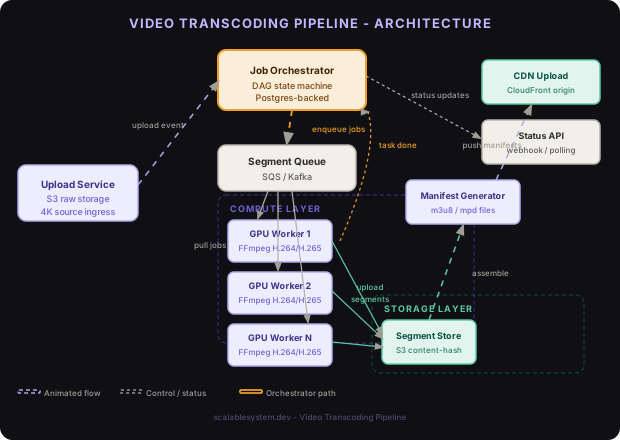
When a user finishes uploading a raw video, the Upload Service writes the file to S3 and publishes an event to the Job Orchestrator. The Orchestrator runs the segmentation step synchronously (or triggers a dedicated segmentation worker for very large files), writes one job record per segment-rendition pair to a Postgres jobs table, then enqueues all of those jobs into SQS. The Transcoding Worker Pool - a fleet of GPU-backed EC2 instances - consumes jobs from SQS, pulls the segment from S3, encodes it with FFmpeg, uploads the output to S3, and marks the job complete. A completion counter in the Orchestrator tracks how many of the N total jobs have finished. When the count reaches N, the Manifest Generator assembles the m3u8 and mpd files from the segment metadata and the CDN Upload Service pushes the full rendition tree to the CDN origin.
The Status API sits alongside the Orchestrator and serves real-time progress to upstream callers: what percentage of segments are encoded, which renditions are available, estimated time to completion. Clients can poll this endpoint or register a webhook URL that the Orchestrator will call when the job transitions to COMPLETE or FAILED.
Architecture Insight
Segmentation is the key to parallelism. A one-hour video at 2-second segments produces 1,800 segment jobs per rendition. At 8 renditions that is 14,400 independent encoding tasks. Each task takes roughly 30 seconds on a modern GPU worker. With 80 workers, the entire job finishes in about 3 minutes - well inside the 5-minute SLA. Without segmentation, you have exactly one encoding job that no amount of horizontal scaling can speed up.
Video Segmentation
The segmentation step takes the raw source file and cuts it into segments that each worker will encode independently. The naive approach - splitting by time using a fixed interval - produces broken frames at segment boundaries because video is not encoded frame-by-frame. Frames are encoded relative to each other in groups called GOPs (Group of Pictures). An I-frame is a full independent frame; P-frames and B-frames store only the delta from surrounding frames. If you cut a video in the middle of a GOP, the decoder cannot reconstruct the frames at the beginning of the next segment without the missing reference frames from the previous segment.
GOP-aligned segmentation solves this by only cutting at I-frame boundaries. You first probe the source file to find the timestamp of every I-frame, then choose cut points that fall as close as possible to your target segment duration while landing exactly on an I-frame. This guarantees every segment starts with a complete decodable frame and can be encoded independently.
import subprocess
import json
import math

def find_keyframe_timestamps(source_path: str) -> list[float]:
    """Use ffprobe to extract all I-frame timestamps from the source."""
    cmd = [
        "ffprobe",
        "-select_streams", "v:0",
        "-skip_frame", "nokey",
        "-show_entries", "frame=pkt_pts_time",
        "-of", "json",
        "-i", source_path
    ]
    result = subprocess.run(cmd, capture_output=True, text=True, check=True)
    data = json.loads(result.stdout)
    return [float(f["pkt_pts_time"]) for f in data["frames"]]


def plan_segments(
    keyframes: list[float],
    duration: float,
    target_segment_secs: float = 6.0
) -> list[tuple[float, float]]:
    """
    Build a list of (start, end) pairs aligned to keyframe boundaries.
    Each segment is at least target_segment_secs long.
    """
    segments = []
    current_start = 0.0
    target_end = target_segment_secs

    for kf in keyframes:
        if kf >= target_end and kf > current_start:
            segments.append((current_start, kf))
            current_start = kf
            target_end = kf + target_segment_secs

    # Final segment to end of file
    if current_start < duration:
        segments.append((current_start, duration))

    return segments


def extract_segment(
    source_path: str,
    output_path: str,
    start: float,
    end: float
) -> None:
    """Extract a single GOP-aligned segment without re-encoding."""
    cmd = [
        "ffmpeg",
        "-ss", str(start),
        "-to", str(end),
        "-i", source_path,
        "-c", "copy",          # stream copy - no re-encode at segmentation stage
        "-avoid_negative_ts", "make_zero",
        "-reset_timestamps", "1",
        "-y",
        output_path
    ]
    subprocess.run(cmd, check=True)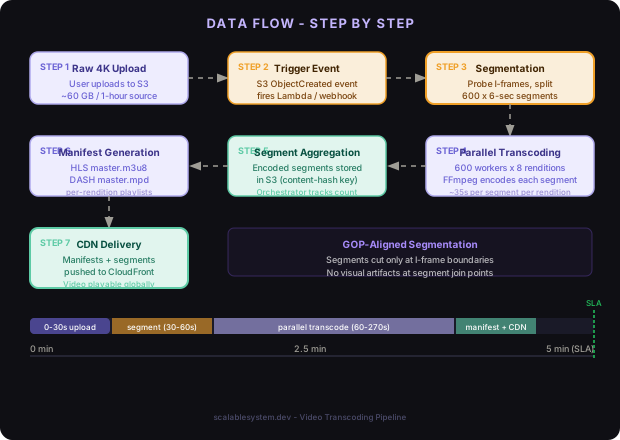
GOP Alignment
Using -c copy during segmentation avoids a quality-destroying double-encode. The source video is split into raw segments without touching the encoded bitstream. Each worker then re-encodes its segment from scratch at the target bitrate. Without GOP alignment, boundary frames in the encoded output would produce visual artifacts - green blocks, smeared motion - that viewers notice immediately.
The Transcoding Workers
Each worker is a stateless process running on a GPU instance. It has no local knowledge of the overall job - it only knows how to take one segment job from the queue, encode it, and report success or failure. This statelessness is what allows the pool to scale horizontally: adding more workers speeds up the job without any coordination between workers.
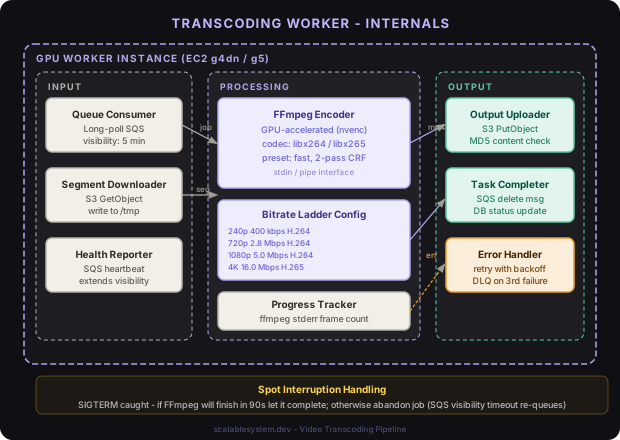
Codec selection is a trade-off between compatibility and efficiency. H.264 (AVC) plays everywhere - every browser, every smart TV, every phone made in the last decade. H.265 (HEVC) delivers the same perceptual quality at roughly half the bitrate, but requires licensing fees and is not universally supported. A production pipeline generates both: H.264 for broad compatibility and H.265 for bandwidth-sensitive delivery to clients that support it. AV1 is emerging as a royalty-free alternative to H.265 with similar efficiency but dramatically slower encode times on non-dedicated hardware.
Bitrate ladder generation determines how many renditions to produce and at what bitrates. A static ladder (always produce the same 8 renditions) wastes compute on low-complexity content - a talking-head video at 4K looks fine at 2 Mbps. A per-title encode ladder analyzes the source complexity and generates a custom ladder: more bitrate steps where the content benefits, fewer where it does not. Netflix popularized this approach with their per-title optimization. For this design, we use a fixed ladder but cap renditions at the source resolution - a 1080p source does not get a 4K rendition.
package worker

import (
    "context"
    "fmt"
    "log"
    "os/exec"
    "path/filepath"
    "time"
)

type SegmentJob struct {
    JobID        string
    VideoID      string
    SegmentIndex int
    SegmentS3Key string
    Rendition    Rendition
    OutputS3Key  string
}

type Rendition struct {
    Name      string
    Width     int
    Height    int
    VideoBitrate string
    AudioBitrate string
    Codec     string // "libx264" or "libx265"
}

var Bitrateladder = []Rendition{
    {Name: "240p",     Width: 426,  Height: 240,  VideoBitrate: "400k",  AudioBitrate: "64k",  Codec: "libx264"},
    {Name: "360p",     Width: 640,  Height: 360,  VideoBitrate: "800k",  AudioBitrate: "96k",  Codec: "libx264"},
    {Name: "480p",     Width: 854,  Height: 480,  VideoBitrate: "1400k", AudioBitrate: "128k", Codec: "libx264"},
    {Name: "720p",     Width: 1280, Height: 720,  VideoBitrate: "2800k", AudioBitrate: "128k", Codec: "libx264"},
    {Name: "1080p",    Width: 1920, Height: 1080, VideoBitrate: "5000k", AudioBitrate: "192k", Codec: "libx264"},
    {Name: "1080p_hdr",Width: 1920, Height: 1080, VideoBitrate: "8000k", AudioBitrate: "192k", Codec: "libx265"},
    {Name: "4k",       Width: 3840, Height: 2160, VideoBitrate: "16000k",AudioBitrate: "256k", Codec: "libx265"},
    {Name: "4k_hdr",   Width: 3840, Height: 2160, VideoBitrate: "24000k",AudioBitrate: "256k", Codec: "libx265"},
}

func ProcessJob(ctx context.Context, job SegmentJob, s3 S3Client) error {
    localInput := filepath.Join("/tmp", job.JobID+"-input.mp4")
    localOutput := filepath.Join("/tmp", job.JobID+"-output.mp4")

    // 1. Download segment from S3
    if err := s3.Download(ctx, job.SegmentS3Key, localInput); err != nil {
        return fmt.Errorf("download segment: %w", err)
    }
    defer cleanup(localInput)
    defer cleanup(localOutput)

    // 2. Transcode with FFmpeg
    r := job.Rendition
    args := []string{
        "-i", localInput,
        "-c:v", r.Codec,
        "-b:v", r.VideoBitrate,
        "-maxrate", r.VideoBitrate,
        "-bufsize", doubleBitrate(r.VideoBitrate),
        "-vf", fmt.Sprintf("scale=%d:%d:force_original_aspect_ratio=decrease,pad=%d:%d:(ow-iw)/2:(oh-ih)/2", r.Width, r.Height, r.Width, r.Height),
        "-c:a", "aac",
        "-b:a", r.AudioBitrate,
        "-movflags", "+faststart",
        "-preset", "fast",
        "-y",
        localOutput,
    }
    cmd := exec.CommandContext(ctx, "ffmpeg", args...)
    if output, err := cmd.CombinedOutput(); err != nil {
        return fmt.Errorf("ffmpeg failed: %w\noutput: %s", err, output)
    }

    // 3. Upload output to S3 with content-hash key for idempotency
    if err := s3.Upload(ctx, localOutput, job.OutputS3Key); err != nil {
        return fmt.Errorf("upload segment: %w", err)
    }

    log.Printf("completed job %s segment %d rendition %s", job.VideoID, job.SegmentIndex, r.Name)
    return nil
}
Watch Out
A worker crashing mid-segment is expected at scale - spot instances are reclaimed, OOM killers fire, network partitions happen. The SQS visibility timeout is your safety net: if the worker does not delete the message within the timeout window (typically 5-10 minutes per segment), SQS makes the message visible again and another worker picks it up. The critical requirement is that re-encoding a segment produces bit-identical output, or at least that the output key is idempotent - if you upload twice you do not create two conflicting files. Use a deterministic output key based on video ID + segment index + rendition name, not a random UUID.
Job Orchestration
The Orchestrator is a state machine that manages the lifecycle of a full transcoding job from raw upload to CDN delivery. It is the only component that knows the full shape of the work - how many segments exist, how many renditions are needed, and what the overall completion criteria are.
The DAG is straightforward: one segmentation task fans out to N * R parallel transcode tasks (N segments times R renditions), which fan back in to one manifest generation task, which triggers one CDN upload task. The Orchestrator does not process the DAG itself - it writes all tasks to Postgres and pushes ready tasks to SQS. Workers pull from SQS and update Postgres on completion. The Orchestrator subscribes to a completion stream (SQS FIFO or a Postgres LISTEN/NOTIFY channel) and re-evaluates the DAG state on every update.
Job state machine:
PENDING -> SEGMENTING -> TRANSCODING -> MANIFESTING -> UPLOADING -> COMPLETE
                                                                  -> FAILED
Each transition is guarded by a database write. If the Orchestrator restarts between transitions, it reads the current state from Postgres and resumes from the last known good state. No work is lost; no work is duplicated.
Dead letter queue handling: SQS delivers a message up to maxReceiveCount times (set to 3 for segment jobs). After three failures the message moves to a DLQ. The Orchestrator has a DLQ processor that reads failed jobs, increments the failure counter on the parent job, and - if the failure count exceeds a threshold - marks the entire job as FAILED and notifies the upstream caller. For transient failures (S3 throttling, temporary GPU errors) the job is re-queued with exponential backoff before hitting the DLQ.
Real World
AWS Elemental MediaConvert, YouTube’s Zencoder, and Mux all implement variants of this exact pattern. MediaConvert exposes the segment-parallel approach as a managed API - you specify the bitrate ladder and it handles segmentation, worker allocation, and manifest assembly. At YouTube scale, the pipeline is more complex: videos are analyzed for scene complexity before segmenting, per-title encode settings are computed by an ML model, and the bitrate ladder has over 20 renditions including VP9 and AV1 targets. The core pattern - segment, fan out, fan in, manifest - has remained stable for over a decade.
Data Model
The data model has three core tables: one for the top-level job, one for segment metadata, and one for individual encoding tasks.
CREATE TABLE transcoding_jobs (
    id             UUID PRIMARY KEY DEFAULT gen_random_uuid(),
    video_id       UUID NOT NULL,
    source_s3_key  TEXT NOT NULL,
    status         TEXT NOT NULL DEFAULT 'PENDING',
    -- PENDING | SEGMENTING | TRANSCODING | MANIFESTING | UPLOADING | COMPLETE | FAILED
    total_tasks    INT,
    completed_tasks INT NOT NULL DEFAULT 0,
    failed_tasks   INT NOT NULL DEFAULT 0,
    webhook_url    TEXT,
    created_at     TIMESTAMPTZ NOT NULL DEFAULT now(),
    updated_at     TIMESTAMPTZ NOT NULL DEFAULT now()
);

CREATE TABLE segments (
    id             UUID PRIMARY KEY DEFAULT gen_random_uuid(),
    job_id         UUID NOT NULL REFERENCES transcoding_jobs(id),
    segment_index  INT NOT NULL,
    start_time_sec NUMERIC(10,4) NOT NULL,
    end_time_sec   NUMERIC(10,4) NOT NULL,
    s3_key         TEXT NOT NULL,   -- raw segment location
    created_at     TIMESTAMPTZ NOT NULL DEFAULT now(),
    UNIQUE (job_id, segment_index)
);

CREATE TABLE encoding_tasks (
    id             UUID PRIMARY KEY DEFAULT gen_random_uuid(),
    job_id         UUID NOT NULL REFERENCES transcoding_jobs(id),
    segment_id     UUID NOT NULL REFERENCES segments(id),
    rendition_name TEXT NOT NULL,    -- "720p", "1080p", etc.
    status         TEXT NOT NULL DEFAULT 'QUEUED',
    -- QUEUED | IN_PROGRESS | COMPLETE | FAILED
    output_s3_key  TEXT,
    duration_ms    INT,
    worker_id      TEXT,
    attempt_count  INT NOT NULL DEFAULT 0,
    created_at     TIMESTAMPTZ NOT NULL DEFAULT now(),
    updated_at     TIMESTAMPTZ NOT NULL DEFAULT now(),
    UNIQUE (segment_id, rendition_name)
);

CREATE INDEX idx_encoding_tasks_job_status ON encoding_tasks(job_id, status);
CREATE INDEX idx_transcoding_jobs_status ON transcoding_jobs(status, updated_at);
S3 key convention: All outputs follow a deterministic path so any process can compute the key without querying the database.
raw/          {video_id}/source.mp4
segments/raw/ {video_id}/{segment_index:05d}.mp4
segments/enc/ {video_id}/{rendition_name}/{segment_index:05d}.mp4
manifests/    {video_id}/{rendition_name}/playlist.m3u8
manifests/    {video_id}/master.m3u8
HLS manifest structure:
#EXTM3U
#EXT-X-VERSION:3
#EXT-X-TARGETDURATION:8
#EXT-X-MEDIA-SEQUENCE:0

#EXTINF:6.000,
https://cdn.example.com/segments/enc/abc123/720p/00000.mp4
#EXTINF:6.000,
https://cdn.example.com/segments/enc/abc123/720p/00001.mp4
#EXTINF:4.812,
https://cdn.example.com/segments/enc/abc123/720p/00002.mp4
#EXT-X-ENDLIST
Key Algorithms and Protocols
Bitrate ladder generation with source resolution capping:
SOURCE_RESOLUTIONS = {
    "240p":     (426,  240),
    "360p":     (640,  360),
    "480p":     (854,  480),
    "720p":     (1280, 720),
    "1080p":    (1920, 1080),
    "1080p_hdr":(1920, 1080),
    "4k":       (3840, 2160),
    "4k_hdr":   (3840, 2160),
}

def build_rendition_ladder(source_height: int) -> list[str]:
    """
    Return only the renditions at or below the source height.
    Avoids upscaling a 1080p video to a fake 4K rendition.
    """
    return [
        name for name, (_, h) in SOURCE_RESOLUTIONS.items()
        if h <= source_height
    ]


def generate_master_manifest(video_id: str, renditions: list[str]) -> str:
    """Build an HLS master playlist referencing per-rendition playlists."""
    RENDITION_META = {
        "240p":      ("400000",  "426x240"),
        "360p":      ("800000",  "640x360"),
        "480p":      ("1400000", "854x480"),
        "720p":      ("2800000", "1280x720"),
        "1080p":     ("5000000", "1920x1080"),
        "1080p_hdr": ("8000000", "1920x1080"),
        "4k":        ("16000000","3840x2160"),
        "4k_hdr":    ("24000000","3840x2160"),
    }

    lines = ["#EXTM3U", "#EXT-X-VERSION:3", ""]

    for r in renditions:
        bandwidth, resolution = RENDITION_META[r]
        lines.append(
            f'#EXT-X-STREAM-INF:BANDWIDTH={bandwidth},RESOLUTION={resolution}'
        )
        lines.append(
            f'https://cdn.example.com/manifests/{video_id}/{r}/playlist.m3u8'
        )
        lines.append("")

    return "\n".join(lines)
Idempotent segment upload using content-hash deduplication:
import hashlib
import boto3

def upload_segment_idempotent(
    s3_client,
    local_path: str,
    bucket: str,
    key: str
) -> str:
    """
    Upload a segment only if it doesn't already exist with the same content hash.
    Returns the S3 ETag (MD5 of content for small files).
    """
    with open(local_path, "rb") as f:
        content = f.read()

    content_md5 = hashlib.md5(content).hexdigest()

    # Check if the object already exists with the same hash
    try:
        head = s3_client.head_object(Bucket=bucket, Key=key)
        existing_etag = head["ETag"].strip('"')
        if existing_etag == content_md5:
            # Already uploaded - idempotent success
            return existing_etag
    except s3_client.exceptions.ClientError as e:
        if e.response["Error"]["Code"] != "404":
            raise

    # Upload with MD5 for server-side integrity verification
    import base64
    md5_b64 = base64.b64encode(bytes.fromhex(content_md5)).decode()
    response = s3_client.put_object(
        Bucket=bucket,
        Key=key,
        Body=content,
        ContentMD5=md5_b64,
    )
    return response["ETag"].strip('"')
Scaling and Performance
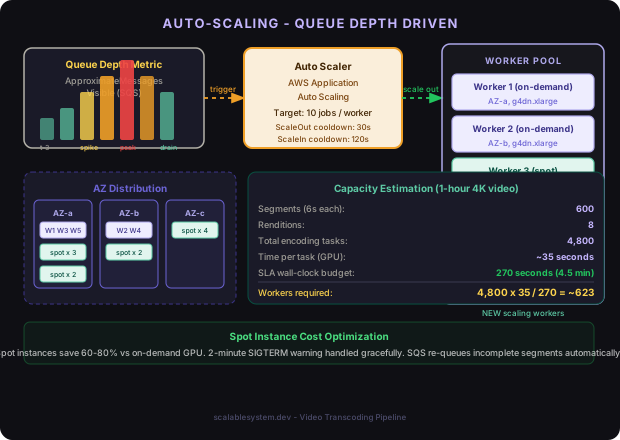
Capacity estimation for a one-hour 4K video:
| Parameter | Value |
|---|---|
| Source duration | 3,600 seconds |
| Segment length | 6 seconds |
| Total segments | 600 |
| Renditions | 8 |
| Total encoding tasks | 4,800 |
| Encode time per task (GPU worker) | ~35 seconds |
| Worker-seconds required | 168,000 seconds |
| Target wall-clock time | 270 seconds (4.5 min, with 30s buffer) |
| Workers required | 168,000 / 270 = ~623 workers |
In practice, 4K HDR tasks take longer than 240p tasks. A mixed fleet strategy allocates more workers to high-rendition tasks. You can also cap the required fleet size by processing renditions in priority order: start uploading completed lower-bitrate renditions to the CDN while higher-bitrate renditions are still encoding. The video becomes playable at 720p while 4K is still in progress.
Auto-scaling on queue depth:
# AWS Application Auto Scaling policy for the worker ECS service
ScalingPolicy:
  Type: AWS::ApplicationAutoScaling::ScalingPolicy
  Properties:
    PolicyType: TargetTrackingScaling
    TargetTrackingScalingPolicyConfiguration:
      TargetValue: 10          # target: 10 jobs per worker
      CustomizedMetricSpecification:
        MetricName: ApproximateNumberOfMessagesVisible
        Namespace: AWS/SQS
        QueueName: !GetAtt TranscodingQueue.QueueName
        Statistic: Sum
      ScaleInCooldown: 120     # wait 2 min before scaling in
      ScaleOutCooldown: 30     # scale out fast on demand spike
Real World
Spot instances cut transcoding costs by 60-80% compared to on-demand GPU instances. The catch is interruption: AWS gives a 2-minute warning before reclaiming a spot instance. Workers must handle SIGTERM gracefully - finish the current FFmpeg invocation if it will complete within 90 seconds, otherwise checkpoint progress. For segments under 10 seconds at typical bitrates, FFmpeg usually finishes before the 2-minute deadline. For the rare case where it does not, SQS visibility timeout handles re-queuing automatically when the worker disappears.
Failure Modes and Recovery
| Failure | Detection | Recovery |
|---|---|---|
| Worker crash mid-segment | SQS visibility timeout expires | Message re-queued, new worker picks up, re-encodes segment |
| S3 upload failure | Worker returns error, marks task FAILED | DLQ processor re-queues with backoff, new worker retries |
| Orchestrator restart | Postgres state survives restart | On startup, Orchestrator scans for TRANSCODING jobs and re-queues incomplete tasks |
| Segment corruption | MD5 mismatch on S3 ETag verification | Worker marks segment FAILED, Orchestrator logs corrupted source key, alerts operator |
| CDN upload failure | HTTP 5xx from CDN origin API | Manifest upload retried up to 5 times with exponential backoff; on exhaustion, job moves to FAILED |
| SQS message duplication | Two workers pick up same task (rare) | Idempotent output keys - second upload overwrites identical content; database UNIQUE constraint on (segment_id, rendition_name) prevents double-counting completions |
| Segmentation failure | FFprobe or FFmpeg exits non-zero | Job moves to FAILED immediately; source file flagged as unprocessable; operator alerted |
Watch Out
Partial manifests are the most dangerous failure mode. If the Manifest Generator runs before all encoding tasks are complete - due to a race condition in the completion counter - it produces an m3u8 that references segments that do not yet exist. CDN edge nodes cache this manifest and viewers see playback errors for the full CDN TTL. Guard this with a database transaction: only set job status to MANIFESTING after a COUNT query confirms completed_tasks = total_tasks. Use SELECT FOR UPDATE on the job row to prevent concurrent Orchestrator replicas from both triggering manifest generation.
Comparison of Approaches
| Approach | Parallelism | Operational Cost | Latency | When to Use |
|---|---|---|---|---|
| Single-threaded sequential | None - one FFmpeg per video | Very low | 45+ min for 1hr 4K | Development, tiny volumes (<10 uploads/day) |
| Segmented parallel (this design) | High - N segments x R renditions | Medium - GPU fleet management | 3-5 min for 1hr 4K | Production at any meaningful scale |
| Cloud-managed (MediaConvert, Mux) | Managed internally | Low ops, higher per-minute cost | 4-8 min depending on queue | Early-stage products, teams without video infra expertise |
| Serverless functions (Lambda) | High but constrained | Low at low volume | 8-15 min (cold starts, 15-min timeout limits) | Light workloads where GPU is not needed (audio, low-res) |
The segmented parallel design is the right default for any team processing more than a few hundred videos per day. The operational complexity of managing a GPU worker fleet is offset by a 10-20x cost reduction compared to cloud-managed services at that volume, and full control over codec settings, quality tuning, and feature velocity.
Cloud-managed services (MediaConvert, Mux) are compelling at low volume or when the engineering team is small. The per-minute pricing is easy to reason about, there is no fleet to manage, and SLA guarantees are contractual. The trade-off is lock-in and limited customization - you cannot add a custom codec pass or a scene-detection preprocessing step without building your own layer on top anyway.
Key Takeaways
- GOP-aligned segmentation is non-negotiable. Cutting on arbitrary timestamps produces broken frames that corrupt the encoded output. Always probe I-frame boundaries before deciding segment cut points.
- The bitrate ladder should be source-aware. Never upscale - a 1080p source producing a fake 4K rendition wastes compute and storage without any quality benefit.
- Workers must be fully stateless. Any worker must be able to pick up any segment job at any time. This is what enables the pool to scale horizontally and survive spot interruptions.
- Idempotency is a correctness requirement, not an optimization. Every write - segment upload, task status update, manifest assembly - must be safe to retry. If it is not, a single transient failure corrupts the entire job.
- The completion counter is the critical shared state. Use database transactions and optimistic locking to prevent races between Orchestrator replicas. A partial manifest reaching the CDN is worse than a delayed complete manifest.
- Serve lower renditions as soon as they are ready. Do not wait for 4K to finish before making 720p available. Progressive rendition availability dramatically improves perceived latency for end users.
- SQS visibility timeout is your primary failure recovery mechanism. Set it to 2x the expected segment encode time. Too short and healthy workers get preempted; too long and crashed workers delay recovery.
- Monitor queue depth, not just job status. A queue that stops draining means workers are dying faster than they are being replaced. Alert on queue-depth growth rate, not just absolute depth.
FAQ
Why not use a single FFmpeg call with -map to produce all renditions in one pass?
Multi-pass FFmpeg with -map reads the source once and writes multiple output streams. This saves I/O on the source read but ties all renditions to a single worker and a single encode duration. You lose the parallelism that is the entire point of the architecture. Multi-pass encoding makes sense as an optimization within a single segment (encode all 8 renditions of one segment in one FFmpeg invocation), but not as a replacement for segment-level parallelism.
How do you handle live streams where there is no fixed source file?
Live transcoding replaces batch segmentation with a real-time ingest pipeline. A live encoder (e.g., FFmpeg in push mode or AWS MediaLive) produces CMAF chunks as the stream arrives. Workers encode each chunk as it lands rather than waiting for the full file. The manifest is updated incrementally rather than assembled at the end. The architecture is similar but the completion condition is “stream ended” rather than “all tasks complete.”
What happens if the source video has variable frame rate?
Variable frame rate (VFR) sources - common with screen recordings and some phone cameras - need to be normalized to constant frame rate (CFR) before segmentation. FFmpeg’s -vf fps=30 filter does this. Skip this step and GOP boundaries become unpredictable, breaking the segment splitter. Always detect VFR with ffprobe (r_frame_rate vs avg_frame_rate) and normalize before the segmentation stage.
How do you prevent the same video from being transcoded twice if the upload event is delivered more than once?
The Orchestrator checks for an existing transcoding job with the same (video_id, source_s3_key) pair before creating a new one. If a job already exists in any non-FAILED state, the duplicate event is silently dropped and the existing job ID is returned. This makes job creation idempotent. For FAILED jobs, a retry is allowed - the existing job is reset to PENDING and re-processed.
Should the Manifest Generator be a separate service or part of the Orchestrator?
In small deployments, manifest generation runs as a function inside the Orchestrator process - it is called once per job and is CPU-cheap. At high volume (thousands of jobs per hour), separate the Manifest Generator into its own service that reads segment metadata from the database and writes manifests. This allows the Orchestrator to stay focused on state management and lets the Manifest Generator scale independently if manifest complexity grows (DASH MPD files for multi-audio, multi-subtitle content can be complex to assemble).
How do you handle audio-only or subtitle tracks in multi-language content?
Each language track is segmented and encoded independently, producing its own set of per-rendition segments. The HLS master manifest uses #EXT-X-MEDIA tags to reference alternative audio and subtitle renditions. The encoding task table gains a track_type column (video, audio, subtitle) and a language column. The Orchestrator fans out encoding tasks for all tracks in parallel. Manifest generation waits for all tracks to complete before assembling the master playlist.
Interview Questions
“Walk me through how you would design the job orchestration layer to survive orchestrator restarts without losing job state or producing duplicate output.”
The key insight is that the Orchestrator is stateless at the process level - all durable state lives in Postgres. On startup, the Orchestrator queries for jobs in non-terminal states (SEGMENTING, TRANSCODING, MANIFESTING, UPLOADING) and re-evaluates each one. For TRANSCODING jobs, it counts completed tasks in the database and re-queues any tasks still in QUEUED state that are not already visible in SQS. Idempotent task IDs prevent duplicate processing. The SQS visibility timeout handles the case where a task was in-flight when the Orchestrator restarted.
“How would you modify this design to support a 99.99% SLA instead of 99.9%?”
99.9% allows 1 in 1,000 jobs to fail permanently. 99.99% allows 1 in 10,000. The main levers are: multi-region worker fleets (a full AZ outage should not fail a job), redundant segment storage (S3 cross-region replication), multiple DLQ retry attempts with longer backoff windows, and source validation before segmentation begins (check codec compatibility, file integrity, duration bounds). You also need chaos engineering to regularly test the failure recovery paths - a recovery system that has never been exercised will fail when you actually need it.
“The product team wants to add a watermarking step that runs after transcoding. How do you integrate it without blowing the 5-minute SLA?”
Watermarking is a per-rendition per-segment operation - same granularity as transcoding. Add a WATERMARKING status to the DAG between TRANSCODING and MANIFESTING. Workers pick up watermark tasks from a separate queue after encoding tasks complete. For simple watermarks (static logo overlay), the watermarking step takes under 5 seconds per segment and can overlap with still-encoding higher renditions. For complex per-viewer watermarks (forensic invisible watermarking), the approach changes: apply watermarking at edge request time rather than at ingest, using signed URL parameters to vary the watermark pattern per viewer.
“How would you implement a cost optimization that skips encoding certain renditions for short videos?”
Add a preprocessing step that reads video duration and source resolution, then computes the minimum rendition set. For videos under 30 seconds, always produce all renditions (the compute cost is trivial). For videos over 10 minutes, apply per-title analysis to determine which renditions provide meaningful quality steps. Additionally, if the source file is already H.264 at a bitrate below the target, stream-copy that rendition instead of re-encoding - this is lossless quality preservation with near-zero compute cost. Track per-rendition compute savings in the jobs table to tune the policy over time.
“You receive 50,000 video uploads in one hour due to a viral event. How does the system respond?”
The SQS queue absorbs the burst immediately - queues have effectively unlimited depth. The auto-scaler sees queue depth grow and begins launching spot instances. EC2 spot capacity can scale to hundreds of instances in a few minutes. The bottleneck is not compute but S3 write throughput - 50,000 videos at 8 renditions each is 400,000 concurrent S3 upload streams. Spread segment keys across a wide prefix space (video ID is already a UUID, so prefix distribution is automatic) to saturate S3 bandwidth limits rather than concentrating writes. Monitor the SQS oldest-message-age metric rather than just queue depth - this tells you whether the auto-scaler is keeping pace with ingest or falling further behind.
Want to see how these patterns hold up when traffic spikes 50x at 3 AM? That's exactly what this Premium deep-dive covers.