Build Google Drive's File Sync Engine
distributed-systems reliability scalability
System Design Deep Dive
Google Drive File Sync Engine
Syncing files across every device without losing a single byte - even when two people edit the same document offline at the same time.
Imagine a law firm with three offices - London, New York, and Singapore - each keeping physical copies of every contract. When a partner in London marks up a document, a courier runs to the photocopier, makes two new copies, crosses out the old paragraph numbers and writes the deltas in the margins, then hops on a plane to hand-deliver corrected pages to each office. That is roughly what naive file sync does: copy the whole file, ship it everywhere, hope nobody else edited it while the courier was airborne. The moment two offices mark up the same contract over the weekend, you have a problem.
Google Drive, Dropbox, iCloud, and OneDrive collectively synchronize data for billions of users across petabytes of storage and millions of concurrent connections. A typical Drive deployment handles hundreds of thousands of file mutations per second and must propagate each change to every connected device in under 30 seconds. An average user has roughly 10 GB stored and edits files from three to five devices. At that scale, uploading the entire file on every keystroke would consume roughly 50 Tbps of upload bandwidth globally - more than most internet providers deliver.
The naive approach fails for three reasons. First, bandwidth is not free: mobile users on metered LTE plans cannot afford multi-megabyte uploads for a one-sentence edit. Second, latency compounds across the round trip - detect change, compress, upload, fan-out, download, apply - making a 30-second freshness target impossible if each step moves gigabytes. Third, offline edits on two devices collide when they reconnect, and a first-write-wins strategy silently destroys work.
Four forces pull against each other in every design decision: bandwidth efficiency versus freshness (you can batch uploads to save bytes but you sacrifice latency), consistency versus offline availability (locking a file to prevent conflicts prevents you from working offline), simplicity versus conflict handling (the easiest conflict strategy - “last writer wins” - is the most dangerous), and storage cost versus version history (keeping every version enables recovery but multiplies storage spend). We need to solve for three core problems: detecting changes as they happen on any device, propagating only the bytes that changed rather than the whole file, and resolving conflicts that inevitably occur when the same file is edited from two devices without an internet connection.
Requirements and Constraints
Functional Requirements
- Detect file changes on any connected device within 1 second of the change occurring
- Upload only changed portions of a file (delta sync) rather than the full file on every change
- Propagate changes from the originating device to all other linked devices within 30 seconds
- Detect concurrent edits to the same file and resolve conflicts without silently losing data
- Maintain version history for at least 30 days, allowing point-in-time recovery
- Support full offline editing and queue sync operations until connectivity is restored
- Deduplicate identical file content across users to minimize storage consumption
Non-Functional Requirements
- Sync propagation under 30 seconds end-to-end for files under 1 GB on a stable connection
- 99.99% availability for the metadata service (four nines - less than 53 minutes downtime per year)
- Petabyte-scale object storage with per-file deduplication at the chunk level
- Exactly-once delivery semantics for the sync event queue
- Support 1 billion users with average 10 GB stored each (10 exabytes total raw storage)
- API throughput of at least 500,000 metadata operations per second at peak
Constraints and Assumptions
- Mobile clients must minimize battery and data usage - prefer background sync and cellular-aware scheduling
- Clients operate on unreliable connections - partial uploads must be resumable without restarting
- File sizes range from 1 KB notes to 50 GB video exports; the chunking strategy must handle both
- We assume the cloud object store (Google Cloud Storage or S3-equivalent) is reliable and handles its own replication
High-Level Architecture
The system has seven major components. The Change Detector runs on each client device, watching the file system for mutations. The Chunk Engine splits files into content-defined chunks and computes fingerprints for each. The Sync Queue is a durable event log (think Kafka) that orders sync events per user. The Metadata Service is the source of truth for file state, chunk inventory, and device clock vectors. The Object Storage layer (GCS or S3-equivalent) holds the actual chunk bytes, deduplicated across all users. The Vector Clock Service tracks concurrent edit ordering across devices. The Conflict Resolver detects divergent histories and creates conflict copies when automatic merge is not safe.
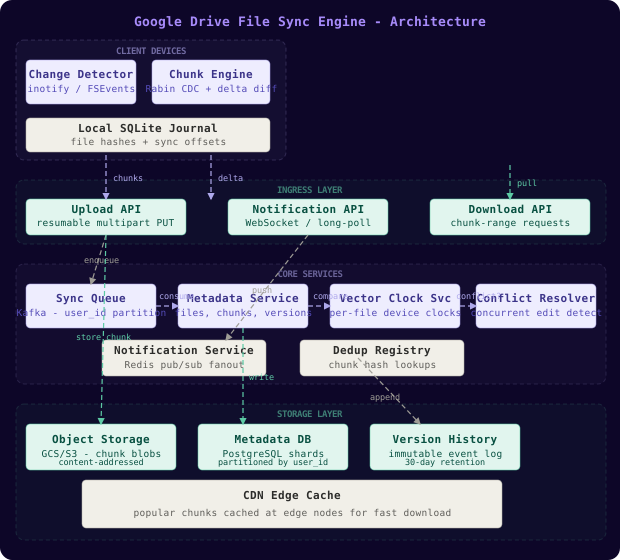
The data flow for a standard sync cycle: a file changes on Device A, the Change Detector picks it up and hands off to the Chunk Engine, which computes the diff against the last known chunk manifest. Only new or modified chunks are uploaded to Object Storage. The Chunk Engine then writes a sync event to the Sync Queue containing the file ID, new chunk manifest, and the device’s current vector clock. The Metadata Service consumes from the queue, checks the vector clock against the stored clock for that file, and either applies the update or routes it to the Conflict Resolver. The Metadata Service then pushes a notification to all other devices linked to the same user account via long-polling or WebSocket, telling them a new version is available. Each recipient device downloads only the chunks it does not already have locally.
Chunking combined with delta sync is the single most impactful optimization in the whole system. A 100 MB document edited in the middle has roughly 50 MB of unchanged content before the edit and 50 MB after. With 4 MB average chunks, only 1 to 3 chunks change - meaning you upload 4 to 12 MB instead of 100 MB. That is an 8x to 25x bandwidth reduction on a single edit.
The Change Detector
Think of the Change Detector as the building’s security guard - it sits at the door watching every person (file) who enters or leaves and logs the event with a timestamp. On desktop platforms (macOS, Linux, Windows), the operating system provides native file system notification APIs: FSEvents on macOS, inotify on Linux, ReadDirectoryChangesW on Windows. These APIs deliver kernel-level events the moment a file descriptor is closed after a write - no polling, no wasted CPU.
Mobile is different. iOS and Android heavily throttle background processes to preserve battery. The change detector on mobile uses a hybrid strategy: it hooks into app foreground/background transitions to trigger a sync cycle when the user opens the Drive app, schedules a background task that fires every 15 minutes when on Wi-Fi and every 60 minutes on cellular, and listens to push notifications from the server that signal an inbound change.
The core operation in the Change Detector is comparing the new state of a file against the last known state using content hashes, not modification timestamps. Timestamps are unreliable: they can be reset by file copies, NFS mounts, or certain backup tools. A content hash catches the actual change.
import hashlib
import os
import sqlite3
from dataclasses import dataclass
from typing import Optional

@dataclass
class FileState:
    path: str
    size: int
    mtime: float
    content_hash: str  # SHA-256 of full file content

class ChangeDetector:
    """
    Detects file changes by comparing current content hashes against
    a local SQLite journal of last-known states.
    """
    def __init__(self, watch_root: str, journal_path: str):
        self.watch_root = watch_root
        self.db = sqlite3.connect(journal_path, check_same_thread=False)
        self._init_journal()

    def _init_journal(self):
        self.db.execute("""
            CREATE TABLE IF NOT EXISTS file_journal (
                path TEXT PRIMARY KEY,
                size INTEGER,
                mtime REAL,
                content_hash TEXT,
                synced_at REAL
            )
        """)
        self.db.commit()

    def compute_hash(self, path: str) -> str:
        h = hashlib.sha256()
        with open(path, "rb") as f:
            for chunk in iter(lambda: f.read(65536), b""):
                h.update(chunk)
        return h.hexdigest()

    def scan_file(self, path: str) -> Optional[FileState]:
        """Returns FileState if the file changed since last scan, else None."""
        try:
            stat = os.stat(path)
        except FileNotFoundError:
            return None

        row = self.db.execute(
            "SELECT mtime, content_hash FROM file_journal WHERE path = ?",
            (path,)
        ).fetchone()

        # Fast path: mtime unchanged means content almost certainly unchanged
        if row and abs(row[0] - stat.st_mtime) < 0.001:
            return None

        # Slow path: mtime changed, verify with full hash
        new_hash = self.compute_hash(path)
        if row and row[1] == new_hash:
            # mtime changed but content did not (e.g., touch command)
            self.db.execute(
                "UPDATE file_journal SET mtime = ? WHERE path = ?",
                (stat.st_mtime, path)
            )
            self.db.commit()
            return None

        return FileState(
            path=path,
            size=stat.st_size,
            mtime=stat.st_mtime,
            content_hash=new_hash,
        )

    def record_synced(self, state: FileState):
        self.db.execute("""
            INSERT INTO file_journal (path, size, mtime, content_hash, synced_at)
            VALUES (?, ?, ?, ?, strftime('%s','now'))
            ON CONFLICT(path) DO UPDATE SET
                size=excluded.size, mtime=excluded.mtime,
                content_hash=excluded.content_hash, synced_at=excluded.synced_at
        """, (state.path, state.size, state.mtime, state.content_hash))
        self.db.commit()
The local SQLite journal is the change journal - a persistent record of what the client has already synced. It survives app restarts, allowing the client to resume interrupted sync sessions without re-hashing files it already processed.
The Chunk Engine
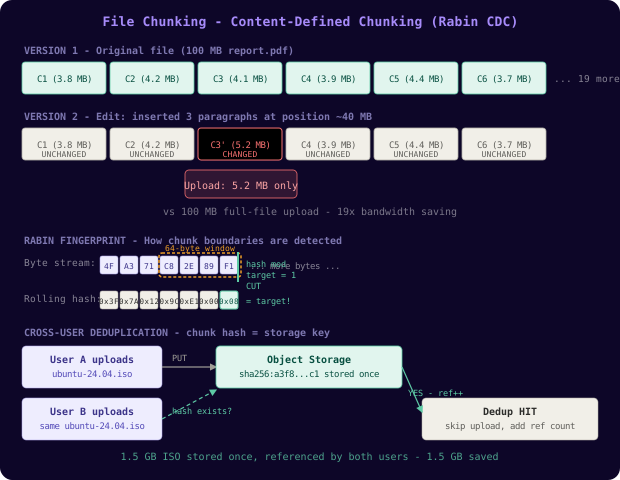
The Chunk Engine is the postal sorting office. Rather than shipping the entire parcel when a customer updates their address on the label, the sorter peels off just the label, replaces it, and re-seals the box. The Chunk Engine splits a file into variable-length chunks using content-defined boundaries, and on subsequent edits only the chunks whose content changed need to be uploaded.
The critical technique here is content-defined chunking (CDC) using Rabin fingerprinting. Fixed-size chunking (splitting every file into exactly 4 MB blocks) is simple but fragile: inserting one byte at the beginning of a file shifts every subsequent block boundary, making all chunks appear “changed” even though only the inserted byte is new. Rabin fingerprinting evaluates a rolling hash over a sliding window and cuts a new chunk boundary whenever the hash value mod a target chunk size equals a magic constant. This means boundaries are anchored to content, not position - insert a byte and only the chunk containing that byte changes.
import hashlib
from typing import Generator, Tuple

# Rabin polynomial constant - standard value used in many CDC implementations
RABIN_MOD = (1 << 31) - 1
RABIN_PRIME = 3  # primitive root

TARGET_CHUNK_SIZE = 4 * 1024 * 1024   # 4 MB average
MIN_CHUNK_SIZE    = 512 * 1024         # 512 KB minimum
MAX_CHUNK_SIZE    = 16 * 1024 * 1024   # 16 MB maximum
WINDOW_SIZE       = 64                 # rolling window in bytes
CUT_MASK          = (1 << 13) - 1     # triggers boundary ~every 8 KB on average

def rabin_chunk(data: bytes) -> Generator[Tuple[int, int], None, None]:
    """
    Yields (start, end) byte ranges for each content-defined chunk.
    Uses a Rabin rolling hash to detect chunk boundaries.
    """
    n = len(data)
    start = 0
    h = 0
    window = bytearray(WINDOW_SIZE)
    window_pos = 0

    for i in range(n):
        byte = data[i]
        old = window[window_pos % WINDOW_SIZE]
        window[window_pos % WINDOW_SIZE] = byte
        window_pos += 1

        # Roll out the oldest byte, roll in the new byte
        h = (h * RABIN_PRIME + byte - old * pow(RABIN_PRIME, WINDOW_SIZE, RABIN_MOD)) % RABIN_MOD

        chunk_len = i - start + 1
        if chunk_len < MIN_CHUNK_SIZE:
            continue
        if chunk_len >= MAX_CHUNK_SIZE or (h & CUT_MASK) == 1:
            yield (start, i + 1)
            start = i + 1
            h = 0
            window = bytearray(WINDOW_SIZE)
            window_pos = 0

    if start < n:
        yield (start, n)


def chunk_file(file_path: str) -> list[dict]:
    """
    Splits a file into content-defined chunks, computing SHA-256 for each.
    Returns a manifest of {chunk_id, start, end, size, hash}.
    """
    with open(file_path, "rb") as f:
        data = f.read()

    manifest = []
    for start, end in rabin_chunk(data):
        chunk_data = data[start:end]
        chunk_hash = hashlib.sha256(chunk_data).hexdigest()
        manifest.append({
            "chunk_id": chunk_hash,  # hash IS the ID - enables deduplication
            "start": start,
            "end": end,
            "size": end - start,
            "hash": chunk_hash,
        })
return manifestUsing the chunk hash as the chunk ID is what enables cross-user deduplication. If two users each upload a popular PDF, the Chunk Engine detects that the chunk with hash X already exists in Object Storage and skips the upload entirely - just recording a new reference to the existing bytes. This is content-addressable storage in action.
The Sync Queue and Metadata Service
The Sync Queue is the conveyor belt in a factory - each item (sync event) moves in order, each station (consumer) processes its item exactly once, and nothing falls off the belt even if a station momentarily breaks down.
The queue is implemented as a Kafka topic partitioned by user_id. Each partition maintains strict ordering, which is critical: if Device A uploads version 3 of a file and then Device B uploads version 4, we must apply them in that order. Partitioning by user ensures all events for a given user land in one partition, providing per-user ordering without global coordination.
The Metadata Service consumes from the queue using an offset-based consumer group. After processing each event, it commits the offset to a durable store. If the Metadata Service crashes mid-processing, it re-reads from the last committed offset - at-least-once delivery. Idempotency keys on each sync event (the event_id field) prevent double-applying a retry.
-- Core metadata tables, partitioned by user_id for horizontal scaling

CREATE TABLE files (
    file_id       UUID        NOT NULL,
    user_id       UUID        NOT NULL,
    parent_id     UUID,                           -- folder hierarchy
    name          TEXT        NOT NULL,
    size_bytes    BIGINT      NOT NULL DEFAULT 0,
    content_hash  TEXT,                           -- SHA-256 of full file
    version       INTEGER     NOT NULL DEFAULT 1,
    is_deleted    BOOLEAN     NOT NULL DEFAULT FALSE,
    created_at    TIMESTAMPTZ NOT NULL DEFAULT NOW(),
    updated_at    TIMESTAMPTZ NOT NULL DEFAULT NOW(),
    PRIMARY KEY (user_id, file_id)
) PARTITION BY HASH (user_id);

CREATE TABLE file_chunks (
    file_id       UUID        NOT NULL,
    user_id       UUID        NOT NULL,
    version       INTEGER     NOT NULL,
    chunk_index   INTEGER     NOT NULL,           -- position in file
    chunk_id      TEXT        NOT NULL,           -- SHA-256 hash = storage key
    chunk_size    INTEGER     NOT NULL,
    PRIMARY KEY (user_id, file_id, version, chunk_index)
) PARTITION BY HASH (user_id);

CREATE TABLE sync_events (
    event_id      UUID        NOT NULL DEFAULT gen_random_uuid(),
    user_id       UUID        NOT NULL,
    file_id       UUID        NOT NULL,
    device_id     UUID        NOT NULL,
    event_type    TEXT        NOT NULL,           -- 'create' | 'update' | 'delete' | 'move'
    new_version   INTEGER     NOT NULL,
    chunk_manifest JSONB,                         -- list of {chunk_id, index, size}
    vector_clock  JSONB       NOT NULL,           -- {device_id: counter, ...}
    created_at    TIMESTAMPTZ NOT NULL DEFAULT NOW(),
    PRIMARY KEY (user_id, event_id)
) PARTITION BY HASH (user_id);

CREATE TABLE device_clocks (
    user_id       UUID        NOT NULL,
    file_id       UUID        NOT NULL,
    device_id     UUID        NOT NULL,
    clock_value   INTEGER     NOT NULL DEFAULT 0, -- logical clock per device per file
    last_sync_at  TIMESTAMPTZ NOT NULL DEFAULT NOW(),
    PRIMARY KEY (user_id, file_id, device_id)
) PARTITION BY HASH (user_id);

-- Indexes for common access patterns
CREATE INDEX idx_files_user_updated ON files (user_id, updated_at DESC);
CREATE INDEX idx_sync_events_device ON sync_events (user_id, device_id, created_at DESC);
CREATE INDEX idx_device_clocks_file ON device_clocks (user_id, file_id);
Partitioning by user_id is the key scaling decision here. All metadata for a given user lives in the same partition, enabling single-shard queries for the most common access pattern (list all files for user X). Cross-user queries (admin reports, deduplication analytics) are rare and can tolerate scatter-gather across all partitions.
The Conflict Resolver
Conflict resolution is the most philosophically interesting part of file sync. Think of it like air traffic control over a single runway: two planes (devices) both cleared for landing (both started editing offline) approach at the same time. The controller (Conflict Resolver) cannot let both land simultaneously - one must hold. But unlike air traffic control, we cannot simply tell one device to discard its work. Every edit represents a human’s intent and must be preserved.
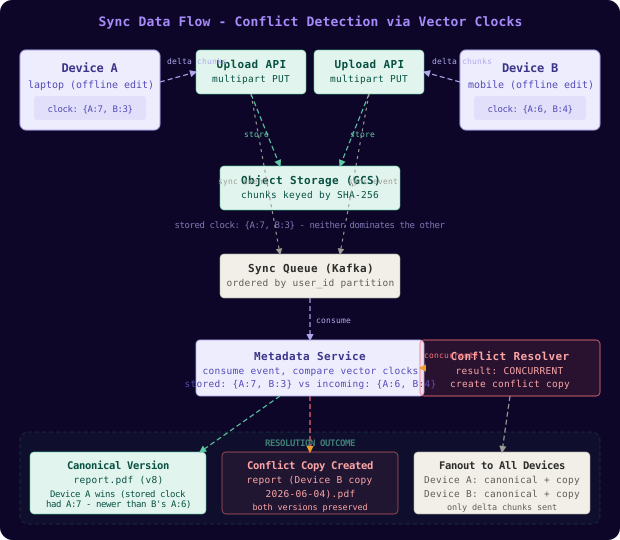
The system uses vector clocks to detect concurrent edits. A vector clock is a map from device ID to a logical counter. Each time Device A writes to a file, it increments its own counter in the clock. When it syncs, the server records the clock alongside the new version. When Device B later syncs an edit to the same file, the server compares clocks: if B’s clock is strictly greater than the stored clock (meaning B saw every change A made before editing), B’s version supersedes A’s. If neither clock dominates the other (both have increments the other hasn’t seen), the edits are concurrent - a conflict exists.
// Vector clock comparison for conflict detection
// Returns: "dominates", "dominated", "concurrent", or "equal"

package sync

import "fmt"

type VectorClock map[string]int

func (a VectorClock) Compare(b VectorClock) string {
    aGtB := false
    bGtA := false

    // Collect all device IDs from both clocks
    allDevices := make(map[string]bool)
    for k := range a { allDevices[k] = true }
    for k := range b { allDevices[k] = true }

    for device := range allDevices {
        av := a[device] // defaults to 0 if absent
        bv := b[device]
        if av > bv { aGtB = true }
        if bv > av { bGtA = true }
    }

    switch {
    case !aGtB && !bGtA:
        return "equal"
    case aGtB && !bGtA:
        return "dominates"   // a is strictly newer than b
    case bGtA && !aGtB:
        return "dominated"   // b is strictly newer than a
    default:
        return "concurrent"  // true conflict - neither has seen all changes from the other
    }
}

func (a VectorClock) Merge(b VectorClock) VectorClock {
    merged := make(VectorClock)
    allDevices := make(map[string]bool)
    for k := range a { allDevices[k] = true }
    for k := range b { allDevices[k] = true }
    for device := range allDevices {
        av, bv := a[device], b[device]
        if av > bv { merged[device] = av } else { merged[device] = bv }
    }
    return merged
}

type ConflictResolver struct {
    MetadataStore interface {
        GetFileVersion(fileID string) (*FileVersion, error)
        SaveConflictCopy(original, conflict *FileVersion) error
    }
}

func (cr *ConflictResolver) Resolve(incoming *SyncEvent) (*Resolution, error) {
    stored, err := cr.MetadataStore.GetFileVersion(incoming.FileID)
    if err != nil { return nil, fmt.Errorf("get stored version: %w", err) }

    result := stored.VectorClock.Compare(incoming.VectorClock)
    switch result {
    case "dominated", "equal":
        // Incoming is newer - apply it as the new canonical version
        return &Resolution{Action: "apply", Version: incoming}, nil
    case "dominates":
        // Stored is newer - incoming is a stale write, discard it
        return &Resolution{Action: "discard", Version: stored}, nil
    case "concurrent":
        // True conflict: keep both, create a conflict copy of the incoming edit
        // The device that uploaded last gets the "conflict copy" label
        return &Resolution{
            Action:       "conflict_copy",
            Version:      stored,
            ConflictCopy: incoming,
        }, nil
    }
    return nil, fmt.Errorf("unknown comparison result: %s", result)
}
When a conflict is detected, the system creates a conflict copy - a new file named {original_name} (Device B's conflicted copy {date}).ext - and syncs both the original and the conflict copy to all devices. This is exactly the approach Dropbox pioneered and Google Drive adopted for binary files. No data is lost; the user sees two versions and can manually merge or delete the one they don’t want. For Google Docs native files, a richer CRDT-based operational transform handles this automatically, but for arbitrary binary files (images, videos, executables), conflict copy is the safest strategy.
Data Model
The data model described in the SQL DDL above centers on four tables. files is the inode table - one row per file per user, holding the current version metadata. file_chunks is the manifest table - one row per chunk per version, linking a file version to the chunk hashes stored in Object Storage. sync_events is the event log - an append-only record of every mutation, used for audit trails, version history browsing, and replay during conflict resolution. device_clocks tracks the last-known vector clock for each device/file pair, enabling efficient conflict detection without reading the full event log.
Partitioning all four tables by user_id using PostgreSQL’s PARTITION BY HASH allows us to spread users across database shards. A 16-way hash partition distributes ~62.5 million users per shard at 1 billion total users. Each shard handles roughly 600,000 file operations per second at peak, achievable with a write-optimized PostgreSQL configuration backed by NVMe SSDs and read replicas for query offloading.
The lifecycle of a sync event: Device A edits report.pdf offline. On reconnect, the Chunk Engine computes the diff (3 chunks changed out of 25). It creates a sync_event row with the new chunk manifest and the device’s current vector clock {DeviceA: 7, DeviceB: 3}. The Metadata Service reads the stored clock {DeviceA: 6, DeviceB: 3} and computes dominates (Device A is one step ahead, Device B’s state is fully incorporated). It applies the new version, updates files.version to 8, writes 3 new rows to file_chunks, and publishes a fanout notification to Device B and Device C. They pull only the 3 changed chunks - 12 MB instead of the full 100 MB PDF.
Key Algorithms and Protocols
Content-Defined Chunking with Rabin Fingerprinting
The Rabin polynomial rolling hash computes a fingerprint over a sliding window of bytes. When the fingerprint modulo a target value equals a magic constant, a chunk boundary is cut. The window size (64 bytes) is small enough to be computed in microseconds but large enough to produce stable boundary detection. The target chunk size is tuned via the CUT_MASK - a 13-bit mask produces boundaries roughly every 8 KB; for 4 MB average chunks, a 19-bit mask is used in production.
Content-defined chunking is why inserting a single character at the beginning of a 1 GB video file only invalidates one chunk - roughly 4 MB - instead of the entire file. The boundary positions shift, but the content after the insertion point produces identical rolling hash values to before, so the same chunk boundaries emerge from the same content.
Vector Clock Comparison for Conflict Detection
The Go code above shows a clean vector clock comparator. The key insight is that a partial order exists among versions: version A “dominates” B if and only if every device’s counter in A is greater than or equal to the corresponding counter in B, with at least one strictly greater. If neither A nor B dominates the other, they are concurrent - a conflict. Merging two clocks takes the element-wise maximum, which is the “join” operation in lattice theory.
Vector clocks give us a causal order, not a wall-clock order. Two events can happen microseconds apart on two devices and still be “concurrent” in the vector clock sense if neither device had seen the other’s write. This correctly models the offline edit scenario where physical time is irrelevant - only causality matters.
Delta Sync - Only Upload Changed Chunks
from typing import NamedTuple

class ChunkRef(NamedTuple):
    chunk_id: str   # SHA-256 hash
    index: int
    size: int

def compute_delta(
    old_manifest: list[ChunkRef],
    new_manifest: list[ChunkRef],
    known_server_chunks: set[str],
) -> tuple[list[ChunkRef], list[ChunkRef]]:
    """
    Given the previous chunk manifest, the new chunk manifest, and the set of
    chunk hashes already present on the server, returns:
      - chunks_to_upload: new chunks the server does not yet have
      - unchanged_chunks: existing chunks the server can reuse by reference
    """
    old_ids = {c.chunk_id for c in old_manifest}
    chunks_to_upload = []
    unchanged_chunks = []

    for chunk in new_manifest:
        if chunk.chunk_id in old_ids and chunk.chunk_id in known_server_chunks:
            # Chunk is unchanged from previous version AND already on the server
            unchanged_chunks.append(chunk)
        elif chunk.chunk_id in known_server_chunks:
            # Chunk is new to this file version but already deduplicated on the server
            # (another user or another file has the same content) - no upload needed
            unchanged_chunks.append(chunk)
        else:
            # Genuinely new chunk - must upload
            chunks_to_upload.append(chunk)

    return chunks_to_upload, unchanged_chunks


def sync_file(file_path: str, file_id: str, device_id: str, metadata_client, storage_client):
    """
    Full delta sync flow for a single file mutation.
    """
    new_manifest = [
        ChunkRef(chunk_id=c["chunk_id"], index=i, size=c["size"])
        for i, c in enumerate(chunk_file(file_path))
    ]

    # Ask the metadata service for current version and server-side chunk inventory
    current_version = metadata_client.get_file_version(file_id)
    old_manifest = current_version.chunk_manifest if current_version else []
    server_chunks = metadata_client.get_known_chunks(
        {c.chunk_id for c in new_manifest}
    )

    to_upload, reused = compute_delta(old_manifest, new_manifest, server_chunks)

    # Upload only new chunks - each in its own resumable PUT request
    for chunk_ref in to_upload:
        chunk_bytes = read_chunk(file_path, chunk_ref)
        storage_client.put_chunk(chunk_ref.chunk_id, chunk_bytes)

    # Commit the new version to the metadata service with vector clock
    metadata_client.commit_version(
        file_id=file_id,
        device_id=device_id,
        new_manifest=new_manifest,
        upload_count=len(to_upload),
        reuse_count=len(reused),
)The “ask the server which chunks it already has” step before uploading is critical for cross-user deduplication. If your colleague just uploaded the same ISO image, none of its chunks need uploading from your device - the server already has them referenced from the other user’s file, even though this is your first time uploading it.
Scaling and Performance
The system scales horizontally by user shard. At 1 billion users the estimates break down as follows:
Storage capacity estimate:
- Users: 1,000,000,000 (1 billion)
- Average storage per user: 10 GB
- Raw storage required: 10,000,000,000 GB = 10 exabytes

Deduplication savings:
- Typical dedup ratio for consumer files: 2x to 3x (photos, videos, documents)
- Effective storage after dedup: ~4 to 5 exabytes

Version history overhead (30 days, average 5 versions per file per month):
- Average files per user: 1,000 files
- Average file changes per day: 10 files changed
- Incremental chunk storage per day: 10 files x 3 changed chunks x 4 MB = 120 MB/user/day
- At 100M active daily users: 120 MB x 100M = 12 PB/day of incremental chunk storage

Metadata service throughput:
- Peak mutations per second: 500,000
- At 16 database shards: ~31,250 writes/shard/second
- PostgreSQL with WAL and NVMe SSDs: achievable with connection pooling (PgBouncer)

Sync queue throughput (Kafka):
- 500,000 events/second partitioned across 1,024 partitions
- ~488 events/partition/second - well within Kafka's per-partition limits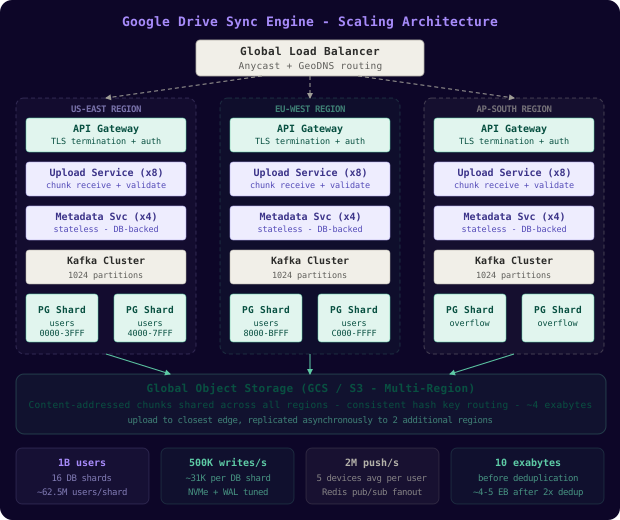
Object Storage scales independently. GCS and S3 use consistent hashing to distribute objects across storage nodes. Because chunk IDs are SHA-256 hashes (uniformly distributed), the key space distributes naturally across nodes with no hot spots. Chunk storage nodes are append-only - once a chunk is written, it is never modified, only referenced or garbage-collected when its reference count drops to zero.
The Metadata Service fanout (notifying all devices when a file changes) is the most read-heavy operation. A user with 5 devices generates 4 fanout notifications per sync event. At 500,000 mutations per second, that is 2 million push notification deliveries per second. This is handled via a separate Notification Service backed by long-polling connections or WebSocket connections to connected clients, with a Redis pub/sub layer for server-to-server fanout within the notification cluster.
Dropbox’s 2012 engineering blog post described using librsync-style chunking before switching to their own content-defined chunking algorithm. At their peak, deduplication eliminated roughly 30% of storage - not 50% as you might hope, because most storage is photos and videos which are already compressed and highly unique. The real win is in delta sync for frequently-edited documents, not dedup on binary media.
Failure Modes and Recovery
| Failure Scenario | Detection | Impact | Recovery |
|---|---|---|---|
| Client upload interrupted mid-chunk | Upload timeout on client; server sees partial chunk | File version not committed; no data visible to other devices | Client retries from last successfully uploaded chunk using a resumable upload session ID |
| Metadata Service crash during commit | Health check failure; Kafka consumer group rebalance | In-flight sync event not applied | Kafka offset not committed; event replayed from last committed offset after restart |
| Object Storage chunk not found | GET returns 404 when device tries to download a chunk | Sync fails on receiving device; file appears unchanged | Metadata Service detects orphaned chunk reference, marks file version as “needs repair”, triggers re-upload from originating device |
| Split-brain: user edits same file on two offline devices | Vector clock comparison on reconnect shows concurrent clocks | True conflict - neither version has seen the other’s changes | Conflict copy created; both versions preserved; user notified to review |
| Notification fanout failure | Receiving device never gets push notification | Device is stale; shows outdated file version | Client polls for changes on every foreground activation; maximum staleness bounded by polling interval (15 min background) |
| Database partition unavailable | Metadata Service returns 5xx for writes in affected user range | Affected users cannot sync for duration of outage | Read replica promoted; write traffic fails over to promoted replica; RPO depends on replication lag (typically under 1 second) |
The split-brain scenario is the most dangerous failure mode. If a user edits a file on Device A while on an airplane and on Device B while at a coffee shop, both devices reconnect to different regional servers before the vector clock comparison runs, and the conflict resolution logic has a race condition in the write path - it is possible for both versions to “win” if the comparison and commit are not done atomically. Always wrap the vector clock compare-and-swap in a database transaction with an optimistic lock on the file’s current version number.
Comparison of Approaches
| Approach | Bandwidth | Complexity | Conflict Handling | Best Fit |
|---|---|---|---|---|
| Full-file upload on every change | Very high - uploads entire file regardless of change size | Low - simple PUT to object storage | Last-writer-wins or manual conflict copy | Small files under 1 MB where chunking overhead exceeds savings |
| Delta sync with CDC chunking | Low - only changed chunks uploaded; typical 5x to 20x savings | Medium - requires chunk engine, manifest tracking, dedup layer | Conflict copy on concurrent edits; no data loss | General-purpose file sync (Google Drive, Dropbox, OneDrive) |
| CRDT-based merge | Low to medium - can sync operation logs instead of bytes | Very high - CRDT data structures are complex; works only for specific data types | Automatic merge with no user intervention needed | Collaborative text editors (Google Docs), JSON documents, data structures |
| Rsync-based rolling checksum | Low - similar to CDC delta sync in bandwidth efficiency | Medium - rsync protocol requires bidirectional communication and server-side state | No native conflict handling - must be layered on separately | Server-to-server replication, backup systems where one side is authoritative |
For a general-purpose file sync system handling arbitrary binary files (images, videos, executables, PDFs), delta sync with content-defined chunking is the right choice. It delivers the bandwidth savings of rsync without requiring a stateful server-side process per sync session, and it supports deduplication across users. CRDT-based sync is compelling for structured data but requires the file format to be CRDT-friendly - you cannot CRDT-merge a JPEG. Full-file upload is acceptable only as a fallback for files under 512 KB where chunking overhead exceeds the savings.
Key Takeaways
- Content-defined chunking eliminates the boundary-shift problem of fixed-size chunking. Rabin fingerprinting anchors chunk boundaries to content, meaning insertions only invalidate the chunk they land in, not every subsequent chunk.
- Vector clocks provide causal ordering without requiring synchronized wall clocks. Two edits are “concurrent” when neither device’s clock dominates the other’s - regardless of when they happened in real time.
- Conflict copy is the safest binary file conflict strategy. Automatic merge works for text and structured formats. For arbitrary binary files, preserve both versions and let the user decide - never silently discard an edit.
- Deduplication via content-addressable storage is a free benefit of hashing chunks. The same content anywhere in the system - same user, different file; different user, same ISO - results in a single stored copy with multiple references.
- Partition metadata by user_id to ensure all operations for a single user hit one shard. This eliminates cross-shard coordination for the most common access patterns while allowing the system to scale to billions of users.
- The sync queue provides durability across client reconnects. Events not yet consumed survive server restarts because Kafka (or any durable log) holds them until the consumer commits the offset.
- Battery-aware scheduling on mobile is not optional. Aggressive background sync drains battery and causes app stores to flag the app. Cellular-aware throttling, foreground-triggered syncs, and push notifications for inbound changes are the correct model.
- Resumable uploads are mandatory for large files. A 50 GB video upload that fails at 49 GB must not restart from zero. Resumable upload session tokens with per-chunk acknowledgment make large file sync reliable on flaky connections.
Frequently Asked Questions
How do you handle renames and moves without treating them as delete + create?
The sync_events table has an event_type of move, which carries both the old and new parent_id and name. The file’s file_id stays constant across renames. Devices receiving a move event update their local path mapping without downloading any chunk data. This is why file IDs rather than paths are the primary key in the metadata model - a file can move freely without breaking any links, version history, or shared references.
Why not use rsync instead of building a custom chunk engine?
Rsync is excellent for server-to-server replication where you control both ends. It requires running a server-side rsync daemon with access to the existing file, and its rolling checksum protocol requires a round trip to fetch the server’s checksum list before computing the delta. For a client-server architecture with millions of clients, that server-side process-per-connection model does not scale. Content-defined chunking at the client gives us the same bandwidth benefit as rsync while being a stateless, parallel-uploadable approach.
How does the system handle files that change faster than the sync cycle?
The Change Detector uses a debounce mechanism: after detecting a change, it waits 2 seconds for the file to “settle” before triggering a sync. This coalesces rapid successive writes (e.g., an autosave that fires every 500 ms) into a single sync event. If a file is continuously written (a running log file, for example), the sync engine uses a “snapshot at debounce timeout” strategy - it copies the file at the moment the debounce fires and syncs that snapshot, allowing the original to continue being written.
Why not use operational transforms (OT) instead of conflict copies?
Operational transforms (used by early Google Wave and early Docs) require a central server to order every operation in real time. They are complex to implement correctly (especially for complex document structures) and do not work offline - operations must be submitted and acknowledged in order. CRDTs (Conflict-free Replicated Data Types) solve the offline problem but require the file format to be designed as a CRDT from the start. For arbitrary third-party file formats (PSD, DOCX, MP4), you cannot apply CRDT semantics. Conflict copy is format-agnostic and always safe.
What happens if the server loses track of which chunks a user has locally?
Each client maintains its own local chunk manifest in the SQLite journal. If the server loses the client’s state (e.g., after a disaster recovery event), the client detects the inconsistency by comparing the server’s reported current version against its local journal. It performs a “re-index sync” - re-sends the full chunk manifest for all files (not the chunk data, just the hash list) - allowing the server to reconstruct its knowledge of what the client has. This is the “slow path” that only triggers after a server-side state loss.
How do you prevent a malicious user from poisoning the dedup pool?
Chunk deduplication is verified at write time: the server recomputes the SHA-256 of every uploaded chunk and rejects it if the hash does not match the chunk ID the client claims. A malicious client cannot substitute different content for a known hash because SHA-256 is collision-resistant in practice. For additional defense, deduplication is isolated per account by default; cross-user deduplication only applies to public read-only content (e.g., popular software distributions) where hash collision is not a security concern.
Interview Questions
Design the resumable upload protocol for a 10 GB file over a flaky mobile connection.
Expected depth: Candidate should describe splitting the upload into chunks (matching the sync chunk boundaries), assigning each chunk a sequential ID, having the server return the last successfully committed chunk ID on reconnect, and resuming from that point. Bonus: discuss chunked upload parallelism (uploading 4 chunks simultaneously), server-side chunk assembly, and handling the case where the server receives duplicate chunk uploads from a retry.
How would you design the notification fanout to ensure all 5 devices learn about a change within 30 seconds?
Expected depth: Should describe long-polling or WebSocket connections per device, a Redis pub/sub layer for server-to-server notification delivery when devices are connected to different Notification Service nodes, a fallback polling interval for devices that miss the push notification, and a “catch-up” mechanism on reconnect that fetches all events since the device’s last known vector clock.
A user reports that two versions of the same file exist on their desktop but only one on their phone. Walk through the conflict resolution lifecycle.
Expected depth: Should trace: both devices edited offline, reconnected at different times, vector clocks showed “concurrent” on the second reconnect, Conflict Resolver created a conflict copy, fanout sent both versions to phone, phone may have downloaded only one version if the second arrived during a background sync throttle window. Should identify the phone polling interval as the gap and propose checking the notification delivery log.
How do you garbage-collect orphaned chunks that are no longer referenced by any file version?
Expected depth: Should describe reference counting in the file_chunks table (decrement on version deletion, delete chunk from object storage when count reaches zero), or a background job that scans for chunk hashes with zero references older than 7 days (the delay avoids race conditions with in-flight uploads). Should mention the tombstone pattern for deleted files (soft delete with is_deleted=true before hard delete + chunk GC) and the interaction with version history retention policies.
How would you add real-time collaborative editing (like Google Docs) on top of this file sync infrastructure?
Expected depth: Should recognize that binary file sync (this system) and collaborative text editing (Google Docs) are fundamentally different problems. For collaborative editing, the transport layer (WebSocket, this system’s notification channel) is reusable, but the conflict resolution layer must be replaced with Operational Transform or CRDT-based merge. The file sync engine becomes the persistence and versioning layer - each committed OT/CRDT snapshot is stored as a new file version using the existing chunk engine - while the real-time merge happens in a separate Collaboration Service that manages the in-memory document state.
Premium Content
Unlock the full article along with everything else in the archive — all in one place.