Build Facebook Live Low-Latency Video Streaming
scalability performance cloud-infrastructure
System Design Deep Dive
Facebook Live Streaming
How do you broadcast one stream to millions of viewers with under 5 seconds of end-to-end latency?
Think of Facebook Live like a global radio broadcast tower - except you need one per broadcaster, you do not know when or where any broadcast will start, and you need to simultaneously retune the signal to dozens of different quality levels for listeners on different hardware. One broadcaster starts streaming from a phone in Mumbai. Within 5 seconds, a million viewers in New York, London, and Tokyo should all be watching, each receiving the highest quality their network can sustain, with no rebuffering.
The numbers make this hard: a single 1080p live stream is about 6 Mbps. Scale that to 1 million concurrent viewers and you need 6 Tbps of outbound bandwidth - just for one popular stream. Multiply by thousands of concurrent streams running simultaneously on the platform. Then add the constraint that every viewer must receive an uninterrupted experience regardless of whether their connection is 4G cellular or gigabit fiber.
The three-way tension: latency vs compatibility vs cost. WebRTC gives you sub-second latency but limited scalability past a few thousand concurrent viewers per relay. HLS is compatible with every device on earth but adds 10-30 seconds of latency by default. Low-latency HLS (LL-HLS) sits in the middle: 3-5 seconds of latency with broad compatibility. Choosing the wrong point on this curve means either building a second distribution system or disappointing 99% of viewers.
Requirements and Constraints
Functional Requirements
- Accept live video streams from broadcasters using RTMP from OBS, mobile apps, or streaming software
- Transcode each ingest stream into 4 bitrate tiers in real time (360p, 480p, 720p, 1080p)
- Deliver adaptive bitrate (ABR) streams to viewers using HLS or LL-HLS
- Support millions of concurrent viewers per stream
- Allow viewers to start watching within 5 seconds of a stream going live (join latency)
- Provide stream health monitoring and alerting for broadcasters
Non-Functional Requirements
- End-to-end latency: under 5 seconds (glass-to-glass, broadcaster camera to viewer screen)
- Viewer join latency: under 3 seconds from page load to first frame
- Concurrent viewers per stream: up to 5 million for major events
- Concurrent live streams platform-wide: up to 500,000 streams at any given time
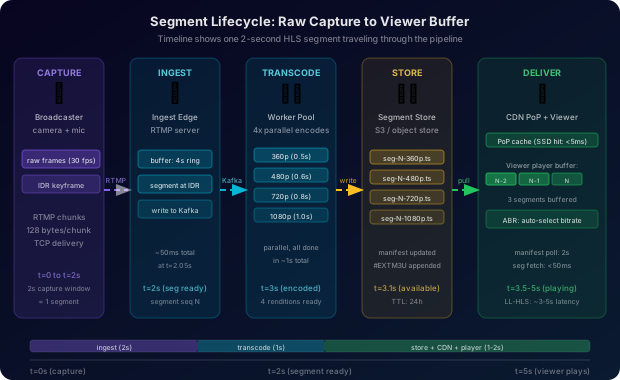
- Transcode latency: each 2-second HLS segment ready within 3 seconds of capture
- Ingest uptime: 99.99% (4 minutes of downtime per month)
- Segment availability at edge: 99.999% (viewer never sees a 404 for a valid segment)
Constraints
- Broadcasters use commodity hardware and unreliable networks - the ingest protocol must tolerate packet loss
- Viewers span every device from 2016 iPhones to 8K smart TVs - delivery must use open standards
- Transcoding is CPU-intensive: one 1080p-to-4-quality-level transcode requires ~8 vCPUs in real time
- Storage cost: segments expire after 24 hours (live replay window), then archival
- A broadcaster with 10 million followers creates a viewer surge at stream start
High-Level Architecture
The system has three horizontal layers: ingest, processing, and distribution. Each layer is independently scaled and can fail in isolation without taking down the others.
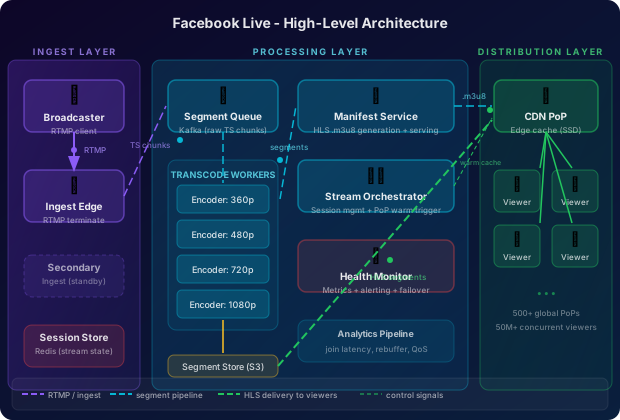
The Ingest Layer receives RTMP connections from broadcasters. An ingest edge server terminates the RTMP session and writes raw video segments to a durable intermediate store (Kafka or object storage). The Processing Layer picks up raw segments, runs parallel transcoding workers that produce 4 HLS renditions per segment, and writes finished segments to the segment object store. The Distribution Layer consists of globally distributed CDN Points of Presence (PoPs) that cache HLS segments close to viewers, warm the cache proactively when a new stream starts, and serve HLS manifests and segment files at scale.
The ingest and distribution paths are architecturally decoupled on purpose. A broadcaster’s RTMP connection terminates at the closest ingest PoP, but that PoP does not serve viewers - segments flow inward to transcoding workers and then outward to viewer-facing CDN PoPs. This separation means transcoding capacity can be centralized cheaply while ingest and delivery remain geographically distributed.
RTMP Ingest Layer
RTMP (Real-Time Messaging Protocol) is the industry standard for live stream ingest - it was originally a Flash protocol but became the de facto broadcaster-to-server protocol because every streaming tool (OBS, Streamlabs, FFmpeg) supports it natively.
A broadcaster opens a persistent TCP connection to the nearest ingest server using a URL like rtmp://live.facebook.com/live/{stream_key}. RTMP uses a multiplexed chunk stream over TCP, breaking the video into 128-byte chunks that interleave audio and video data. TCP provides reliable in-order delivery, which prevents the partial-frame corruption that would happen over UDP - at the cost of head-of-line blocking when a packet is lost on a congested network.
Ingest Session Management:
Each ingest server manages thousands of concurrent broadcaster TCP connections. When a broadcaster connects, the ingest server:
- Validates the stream key against the auth service
- Creates a stream session record in the session store (Redis) with state
LIVE - Begins buffering incoming RTMP chunks into a circular buffer (4 seconds, ~4MB per stream)
- Segments the stream into 2-second chunks as keyframes arrive (IDR frames force a clean cut point)
- Writes each raw segment to Kafka for the transcoding workers to consume
The ingest server does NOT transcode - it only repackages RTMP into transport stream (TS) segments. This keeps the ingest server lightweight: each box can handle 3,000+ concurrent broadcaster streams. Transcoding happens downstream with dedicated GPU/CPU resources.
Segmentation at keyframe boundaries is non-negotiable for ABR streaming. An HLS segment that does not start at a keyframe forces the decoder to reconstruct frames from a previous segment, causing a visible seek artifact. Most ingest servers configure broadcasters to send a keyframe every 2 seconds (matching the segment duration) via the stream key setup flow.
Ingest Redundancy:
A broadcaster connects to a primary ingest server. A secondary ingest server (in a different data center) holds a hot standby connection for the same stream key. If the primary goes down, the broadcaster’s streaming software reconnects to the secondary within the RTMP reconnection timeout (typically 5 seconds). Segment numbering continues from where the primary left off - the primary and secondary share the session state via Redis so the transcoding workers see a contiguous sequence.
Real-Time Transcoding Pipeline
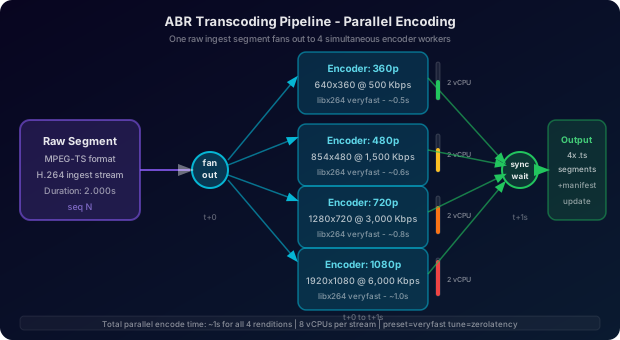
Raw ingest segments arrive at the transcoding tier as MPEG-TS chunks. Each chunk must be transcoded into 4 bitrate variants and packaged as HLS segments before it can be served to viewers. This must happen faster than real time: a 2-second segment must be fully transcoded and available within 3 seconds of the segment being captured by the broadcaster.
The ABR Ladder:
| Rendition | Resolution | Video Bitrate | Audio Bitrate | Total |
|---|---|---|---|---|
| 360p | 640x360 | 500 Kbps | 96 Kbps | 596 Kbps |
| 480p | 854x480 | 1,500 Kbps | 128 Kbps | 1,628 Kbps |
| 720p | 1280x720 | 3,000 Kbps | 160 Kbps | 3,160 Kbps |
| 1080p | 1920x1080 | 6,000 Kbps | 192 Kbps | 6,192 Kbps |
The transcoding pipeline uses H.264 video encoding (for broad device compatibility) with AAC audio. Each ingest segment spawns 4 parallel encoding jobs - one per rendition. The jobs run on a pool of transcoding workers backed by multi-core CPU instances (c5.4xlarge or equivalent). A single 2-second 1080p-to-360p transcode takes approximately 0.5 seconds on 2 vCPUs. Running all 4 renditions in parallel on 8 vCPUs, the entire ABR ladder is ready in about 1 second - well within the 3-second budget.
# Transcoding job dispatcher: receives raw segments and spawns parallel encode tasks
import asyncio
from dataclasses import dataclass
from typing import Optional

@dataclass
class RawSegment:
    stream_id: str
    sequence_num: int
    data: bytes              # MPEG-TS data
    duration_ms: int         # segment duration (nominally 2000ms)
    keyframe_offset: int     # byte offset of first IDR frame
    captured_at: float       # unix timestamp when segment was finalized

@dataclass
class EncodedSegment:
    stream_id: str
    sequence_num: int
    rendition: str           # "360p", "480p", "720p", "1080p"
    data: bytes              # H.264 + AAC in MPEG-TS container
    duration_ms: int
    init_segment: Optional[bytes]  # fMP4 init for LL-HLS

ABR_LADDER = [
    {"name": "360p",  "width": 640,  "height": 360,  "video_kbps": 500,  "audio_kbps": 96},
    {"name": "480p",  "width": 854,  "height": 480,  "video_kbps": 1500, "audio_kbps": 128},
    {"name": "720p",  "width": 1280, "height": 720,  "video_kbps": 3000, "audio_kbps": 160},
    {"name": "1080p", "width": 1920, "height": 1080, "video_kbps": 6000, "audio_kbps": 192},
]

class TranscodeDispatcher:
    def __init__(self, worker_pool, segment_store, manifest_updater):
        self.workers = worker_pool
        self.store = segment_store
        self.manifest = manifest_updater

    async def dispatch(self, raw: RawSegment) -> None:
        # Launch all 4 renditions in parallel
        encode_tasks = [
            self._encode_rendition(raw, rendition)
            for rendition in ABR_LADDER
        ]
        encoded_segments = await asyncio.gather(*encode_tasks)

        # Write all renditions to object store atomically (per sequence number)
        store_tasks = [
            self.store.put(seg)
            for seg in encoded_segments
        ]
        await asyncio.gather(*store_tasks)

        # Update HLS manifest to include this sequence number
        await self.manifest.append_segment(
            stream_id=raw.stream_id,
            sequence_num=raw.sequence_num,
            duration_ms=raw.duration_ms,
            renditions=[seg.rendition for seg in encoded_segments]
        )

    async def _encode_rendition(self, raw: RawSegment, rendition: dict) -> EncodedSegment:
        # Dispatches to a transcoding worker (FFmpeg subprocess or hardware encoder)
        job = TranscodeJob(
            input_data=raw.data,
            width=rendition["width"],
            height=rendition["height"],
            video_bitrate=rendition["video_kbps"] * 1000,
            audio_bitrate=rendition["audio_kbps"] * 1000,
            codec="libx264",
            preset="veryfast",  # speed over compression ratio for live
            tune="zerolatency",
        )
        result = await self.workers.submit(job)
        return EncodedSegment(
            stream_id=raw.stream_id,
            sequence_num=raw.sequence_num,
            rendition=rendition["name"],
            data=result.encoded_bytes,
            duration_ms=raw.duration_ms,
            init_segment=result.init_segment,
        )
The preset=veryfast and tune=zerolatency FFmpeg flags are critical for live streaming. The veryfast preset reduces encoding latency at the cost of ~10% larger output files. zerolatency disables B-frames and lookahead, reducing the encoder buffer delay from ~400ms to near zero.
Never use hardware encoders (NVENC, QuickSync) as the sole transcode path in a live streaming system. Hardware encoder availability is limited per host - typically 3-5 concurrent sessions per GPU. CPU-based encoding (libx264/libx265) scales linearly with cores and does not require specialized hardware. Reserve hardware encoders for the expensive high-bitrate renditions (720p, 1080p) and CPU encoders for the cheaper ones (360p, 480p) to maximize hardware utilization.
Transcoding Backpressure:
If a stream produces segments faster than the worker pool can transcode (e.g., high motion video where encoding takes longer), a backpressure mechanism prevents queue unbounded growth. Each stream’s work queue is bounded at 10 segments (~20 seconds). If the queue is full, the dispatcher drops the oldest unprocessed segment and logs a quality gap event. Viewers experience this as a brief stutter rather than infinite buffering.
PoP-Based Distribution
After transcoding, HLS segments live in a central object store (like S3 or Facebook’s internal blob store). Getting those segments to millions of concurrent viewers requires distributing the data geographically - that is the job of the CDN Point of Presence (PoP) network.
How PoPs work for live streaming:
A live stream PoP is different from a static CDN cache. Static CDN caches are reactive - they fetch on first miss. Live streaming PoPs must be proactive: when a new stream starts, the orchestrator pushes a cache-warm command to the nearest 20-50 PoPs before any viewers request segments. This is called push-based cache warming.
The cache warming flow:
- Broadcaster connects to ingest. Ingest service publishes a
stream.startedevent to the event bus. - The PoP selection service looks up the broadcaster’s follower list, applies a geo-distribution model based on where followers are located, and selects the top 40 PoPs to warm.
- Each selected PoP registers a subscription: “poll for new segments on stream
{stream_id}as soon as they are available.” - As transcoding workers publish segments, PoPs fetch them immediately rather than waiting for a viewer request.
After cache warming, HLS segment delivery is a simple HTTP GET from viewer to nearest PoP. The PoP checks its local cache (memory or NVMe SSD), serves from cache on a hit (sub-millisecond), or fetches from the segment store on a miss (50-100ms round trip to origin) and populates the cache for subsequent viewers.
HLS Manifest Serving:
The HLS manifest (.m3u8 file) is the control plane for every viewer’s player. It lists available segments in sequence order. The manifest is updated every 2 seconds (once per segment). Unlike segments, the manifest must NOT be aggressively cached at the PoP - a stale manifest causes the viewer’s player to stop progressing. Manifests are served with a short TTL (2-4 seconds) or with cache-busting query parameters so players always see the latest segment list.
Akamai’s Media Delivery platform and AWS CloudFront both use the PoP model for live streaming distribution. Akamai reports serving live streams to over 200,000 concurrent viewers per PoP during major sports events. The key to this scale is that each viewer fetches the same HLS segments - unlike WebRTC, which requires individual connections per viewer - turning live video delivery into a static file distribution problem that CDNs already know how to solve.
HLS vs WebRTC Tradeoff
The two dominant live streaming delivery protocols represent opposing tradeoffs on the latency-vs-scale curve.
HTTP Live Streaming (HLS):
- Latency: 6-30 seconds (standard); 3-5 seconds (LL-HLS)
- Scale: unlimited - every viewer is just an HTTP file download
- Compatibility: native support on iOS, Android, all major browsers, Smart TVs
- Reliability: segment-based model is resilient to network jitter - the player buffers ahead
- Mechanism: player polls manifest, fetches segments as a series of HTTP range requests
WebRTC:
- Latency: 150-500ms (sub-second, “real time”)
- Scale: requires a relay server (SFU) per cluster of 500-2,000 viewers
- Compatibility: supported in modern browsers; limited on Smart TVs and older devices
- Reliability: UDP-based, subject to packet loss and jitter visible to the viewer
- Mechanism: persistent P2P or SFU connection with RTP streams
| Dimension | Standard HLS | Low-Latency HLS | WebRTC |
|---|---|---|---|
| Latency | 15-30s | 3-5s | 0.1-0.5s |
| Viewers/server | 100,000+ | 100,000+ | 500-2,000 |
| CDN compatible | Yes | Yes | No |
| Device support | Universal | Modern (2020+) | Modern browsers |
| Infrastructure cost | Low | Low-medium | High |
| Suitable for | Broadcast TV | Live streaming | Video calls, auctions |
Facebook Live uses LL-HLS as the primary delivery protocol for consumer streaming. WebRTC is reserved for interactive use cases (Facebook Messenger video, live Q&A with bidirectional audio). The 3-5 second latency of LL-HLS is imperceptible for the social viewing experience - viewers commenting “wow this is amazing” do not need sub-second alignment with the broadcast.
The key innovation in Low-Latency HLS (introduced by Apple in 2019) is partial segments: the player can start downloading a segment before it is fully encoded. A 2-second segment is divided into 200ms “partial parts.” As soon as 200ms of video is ready, the player fetches that partial part and starts playing. This reduces the minimum buffering requirement from one full segment (2s) to one partial part (0.2s), cutting latency by 10x while remaining fully CDN-compatible.
Viewer Join Latency
Viewer join latency - the time from a user clicking “watch” to seeing the first frame - is the most user-visible performance metric for live streaming. A 10-second loading spinner loses viewers; a 2-second load retains them.
Join latency decomposition:
- DNS resolution for the PoP: 50-100ms (can be cached)
- TLS handshake to PoP: 100-200ms
- Fetch master manifest (HLS master playlist): 50-100ms
- Fetch variant manifest (one per rendition): 50-100ms
- Fetch initial segments (minimum 3 segments for smooth playback): 200-600ms
- Decoder startup and first frame render: 50-150ms
Total cold path: 500ms - 1,250ms in ideal conditions.
The key optimizations that get this under 3 seconds even on mobile:
Manifest pre-fetching: When a user’s Facebook feed shows a live video card, the player prefetches the master manifest in the background before the user taps “Watch.” By the time the tap happens, step 3 is already done.
PoP-local manifest caching: The variant manifest is cached at the PoP with a 2-second TTL. The first viewer at a PoP incurs the origin round trip; all subsequent viewers within 2 seconds serve from PoP cache.
Low initial segment count for LL-HLS: LL-HLS players only need 3 partial parts (600ms of video) before starting playback, compared to 3 full segments (6 seconds) for standard HLS.
Stream head optimization: The HLS manifest always includes a #EXT-X-PROGRAM-DATE-TIME tag pointing to real wall-clock time. When a viewer joins, the player requests the manifest, reads the latest sequence number, and immediately requests the most recent 3 segments rather than starting from segment 1. This avoids the “catch-up” delay where a late joiner watches from stream start.
# HLS manifest generator: produces the variant manifest updated per segment
from dataclasses import dataclass, field
from typing import Optional
import time

@dataclass
class HLSSegment:
    sequence_num: int
    duration_ms: int
    uri: str             # CDN URL for this segment
    wall_clock: float    # unix timestamp of segment start (for EXT-X-PROGRAM-DATE-TIME)
    partial_parts: list  # list of partial segment URIs for LL-HLS

class HLSManifestGenerator:
    WINDOW_SIZE = 10     # number of segments to keep in live manifest
    TARGET_DURATION = 2  # seconds per segment

    def __init__(self, stream_id: str, rendition: str, cdn_base_url: str):
        self.stream_id = stream_id
        self.rendition = rendition
        self.cdn_base = cdn_base_url
        self.segments: list[HLSSegment] = []
        self.media_sequence = 0  # EXT-X-MEDIA-SEQUENCE value

    def append_segment(self, seq: int, duration_ms: int, wall_clock: float, partial_parts: list) -> None:
        segment_uri = f"{self.cdn_base}/segments/{self.stream_id}/{self.rendition}/{seq}.ts"
        self.segments.append(HLSSegment(
            sequence_num=seq,
            duration_ms=duration_ms,
            uri=segment_uri,
            wall_clock=wall_clock,
            partial_parts=partial_parts,
        ))
        # Trim to sliding window
        if len(self.segments) > self.WINDOW_SIZE:
            self.segments.pop(0)
            self.media_sequence += 1

    def render(self) -> str:
        lines = [
            "#EXTM3U",
            "#EXT-X-VERSION:6",
            f"#EXT-X-TARGETDURATION:{self.TARGET_DURATION}",
            f"#EXT-X-MEDIA-SEQUENCE:{self.media_sequence}",
            # LL-HLS: declare partial segment support
            f"#EXT-X-SERVER-CONTROL:CAN-BLOCK-RELOAD=YES,PART-HOLD-BACK=0.6",
            f"#EXT-X-PART-INF:PART-TARGET=0.2",
        ]
        for seg in self.segments:
            # LL-HLS partial parts (200ms each)
            for part_uri in seg.partial_parts:
                lines.append(f"#EXT-X-PART:DURATION=0.2,URI=\"{part_uri}\"")
            # Full segment
            duration_s = seg.duration_ms / 1000.0
            lines.append(f"#EXT-X-PROGRAM-DATE-TIME:{_iso8601(seg.wall_clock)}")
            lines.append(f"#EXTINF:{duration_s:.3f},")
            lines.append(seg.uri)
        return "\n".join(lines)

def _iso8601(ts: float) -> str:
    import datetime
return datetime.datetime.utcfromtimestamp(ts).strftime("%Y-%m-%dT%H:%M:%S.%f")[:-3] + "Z"YouTube Live uses a variant of HLS called DASH (Dynamic Adaptive Streaming over HTTP) for its primary delivery, with standard 2-4 second segment durations for most streams and a low-latency mode for live events like sports. Twitch uses a custom HLS variant with 2-second segments and progressive segment fetching. Both platforms operate global CDN networks with hundreds of PoPs - Twitch uses Akamai and Fastly, YouTube uses Google’s own edge network (GGC - Google Global Cache) deployed in ISP facilities.
Stream Health Monitoring
Stream health monitoring has two consumers: broadcasters (who need to know their stream quality is good) and the platform operations team (who need to know the infrastructure is healthy across all streams).
Per-stream metrics collected at the ingest layer:
video_fps- frames per second received (target: 30fps for most content)audio_video_sync_delta_ms- drift between audio and video timestampssegment_duration_variance_ms- how consistent are segment lengths (jitter)keyframe_interval_ms- time between IDR frames (affects seek accuracy)ingest_bitrate_kbps- broadcaster’s upstream bitratenetwork_jitter_ms- TCP retransmit rate proxy
Per-segment transcoding metrics:
transcode_latency_msper segment per renditionencoder_queue_depth- segments waiting to be encodedencoding_speed_ratio- real-time factor (>1.0 means encoding faster than real time)
Aggregated platform metrics:
live_stream_count- total active streamsviewer_rebuffer_rateby PoP region - leading indicator of CDN degradationmanifest_404_rate- indicator of segment store failuresp99_join_latency_msby region
Stream health alerting logic:
# Stream health monitor: evaluates per-stream health signals and triggers interventions
from dataclasses import dataclass
from enum import Enum
from typing import Optional

class StreamHealthStatus(Enum):
    HEALTHY = "healthy"
    DEGRADED = "degraded"    # quality issues; viewers may see rebuffering
    CRITICAL = "critical"    # stream at risk of failing; auto-failover eligible

@dataclass
class StreamHealthSnapshot:
    stream_id: str
    sampled_at: float
    ingest_bitrate_kbps: float
    video_fps: float
    segment_transcode_latency_p99_ms: float
    encoder_queue_depth: int
    viewer_rebuffer_rate_pct: float

class StreamHealthMonitor:
    THRESHOLDS = {
        "min_fps": 20.0,
        "max_transcode_latency_ms": 2500,   # must stay under segment duration
        "max_encoder_queue_depth": 5,
        "max_rebuffer_rate_pct": 3.0,
        "min_ingest_bitrate_kbps": 200,
    }

    def evaluate(self, snap: StreamHealthSnapshot) -> StreamHealthStatus:
        critical_conditions = [
            snap.video_fps < self.THRESHOLDS["min_fps"],
            snap.encoder_queue_depth > self.THRESHOLDS["max_encoder_queue_depth"],
            snap.ingest_bitrate_kbps < self.THRESHOLDS["min_ingest_bitrate_kbps"],
        ]
        degraded_conditions = [
            snap.segment_transcode_latency_p99_ms > self.THRESHOLDS["max_transcode_latency_ms"],
            snap.viewer_rebuffer_rate_pct > self.THRESHOLDS["max_rebuffer_rate_pct"],
        ]

        if any(critical_conditions):
            return StreamHealthStatus.CRITICAL
        if any(degraded_conditions):
            return StreamHealthStatus.DEGRADED
        return StreamHealthStatus.HEALTHY

    def on_critical(self, stream_id: str, snap: StreamHealthSnapshot) -> None:
        # Trigger failover to secondary ingest server if primary is degraded
        self._notify_broadcaster(stream_id, "Stream degraded - check your upload speed")
        self._trigger_ingest_failover(stream_id)
        self._page_oncall(stream_id, snap)
Auto-failover: When a stream’s encoder queue depth exceeds 5 segments (10 seconds of backlog), the orchestrator marks the current transcoding worker as overloaded and migrates the stream’s job queue to a less-loaded worker. Migration takes 1-2 segments worth of latency (2-4 seconds) but prevents the latency from growing unboundedly.
The rebuffer rate at the viewer (measured by the player) is a lagging indicator - by the time viewers are rebuffering, the stream is already in trouble. The leading indicators are encoder queue depth and transcode latency at the processing tier. A well-tuned monitoring system pages on encoder queue depth exceeding 3 segments, well before viewers notice any degradation.
Data Model
-- Stream sessions: one row per broadcast
CREATE TABLE stream_sessions (
    stream_id           VARCHAR(36) PRIMARY KEY,   -- UUID
    broadcaster_id      BIGINT NOT NULL,
    stream_key          VARCHAR(64) NOT NULL UNIQUE,
    status              ENUM('scheduled','live','ended','error') NOT NULL DEFAULT 'scheduled',
    ingest_server_id    VARCHAR(64),               -- which ingest edge server
    ingest_started_at   TIMESTAMPTZ,
    ingest_ended_at     TIMESTAMPTZ,
    peak_viewer_count   INT NOT NULL DEFAULT 0,
    total_viewer_minutes BIGINT NOT NULL DEFAULT 0,
    created_at          TIMESTAMPTZ NOT NULL DEFAULT NOW()
);

CREATE INDEX idx_sessions_broadcaster ON stream_sessions(broadcaster_id, ingest_started_at DESC);
CREATE INDEX idx_sessions_live ON stream_sessions(status) WHERE status = 'live';

-- Segment metadata: one row per HLS segment per rendition
-- Partitioned by stream_id to keep segment lookups local
CREATE TABLE stream_segments (
    stream_id       VARCHAR(36) NOT NULL,
    sequence_num    INT NOT NULL,
    rendition       VARCHAR(8) NOT NULL,          -- "360p", "480p", "720p", "1080p"
    duration_ms     SMALLINT NOT NULL,
    object_key      TEXT NOT NULL,                -- path in blob store
    byte_size       INT NOT NULL,
    transcoded_at   TIMESTAMPTZ NOT NULL,
    transcode_ms    SMALLINT NOT NULL,            -- how long encoding took
    wall_clock_time TIMESTAMPTZ NOT NULL,         -- wall clock at segment start
    PRIMARY KEY (stream_id, sequence_num, rendition)
) PARTITION BY HASH (stream_id);

-- Stream health snapshots: rolling 24h window for debugging
CREATE TABLE stream_health_log (
    stream_id               VARCHAR(36) NOT NULL,
    sampled_at              TIMESTAMPTZ NOT NULL,
    ingest_bitrate_kbps     SMALLINT,
    video_fps               SMALLINT,
    transcode_latency_p99   SMALLINT,
    encoder_queue_depth     SMALLINT,
    viewer_rebuffer_rate    NUMERIC(4,2),
    health_status           VARCHAR(16),
    PRIMARY KEY (stream_id, sampled_at)
) PARTITION BY RANGE (sampled_at);

-- Rotate health log partitions daily, retain 7 days
ALTER TABLE stream_health_log ADD CONSTRAINT health_log_retention
    CHECK (sampled_at >= NOW() - INTERVAL '7 days');

-- Viewer sessions: used for analytics and rebuffer attribution
CREATE TABLE viewer_sessions (
    session_id          VARCHAR(36) PRIMARY KEY,
    stream_id           VARCHAR(36) NOT NULL,
    viewer_id           BIGINT,                   -- null for unauthenticated
    pop_id              VARCHAR(16) NOT NULL,     -- which CDN PoP served this viewer
    join_latency_ms     SMALLINT,
    initial_rendition   VARCHAR(8),
    rebuffer_count      SMALLINT NOT NULL DEFAULT 0,
    total_watch_ms      INT NOT NULL DEFAULT 0,
    joined_at           TIMESTAMPTZ NOT NULL,
    last_seen_at        TIMESTAMPTZ NOT NULL
);

CREATE INDEX idx_viewer_sessions_stream ON viewer_sessions(stream_id, joined_at DESC);
The stream_segments table is the most write-heavy table in the system: at 500,000 concurrent streams, each producing 4 renditions at 0.5 segments/second, that is 1 million segment rows per second. This table is append-only and never updated - segments are immutable once encoded. At this write rate, traditional row-store databases are impractical; the segment metadata is better served by a time-series store or a columnar store like ClickHouse, with object storage (S3) as the actual segment data layer.
Key Algorithms and Protocols
ABR Ladder Selection Logic
The viewer’s ABR player continuously selects the best rendition to request based on available bandwidth. A simple throughput-based ABR algorithm:
# ABR ladder selection: client-side bitrate adaptation
from dataclasses import dataclass
from typing import Optional

@dataclass
class RenditionProfile:
    name: str
    bitrate_kbps: int
    width: int
    height: int

ABR_LADDER = [
    RenditionProfile("360p",  596,  640,  360),
    RenditionProfile("480p",  1628, 854,  480),
    RenditionProfile("720p",  3160, 1280, 720),
    RenditionProfile("1080p", 6192, 1920, 1080),
]

class ABRSelector:
    # Safety margin: only select rendition if bandwidth is 1.4x its bitrate
    # Prevents oscillation on fluctuating networks
    SAFETY_MARGIN = 1.4
    # Minimum segments at current quality before upgrading
    UPGRADE_STABILITY_COUNT = 3

    def __init__(self):
        self.current_rendition = ABR_LADDER[0]  # start at lowest quality
        self.stable_segments = 0
        self.bandwidth_samples: list[float] = []  # rolling window

    def update_bandwidth(self, measured_kbps: float) -> None:
        self.bandwidth_samples.append(measured_kbps)
        if len(self.bandwidth_samples) > 5:
            self.bandwidth_samples.pop(0)

    def select_rendition(self) -> RenditionProfile:
        if not self.bandwidth_samples:
            return self.current_rendition

        # Use harmonic mean for bandwidth estimation (conservative)
        n = len(self.bandwidth_samples)
        harmonic_mean = n / sum(1.0 / s for s in self.bandwidth_samples)
        available = harmonic_mean / self.SAFETY_MARGIN

        # Find the highest rendition that fits within available bandwidth
        best = ABR_LADDER[0]
        for rendition in ABR_LADDER:
            if rendition.bitrate_kbps <= available:
                best = rendition

        # Only upgrade if we've been stable for UPGRADE_STABILITY_COUNT segments
        if best.bitrate_kbps > self.current_rendition.bitrate_kbps:
            self.stable_segments += 1
            if self.stable_segments >= self.UPGRADE_STABILITY_COUNT:
                self.current_rendition = best
                self.stable_segments = 0
        else:
            # Downgrade immediately (avoid rebuffering at all costs)
            self.current_rendition = best
            self.stable_segments = 0

        return self.current_rendition
The harmonic mean is used instead of arithmetic mean for bandwidth estimation because it is more conservative: a single slow segment (100 Kbps) with four fast ones (10,000 Kbps) gives a harmonic mean of ~490 Kbps rather than ~8,100 Kbps. Overestimating bandwidth causes the player to request a high-bitrate segment it cannot download in time, triggering a rebuffer.
HLS Manifest Structure
A complete multi-rendition HLS manifest looks like this:
# Master playlist (served at /live/{stream_id}/master.m3u8)
#EXTM3U
#EXT-X-VERSION:6

# Rendition declarations
#EXT-X-STREAM-INF:BANDWIDTH=596000,RESOLUTION=640x360,CODECS="avc1.42c01e,mp4a.40.2"
/live/{stream_id}/360p/manifest.m3u8

#EXT-X-STREAM-INF:BANDWIDTH=1628000,RESOLUTION=854x480,CODECS="avc1.42c01e,mp4a.40.2"
/live/{stream_id}/480p/manifest.m3u8

#EXT-X-STREAM-INF:BANDWIDTH=3160000,RESOLUTION=1280x720,CODECS="avc1.64001f,mp4a.40.2"
/live/{stream_id}/720p/manifest.m3u8

#EXT-X-STREAM-INF:BANDWIDTH=6192000,RESOLUTION=1920x1080,CODECS="avc1.640028,mp4a.40.2"
/live/{stream_id}/1080p/manifest.m3u8

# Variant manifest (served at /live/{stream_id}/720p/manifest.m3u8)
#EXTM3U
#EXT-X-VERSION:6
#EXT-X-TARGETDURATION:2
#EXT-X-MEDIA-SEQUENCE:4821
#EXT-X-SERVER-CONTROL:CAN-BLOCK-RELOAD=YES,PART-HOLD-BACK=0.6
#EXT-X-PART-INF:PART-TARGET=0.2

#EXT-X-PROGRAM-DATE-TIME:2026-06-05T14:30:08.000Z
#EXT-X-PART:DURATION=0.2,URI="seg-4821-p0.ts"
#EXT-X-PART:DURATION=0.2,URI="seg-4821-p1.ts"
#EXT-X-PART:DURATION=0.2,URI="seg-4821-p2.ts"
#EXTINF:2.000,
seg-4821.ts

#EXT-X-PROGRAM-DATE-TIME:2026-06-05T14:30:10.000Z
#EXT-X-PART:DURATION=0.2,URI="seg-4822-p0.ts"
#EXTINF:2.000,
seg-4822.ts
Scaling and Performance
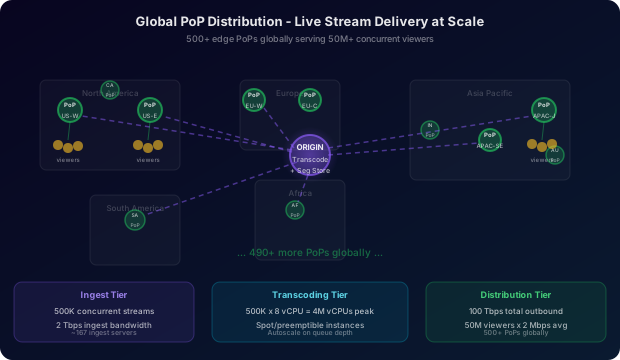
Back-of-envelope capacity estimation:
Ingest tier:
  - 500,000 concurrent streams
  - Average ingest bitrate: 4 Mbps per stream
  - Total ingest bandwidth: 500K * 4 Mbps = 2 Tbps
  - Ingest servers needed: assume 3,000 streams/server = 167 ingest servers

Transcoding tier:
  - 500,000 streams * 4 renditions = 2M active encode jobs
  - Each 2-second segment takes ~1 second to encode on 2 vCPUs
  - Encode throughput: 500K streams * 4 renditions * 0.5 segments/sec = 1M encodes/sec
  - CPUs needed: 1M encodes/sec * 2 vCPUs/encode * 1 sec/encode = 2M vCPUs
    (realistic: 500K * 8 vCPUs per stream ABR ladder = 4M vCPUs peak)
  - Practical: use spot/preemptible instances for transcoding; autoscale with 5-min lead time

Distribution tier:
  - 50M concurrent viewers (average ~100 viewers per stream)
  - Average viewer bitrate: 2 Mbps (mix of renditions)
  - Total outbound bandwidth: 50M * 2 Mbps = 100 Tbps
  - Viewers per PoP: 200,000 (500 PoPs globally)
  - Each PoP handles: 200K viewers * 2 Mbps = 400 Gbps per PoP

Storage:
  - Segment size average: 500 KB (at 2 Mbps average)
  - Segments per stream per second: 0.5 (one 2-sec segment per 2 seconds)
  - Segment write rate: 500K streams * 4 renditions * 0.5/sec = 1M segments/sec
  - Segment write bandwidth: 1M/sec * 500 KB = 500 GB/sec to segment store
  - 24h retention: 500K streams * 4 renditions * (86400/2) segs * 500 KB = 43.2 PB/day
    (practical: only popular streams kept for 24h; ephemeral streams deleted on end)
The dominant cost driver is outbound bandwidth from PoPs to viewers - at 100 Tbps, this costs approximately $3-8M/day at cloud bandwidth prices. This is why Facebook built its own CDN infrastructure rather than relying on commercial CDN providers. At this scale, the margin on bandwidth alone justifies the capital expenditure of building and operating a private CDN.
The cost per viewer-hour for live streaming is dominated by bandwidth (80%+), not compute. The transcoding CPU cost is roughly $0.002/stream/hour (2 vCPUs at $0.10/vCPU-hour). The bandwidth cost for 1 million viewers watching at 2 Mbps is 2 Tbps * $0.08/GB = $57,600/hour. This asymmetry explains why CDN optimization (cache hit rates, PoP placement, bitrate ladder tuning) has 100x more financial impact than transcoding optimization.
Autoscaling strategy:
- Ingest servers: scale on active RTMP connection count; 2-minute spin-up time is acceptable (broadcaster reconnects)
- Transcoding workers: scale on encoder queue depth; use spot instances with preemption-safe checkpointing
- CDN PoPs: capacity is pre-provisioned based on historical viewer patterns per region; scale-up is triggered by viewer surge detection (>80% PoP capacity)
During the 2022 FIFA World Cup, Amazon IVS (Interactive Video Service) and Akamai both reported serving individual streams to over 5 million concurrent viewers, with sustained outbound bandwidth exceeding 10 Tbps from single regional PoP clusters. Facebook Live handled multiple concurrent high-viewership streams during the 2020 US election coverage with zero reported viewer outages - achieved through a combination of pre-warming 200+ PoPs per stream and predictive autoscaling triggered by stream start events rather than viewer demand spikes.
Failure Modes and Recovery
| Failure | Detection | Impact | Recovery |
|---|---|---|---|
| Ingest server crash mid-stream | RTMP TCP disconnect; session store heartbeat timeout | Broadcaster stream drops; viewers see rebuffering until reconnect | Broadcaster client auto-reconnects (5s); secondary ingest takes over; sequence numbering resumes from checkpoint |
| Transcoding worker overload | Encoder queue depth > 5 segments | Transcoding latency grows; manifest lag; viewers fall behind | Orchestrator migrates stream to under-loaded worker; 1 segment gap in output (stutter) |
| Segment store write failure | S3/blob write error rate > 0.1% | Segments not available at PoPs; viewers get 404s on segment fetch | Retry with exponential backoff; if persistent, failover to backup segment store in different region |
| PoP cache miss storm at stream start | Cache hit rate drops to near 0% at stream start | Every viewer fetches from origin; origin bandwidth saturated | Push-based cache warming (segments pushed to PoPs before first viewer request) eliminates cold start; rate-limit origin fetch per PoP |
| Manifest staleness at PoP | Viewer player progress stalls; sequence number not advancing | Viewers experience frozen stream | Manifest served with short TTL (2-4 seconds) or no-cache; players poll manifest with blocking reload request |
| CDN PoP network partition | PoP unreachable; viewer DNS resolution fails | All viewers routed to this PoP experience outage | Anycast DNS removes partitioned PoP from rotation within 30 seconds; viewers re-resolve to nearest healthy PoP |
| Broadcaster uploads at wrong bitrate | Stream health monitor: ingest_bitrate_kbps too low or too high | Transcoding workers waste CPU on upscaling low-quality input | Alert broadcaster; if bitrate < 200 Kbps, skip 720p and 1080p renditions automatically |
The “thundering herd” at stream start is the most dangerous failure mode. When a broadcaster with 5 million followers goes live, their followers’ apps receive a push notification simultaneously. If 200,000 viewers try to load the stream in the same 5-second window and all the CDN PoPs have cold caches, the manifest and segment origin servers receive 200,000 requests per second out of nowhere. Pre-warming PoPs at stream start and serving the first few segments from multiple origin replicas prevents this. Never design the origin to be the fallback for viewer-scale traffic.
Comparison of Approaches
| Protocol | Latency | Scale | Device Support | Infrastructure Complexity | Best Use Case |
|---|---|---|---|---|---|
| Standard HLS | 15-30s | Unlimited (CDN) | Universal | Low | VOD, sports replay |
| DASH | 10-20s | Unlimited (CDN) | Modern devices | Medium | Broadcast TV over web |
| Low-Latency HLS | 3-5s | Unlimited (CDN) | iOS 14+, modern browsers | Medium | Live social streaming |
| WebRTC (SFU) | 0.1-0.5s | ~2,000/SFU | Modern browsers | High | Video calls, auctions |
| RTMP (delivery) | 2-4s | Limited (~5,000/server) | Flash-era (legacy) | Medium | Legacy encoder ingest only |
| SRT | 0.5-4s | Limited | Broadcast hardware | Medium | Professional broadcast ingest |
The industry has converged on two distinct use cases with different protocol stacks: interactive streaming (sub-second latency required) uses WebRTC end-to-end, and broadcast streaming (millions of passive viewers) uses RTMP ingest + HLS/LL-HLS delivery. Attempting to use WebRTC for broadcast-scale delivery requires thousands of SFU servers and eliminates CDN cacheability - the economics do not work.
Key Takeaways
- Ingest and delivery are separate systems - RTMP ingest terminates at the edge, segments flow inward to transcoding, then outward to CDN PoPs. This separation is what allows ingest to scale to 500,000 streams while delivery scales to 50 million viewers.
- Transcoding is the critical path - a 2-second segment must be encoded into 4 renditions and published within 3 seconds.
preset=veryfastandtune=zerolatencyare not optional for live encoding. - LL-HLS partial segments reduce the minimum playback buffer from one full segment (2s) to one partial part (200ms), cutting end-to-end latency by 10x while remaining fully CDN-compatible.
- Push-based cache warming is mandatory for popular streams - reactive CDN caching (fetch on first miss) creates a thundering herd at stream start when millions of followers receive a push notification simultaneously.
- The ABR player uses harmonic mean bandwidth estimation rather than arithmetic mean to avoid overestimating available bandwidth and triggering rebuffering on the next segment fetch.
- Manifests must not be aggressively cached - a stale HLS manifest causes viewer progress to stall. Segments can be cached indefinitely (they are immutable); manifests must expire within one segment duration.
- Bandwidth cost dominates the economics - at 50M concurrent viewers at 2 Mbps average, outbound bandwidth is 100 Tbps. This makes CDN cache hit rate optimization (1% improvement = 1 Tbps saved) worth millions of dollars per day.
- Stream health leading indicators are encoder queue depth and transcode latency, not viewer rebuffer rate. Rebuffering is the lagging outcome; page on queue depth to intervene before viewers are affected.
Frequently Asked Questions
Q: Why use RTMP for ingest rather than a modern protocol like WebRTC or SRT? A: RTMP has 20 years of broadcaster tooling support. Every streaming software (OBS, Streamlabs, XSplit, Wirecast, every hardware encoder) supports RTMP natively. Protocol adoption is a network effect problem - until all encoder software supports SRT or WebRTC, RTMP remains the lingua franca for ingest. Facebook and YouTube both support RTMP ingest because that is what the ecosystem supports. SRT is gaining traction for professional broadcast ingest where low-latency over unreliable WAN links matters, but consumer streaming still defaults to RTMP.
Q: How does the system handle a broadcaster whose upload bandwidth drops mid-stream? A: The ingest buffer (4 seconds, ~4MB) absorbs short-term fluctuations. If the broadcaster’s bitrate drops below 200 Kbps, the stream health monitor triggers rendition shedding: the transcoding pipeline drops the 1080p and 720p encode jobs and only produces 360p and 480p. This reduces the viewer experience quality but prevents complete stream failure. The broadcaster’s encoder app also monitors upstream bandwidth and can dynamically lower its output bitrate. A complete upload failure causes an RTMP disconnect; the broadcaster’s app reconnects to the secondary ingest server.
Q: How do you prevent the manifest server from becoming a bottleneck for a 5-million-viewer stream? A: The HLS manifest is a text file of ~500 bytes updated every 2 seconds. Five million viewers polling every 2 seconds is 2.5 million manifest requests/second. At 500 bytes per response, this is 1.25 GB/second of manifest traffic. The manifest is served through the CDN with a 2-second TTL: all viewers at a PoP share the same cached manifest, so the PoP makes at most one upstream manifest fetch per 2 seconds, regardless of viewer count. The effective manifest RPS to origin per PoP is just 0.5 (one fetch every 2 seconds). With 500 PoPs, origin manifest RPS is 250 - trivially handled by a load-balanced manifest service.
Q: How do you handle a stream replay - viewers watching a just-ended stream from the beginning?
A: During the live stream, all segments are stored in the segment object store with a 24-hour retention window. When the broadcast ends, the HLS manifest generator appends an #EXT-X-ENDLIST tag to signal the stream is over. The VOD (video on demand) service then generates a new complete manifest pointing to all segments in order, from segment 0 to the final segment. Viewers who join after the stream ends receive this VOD manifest and can seek to any point in the recording. This replay window is free because the segments were already stored for live delivery.
Q: What is the maximum viewer join latency you can achieve with Low-Latency HLS? A: With LL-HLS, the theoretical minimum join latency is: 1 partial part latency (200ms) + 1 round trip to PoP (50ms) + TLS setup (100ms) + manifest fetch (50ms) = ~400ms. In practice, the player needs 3 partial parts to start playback smoothly, putting the minimum at about 800ms to 1,500ms. Facebook targets under 3 seconds including all network round trips, DNS resolution, and client-side player startup. The biggest variable is the client’s location relative to the nearest PoP - a viewer 200ms from the nearest PoP adds 600ms of round-trip overhead just for the initial 3 segment fetches.
Q: How do you detect and handle a broadcast that goes viral unexpectedly? A: Viewer count is monitored at 30-second intervals per stream. When a stream’s viewer count doubles in under 2 minutes (viral signal), the autoscaler triggers preemptive PoP warming for the next tier of PoPs (the nearest 40 PoPs per continent rather than the initial 20). The transcoding workers for that stream are marked as high-priority, preventing resource preemption on spot instances. If the stream approaches 100K concurrent viewers, an on-call alert fires for the streaming infrastructure team to manually verify CDN capacity allocation. At 500K viewers, the stream is automatically promoted to “major event” tier with dedicated PoP resources and a human operator on-call.
Interview Questions
Q: Design a live video streaming system for 1 million concurrent viewers. Expected depth: Cover the three-layer architecture (ingest, transcoding, distribution). Explain RTMP ingest and why TCP is used despite latency penalty. Describe the ABR ladder and why parallel encoding is required for real-time performance. Explain PoP-based distribution and the push-vs-pull cache warming distinction. Calculate bandwidth requirements (1M viewers * 2 Mbps = 2 Tbps). Identify the manifest staleness problem and why manifests need short TTLs. Contrast HLS latency (5s) vs WebRTC latency (0.5s) and explain when each is appropriate.
Q: A popular streamer starts a broadcast and 500,000 viewers try to join within 10 seconds. Walk me through what happens. Expected depth: Stream start event triggers push notification to followers. PoP cache warming begins immediately at stream start (before viewers arrive). Viewers’ apps receive notification, fetch master manifest from CDN. CDN serves cached manifest (warm) within milliseconds. Viewers request first 3 partial HLS segments. PoPs serve from cache if warm (sub-50ms) or fetch from segment store if cold (50-100ms). Players start playback after 3 partial parts. Without pre-warming, the origin segment store would receive 500K requests in 10 seconds - 50K RPS - which would be catastrophic without a cache in front.
Q: How would you design the transcoding tier to be fault-tolerant? Expected depth: Transcoding jobs are idempotent - encoding the same raw segment twice produces the same output (given deterministic encoder settings). Jobs are stored in a durable queue (Kafka or SQS). If a worker crashes mid-job, the job is re-queued (at-least-once delivery). Workers use a dead-letter queue for segments that fail to encode after 3 retries. For persistent worker failures, the orchestrator reassigns the stream’s job queue to healthy workers. Checkpointing is not needed because segments are short (2 seconds) and re-encoding from scratch is fast. The critical invariant is that no segment is permanently lost - a gap in the segment store causes manifest holes that viewers see as stream interruption.
Q: What are the tradeoffs between storing HLS segments in S3 vs a distributed cache like Redis? Expected depth: S3 is appropriate for segment storage because segments are immutable, large (100KB-1MB), written once and read many times, and must be retained for 24 hours. S3 provides 11-9s durability and infinite capacity. Redis is inappropriate for raw segment storage due to memory cost (100KB * 500K streams * 4 renditions * 50 segments = 10TB RAM) and the lack of built-in CDN integration. However, Redis is used for the manifest (small, frequently updated, 2-second TTL) and stream session state (stream_id to ingest server mapping, viewer counts). The CDN PoP layer provides the caching layer for segments between S3 and viewers - PoP SSDs are a cheaper and more appropriate caching medium than RAM for large binary objects.
Q: How does the system ensure a viewer in Tokyo and a viewer in London see the same stream frame at the same wall-clock time?
Expected depth: They do not, and that is intentional. Each viewer’s player independently manages its buffer and playback position. The #EXT-X-PROGRAM-DATE-TIME tag in the HLS manifest tells each player the real-world time corresponding to each segment. A viewer in Tokyo who joined 30 seconds late will be watching a different (earlier) segment than a viewer in London who joined at stream start. For social streaming where viewers comment in real time, there is inherent latency variance of up to 10 seconds between viewers depending on join time and ABR buffer state. True synchronized viewing requires a separate coordination mechanism (a “sync to live” player mode) that periodically skips ahead to reduce the viewer’s live edge delay.
Premium Content
Unlock the full article along with everything else in the archive — all in one place.