Build Slack's Channel Message Fan-Out and Unread Counts
distributed-systems scalability performance
Slack Message Fan-Out System
Delivering one message to thousands of channel members in real-time, while keeping unread counts accurate across every device you own.
You are typing in a Slack channel with 8,000 members. You hit Enter. Within 150 milliseconds, every online member’s screen shows a new message. Within the same window, their unread badge increments by exactly one. Open Slack on your phone - same badge count. Close the channel on desktop, open it on your iPad - the badge clears. The server knows you read it.
This is not magic. It is a precisely engineered fan-out pipeline that touches half a dozen distributed systems in under two hundred milliseconds. The deceptive simplicity of the Slack UI hides one of the hardest problems in real-time systems: how do you push a single event to thousands of subscribers without either crushing your write throughput or leaving users staring at stale data?
Think of it like a radio broadcast tower. One station transmits. Ten million radios receive. The trick is that every radio has a different signal strength, some channels have 5 members and some have 50,000, and you also need to track which stations each listener has tuned into and for how long. That is the Slack fan-out problem in one sentence.
Three decisions define the entire architecture. First, how do you store and look up the list of channel members efficiently for channels that range from 2 to 500,000 users? Second, how do you fan out a message to all of them within your latency budget without blowing up your write amplification? And third, how do you maintain per-user per-channel unread counts that stay accurate even when users open the same channel on three devices simultaneously?
Requirements and Constraints
Functional Requirements
- Send a message to a channel and deliver it in real-time to all online members
- Maintain accurate unread message counts per user per channel
- Track a read cursor (last-read position) per user per channel
- Sync read state across all devices a user has logged in on
- Support channels from 2 to 500,000 members (enterprise grid workspaces)
- Handle edit and delete events propagating to all members
- Push notifications to offline users via APNs / FCM
Non-Functional Requirements
| Metric | Target |
|---|---|
| Message delivery p99 latency | < 200ms for online users |
| Unread count accuracy | Eventual, within 1 second |
| Cross-device sync latency | < 500ms |
| Fan-out write throughput | 500K messages/second peak |
| WebSocket connections | 10M concurrent (system-wide) |
| Channel member list reads | < 5ms at p99 |
| Unread counter reads | < 2ms at p99 |
| System availability | 99.99% |
Traffic Estimates
Slack processes roughly 1.5 billion messages per day. At peak, that is ~20,000 messages per second. With an average of 50 channel members, that is 1 million fan-out write operations per second at peak. Counter increments run at 2-5x the message rate due to multi-device registrations.
High-Level Architecture
The system decomposes into six primary components: a WebSocket Gateway, a Message Service, a Fan-Out Engine backed by Kafka, a Channel Member Store, a Redis-based Unread Counter service, and a Read Cursor Store.
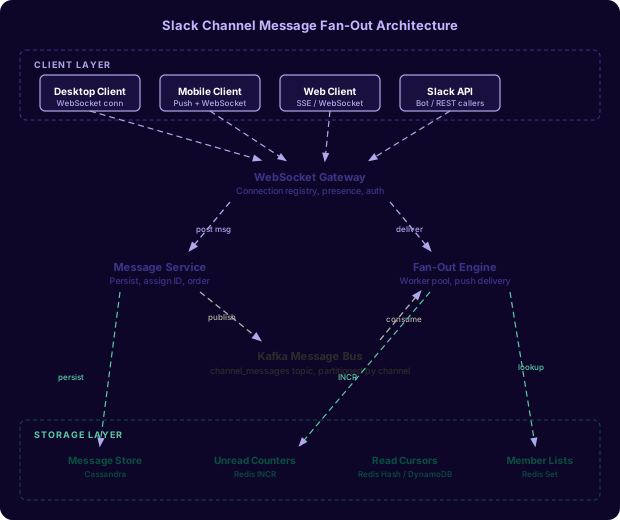
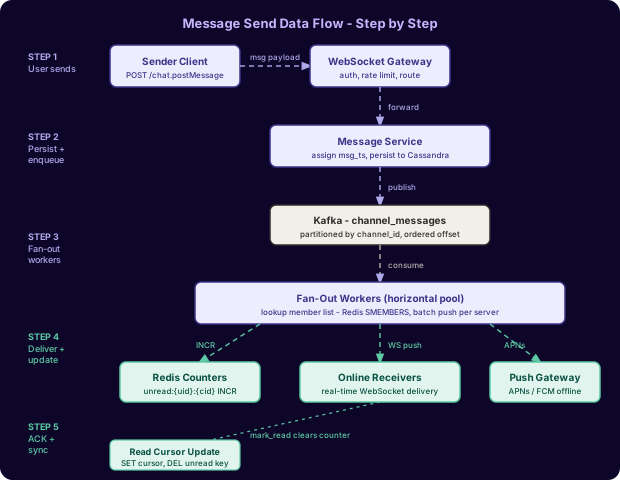
The data flow for a sent message proceeds as follows. The sender’s client sends a chat.postMessage payload over the persistent WebSocket connection. The Gateway authenticates the request, verifies channel membership, and forwards to the Message Service. The Message Service assigns a monotonic timestamp-based ID (Slack calls this msg_ts), persists the message to the message store, and publishes a channel_message event to a Kafka topic partitioned by channel_id. Fan-Out Workers consume from Kafka, look up the channel member list from Redis, and in parallel push to online WebSocket connections and increment Redis unread counters for all members. Offline users receive mobile push notifications via APNs/FCM.
Channel Subscriber Management
Every channel maintains a member list. Querying this list on every message send is the hottest read in the system - it must be fast.
Storage Strategy
For channels up to 10,000 members, the member list lives as a Redis Set using the key channel:members:{channel_id}. The value is a set of user_id strings. SMEMBERS returns all members in O(N) but N is bounded and the operation completes in microseconds for typical channel sizes.
# Add member to channel
SADD channel:members:C012345 U001 U002 U003

# Get all members for fan-out
SMEMBERS channel:members:C012345

# Check membership (used at message send to verify auth)
SISMEMBER channel:members:C012345 U001

# Get member count
SCARD channel:members:C012345
For large channels (10,000+ members), SMEMBERS returning all user IDs in one shot becomes expensive both in memory and network transfer. The system switches to a paginated approach using Redis Sorted Sets, where the score is the member’s join timestamp. The Fan-Out Worker iterates using ZSCAN in batches of 1,000.
# Large channel: sorted set keyed by join time
ZADD channel:members:large:C099999 1717200000 U001
ZADD channel:members:large:C099999 1717200001 U002

# Paginated scan for fan-out workers
ZSCAN channel:members:large:C099999 0 COUNT 1000
The source of truth for membership lives in Postgres (or Vitess for sharding). Redis is a write-through cache invalidated on join/leave events. Cache warm-up happens on first access with a TTL of 24 hours extended on each access.
Large Workspace Optimization
Slack Enterprise Grid workspaces can have channels with hundreds of thousands of members. For channels above 50,000 members, two additional optimizations apply:
-
The member list is pre-sharded across multiple Redis keys:
channel:members:{channel_id}:shard:{N}where N ranges from 0 to the number of shards. Each shard holds ~5,000 member IDs. Fan-Out Workers are assigned one shard each, eliminating coordinator bottlenecks. -
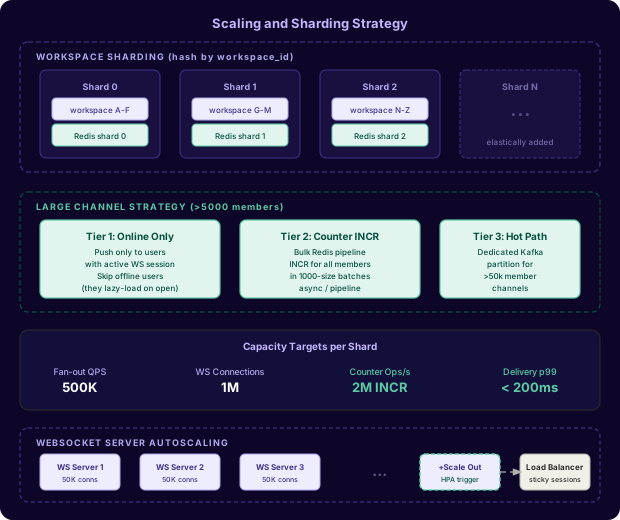
Online-only delivery: the fan-out worker first intersects the member list with the set of currently-online users (maintained per-server in a separate Redis structure). Only online users receive real-time WebSocket delivery. Offline members get a counter increment only, and they lazy-load message history when they next open the channel.
Message Fan-Out Workers
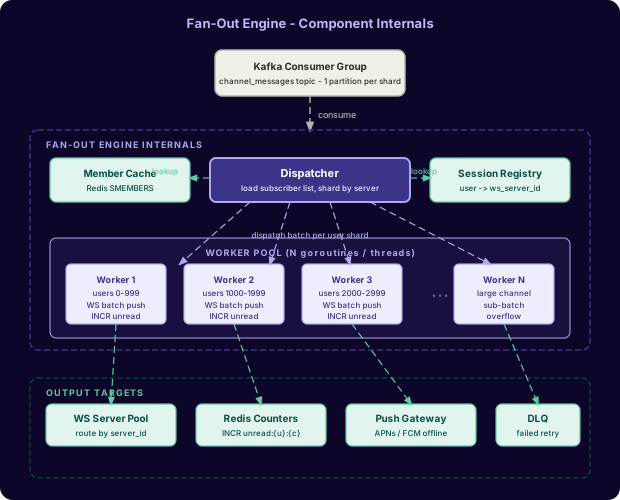
The Fan-Out Engine is a horizontally-scaled pool of Go goroutines (or threads in other implementations) that consume messages from Kafka and distribute them to WebSocket servers.
Fan-Out Strategies
Three strategies exist, and the correct choice depends on channel size:
Push fan-out (small channels, < 1,000 members): The worker fetches all member IDs, looks up which WebSocket server each member’s session is pinned to (from the Session Registry in Redis), and directly calls each WebSocket server’s internal gRPC API with the message payload. This is synchronous from the worker’s perspective but runs concurrently per member.
Batched push fan-out (medium channels, 1,000-50,000 members): Workers group target users by their WebSocket server ID, then send one batched gRPC call per server containing all user IDs that server should deliver to. This reduces network round-trips from N (one per user) to S (one per server), where S is the number of WebSocket servers - typically in the tens.
Sparse fan-out (large channels, > 50,000 members): Workers only push to currently-online members (intersection of member set with online set). Offline members receive only a counter increment. When they reconnect, they send a channels.info request that returns the current unread count from Redis and then lazy-loads the message history from the message store.
Push vs Pull Decision
The choice between push (server sends) and pull (client polls) has fundamental trade-offs:
Push delivers lower latency but increases server write load. Pull is simpler but requires clients to poll frequently enough to feel real-time. A hybrid is often optimal: push for online users (low latency), pull for offline detection (client reconnects and polls for missed messages).
The fan-out workers implement retry with exponential backoff for failed WebSocket deliveries. A failed delivery (offline user, connection drop) adds the user to a push notification queue for APNs/FCM delivery.
Unread Counter Design
Every user has an unread count for every channel they are a member of. Slack shows this as a bold number badge in the sidebar. The counter must be fast to increment (on every fan-out), fast to read (sidebar loads), and accurate enough that users trust it.
Redis Counter Structure
# Unread count: key per user per channel
INCR unread:{user_id}:{channel_id}

# Read the count
GET unread:U001:C012345

# Reset on channel open (user reads messages)
DEL unread:U001:C012345

# Batch read for sidebar (pipeline all channels for a user)
MGET unread:U001:C001 unread:U001:C002 unread:U001:C003 ...
The increment happens in the Fan-Out Worker for every member that did not send the message (the sender’s own counter is not incremented). The worker uses Redis pipelining to batch all INCR commands for a channel’s members into a single network round-trip, amortizing the TCP overhead.
Eventual Consistency vs Exact Counts
Maintaining exact unread counts is harder than it looks. The race condition is: user opens channel, simultaneously a new message arrives, both the read-clear and the new increment happen concurrently. If the INCR happens after the DEL, the count is wrong.
Three approaches exist:
-
Counter + cursor approach (Slack’s actual model): Store both a
last_read_tscursor and an unread count. On channel open, reset the counter to 0 and set the cursor to the latestmsg_ts. When a new message arrives, compare itsmsg_tsto the stored cursor. Ifmsg_ts > cursor, increment. This prevents stale increments after a read event. -
Derived count approach: Do not store a counter at all. Compute unread count as
COUNT(messages WHERE ts > last_read_cursor AND channel_id = X). This is always accurate but requires a database query. Only feasible with heavy caching. -
Approximate count approach: Accept that the count may be off by at most one under concurrent access. Use a Redis INCR and DEL without locking. This is what most production systems do, because an off-by-one unread badge is acceptable and the simplicity is worth it.
Read Cursor Storage
A read cursor tracks the last message a user has read in each channel. It is the foundation for computing unread counts and is essential for cross-device sync.
Data Model
# Read cursor: hash of channel_id -> last_read_msg_ts
HSET read_cursor:{user_id} C012345 1717200000.123456
HSET read_cursor:{user_id} C099999 1717199999.654321

# Read cursor for one channel
HGET read_cursor:{user_id} C012345

# Batch read for sidebar
HMGET read_cursor:{user_id} C001 C002 C003 ...
The cursor value is a Slack-style msg_ts: a Unix timestamp with microsecond precision as a float string (e.g., "1717200000.123456"). Messages are totally ordered by msg_ts within a channel.
Cross-Device Sync
When user Alice opens channel #engineering on her laptop, the client sends a channels.mark API call setting her read cursor to the latest visible message’s msg_ts. The server updates HSET read_cursor:U001 C012345 {ts} and also publishes a cursor_update event to a Kafka topic (or a Redis Pub/Sub channel) scoped to the user’s session. All other active sessions for Alice (her phone, her iPad) subscribe to this user-level event stream and receive the cursor update. They then recalculate their local unread badge from the new cursor.
Cursor Update Protocol
The cursor update must be idempotent and last-writer-wins. If Alice’s phone and laptop both mark the channel read within 100ms of each other, the higher msg_ts wins. This is implemented with a Lua script to prevent race conditions:
-- Lua script: only update cursor if new ts is greater than current
local key = KEYS[1]
local field = KEYS[2]
local new_ts = ARGV[1]
local current = redis.call('HGET', key, field)
if current == false or tonumber(new_ts) > tonumber(current) then
  redis.call('HSET', key, field, new_ts)
  redis.call('DEL', 'unread:' .. ARGV[2] .. ':' .. ARGV[3])
  return 1
end
return 0
For durability, read cursors are also written to DynamoDB (or similar durable KV store) asynchronously. Redis is the fast path; DynamoDB is the recovery path on cache eviction or Redis failure.
Data Model
Message Store (Cassandra)
CREATE TABLE messages (
  channel_id   TEXT,
  msg_ts       DECIMAL,
  message_id   UUID,
  user_id      TEXT,
  workspace_id TEXT,
  body         TEXT,
  type         TEXT,   -- 'message', 'edit', 'delete'
  thread_ts    DECIMAL,
  attachments  TEXT,   -- JSON blob
  PRIMARY KEY ((channel_id), msg_ts, message_id)
) WITH CLUSTERING ORDER BY (msg_ts DESC, message_id ASC)
  AND default_time_to_live = 7776000;  -- 90 day TTL on hot storage
The partition key is channel_id, so all messages for a channel live on the same Cassandra node (or replica set). The clustering column msg_ts enables efficient range scans for “load messages since cursor” queries: SELECT * FROM messages WHERE channel_id = ? AND msg_ts > ? LIMIT 50.
Channel Membership (Postgres/Vitess)
CREATE TABLE channel_members (
  channel_id   VARCHAR(20) NOT NULL,
  user_id      VARCHAR(20) NOT NULL,
  workspace_id VARCHAR(20) NOT NULL,
  joined_at    TIMESTAMPTZ NOT NULL DEFAULT NOW(),
  role         VARCHAR(20) NOT NULL DEFAULT 'member',
  muted        BOOLEAN NOT NULL DEFAULT FALSE,
  PRIMARY KEY (channel_id, user_id)
);

CREATE INDEX idx_channel_members_user ON channel_members (user_id, workspace_id);
CREATE INDEX idx_channel_members_count ON channel_members (channel_id) INCLUDE (user_id);
The Postgres table is the source of truth. A background job syncs changes to Redis on join/leave events, plus a daily full reconciliation job detects drift.
Session Registry (Redis)
# Session: which WebSocket server is this user connected to?
# Expires with a TTL equal to the heartbeat interval * 2
SET session:{user_id}:{device_id} ws-server-042 EX 120

# Reverse map: which users are on this WS server?
SADD ws_server_users:ws-server-042 U001 U002 U003

# Presence: is user online at all (any device)?
SET presence:{user_id} 1 EX 60
Key Algorithms and Protocols
Fan-Out Worker (Go)
func (w *FanOutWorker) processMessage(msg ChannelMessage) error {
    // 1. Fetch channel members from Redis
    members, err := w.redis.SMembers(ctx, fmt.Sprintf("channel:members:%s", msg.ChannelID))
    if err != nil {
        return fmt.Errorf("member fetch: %w", err)
    }

    // 2. Group members by their WebSocket server
    serverGroups := make(map[string][]string)
    for _, uid := range members {
        if uid == msg.SenderID {
            continue // don't push to sender
        }
        serverID, err := w.redis.Get(ctx, fmt.Sprintf("session:%s:*", uid))
        if err == redis.Nil {
            // user offline: queue push notification
            w.pushQueue.Enqueue(uid, msg)
            continue
        }
        serverGroups[serverID] = append(serverGroups[serverID], uid)
    }

    // 3. Batch push to each WS server
    var wg sync.WaitGroup
    for serverID, userIDs := range serverGroups {
        wg.Add(1)
        go func(sid string, uids []string) {
            defer wg.Done()
            if err := w.wsClient.BatchDeliver(sid, uids, msg); err != nil {
                log.Errorf("delivery to %s failed: %v", sid, err)
            }
        }(serverID, userIDs)
    }
    wg.Wait()

    // 4. Increment unread counters in pipeline
    pipe := w.redis.Pipeline()
    for _, uid := range members {
        if uid == msg.SenderID {
            continue
        }
        pipe.Incr(ctx, fmt.Sprintf("unread:%s:%s", uid, msg.ChannelID))
    }
    _, err = pipe.Exec(ctx)
    return err
}
Read Cursor Update (Python)
import redis
import json

CURSOR_UPDATE_SCRIPT = """
local key = KEYS[1]
local field = KEYS[2]
local new_ts = tonumber(ARGV[1])
local user_id = ARGV[2]
local channel_id = ARGV[3]

local current = redis.call('HGET', key, field)
if current == false or tonumber(current) < new_ts then
  redis.call('HSET', key, field, ARGV[1])
  redis.call('DEL', 'unread:' .. user_id .. ':' .. channel_id)
  redis.call('PUBLISH', 'cursor_updates:' .. user_id,
    cjson.encode({channel_id=channel_id, ts=ARGV[1]}))
  return 1
end
return 0
"""

cursor_update_sha = r.script_load(CURSOR_UPDATE_SCRIPT)

def mark_channel_read(user_id: str, channel_id: str, msg_ts: str):
    key = f"read_cursor:{user_id}"
    result = r.evalsha(
        cursor_update_sha,
        2,              # numkeys
        key, channel_id,
        msg_ts, user_id, channel_id
    )
    if result == 1:
        # async: persist to DynamoDB for durability
        dynamo_queue.put({
            "user_id": user_id,
            "channel_id": channel_id,
            "ts": msg_ts
        })
    return result
Message Ordering Guarantee (Python)
import time
import threading

_ts_lock = threading.Lock()
_last_ts = 0.0

def generate_msg_ts(channel_id: str) -> str:
    """
    Generate a monotonically increasing msg_ts per channel.
    Uses wall clock but ensures no two messages in the same
    channel share the same timestamp.
    """
    with _ts_lock:
        global _last_ts
        now = time.time()
        # Ensure strict monotonicity within process
        if now <= _last_ts:
            now = _last_ts + 0.000001  # 1 microsecond forward
        _last_ts = now
    # In production: channel-scoped sequence via Redis INCR
    # to handle multiple Message Service instances
    seq = redis_client.incr(f"msg_seq:{channel_id}")
    return f"{now:.6f}"  # e.g. "1717200000.123456"
Scaling and Performance
Partition Strategy
The system shards by workspace_id at the top level. Each shard is an independent deployment of all services (Message Service, Fan-Out Workers, Redis cluster, Cassandra keyspace). Within a shard, Kafka partitions are allocated by channel_id. This ensures that all messages for a given channel are processed in order by the same partition.
Fan-Out Workers scale horizontally. Adding a worker adds a Kafka consumer to the group, and Kafka’s consumer group protocol automatically rebalances partitions. No coordination logic is needed.
Capacity Estimation
Daily active users:          30M
Peak concurrent connections: 8M WebSocket sessions
Messages per second (peak):  25,000
Average channel members:     50
Peak fan-out events/sec:     25,000 * 50 = 1,250,000
Redis INCR ops/sec:          1,250,000 (one per fan-out)

Redis memory for counters:
  30M users * 50 channels each * (8 bytes key + 4 bytes value)
  = 30M * 50 * 12 bytes = 18 GB (fits on a single Redis cluster)

Redis memory for cursors:
  30M users * 50 channels * 16 bytes per cursor
  = 24 GB

Kafka throughput:
  25,000 messages/sec * avg 2KB payload = 50 MB/sec
  With replication factor 3: 150 MB/sec write throughput
Well within single Kafka cluster capacityFailure Modes and Recovery
| Failure | Impact | Detection | Recovery |
|---|---|---|---|
| Redis counter node failure | Unread counts show 0 for affected users | Health check + counter mismatch alert | Failover to replica; recompute from Cassandra cursor delta |
| Kafka consumer lag spike | Fan-out delay, messages delivered late | Consumer lag metric > threshold | Scale up Fan-Out Worker replicas; alert if lag > 30s |
| WebSocket server crash | Connected users disconnected mid-session | Health check; client reconnect event | Client reconnects to new WS server; fetches missed messages via REST poll |
| Fan-out worker OOM on large channel | No delivery for one channel | Worker crash + Kafka consumer rebalance | Kafka reassigns partition; next worker processes; add memory limit + shard large channels |
| Clock skew between Message Service instances | Out-of-order msg_ts collisions | Duplicate message IDs in store | Redis atomic sequence per channel as tiebreaker; Cassandra deduplication on write |
| DynamoDB cursor write failure | Cursors lost on Redis eviction | DLQ depth > 0 | Retry from DLQ with backoff; read cursor resets to 0 (user sees false unread) |
Comparison of Approaches
| Dimension | Approach | Throughput | Latency | Complexity | Best For |
|---|---|---|---|---|---|
| Fan-out | Push (write to all) | Low (write amplification) | Very low | Low | Small channels < 1K members |
| Fan-out | Pull (client polls) | High | High (poll interval) | Low | Offline-heavy scenarios |
| Fan-out | Hybrid (push online, pull offline) | Medium | Low for online | Medium | Production at scale |
| Unread counts | Exact (query on read) | N/A | High (DB query) | Low | Low-scale, high accuracy |
| Unread counts | Approximate (INCR/DEL) | High | Very low (Redis) | Low | Production (off-by-one OK) |
| Unread counts | Cursor-derived (compute from ts) | Medium | Medium (indexed query) | Medium | When exact counts matter |
| Member lists | DB query on every send | Low | High | Low | Never at scale |
| Member lists | Redis Set cache | High | Very low | Medium | Standard approach |
| Member lists | Pre-sharded Redis Sets | Very high | Very low | High | 50K+ member channels |
| Cross-device sync | Polling | Low server load | High (poll interval) | Low | Legacy mobile apps |
| Cross-device sync | User-scoped pub/sub | Medium | Low | Medium | Modern approach |
Key Takeaways
- Fan-out is a write amplification problem: one message times N members. Design the entire architecture around controlling this amplification, not hiding it.
- Kafka is the correct decoupling point. Persist first, fan-out asynchronously. This keeps the sender’s latency flat regardless of channel size.
- Redis Sets are the right data structure for channel member lists.
SMEMBERSon a 10,000-member set completes in under a millisecond. Cache invalidation on join/leave is straightforward. - Large channels (> 50K members) require a fundamentally different strategy: online-only push delivery, sharded member lists, and dedicated Kafka partitions. One codepath does not serve all channel sizes.
- Unread counters do not need to be exactly correct. The invariants that matter are: zero means zero, and the counter clears on channel open. Approximate INCR/DEL with eventual consistency is the right trade-off.
- Read cursors are the source of truth for unread state. A cursor per user per channel, with last-writer-wins semantics across devices, is simple and correct.
- Cross-device sync is a user-scoped fan-out. When Alice marks a channel read, publish a
cursor_updateevent to all of Alice’s active sessions. This is a tiny fan-out (2-5 devices) and has negligible cost. - The WebSocket session registry (user to server mapping) is a critical hot path. Keep it in Redis with short TTLs. A session table in Postgres at this access frequency would be a write bottleneck.
Frequently Asked Questions
Why Kafka instead of Redis Pub/Sub for fan-out?
Redis Pub/Sub is ephemeral. If a Fan-Out Worker is down when a message is published, the event is lost. Kafka provides durability and replay. A worker can restart, seek to its last committed offset, and reprocess messages without any lost deliveries. For unread counts, a missed increment means a permanently incorrect badge until the user opens the channel. Kafka’s durability guarantee is non-negotiable.
How does Slack handle the “thundering herd” when a large channel gets a message?
Multiple techniques combine. The Fan-Out Workers are pre-scaled and warmed before the message arrives (they are always running, consuming from Kafka). The worker shards the member list and processes in parallel rather than sequentially. The Redis pipeline batches all INCR operations into one network round-trip. And the WS delivery groups by server, so at most one gRPC call goes to each server regardless of how many of that server’s users are in the channel.
What happens when a user has Slack open on five devices?
The Session Registry maps user_id:device_id to a WebSocket server. The Fan-Out Worker finds all sessions for the user and delivers to each one independently. The unread counter is per user (not per device), so it is incremented once. When any device marks the channel read, the cursor update is published to the user’s session topic, and all other devices receive the cursor update and clear their local badge.
How does Slack preserve message order?
Within a channel, messages are ordered by msg_ts. The Message Service generates msg_ts using a process-local monotonic clock with a Redis atomic sequence as a tiebreaker across multiple instances. Cassandra stores messages ordered by msg_ts descending. Clients render in ascending order. For edit and delete events, the original msg_ts is preserved as the event identifier, and the edit is stored as a new record referencing the original.
How are unread counts recovered after a Redis failure?
The Fan-Out Worker also writes counter increments to a write-ahead log in Kafka (the same channel_messages topic). On recovery, a recompute job reads the WAL from the last known-good cursor timestamp and re-runs the counter increments for all users. For the read cursor, the durable copy in DynamoDB serves as the recovery source. The recompute job calculates: for each user, for each channel, COUNT(messages WHERE msg_ts > read_cursor). This recompute runs as a background job and takes seconds to minutes depending on channel activity.
What is the latency breakdown for a delivered message?
A typical message delivery path: 10ms for WS receive + auth at Gateway, 15ms for Message Service persist to Cassandra, 5ms for Kafka publish, 5ms for Fan-Out Worker Kafka poll delay, 5ms for Redis member list fetch, 15ms for WS server gRPC delivery, 5ms for WS write to client socket. Total: ~60ms p50, ~150ms p99. The Kafka poll delay dominates variance. Slack targets < 200ms p99 for online delivery.
Interview Questions
How would you design the data model to support message threads (replies) while preserving unread counts per thread?
Expected depth: Thread replies live in the same messages table but have a non-null thread_ts matching the parent message’s ts. Unread counts split into two: channel-level unread (for messages not in any thread) and per-thread unread for threads the user has participated in. The counter key becomes unread:{user_id}:{channel_id}:{thread_ts} for thread unread, and the Fan-Out Worker routes thread messages only to thread subscribers rather than all channel members.
Walk me through how you would handle a workspace with 500,000 users all in a single #general channel.
Expected depth: Standard SMEMBERS on 500K user IDs would return ~30MB of data per message, at thousands of messages per minute. The candidate should describe: sharding the member set across many Redis keys, assigning one Fan-Out Worker per shard, online-only push delivery (only ~5-10% of members are online at any moment in a 500K workspace), batch counter increments using Redis pipelines in chunks of 1,000, and dedicated Kafka partitions for this channel to isolate its throughput from other channels.
How would you implement “mentions” so a user gets a special unread badge even if they have muted the channel?
Expected depth: The Fan-Out Worker checks whether the message body contains @username for each member. For mentioned users, a separate mention_unread:{user_id}:{channel_id} counter is incremented. The sidebar shows the mention badge regardless of mute status. This requires parsing message text during fan-out, which is CPU-cheap. The member’s mute preference is stored in the channel_members table and cached per fan-out to skip regular unread INCR for muted users while still processing mention INCR.
Your unread count system shows occasional counts of “-1” for some users. What could cause this and how would you fix it?
Expected depth: A -1 count means DEL ran before INCR, so the key was absent when INCR ran (Redis INCR on a non-existent key returns 1), but then a concurrent DEL from mark_channel_read ran before the key was set. The race window is tiny but real. Fix: use a Lua script to atomically INCR and then immediately check if the cursor shows this message should already be read - if so, delete. Alternatively, add a floor of 0: INCR then MAX(0, result). The correct fix is the cursor-gated increment described in the unread counter section.
How would you design a system test to verify that unread counts are accurate under concurrent load?
Expected depth: The candidate should describe a property-based test: send N messages to a channel with M members concurrently, from multiple senders, while randomly triggering mark_channel_read calls. After all operations complete and the system has quiesced, verify that for each user: unread_count == COUNT(messages WHERE ts > read_cursor). Run this with fast-check or a similar property-based framework with random N and M. Also test the cross-device sync invariant: same user, two devices, one marks read - verify the other device’s badge reaches 0 within the sync latency SLA.
Premium Content
Unlock the full article along with everything else in the archive — all in one place.