The Report That Took 6 Hours to Run
databases data-engineering performance
System Design Scenario
The Report That Took 6 Hours to Run
When finance needs their numbers, the entire production system pays the price
It’s 9 AM on the first Monday of October. Sarah from Finance clicks “Generate Monthly Report” and settles in with her coffee. She doesn’t know her request just kicked off a query that will join 12 tables, scan 400 million rows, and bring the entire API to its knees for the next 6 hours.
Like a traffic jam that starts with a single fender-bender and backs up for miles, this monthly report cascades through every part of the system. API requests that normally respond in 50ms now take 15 seconds. The connection pool fills up. New requests queue behind the monster query. Users see loading spinners. Support tickets flood in.
The irony is brutal - a report meant to show how well the business is doing makes the business appear broken every month. This is the OLTP-OLAP mixing problem in action.
Why This Happens
The root cause sits at the fundamental mismatch between how production databases are designed and how reporting queries behave. Most engineers assume that if individual queries are fast, then any query will be manageable - but this intuition breaks at the intersection of complexity and scale.
Here’s the failure chain:
monthly report query triggers
  -> 12-table JOIN on production OLTP database
    -> full table scans on order_items (150M rows)
      -> shared_buffers cache pollution
        -> regular API queries forced to disk
          -> connection pool saturation
-> cascading timeouts across all servicesOLTP databases are optimized for small, fast queries on recent data, while reports aggregate historical data across the entire schema - fundamentally incompatible access patterns.
The Naive Solution (and where it breaks)
Most teams reach for one of two approaches: throw more hardware at the problem, or add read replicas. Both seem reasonable at first glance.
Adding more CPU and RAM feels like the obvious fix - if the query is slow, make the database faster. Read replicas sound even smarter: route reports to a separate instance so they don’t affect production traffic.
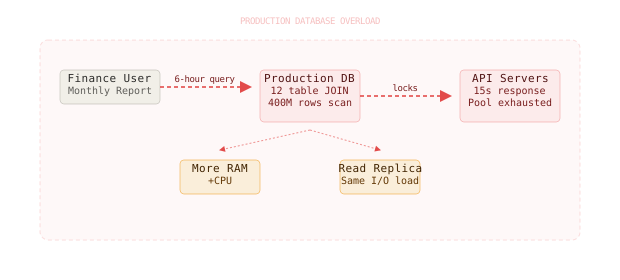
Here’s where it breaks:
Small scale: Monthly report on 1M rows -> completes in 5 minutes
Large scale: Monthly report on 400M rows -> 6 hours, locks prevent other writes
The naive read replica approach fails because replication lag means reports run on stale data, and complex analytical queries still consume enormous amounts of I/O bandwidth that affects the primary database’s performance through network and storage contention.
Read replicas for heavy analytics create a false sense of separation - the I/O load still impacts the primary through shared storage systems and network bandwidth saturation.
The Better Solution
Here’s what actually fixes this. You need to separate your OLTP (operational) workload from your OLAP (analytical) workload at the architectural level, not just the server level.
The solution has three layers: data extraction, transformation, and dedicated analytical storage.
Layer 1: Change Data Capture
The first step is extracting operational data without impacting production queries. Change Data Capture (CDC) streams row-level changes from your production database to a separate analytical system.
-- CDC tracks changes at the row level
CREATE PUBLICATION financial_reports FOR TABLE
  orders, order_items, customers, products, invoices,
  payments, refunds, shipping, inventory, promotions;

-- Streaming changes without impacting production
SELECT * FROM pg_logical_slot_get_changes('financial_slot', NULL, NULL);
CDC captures changes as they happen - inserts, updates, deletes - and streams them to your analytical pipeline. The production database sees virtually no additional load because it’s just writing to its existing Write-Ahead Log.
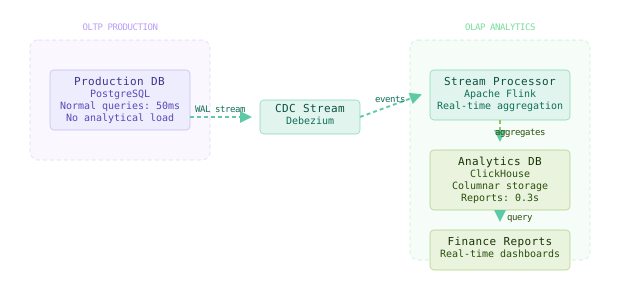
Netflix uses CDC to stream billions of events daily from their production systems to their data lake, keeping operational and analytical workloads completely separate.
Layer 2: Pre-Aggregated Views
Instead of joining 12 tables every month, pre-compute the expensive aggregations as data arrives. This shifts compute cost from query time to write time.
-- Materialized view updated incrementally
CREATE MATERIALIZED VIEW monthly_revenue_summary AS
SELECT
  DATE_TRUNC('month', created_at) as month,
  customer_segment,
  product_category,
  SUM(total_amount) as revenue,
  COUNT(*) as order_count,
  AVG(total_amount) as avg_order_value
FROM orders o
JOIN customers c ON o.customer_id = c.id
JOIN order_items oi ON o.id = oi.order_id
JOIN products p ON oi.product_id = p.id
WHERE created_at >= '2023-01-01'
GROUP BY 1, 2, 3;

-- Refresh incrementally with new data
REFRESH MATERIALIZED VIEW CONCURRENTLY monthly_revenue_summary;
The key insight is computing aggregations as close to real-time as possible. When an order is placed, immediately update the relevant monthly summary instead of waiting for the report request.
Layer 3: Columnar Analytics Database
The final piece is purpose-built analytical storage. Columnar databases like ClickHouse or BigQuery are designed for the exact access patterns that kill OLTP systems.
-- ClickHouse table optimized for analytics
CREATE TABLE revenue_facts (
    month Date,
    customer_segment LowCardinality(String),
    product_category LowCardinality(String),
    revenue AggregateFunction(sum, Decimal(10,2)),
    order_count AggregateFunction(count),
    avg_order_value AggregateFunction(avg, Decimal(10,2))
) ENGINE = AggregatingMergeTree()
ORDER BY (month, customer_segment, product_category);

-- Query that used to take 6 hours now takes 0.3 seconds
SELECT
    month,
    customer_segment,
    sumMerge(revenue) as total_revenue,
    countMerge(order_count) as total_orders
FROM revenue_facts
WHERE month >= '2024-01-01'
GROUP BY month, customer_segment
ORDER BY month DESC;
The architectural pattern is Extract-Transform-Load (ETL) in reverse: continuous extraction and transformation prevents expensive load-time computation.
The Full Architecture
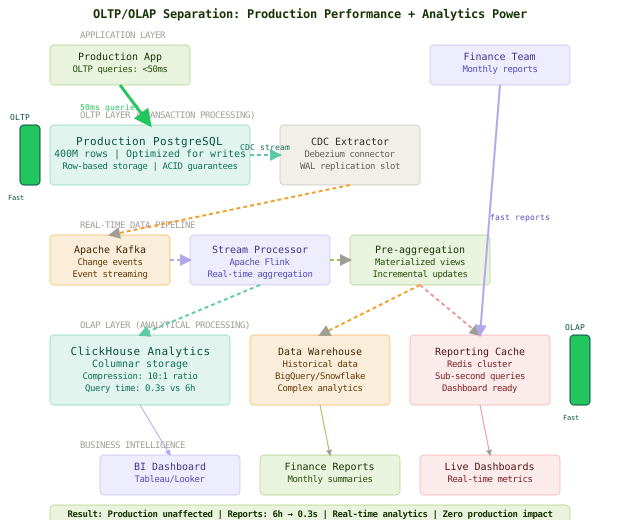
The full solution creates two parallel data paths: one optimized for transactions, one optimized for analytics. Production traffic flows through the OLTP path with sub-100ms queries. Reporting traffic flows through the OLAP path with pre-computed aggregations.
Data moves from OLTP to OLAP continuously via CDC streams. The production database never sees complex analytical queries. Finance gets their reports in seconds instead of hours.
The critical design decision is real-time data movement - batch ETL jobs create staleness problems that force teams back to querying production.
Component Deep Dive
CDC Pipeline
The CDC pipeline’s job is capturing every change in production data without adding latency to production writes.
# Debezium connector configuration for PostgreSQL CDC
connector_config = {
    "name": "financial-cdc-connector",
    "connector.class": "io.debezium.connector.postgresql.PostgresConnector",
    "database.hostname": "prod-db.company.com",
    "database.port": "5432",
    "database.user": "debezium_user",
    "database.password": "secure_password",
    "database.dbname": "production",
    "slot.name": "financial_reports_slot",
    "publication.name": "financial_reports",
    "plugin.name": "pgoutput",
    "table.include.list": "public.orders,public.customers,public.products",
    "key.converter": "org.apache.kafka.connect.json.JsonConverter",
    "value.converter": "org.apache.kafka.connect.json.JsonConverter"
}
The CDC connector creates a logical replication slot that captures changes as they’re written to WAL. This adds approximately 2-3% overhead to write operations but eliminates the need for expensive batch queries.
Stream Processing Engine
The stream processor transforms raw change events into analytical-friendly formats in real-time.
# Apache Flink job for real-time aggregation
from pyflink.datastream import StreamExecutionEnvironment
from pyflink.table import StreamTableEnvironment

def process_order_events():
    env = StreamExecutionEnvironment.get_execution_environment()
    t_env = StreamTableEnvironment.create(env)

    # Source: Kafka CDC events
    t_env.execute_sql("""
        CREATE TABLE order_events (
            order_id BIGINT,
            customer_id BIGINT,
            total_amount DECIMAL(10,2),
            created_at TIMESTAMP(3),
            event_type STRING,
            WATERMARK FOR created_at AS created_at - INTERVAL '5' SECOND
        ) WITH (
            'connector' = 'kafka',
            'topic' = 'debezium.public.orders',
            'properties.bootstrap.servers' = 'kafka:9092'
        )
    """)

    # Sink: Pre-aggregated analytics table
    t_env.execute_sql("""
        CREATE TABLE revenue_summary (
            month STRING,
            customer_segment STRING,
            total_revenue DECIMAL(10,2),
            order_count BIGINT
        ) WITH (
            'connector' = 'clickhouse',
            'url' = 'clickhouse://analytics-db:8123/reports'
        )
    """)

    # Real-time aggregation pipeline
    t_env.execute_sql("""
        INSERT INTO revenue_summary
        SELECT
            DATE_FORMAT(created_at, 'yyyy-MM') as month,
            CASE
                WHEN total_amount > 1000 THEN 'enterprise'
                WHEN total_amount > 100 THEN 'standard'
                ELSE 'basic'
            END as customer_segment,
            SUM(total_amount) as total_revenue,
            COUNT(*) as order_count
        FROM order_events
        WHERE event_type = 'INSERT'
        GROUP BY
            DATE_FORMAT(created_at, 'yyyy-MM'),
            CASE
                WHEN total_amount > 1000 THEN 'enterprise'
                WHEN total_amount > 100 THEN 'standard'
                ELSE 'basic'
            END
    """)
This stream processing approach means aggregations are computed incrementally as orders are placed, rather than in massive batch jobs that lock resources.
Columnar Analytics Store
ClickHouse serves as the analytical query engine, optimized for the exact access patterns that destroy OLTP performance.
-- ClickHouse table with aggressive compression and indexing
CREATE TABLE order_analytics (
    order_date Date,
    customer_id UInt64,
    customer_segment LowCardinality(String),
    product_category LowCardinality(String),
    revenue Decimal(10,2),
    order_count UInt32,
    created_at DateTime
) ENGINE = MergeTree()
PARTITION BY toYYYYMM(order_date)
ORDER BY (order_date, customer_segment, product_category)
SETTINGS index_granularity = 8192;

-- Reports that used to take hours now complete in seconds
SELECT
    formatDateTime(order_date, '%Y-%m') as month,
    customer_segment,
    sum(revenue) as total_revenue,
    sum(order_count) as total_orders,
    avg(revenue/order_count) as avg_order_value
FROM order_analytics
WHERE order_date >= '2024-01-01'
GROUP BY month, customer_segment
ORDER BY month DESC, total_revenue DESC;
The partitioning by month means queries only touch relevant data partitions. The sort order optimizes for the most common query patterns. Compression reduces storage costs by 85% compared to row-based storage.
Query Scheduling
Even on dedicated analytical infrastructure, large queries should be scheduled during off-peak hours to avoid resource contention.
# Apache Airflow DAG for scheduled reporting
apiVersion: v1
kind: ConfigMap
metadata:
  name: monthly-reports-dag
data:
  monthly_reports.py: |
    from airflow import DAG
    from airflow.providers.postgres.operators.postgres import PostgresOperator
    from datetime import datetime, timedelta

    default_args = {
        'owner': 'finance-team',
        'depends_on_past': False,
        'email_on_failure': True,
        'email_on_retry': False,
        'retries': 1,
        'retry_delay': timedelta(minutes=5)
    }

    dag = DAG(
        'monthly_financial_reports',
        default_args=default_args,
        description='Generate monthly financial reports',
        schedule_interval='0 2 1 * *',  # 2 AM on first day of month
        start_date=datetime(2024, 1, 1),
        catchup=False
    )

    generate_revenue_report = PostgresOperator(
        task_id='generate_revenue_report',
        postgres_conn_id='analytics_db',
        sql='CALL generate_monthly_revenue_report({{ ds }})',
        dag=dag
    )
Comparison Table
| Approach | Write Complexity | Read Complexity | Latency | Storage Cost | Failure Modes | Best Use Case |
|---|---|---|---|---|---|---|
| Production DB Queries | Low | High | Hours | Low | Locks entire system | Never - always wrong |
| Read Replica | Low | High | Hours | Medium | Replication lag, I/O contention | Small analytical workloads |
| Batch ETL | Medium | Medium | Daily | High | Stale data, processing windows | Traditional BI workflows |
| Real-time CDC + OLAP | High | Low | Seconds | Medium | Stream processing complexity | Modern analytical systems |
| Pre-aggregated Views | High | Low | Milliseconds | Low | Storage explosion | High-frequency dashboards |
The real-time CDC approach requires more upfront engineering investment but provides the best balance of query performance and data freshness. You’re essentially paying the complexity cost once during architecture design to avoid paying the performance cost every time someone needs a report.
Key Takeaways
- OLTP-OLAP separation is architectural, not just operational - different access patterns need different storage systems
- Change Data Capture enables real-time data movement without impacting production write performance
- Pre-aggregation shifts compute cost from expensive query time to cheaper write time
- Columnar storage provides 10-100x query performance improvement for analytical workloads
- Stream processing maintains data freshness while avoiding batch job complexity
- Query scheduling prevents resource contention even on dedicated analytical infrastructure
- Materialized views trade storage space for query performance at the perfect rate
- Real-time pipelines eliminate the staleness vs performance tradeoff that forces teams back to production queries
The counter-intuitive lesson is that the best way to make reports faster isn’t to make individual queries faster - it’s to avoid running the expensive queries entirely by pre-computing results. Design for the outlier query that kills your system, not the average query that works fine.
Frequently Asked Questions
Q: Why not just schedule the reports to run during off-peak hours? A: Scheduling reduces impact but doesn’t solve the fundamental problem. As data volume grows, even off-peak hours aren’t enough runway for 6-hour queries. Plus, business stakeholders expect near real-time reporting, not day-old data.
Q: Can’t I just add more read replicas to distribute the analytical load? A: Read replicas help with simple queries but complex analytical queries still consume enormous I/O bandwidth. The network and storage contention affects the primary database even when queries run on replicas. You need fundamentally different storage architecture.
Q: What about using database query result caching instead of pre-aggregation? A: Query caching helps with repeated identical queries, but business reports constantly change parameters (date ranges, filters, groupings). Cache hit rates for analytical queries are typically under 20%, making caching ineffective for this use case.
Q: Is CDC worth the operational complexity for smaller companies? A: CDC makes sense when your analytical queries impact production performance. If your monthly report completes in under 10 minutes without affecting other operations, stick with direct database queries until you hit scaling problems.
Q: Why ClickHouse over other analytical databases like Snowflake or BigQuery? A: ClickHouse provides excellent price-performance for real-time analytical workloads, especially when self-hosted. Snowflake and BigQuery are better for complex data science workloads but more expensive for high-frequency operational reporting.
Interview Questions
Q: How would you migrate an existing system from direct production queries to a CDC-based analytical pipeline? Expected depth: Discuss strangler fig pattern, dual-write periods, data validation between systems, rollback strategies, and gradual traffic shifting. Mention specific CDC tools like Debezium and handling schema evolution.
Q: What are the tradeoffs between batch ETL and real-time CDC for analytical workloads? Expected depth: Compare latency (hours vs seconds), complexity (simple batch jobs vs stream processing), cost (scheduled compute vs always-on), failure recovery (replay batches vs stream reprocessing), and data consistency guarantees.
Q: Design a system that provides both real-time analytics and historical reporting with 99.9% uptime. Expected depth: Multi-layered approach with hot/warm/cold storage tiers, backup analytical clusters, circuit breakers around expensive queries, graceful degradation modes, and SLA-driven architecture decisions.
Q: How do you handle schema evolution in a CDC pipeline without breaking downstream analytics? Expected depth: Schema registry usage, backward/forward compatibility patterns, versioned data formats, graceful handling of schema changes, and coordinated deployments across pipeline stages.
Q: What monitoring would you implement for a production analytical pipeline? Expected depth: CDC lag metrics, stream processing throughput, query performance percentiles, data freshness SLAs, pipeline health checks, and business-level data quality monitoring. Specific tools like Prometheus and Grafana.
Want to see how these patterns hold up when traffic spikes 50x at 3 AM? That's exactly what this Premium deep-dive covers.