The Leaky Connection Pool
performance databases
System Design Scenario
The Leaky Connection Pool
When your database connections multiply like rabbits, but your pool can only hold so many
Friday 2:47 AM. The first alert hits: database connection pool exhausted. Your e-commerce app is crawling. Response times jump from 200ms to 8 seconds. Users are hitting refresh, making it worse.
The monitoring dashboard shows a horrifying pattern: 500 active database connections, but your connection pool maximum is set to 100. It’s like having a parking lot with 100 spaces, but 500 cars trying to park. The overflow cars just sit in traffic, engines running, burning gas, waiting for a spot to open. Except instead of cars, these are HTTP requests holding threads, consuming memory, and timing out.
Your app is running 12 instances behind a load balancer. Each instance was configured for a maximum of 10 concurrent database connections, which seemed reasonable during development with 5 concurrent users. Now, during Black Friday traffic with 50,000 concurrent users hitting product pages, each instance is desperately trying to open more connections than the pool allows. The database server shows 147 connection attempts per second, but connections aren’t being properly returned to the pool after queries complete. Some are timing out. Others are being held by long-running transactions. The pool is leaking connections like a bucket with holes.
This is the connection pool exhaustion problem. When application instances multiply faster than your connection management strategy can handle, the database becomes the bottleneck that brings down your entire system.
Why This Happens
The root cause isn’t what most engineers expect. The instinct is to blame connection pool sizing - “just increase the maximum connections from 100 to 500.” But connection pool exhaustion happens because connections aren’t being released properly, not because the pool is too small.
Here’s the failure chain:
high concurrent load
  -> connection checkout without proper release
    -> connection leak accumulation
      -> pool depletion
        -> new requests block waiting for available connections
          -> timeout cascade
            -> circuit breaker trips
              -> total application failure
A database connection is like a phone line to the database server. When your application needs to run a query, it “calls” the database by checking out a connection from the pool. After the query completes, the connection should be “hung up” and returned to the pool for reuse. But when connections don’t get properly released - due to exceptions, long-running transactions, or forgotten cleanup - the pool slowly drains until no connections remain available.
Connection pool exhaustion is usually a connection lifecycle problem, not a sizing problem - leaked connections accumulate until the pool is empty.
The Naive Solution (and where it breaks)
Most engineers reach for the obvious fix: increase the connection pool size. If 100 connections aren’t enough, make it 500. If 500 isn’t enough, make it 1000. This approach treats the symptom, not the disease.
The analogy here is like dealing with a leaky water bucket by making the bucket bigger. Yes, it holds more water temporarily, but you’re still losing water at the same rate. Eventually, even the bigger bucket empties out.
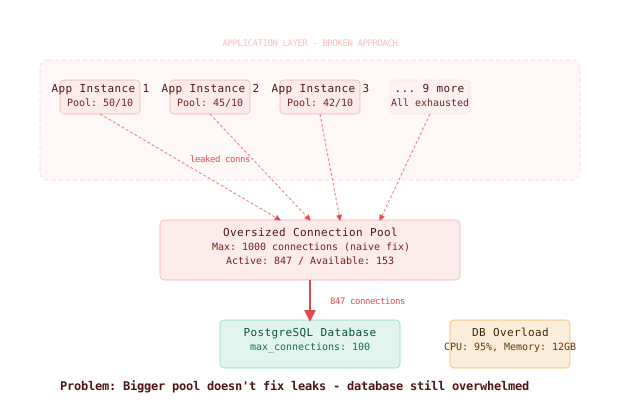
Here’s what happens at scale:
Small scale (100 users): 10 connections -> works fine, leaks are negligible
Large scale (10,000 users): 500 connections -> exhausted in 2 hours as leaks accumulate
The database server itself becomes the bottleneck. PostgreSQL’s default max_connections is 100. MySQL’s default is 151. Each connection consumes memory (8KB-16KB per connection on PostgreSQL), and the database server’s connection handling overhead grows linearly. At 1000+ connections, the database spends more time managing connections than processing queries.
Increasing connection pool size without fixing connection leaks just delays the inevitable failure while consuming more database server resources.
The Better Solution
Here’s what actually fixes this. The solution has three layers: proper connection lifecycle management, connection pool monitoring, and connection pooling middleware.
Layer 1: Connection Lifecycle Management
The first fix is ensuring every database connection is properly returned to the pool. This means wrapping all database operations in try-finally blocks or using connection management patterns that guarantee cleanup.
# Bad: connection can leak if query throws exception
def get_user_orders(user_id):
    conn = db_pool.get_connection()
    cursor = conn.cursor()
    cursor.execute("SELECT * FROM orders WHERE user_id = %s", (user_id,))
    return cursor.fetchall()
    # Connection never returned to pool if exception occurs above

# Good: connection always returned via finally block
def get_user_orders(user_id):
    conn = None
    try:
        conn = db_pool.get_connection()
        cursor = conn.cursor()
        cursor.execute("SELECT * FROM orders WHERE user_id = %s", (user_id,))
        return cursor.fetchall()
    finally:
        if conn:
            db_pool.return_connection(conn)

# Better: use context managers for automatic cleanup
def get_user_orders(user_id):
    with db_pool.get_connection() as conn:
        cursor = conn.cursor()
        cursor.execute("SELECT * FROM orders WHERE user_id = %s", (user_id,))
        return cursor.fetchall()
    # Connection automatically returned when leaving 'with' block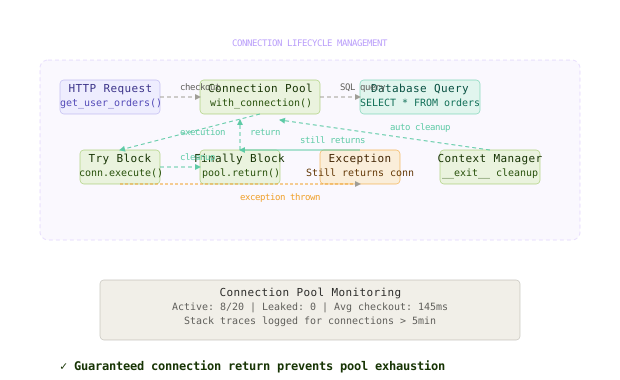
This fixes the immediate leak, but you need monitoring to catch when leaks still happen.
Layer 2: Connection Pool Monitoring
The second layer adds comprehensive monitoring to detect connection leaks before they exhaust the pool. You need metrics on pool utilization, connection age, and leak detection.
# Connection pool wrapper with monitoring
import time
import threading
from dataclasses import dataclass
from typing import Dict, Optional

@dataclass
class ConnectionMetrics:
    checkout_time: float
    thread_id: int
    stack_trace: str

class MonitoredConnectionPool:
    def __init__(self, base_pool, max_connection_age_seconds=300):
        self.base_pool = base_pool
        self.max_age = max_connection_age_seconds
        self.active_connections: Dict[int, ConnectionMetrics] = {}
        self.metrics_lock = threading.Lock()

    def get_connection(self):
        conn = self.base_pool.get_connection()
        conn_id = id(conn)

        with self.metrics_lock:
            self.active_connections[conn_id] = ConnectionMetrics(
                checkout_time=time.time(),
                thread_id=threading.get_ident(),
                stack_trace=self._get_stack_trace()
            )

        return ConnectionWrapper(conn, self, conn_id)

    def return_connection(self, conn_id, conn):
        with self.metrics_lock:
            if conn_id in self.active_connections:
                del self.active_connections[conn_id]

        self.base_pool.return_connection(conn)

    def get_pool_stats(self):
        with self.metrics_lock:
            now = time.time()
            active_count = len(self.active_connections)
            leaked_connections = [
                (conn_id, metrics) for conn_id, metrics
                in self.active_connections.items()
                if now - metrics.checkout_time > self.max_age
            ]

            return {
                'active_connections': active_count,
                'available_connections': self.base_pool.size() - active_count,
                'leaked_connections': len(leaked_connections),
                'leaked_details': leaked_connections[:5]  # Top 5 oldest leaks
}Shopify’s connection pool monitoring catches connection leaks within 30 seconds by tracking checkout duration and stack traces, preventing pool exhaustion during flash sales.
Layer 3: Connection Pooling Middleware (PgBouncer)
The third layer adds a connection pooling middleware like PgBouncer between your application and database. PgBouncer acts like a smart receptionist that manages a smaller number of actual database connections and multiplexes many application connections onto them.
# PgBouncer configuration for connection pool management
[databases]
ecommerce_db = host=db-server.internal port=5432 dbname=ecommerce user=app_user

[pgbouncer]
# Pool mode: transaction-level pooling
pool_mode = transaction

# Connection limits per database
default_pool_size = 25          # Max real DB connections per database
max_client_conn = 200           # Max application connections
reserve_pool_size = 5           # Reserved connections for admin

# Connection lifecycle settings
server_lifetime = 3600          # Kill server connections after 1 hour
server_idle_timeout = 600       # Close idle server connections after 10 minutes
client_idle_timeout = 0         # Don't timeout client connections

# Query timeout hierarchy
query_timeout = 30              # Kill queries running longer than 30 seconds
query_wait_timeout = 10         # Max time to wait for connection from pool

listen_addr = 0.0.0.0
listen_port = 5432
auth_type = md5
auth_file = /etc/pgbouncer/userlist.txt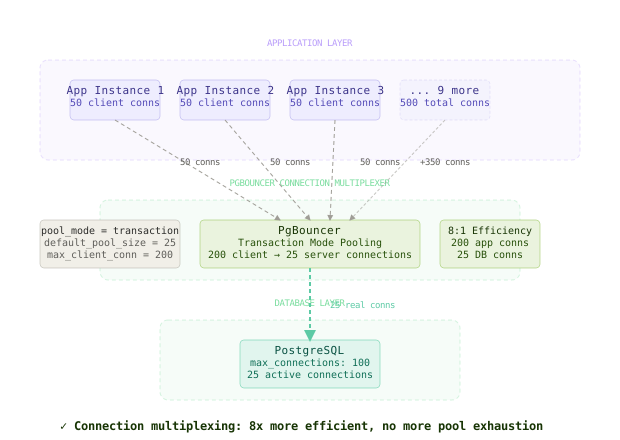
PgBouncer’s transaction-mode pooling means that as soon as a database transaction commits or rolls back, the connection is immediately available for another application to use. This multiplexing allows 200 application connections to share just 25 real database connections efficiently.
The Full Architecture
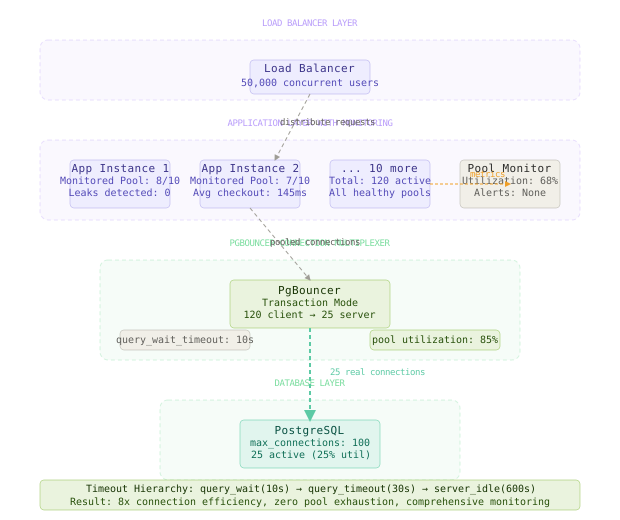
Here’s how the complete solution works end-to-end. When a user request hits your application, the application checks out a connection from its local pool (managed by the monitoring wrapper). That connection actually connects to PgBouncer, not directly to the database. PgBouncer receives the SQL query and assigns it to one of its real database connections using transaction-mode pooling.
When the query completes and the transaction commits, PgBouncer immediately returns that real database connection to its pool, making it available for other waiting queries. Meanwhile, your application returns its connection to the local pool, where the monitoring wrapper tracks the return and updates metrics.
The timeout hierarchy ensures that no request waits indefinitely: queries timeout after 30 seconds, connections timeout waiting for pool availability after 10 seconds, and leaked connections are detected after 5 minutes.
The most important design decision is using transaction-mode pooling in PgBouncer, which maximizes connection reuse by releasing connections immediately when transactions complete.
Component Deep Dives
Connection Monitoring Wrapper
The monitoring wrapper’s job is to track connection lifecycles and detect leaks before they exhaust the pool. It instruments every connection checkout and return, maintaining a real-time view of pool health.
# Comprehensive connection leak detection
class ConnectionLeakDetector:
    def __init__(self, check_interval_seconds=60):
        self.check_interval = check_interval_seconds
        self.warning_threshold = 0.8  # Warn at 80% pool utilization
        self.critical_threshold = 0.95  # Critical at 95% pool utilization

    def start_monitoring(self, pool):
        def monitor_loop():
            while True:
                stats = pool.get_pool_stats()
                utilization = stats['active_connections'] / (stats['active_connections'] + stats['available_connections'])

                if utilization >= self.critical_threshold:
                    self._send_critical_alert(stats)
                elif utilization >= self.warning_threshold:
                    self._send_warning_alert(stats)

                # Log leaked connection details for debugging
                if stats['leaked_connections'] > 0:
                    for conn_id, metrics in stats['leaked_details']:
                        logger.warning(f"Leaked connection {conn_id}: checked out {time.time() - metrics.checkout_time:.1f}s ago by thread {metrics.thread_id}")

                time.sleep(self.check_interval)

        threading.Thread(target=monitor_loop, daemon=True).start()
This monitoring prevents the “silent death” scenario where connection leaks slowly accumulate over hours until the pool suddenly exhausts.
PgBouncer Pool Modes
PgBouncer’s job is to multiplex many application connections onto a smaller number of database connections. The choice of pool mode determines when connections are released back to the pool.
-- Session mode: connection held for entire application session
-- Use case: applications that maintain state across multiple queries
-- Drawback: poor connection reuse, essentially no pooling benefit

-- Transaction mode: connection held only during transaction
-- Use case: web applications with discrete request/response cycles
-- Benefit: maximum connection reuse, optimal for most web workloads

-- Statement mode: connection held only during individual SQL statement
-- Use case: simple read-only queries without transactions
-- Drawback: breaks multi-statement transactions, prepared statements
For most web applications, transaction mode provides the best balance of compatibility and efficiency. Each HTTP request typically corresponds to one database transaction, so releasing the connection immediately when the transaction completes maximizes reuse.
Timeout Hierarchy Configuration
The timeout configuration’s job is to ensure that no request waits indefinitely when the system is under stress. The hierarchy prevents cascading failures by failing fast at each level.
# Timeout hierarchy from fastest to slowest
query_wait_timeout: 10s          # How long to wait for pool connection
query_timeout: 30s               # How long individual queries can run
server_connect_timeout: 15s      # How long to wait for new DB connection
server_idle_timeout: 600s        # How long idle connections stay open
client_idle_timeout: 0           # Client connections never timeout (handled by app)
The key insight is that query_wait_timeout should be much shorter than query_timeout. If the pool is exhausted, you want applications to fail fast (10s) rather than waiting for slow queries to complete (30s).
Comparison Table
| Approach | Write Complexity | Read Complexity | Latency | Memory Usage | Failure Modes | Best Use Case |
|---|---|---|---|---|---|---|
| Naive (increase pool size) | Low | Low | Good | High | Silent exhaustion | Development only |
| Application-level pooling | Medium | Low | Good | Medium | Leak accumulation | Simple applications |
| PgBouncer transaction mode | Medium | Medium | Excellent | Low | Config complexity | High-traffic web apps |
| PgBouncer session mode | Low | Low | Good | High | Poor utilization | Legacy applications |
| Custom connection proxy | High | High | Variable | Medium | Implementation bugs | Special requirements |
For high-traffic web applications, PgBouncer in transaction mode is the clear winner. The small increase in configuration complexity pays off with dramatic improvements in connection efficiency and system reliability. You get 5-10x better connection utilization compared to direct application pooling.
Key Takeaways
- Connection lifecycle management requires defensive programming with try-finally blocks or context managers to guarantee connection return
- Pool monitoring with leak detection prevents silent connection accumulation that leads to sudden pool exhaustion
- PgBouncer transaction mode multiplexes hundreds of application connections onto dozens of database connections efficiently
- Timeout hierarchy ensures fast failure when pools are exhausted rather than indefinite waiting that compounds the problem
- Connection leak detection should track checkout duration, thread ownership, and stack traces to diagnose leak sources
- Pool sizing should account for PgBouncer multiplexing - you need far fewer real database connections than application connections
The fundamental lesson is to design for connection scarcity from day one. Connections are a finite resource that must be managed carefully, not consumed freely. A well-architected system treats every database connection like a precious resource that must be borrowed briefly and returned promptly.
Frequently Asked Questions
Q: Why not just increase the database server’s max_connections setting? A: Each connection consumes memory and CPU overhead on the database server. PostgreSQL uses 8-16KB per connection, and connection management overhead grows linearly. At 1000+ connections, the database spends more time managing connections than processing queries. The optimal database connection count is usually 2-4x your CPU cores.
Q: When should I use session mode vs transaction mode in PgBouncer? A: Use transaction mode for stateless web applications where each HTTP request maps to one database transaction. Use session mode for applications that maintain connection state across multiple queries, like those using prepared statements extensively or connection-specific settings.
Q: How do I detect connection leaks in production? A: Track connection checkout duration and alert when connections are held longer than expected (typically 5-10 minutes). Monitor pool utilization percentage and alert at 80% full. Log stack traces at connection checkout to identify which code paths are causing leaks.
Q: What’s the optimal connection pool size per application instance? A: Start with 10-20 connections per application instance, then tune based on your query patterns. If most queries complete in under 100ms, you need fewer connections. If queries take 1-2 seconds, you need more. The key is measuring actual query duration distribution.
Q: Should connection pools be shared across application instances or isolated? A: Keep pools isolated per application instance for better failure isolation. If one instance has a connection leak or bug, it doesn’t affect other instances. Use PgBouncer as the central multiplexing point rather than trying to share pools directly between application processes.
Interview Questions
Q: Your application’s database connection pool is exhausting under load. Walk through your debugging approach. Expected depth: Mention pool utilization monitoring, connection leak detection, query duration analysis, PgBouncer multiplexing, timeout configuration, and the distinction between connection count and pool size.
Q: Explain the tradeoffs between PgBouncer’s session, transaction, and statement pooling modes. Expected depth: Discuss connection reuse efficiency, application compatibility constraints, prepared statement handling, multi-statement transaction support, and when each mode is appropriate.
Q: Design a connection pool monitoring system that can detect and alert on connection leaks. Expected depth: Cover connection lifecycle tracking, leak detection thresholds, stack trace capture for debugging, pool utilization metrics, timeout hierarchy monitoring, and integration with alerting systems.
Q: How would you size connection pools for an application with 50 instances behind a load balancer? Expected depth: Discuss per-instance pool sizing, database server connection limits, PgBouncer multiplexing ratios, query pattern analysis, connection lifetime expectations, and monitoring-driven tuning.
Q: A database migration increases query latency from 50ms to 500ms. How does this impact connection pool requirements? Expected depth: Explain connection hold time increase, pool turnover rate reduction, required pool size calculations, timeout reconfiguration, and cascade effects on application response times.
Premium Content
Unlock the full article along with everything else in the archive — all in one place.