The Analytics Query That Froze the App
databases data-engineering performance
The Analytics Query That Froze the App
One GROUP BY across 2 billion rows. The whole app ground to a halt.
Tuesday morning, 9:47 AM. The engineering Slack is quiet - that pre-standup calm before the day kicks off. Then the first message: “site feels slow.” Within four minutes, three more identical reports. The on-call engineer opens Datadog. P99 latency on the orders API: 4.2 seconds. Normal baseline: 45ms. Connection pool utilization: 98 of 100 slots occupied. Database CPU: pegged at 98%.
No deploys in the last six hours. No infrastructure changes. No traffic spike visible in the load balancer logs. The engineer starts the checklist: check recent queries, check locks, check slow query log. The slow query log has one entry, and it has been running for 27 minutes.
SELECT
  region,
  product_category,
  SUM(revenue) AS total_revenue,
  COUNT(DISTINCT user_id) AS unique_buyers
FROM orders
GROUP BY region, product_category;
Then a DM arrives from the data team: “Hey, quick heads up - I’m running some revenue analysis on the read replica right now, is that okay?” The orders table has 2.1 billion rows. The query is doing a full sequential scan, spilling intermediate sort buffers to disk, consuming roughly 40 GB of I/O bandwidth, and has evicted most of the working set from the shared buffer pool - the very buffer pool that the application’s point-lookup queries depend on for their 45ms response times.
It is not okay.
This is the OLTP/OLAP collision problem - two fundamentally different workloads competing for the same hardware, and neither winning.
Why This Happens
OLTP (Online Transaction Processing) and OLAP (Online Analytical Processing) are opposites in nearly every dimension that matters for database performance.
An OLTP query looks like SELECT * FROM orders WHERE id = 9847263. It touches one row, uses an index, runs in 2ms, and releases its locks immediately. Your application issues thousands of these per second. The database handles them fine because each one is tiny.
An OLAP query looks like the one above. It touches every row in a 2-billion-row table, ignores all indexes (they would not help a full-table aggregate anyway), builds enormous hash tables in memory, spills to disk when those tables exceed work_mem, holds shared locks for the full duration, and competes for every I/O operation the disk can produce.
The failure chain when both workloads share a host:
Analyst runs GROUP BY on 2B-row orders table
  → Full sequential scan saturates disk I/O bandwidth
    → Shared buffer pool thrashed - OLTP working set evicted
      → OLTP point lookups now require disk reads (10ms instead of 0.1ms)
        → Query latency multiplies by 100x
          → Application connection pool fills up (queries take longer, hold slots)
            → New requests queue behind full pool
              → HTTP timeouts cascade to users
                → On-call engineer paged at 9:47 AM
The read replica does not save you here. The read replica is the same PostgreSQL engine, the same buffer pool architecture, the same I/O constraints. You moved the problem off the primary - good - but you did not eliminate it.
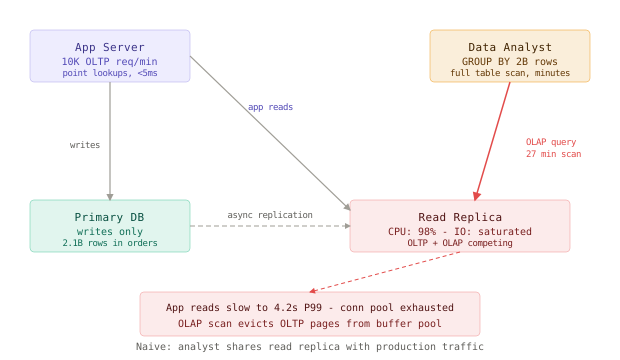
The Naive Solution (and where it breaks)
The instinct every team reaches for first: “analysts should use the read replica, not the primary.” This is a correct step, but it is not a solution. It is a mitigation that works until the replica is the bottleneck.
Small scale (100M rows, 10 analysts):
  → Read replica handles both OLTP reads and occasional OLAP queries
  → Occasional slowdown, usually unnoticed
  → Works fine

Large scale (2B rows, 20 analysts, peak hours):
  → OLAP queries saturate replica I/O during business hours
  → App read latency spikes match analyst query schedules
  → On-call correlates "analyst logged in at 9 AM" with every incident
  → You end up scheduling analyst access to off-peak hours
  → Analysts are blocked from doing their jobs during business hours
  → The business pays engineers and analysts to work around each other
The root issue is that a read replica is just a copy of an OLTP database. It has the same row-oriented storage format, the same buffer pool constraints, the same I/O characteristics. OLAP workloads are not slower there because the machine is weaker - they are slow there because a row-oriented store is the wrong data structure for aggregations over billions of rows.
The Better Solution
The fix unfolds in layers. Each layer solves a specific failure mode, and each builds on the one before it.
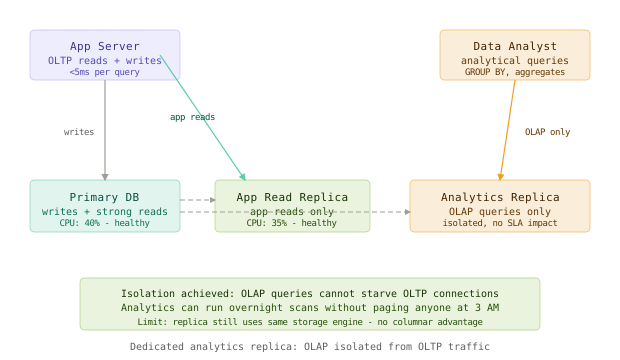
Layer 1: Dedicated Analytics Replica
The first concrete step is creating a second replica whose only purpose is analytics. Application read traffic goes to one replica; analyst queries go to another. The two workloads cannot touch each other.
# PostgreSQL connection config (PgBouncer or application-level)
pools:
  oltp_reads:
    host: app-replica-01.internal
    max_connections: 200
    pool_mode: transaction
  analytics:
    host: analytics-replica-01.internal
    max_connections: 20
    pool_mode: session   # analysts hold long-running connections
This solves the immediate crisis. It does not solve the underlying inefficiency - the analyst’s 27-minute query still takes 27 minutes, it just no longer affects users. But you have bought time to implement the real solutions.
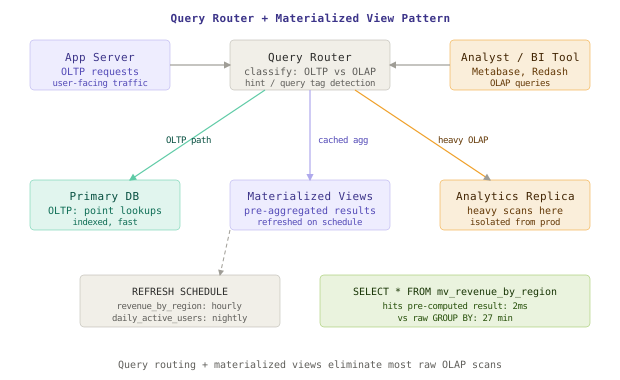
Layer 2: Query Routing
Once you have separate pools, you need a way to route queries to the right one automatically - because analysts will forget, BI tools will connect to whatever string you give them, and every new hire will make the same mistake.
The standard pattern is a query tag system: analytical tools are configured to prepend a /* olap */ comment to their queries, and a middleware layer (PgBouncer, or a thin proxy like RDS Proxy) routes tagged queries to the analytics pool.
# Django: annotate queries from analytics views
from django.db import connection

class OLAPRouter:
    def db_for_read(self, model, **hints):
        if hints.get('analytics'):
            return 'analytics_replica'
        return 'app_replica'

# Usage in reporting views
queryset = Order.objects.using('analytics_replica').filter(...)

# Or via raw SQL with hint
with connection.cursor() as cursor:
    cursor.execute("/* olap */ SELECT region, SUM(revenue) FROM orders GROUP BY region")
For teams using Metabase, Redash, or Looker, the simplest approach is configuring those tools with a separate connection string that points directly to the analytics replica - no code changes required.
Layer 3: Materialized Views
Routing queries to the right replica is necessary but not sufficient for frequently-run dashboards. If finance runs the same regional revenue report every morning, you do not want it doing a full scan of 2 billion rows every morning. You want to pre-compute it.
Materialized views let you store the result of an expensive aggregation and refresh it on a schedule. The analyst queries the view; the scan only happens during the refresh window, not during business hours.
-- Create the materialized view
CREATE MATERIALIZED VIEW mv_revenue_by_region AS
SELECT
  region,
  product_category,
  DATE_TRUNC('day', created_at) AS day,
  SUM(revenue) AS total_revenue,
  COUNT(DISTINCT user_id) AS unique_buyers
FROM orders
GROUP BY region, product_category, DATE_TRUNC('day', created_at);

CREATE INDEX ON mv_revenue_by_region (region, day);

-- Refresh on a schedule (pg_cron or external scheduler)
SELECT cron.schedule('refresh-revenue-mv', '0 2 * * *',
  'REFRESH MATERIALIZED VIEW CONCURRENTLY mv_revenue_by_region');
The CONCURRENTLY flag is critical here. Without it, REFRESH MATERIALIZED VIEW takes an exclusive lock on the view for the entire duration of the scan, which blocks any query against the view during the refresh. With CONCURRENTLY, PostgreSQL builds the new version in the background and swaps atomically at the end. The view remains readable throughout, at the cost of slightly longer refresh time and requiring at least one unique index.
Query result: the morning finance report hits the materialized view and returns in 2ms instead of 27 minutes. The underlying scan happens at 2 AM on the analytics replica, invisible to everyone.
Layer 4: Data Warehouse
Materialized views work for known, predictable queries. They do not work for ad-hoc analysis - the kind where a product manager asks “can you slice revenue by acquisition channel, device type, and cohort month?” and your data team has to either write a new view (and wait for the next refresh cycle) or run a raw query that will take 45 minutes.
For serious analytical workloads, the correct answer is a purpose-built columnar data warehouse: BigQuery, Snowflake, Redshift, or ClickHouse on-prem. These systems store data in column-oriented format rather than row-oriented format, which makes aggregations over a subset of columns dramatically faster - 10x to 100x for typical analytical queries. They are also designed for large parallel scans, which means your analyst’s 27-minute sequential scan might run in 90 seconds.
The integration pattern is a CDC (Change Data Capture) pipeline that streams changes from your production PostgreSQL into the warehouse in near real-time:
# Debezium connector config (Kafka Connect)
connector.class: io.debezium.connector.postgresql.PostgresConnector
database.hostname: primary-db.internal
database.port: 5432
database.dbname: production
table.include.list: public.orders,public.users,public.products
slot.name: debezium_warehouse
plugin.name: pgoutput

# Transforms: route to BigQuery via Kafka → BigQuery connector
transforms: route
transforms.route.type: org.apache.kafka.connect.transforms.ReplaceField$Value
With this in place, your data team works entirely in the warehouse. They never touch the production database. Production performance is decoupled from the data team’s curiosity, their deadline pressure, and their occasional SELECT * on a 2-billion-row table.
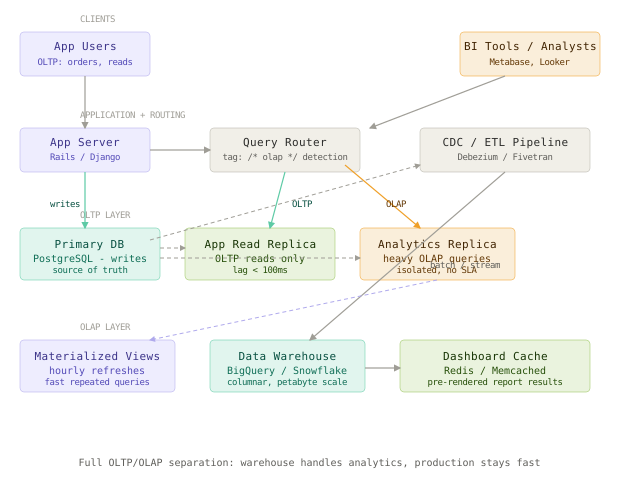
The Full Architecture
Component Deep Dives
Primary DB and Replication Topology
The primary database handles writes only. All reads - both OLTP and OLAP - are offloaded. This keeps the primary’s CPU headroom available for write transactions and reduces the risk of a long-running analytical query interfering with write latency.
-- Check current replication lag across all replicas
SELECT
  client_addr,
  state,
  sent_lsn,
  replay_lsn,
  (sent_lsn - replay_lsn) AS lag_bytes
FROM pg_stat_replication
ORDER BY lag_bytes DESC;

-- Target: app replica lag < 100ms, analytics replica lag up to 30min is acceptable
The analytics replica can tolerate higher replication lag. A dashboard showing yesterday’s revenue being 30 minutes stale is not a business problem. A user seeing stale cart contents because the app replica is 5 seconds behind is a business problem. Separate replicas let you tune these SLAs independently.
Materialized View Refresh Strategy
The key design decision for materialized views is refresh granularity versus freshness. A few patterns:
-- Incremental pattern: only refresh recent data
REFRESH MATERIALIZED VIEW CONCURRENTLY mv_revenue_by_region;
-- (Relies on the view definition filtering to recent dates)

-- Partial view for hot data - keep full history in warehouse
CREATE MATERIALIZED VIEW mv_revenue_last_90_days AS
SELECT * FROM mv_revenue_by_region
WHERE day >= NOW() - INTERVAL '90 days';

-- Alert if refresh falls behind
CREATE OR REPLACE FUNCTION check_mv_freshness()
RETURNS void AS $$
DECLARE last_refresh timestamptz;
BEGIN
  SELECT last_refresh INTO last_refresh
  FROM pg_stat_user_tables WHERE relname = 'mv_revenue_by_region';
  IF last_refresh < NOW() - INTERVAL '25 hours' THEN
    RAISE WARNING 'mv_revenue_by_region has not refreshed in 25h';
  END IF;
END;
$$ LANGUAGE plpgsql;
CDC Pipeline Health
The CDC pipeline is the data path from your OLTP database to your warehouse. If it falls behind or breaks, the warehouse data goes stale. Monitor it with these signals:
-- Check replication slot lag (Debezium uses a replication slot)
SELECT
  slot_name,
  confirmed_flush_lsn,
  pg_current_wal_lsn(),
  (pg_current_wal_lsn() - confirmed_flush_lsn) AS lag_bytes,
  pg_size_pretty(pg_current_wal_lsn() - confirmed_flush_lsn) AS lag_pretty
FROM pg_replication_slots
WHERE slot_name = 'debezium_warehouse';
A warning: replication slots that fall behind accumulate WAL files on disk. If your CDC pipeline is down for 12 hours and you have a busy write workload, PostgreSQL will retain all WAL files produced during that window, which can fill your disk. Set max_slot_wal_keep_size to a sane limit and alert on slot lag exceeding 1 GB.
Comparison Table
| Approach | OLTP Isolation | OLAP Performance | Freshness | Complexity | Best Use Case |
|---|---|---|---|---|---|
| Analyst on primary | None | Poor | Real-time | Low | Never |
| Analyst on shared replica | Partial | Poor | Real-time | Low | Dev/test only |
| Dedicated analytics replica | Full | Poor-to-medium | Near real-time | Medium | <500M rows, simple queries |
| Materialized views | Full | Excellent (for known queries) | Scheduled (hourly-daily) | Medium | Known, repeated dashboards |
| Full data warehouse | Full | Excellent (any query) | Minutes-to-hours | High | Large scale, ad-hoc analysis |
| ClickHouse (on-prem OLAP) | Full | Excellent | Minutes | High | Cost-sensitive, self-hosted |
Key Takeaways
- OLTP vs OLAP separation is not a nice-to-have at scale - when an analyst can take down production, it becomes unavoidable.
- Read replicas isolate the blast radius but do not fix the root cause; the replica is still row-oriented and will still be slow for analytical workloads.
- Dedicated analytics replicas are the minimum viable fix - separate the traffic, give analysts their own host, and the immediate crisis goes away.
- Materialized views eliminate repeated expensive scans for known query patterns; the key is
CONCURRENTLYand scheduling refreshes during off-peak hours. - Query routing automates the traffic split so that individual engineers and analysts do not have to remember which connection string to use.
- CDC pipelines keep the data warehouse current without touching the production database; lag in this pipeline is a business SLA question, not an engineering failure.
- Replication slot lag will fill your disk if your CDC consumer goes offline; set
max_slot_wal_keep_sizeand monitor it. - Data warehouses like BigQuery and Snowflake are not luxuries - for anything beyond simple aggregations over a few hundred million rows, their columnar storage pays for itself in analyst productivity within weeks.
The harder principle: your production database is optimized for one type of question - “what is the current state of record X?” The moment you ask it “what is the aggregate behavior of all records across all time?”, you are asking it to be something it was never designed to be. Build two systems, each great at one thing, rather than one system mediocre at both.
Frequently Asked Questions
Q: Can I use PostgreSQL itself as the OLAP store with columnar extensions like cstore_fdw or pg_analytics?
A: Yes, and it is increasingly viable. pg_analytics (from ParadeDB) and pg_mooncake bring DuckDB-backed columnar storage into PostgreSQL. For teams that want a single system and can tolerate some operational complexity, this is a legitimate option. The tradeoff is that these extensions are newer, have smaller communities, and may not handle the full query surface your BI tool generates. Evaluate against Snowflake or BigQuery based on query volume, not hype.
Q: How do we handle queries that need both recent writes and historical aggregates?
A: This is the read-your-writes + analytics problem. For dashboards, staleness is acceptable and you use the warehouse. For operational queries that need fresh data plus history (e.g., “fraud score combining last-30-days history with this transaction”), you typically compute the history offline and store a derived signal back in the OLTP database where the latency-sensitive query can find it.
Q: At what row count should we add a dedicated analytics replica?
A: When your slowest reasonable analyst query takes more than 30 seconds and runs during business hours. The row count is a proxy - the real signal is query duration and frequency. Some tables at 100M rows cause problems; some at 5B rows are fine because every query uses tight indexes.
Q: Do materialized views work in MySQL?
A: MySQL does not have native materialized views. The common workaround is a scheduled job that truncates and repopulates a summary table. It has the same semantics but requires a maintenance window during the truncate-repopulate cycle (or careful swap-table logic to avoid downtime). MariaDB added a version of materialized views in 10.0, but with significant limitations.
Q: How do we keep the data warehouse in sync when we run schema migrations?
A: This is the most painful part of CDC pipelines. Schema changes in PostgreSQL produce DDL events that Debezium needs to handle before resuming DML replication. Most teams enforce a rule: schema migrations must be announced to the data engineering team 48 hours in advance, and the warehouse schema must be updated first (using expand-contract so both old and new schemas remain valid during the window).
Interview Questions
Q: A data analyst has been told to never run queries on the production database. They use a read replica instead. Two weeks later, you still get latency spikes correlated with their query schedule. What’s happening, and how do you fix it?
Expected depth: Identify that the read replica shares I/O with application reads. Cover dedicated analytics replica as the first fix, materialized views for repeated queries, and data warehouse for ad-hoc analysis. Mention that a row-oriented replica is structurally ill-suited for OLAP regardless of isolation.
Q: Design a system that lets your data team run arbitrary SQL against production data with no more than 1-hour staleness, without impacting application latency.
Expected depth: CDC pipeline (Debezium or Fivetran) feeding a columnar warehouse (BigQuery, Snowflake, or ClickHouse). Cover replication slot management, WAL retention risk, schema migration coordination, and how to monitor pipeline lag. Discuss the tradeoff between 1-hour staleness being acceptable vs. near-real-time requirements.
Q: What is REFRESH MATERIALIZED VIEW CONCURRENTLY and why does the default non-concurrent refresh cause problems?
Expected depth: Default REFRESH takes an exclusive lock on the entire view, blocking all reads for the duration of the scan. CONCURRENTLY builds the new result set in a temp table and does an atomic swap. Requires a unique index. Note that concurrent refresh is slower overall but avoids downtime. Discuss scheduling strategy for refresh windows.
Q: A replication slot for your CDC pipeline falls 50 GB behind after a consumer outage. What are the risks and how do you recover?
Expected depth: PostgreSQL holds WAL files until all consuming slots have confirmed consuming them. A lagging slot means unbounded WAL retention and disk fill risk. Cover max_slot_wal_keep_size as a guard, the risk of data loss vs. disk loss tradeoff when you drop a lagging slot, and the recovery procedure of replaying from a backup vs. re-snapshotting.
Premium Content
Unlock the full article along with everything else in the archive — all in one place.