Cold Start in a Serverless World
cloud-infrastructure performance scalability
System Design Scenario
Cold Start in a Serverless World
When your Lambda functions hibernate and 10,000 users hit the wall of initialization latency
It’s Sunday, 4:17 PM. The engineering team is enjoying a rare quiet weekend when Slack starts lighting up. A viral TikTok just mentioned your app. Traffic spikes from 500 requests per minute to 50,000 in sixty seconds. Your Lambda functions, which handle 100% of your traffic, have been sleeping peacefully in AWS’s warm beds for the last six hours.
The first wave of users hits your API. Lambda spins up new containers. Each one takes 3.2 seconds to initialize - loading dependencies, connecting to databases, warming up the JVM. Think of it like trying to start 500 frozen cars on a winter morning. Each engine needs time to warm up before it can drive, but users are already honking their horns.
Your monitoring dashboard turns red. Response time: 3,200ms. Error rate: 12%. Customer support tickets flood in: “App won’t load”, “Infinite spinner”, “Is the site down?” By the time your functions are warm and ready, 10,000 users have already given up and closed the app. Some switched to competitors.
This is the cold start problem in action.
Why This Happens
The beauty of serverless is that you don’t pay for idle resources. When traffic drops, AWS shuts down your Lambda containers to save everyone money. But when traffic returns, those containers need time to boot up again - like a computer coming out of hibernation.
Smart engineers assume Lambda scales instantly. After all, AWS promises “infinite scale” and “pay only for what you use.” The hidden truth is that scaling happens in two phases: provisioning new containers (fast) and initializing your application code (slow).
Traffic spike
  -> Lambda provisions new containers (200ms)
    -> Runtime initialization (800ms)
      -> Application code loading (1500ms)
        -> Database connection establishment (900ms)
-> User sees 3.4 second spinnerCold starts aren’t really about Lambda being slow - they’re about your application doing expensive work during initialization that should have been done ahead of time.
The Naive Solution (and where it breaks)
Most teams reach for one of two quick fixes: “just keep the functions warm” or “make the code faster.” Both approaches treat symptoms instead of the disease.
Keeping functions warm means sending fake requests every few minutes to prevent containers from shutting down. It’s like leaving your car engine idling in the driveway so it’s always ready to drive. The logic seems sound - no hibernation, no cold starts.
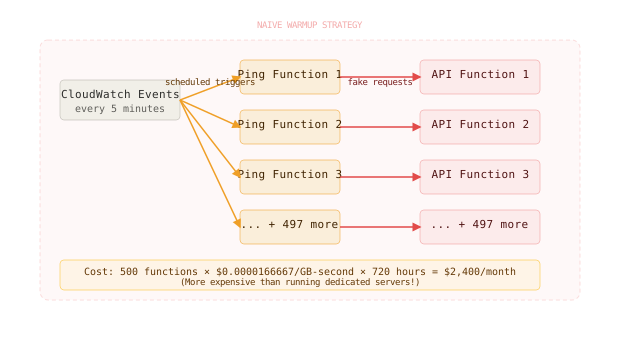
Here’s where it breaks at scale:
Small scale: 10 functions -> $5/month warmup cost -> manageable
Large scale: 500 functions across regions -> $2,400/month -> defeats serverless cost benefits
The second naive approach focuses on code optimization - faster startup times solve cold starts. Teams spend weeks shaving milliseconds off import statements and lazy-loading modules. But even a perfectly optimized Node.js function still needs 400-800ms for basic initialization.
Keeping all functions warm 24/7 can cost more than running dedicated servers, especially for infrequently used endpoints that serve different user patterns throughout the day.
Provisioned Concurrency - The Smart Warmup
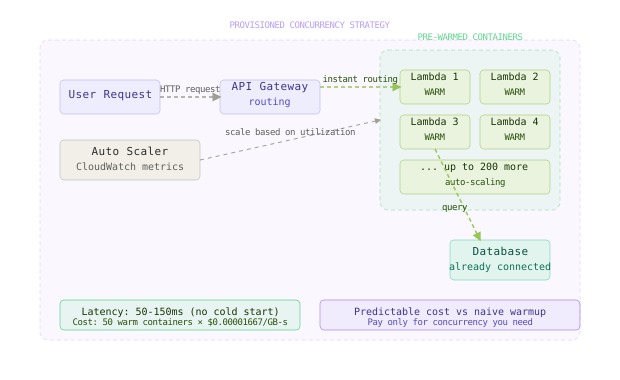
Here’s what actually fixes this. AWS Provisioned Concurrency pre-initializes a specific number of Lambda execution environments and keeps them ready. It’s like having a taxi waiting at the curb instead of calling one when you need it.
Unlike naive warmup strategies, provisioned concurrency only keeps the containers you actually need warm, and AWS handles the complexity of lifecycle management.
# Terraform configuration for provisioned concurrency
resource "aws_lambda_provisioned_concurrency_config" "api_gateway" {
  function_name                     = aws_lambda_function.api.function_name
  provisioned_concurrency_count     = 50
  qualifier                        = aws_lambda_function.api.version
}

# Auto-scaling based on utilization
resource "aws_application_autoscaling_target" "lambda_target" {
  max_capacity       = 200
  min_capacity       = 20
  resource_id        = "function:${aws_lambda_function.api.function_name}:provisioned"
  scalable_dimension = "lambda:provisioned-concurrency:utilization"
  service_namespace  = "lambda"
}

resource "aws_application_autoscaling_policy" "lambda_policy" {
  name               = "lambda-scaling-policy"
  policy_type        = "TargetTrackingScaling"
  resource_id        = aws_application_autoscaling_target.lambda_target.resource_id
  scalable_dimension = aws_application_autoscaling_target.lambda_target.scalable_dimension
  service_namespace  = aws_application_autoscaling_target.lambda_target.service_namespace

  target_tracking_scaling_policy_configuration {
    target_value = 70.0
    predefined_metric_specification {
      predefined_metric_type = "LambdaProvisionedConcurrencyUtilization"
    }
  }
}
Provisioned concurrency solves the initialization delay by moving the cost from response time to a predictable monthly bill. You’re essentially renting always-ready execution environments.
Netflix uses provisioned concurrency for their recommendation engine APIs that serve millions of requests daily. They keep 100-500 containers warm per region, auto-scaling based on traffic patterns learned from historical data.
Lambda SnapStart - Instant Java Warmup
For Java workloads, AWS offers SnapStart - a game-changing optimization that eliminates most cold start pain. SnapStart takes a snapshot of your Lambda function after initialization and uses that snapshot for subsequent invocations.
Think of it like taking a photograph of your application right after it’s fully loaded, then using that photo as the starting point for new instances instead of booting from scratch every time.
// Enable SnapStart in your Lambda function
public class OrderProcessor implements RequestHandler<APIGatewayProxyRequestEvent, APIGatewayProxyResponseEvent> {

    // Database connection initialized once during snapshot creation
    private static final DataSource dataSource = createDataSource();
    private static final ObjectMapper mapper = new ObjectMapper();

    static {
        // Expensive initialization happens during snapshot, not at runtime
        loadConfigurationCache();
        prepareConnectionPools();
        initializeSecurityContext();
    }

    @Override
    public APIGatewayProxyResponseEvent handleRequest(APIGatewayProxyRequestEvent event, Context context) {
        // This code runs fast because initialization already happened in the snapshot
        try (Connection conn = dataSource.getConnection()) {
            Order order = processOrder(event.getBody());
            return createSuccessResponse(mapper.writeValueAsString(order));
        }
    }
}
SnapStart reduces Java cold starts from 2-10 seconds down to 200-500ms by eliminating JVM startup, class loading, and dependency injection framework initialization.
# SAM template with SnapStart enabled
Transform: AWS::Serverless-2016-10-31
Resources:
  OrderProcessorFunction:
    Type: AWS::Serverless::Function
    Properties:
      CodeUri: target/order-processor-1.0.jar
      Handler: com.company.OrderProcessor::handleRequest
      Runtime: java17
      SnapStart:
        ApplyOn: PublishedVersions
      Environment:
        Variables:
          DB_URL: !Ref DatabaseUrl
      Events:
        Api:
          Type: Api
          Properties:
            Path: /orders
Method: postGoldman Sachs reduced their trading platform Lambda cold starts from 8 seconds to 300ms using SnapStart, enabling them to handle market opening spikes without pre-warming hundreds of containers.
Edge Functions - Bring Compute to Users
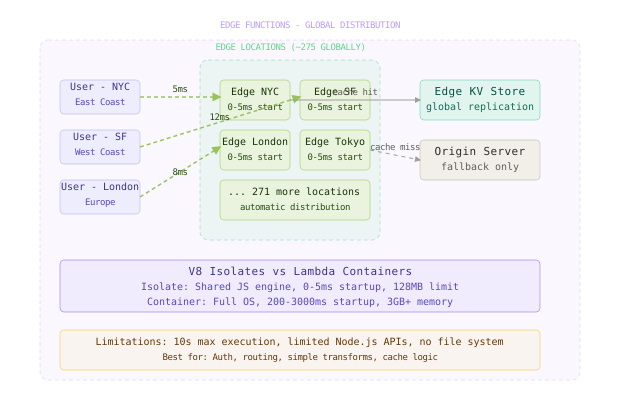
The third approach moves compute closer to users with edge functions. Instead of running Lambda in a few AWS regions, edge functions run in hundreds of locations worldwide. Cloudflare Workers, Vercel Edge Functions, and AWS Lambda@Edge execute code within milliseconds of users.
Edge functions start in 0-5ms because they use V8 isolates instead of full containers. An isolate is like a lightweight sandbox that shares the JavaScript engine but isolates your code. It’s the difference between launching a new browser tab (fast) versus launching an entire browser (slow).
// Cloudflare Worker handling API requests at the edge
addEventListener('fetch', event => {
  event.respondWith(handleRequest(event.request))
})

async function handleRequest(request) {
  // Runs in <5ms globally, no cold start delay
  const url = new URL(request.url)

  if (url.pathname === '/api/user') {
    // Edge KV storage for user data - globally replicated
    const userId = url.searchParams.get('id')
    const userData = await USER_DATA.get(userId)

    return new Response(userData, {
      headers: { 'Content-Type': 'application/json' }
    })
  }

  // Cache responses at edge for instant delivery
  return caches.default.match(request)
}
The tradeoff is capability - edge functions have smaller memory limits, shorter execution times, and limited library support. They excel at simple transformations, routing, and caching but can’t handle complex business logic or large dependencies.
Hybrid Serverless-Container Strategy
The most sophisticated approach combines multiple compute patterns based on traffic characteristics. Hot paths use provisioned Lambda or edge functions for instant response. Background jobs use on-demand Lambda to save costs. Complex workflows run on containers with predictable performance.
# Multi-tier architecture configuration
apiVersion: v1
kind: ConfigMap
metadata:
  name: routing-config
data:
  routes.yaml: |
    routes:
      - path: "/api/auth/*"
        service: edge-functions  # Login/auth needs instant response
        latency_target: 50ms

      - path: "/api/search"
        service: provisioned-lambda  # Search is high-frequency
        concurrency: 100

      - path: "/api/reports/*"
        service: on-demand-lambda  # Reports are infrequent
        timeout: 15m

      - path: "/api/ml/*"
        service: ecs-fargate  # ML needs GPU + long execution
        cpu: 4
        memory: 16GB
        gpu: 1
This hybrid strategy requires sophisticated routing logic that directs requests based on latency requirements, computation needs, and cost constraints.
// Request router determining compute destination
func RouteRequest(ctx context.Context, req *Request) (*Response, error) {
    route := determineRoute(req.Path, req.Priority)

    switch route.Service {
    case "edge-functions":
        return edgeClient.Execute(ctx, req)

    case "provisioned-lambda":
        return lambdaClient.InvokeProvisioned(ctx, req)

    case "on-demand-lambda":
        return lambdaClient.InvokeOnDemand(ctx, req)

    case "ecs-fargate":
        return containerClient.Execute(ctx, req)
    }
}

func determineRoute(path string, priority Priority) Route {
    // Auth requests need instant response
    if strings.HasPrefix(path, "/api/auth/") {
        return Route{Service: "edge-functions"}
    }

    // High-priority user requests use warm Lambda
    if priority == HIGH && isUserFacing(path) {
        return Route{Service: "provisioned-lambda"}
    }

    // Long-running or resource-intensive tasks use containers
    if isComputeIntensive(path) {
        return Route{Service: "ecs-fargate"}
    }

    // Everything else uses cost-optimized on-demand Lambda
    return Route{Service: "on-demand-lambda"}
}The best serverless architectures don’t eliminate cold starts - they strategically choose which requests are worth the cost of keeping warm and which can tolerate brief initialization delays.
The Full Architecture
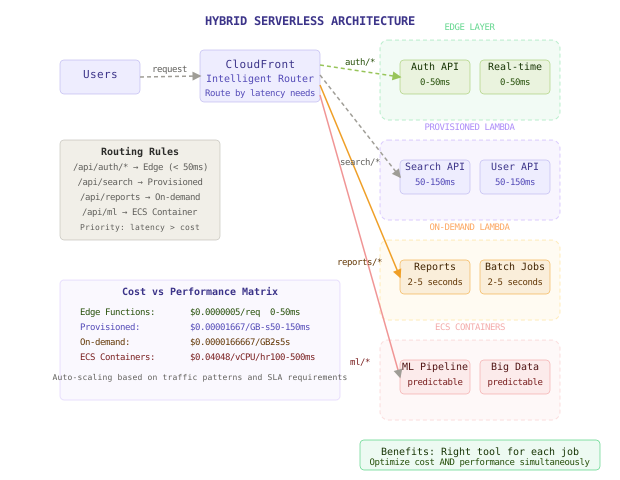
The complete solution uses intelligent request routing to match each workload with the optimal compute pattern. A CloudFront distribution acts as the entry point, analyzing requests and routing them to the most appropriate backend based on latency requirements, computational needs, and cost constraints.
Critical user-facing APIs route to edge functions for sub-100ms response times. High-frequency endpoints use provisioned Lambda with auto-scaling to handle traffic spikes without cold start delays. Batch processes and infrequent operations use on-demand Lambda to minimize costs. Complex machine learning and data processing tasks run on ECS containers with predictable performance characteristics.
The routing logic continuously learns from traffic patterns, automatically adjusting provisioned concurrency based on historical usage and scaling containers based on queue depth and processing requirements.
Serverless cold starts are a resource allocation problem disguised as a performance problem - the solution is intelligent resource management, not just faster code.
Component Deep Dives
CloudFront Request Router
The router’s job is to make smart decisions about where each request should go based on path patterns, historical latency data, and current system load.
// CloudFront function for intelligent routing
function handler(event) {
    const request = event.request;
    const uri = request.uri;
    const headers = request.headers;

    // Auth and real-time APIs need instant response
    if (uri.startsWith('/api/auth/') || uri.startsWith('/api/realtime/')) {
        request.origin = {
            custom: {
                domainName: 'edge-api.workers.dev',
                port: 443,
                protocol: 'https'
            }
        };
        return request;
    }

    // High-traffic APIs use provisioned Lambda
    if (isHighTrafficEndpoint(uri)) {
        const region = selectOptimalRegion(headers['cloudfront-viewer-country']);
        request.origin = {
            custom: {
                domainName: `api-${region}.lambda-url.amazonaws.com`,
                port: 443,
                protocol: 'https'
            }
        };
        return request;
    }

    // Default to cost-optimized on-demand Lambda
    request.origin = {
        custom: {
            domainName: 'api.lambda.amazonaws.com',
            port: 443,
            protocol: 'https'
        }
    };
    return request;
}
Provisioned Concurrency Auto-Scaler
This component monitors Lambda utilization and automatically adjusts provisioned concurrency to maintain target response times while minimizing costs.
# Auto-scaling Lambda provisioned concurrency
import boto3
from datetime import datetime, timedelta

class ProvisionedConcurrencyScaler:
    def __init__(self):
        self.lambda_client = boto3.client('lambda')
        self.cloudwatch = boto3.client('cloudwatch')

    def scale_based_on_metrics(self, function_name):
        # Get current utilization metrics
        end_time = datetime.utcnow()
        start_time = end_time - timedelta(minutes=15)

        response = self.cloudwatch.get_metric_statistics(
            Namespace='AWS/Lambda',
            MetricName='ProvisionedConcurrencyUtilization',
            Dimensions=[
                {'Name': 'FunctionName', 'Value': function_name}
            ],
            StartTime=start_time,
            EndTime=end_time,
            Period=300,
            Statistics=['Average', 'Maximum']
        )

        if not response['Datapoints']:
            return

        avg_utilization = sum(d['Average'] for d in response['Datapoints']) / len(response['Datapoints'])
        max_utilization = max(d['Maximum'] for d in response['Datapoints'])

        current_concurrency = self.get_current_provisioned_concurrency(function_name)

        # Scale up if utilization > 70% or max > 90%
        if avg_utilization > 70 or max_utilization > 90:
            new_concurrency = min(current_concurrency * 1.5, 1000)
            self.update_provisioned_concurrency(function_name, int(new_concurrency))

        # Scale down if utilization < 30% for 15 minutes
        elif avg_utilization < 30:
            new_concurrency = max(current_concurrency * 0.7, 10)
            self.update_provisioned_concurrency(function_name, int(new_concurrency))
Edge Function Cache Layer
Edge functions use distributed cache storage to serve frequently requested data instantly without backend calls.
// Edge cache implementation with automatic invalidation
class EdgeCache {
    constructor() {
        this.kv = EDGE_CACHE; // Cloudflare KV or similar
        this.defaultTTL = 300; // 5 minutes
    }

    async get(key, options = {}) {
        try {
            const cached = await this.kv.get(key, 'json');
            if (!cached) return null;

            // Check if cache is still valid
            if (cached.expires && Date.now() > cached.expires) {
                await this.kv.delete(key);
                return null;
            }

            return cached.data;
        } catch (error) {
            console.error('Cache read error:', error);
            return null;
        }
    }

    async set(key, data, ttlSeconds = this.defaultTTL) {
        const item = {
            data: data,
            expires: Date.now() + (ttlSeconds * 1000),
            timestamp: Date.now()
        };

        try {
            await this.kv.put(key, JSON.stringify(item));
        } catch (error) {
            console.error('Cache write error:', error);
        }
    }

    async invalidatePattern(pattern) {
        // Invalidate all keys matching pattern
        const list = await this.kv.list({ prefix: pattern });
        const deletePromises = list.keys.map(key => this.kv.delete(key.name));
        await Promise.all(deletePromises);
    }
}
Comparison Table
| Approach | Write Complexity | Read Complexity | Latency | Storage Cost | Failure Modes | Best Use Case |
|---|---|---|---|---|---|---|
| Naive Warmup | Low | Low | 50-200ms | High ($$$) | Wasted resources, complex scheduling | Never - always use better alternatives |
| Provisioned Concurrency | Medium | Low | 50-150ms | Medium ($$) | Over/under provisioning, scaling delays | High-frequency APIs, predictable traffic |
| SnapStart (Java) | Medium | Low | 200-500ms | Low ($) | Language-specific, snapshot limitations | Java workloads, complex initialization |
| Edge Functions | High | Medium | 0-50ms | Low ($) | Limited runtime, vendor lock-in | Auth, routing, simple transformations |
| Hybrid Strategy | High | High | 0-150ms | Variable | Increased complexity, routing bugs | Large applications, diverse workload patterns |
The hybrid strategy wins for complex applications despite higher implementation complexity. For simple APIs with predictable traffic, provisioned concurrency offers the best balance of performance and simplicity.
Key Takeaways
• Cold starts aren’t a Lambda problem - they’re an application initialization problem that affects any just-in-time compute platform
• Provisioned concurrency eliminates cold starts by paying for always-ready execution environments, trading cost predictability for performance guarantees
• SnapStart solves Java cold starts by snapshotting initialized applications, reducing startup from seconds to milliseconds for JVM-based workloads
• Edge functions provide instant response times through global distribution but limit runtime complexity and available libraries
• Hybrid architectures match workloads to optimal compute patterns based on latency requirements, frequency, and computational needs
• Smart routing enables cost optimization by directing only latency-sensitive requests to expensive warm resources while using on-demand compute for everything else
• Auto-scaling provisioned concurrency based on utilization patterns prevents both over-provisioning costs and under-provisioning performance degradation
• Cache strategies at the edge reduce backend load and improve response times more effectively than optimizing function startup time alone
The counter-intuitive lesson is that fighting cold starts head-on is often the wrong approach. The most successful serverless architectures embrace cold starts as a cost optimization feature and design around them with intelligent resource allocation rather than trying to eliminate them entirely.
Frequently Asked Questions
Q: Should I keep all my Lambda functions warm to avoid cold starts? A: No. Keeping functions warm 24/7 can cost more than running dedicated servers. Use provisioned concurrency only for high-frequency endpoints where the cost is justified by performance requirements. Let infrequent functions cold start to optimize costs.
Q: How do I know how much provisioned concurrency to set? A: Start with your peak concurrent requests over the last 30 days, add 20% buffer, then monitor utilization metrics. Set up auto-scaling to adjust based on actual usage patterns. Under-provisioning causes cold starts; over-provisioning wastes money.
Q: Can I use SnapStart with other languages besides Java? A: Currently, SnapStart only supports Java runtime. Other languages need different optimization strategies like smaller deployment packages, connection pooling, or edge functions. AWS may expand SnapStart to other managed runtimes in the future.
Q: Why not just optimize my code to start faster instead of using provisioned concurrency? A: Code optimization helps but has limits. Even a perfectly optimized Node.js function needs 200-400ms for basic initialization. Database connections, SDK initialization, and dependency loading create unavoidable delays that provisioning solves better than code changes.
Q: When should I choose edge functions over Lambda? A: Choose edge functions for simple operations that need sub-100ms response times globally: authentication, routing, simple data transformations, and caching logic. Use Lambda for complex business logic, database operations, and integrations with AWS services.
Q: How do I handle database connections with cold starts? A: Use connection pooling services like RDS Proxy to eliminate connection establishment overhead. Avoid creating new database connections in Lambda initialization code. Consider caching database results at the edge or in ElastiCache to reduce database load entirely.
Interview Questions
Q: Design a serverless API that handles both real-time chat and batch report generation with optimal cost and performance. Expected depth: Discuss hybrid architecture with edge functions for chat, on-demand Lambda for reports, WebSocket API Gateway, SQS for batch processing, and cost analysis of each component.
Q: Your Lambda function has a 2-second cold start. Walk me through your debugging and optimization process. Expected depth: Cover profiling tools, deployment package analysis, dependency optimization, connection pooling, initialization vs handler separation, and when to switch to containers.
Q: How would you implement auto-scaling for provisioned concurrency across multiple regions? Expected depth: CloudWatch metrics, Application Auto Scaling, cross-region traffic patterns, latency-based routing, cost optimization strategies, and handling regional failovers.
Q: Compare the tradeoffs between keeping functions warm vs. accepting cold starts for a social media API. Expected depth: Traffic pattern analysis, cost modeling, user experience impact, hybrid strategies, edge caching, and specific AWS services for each approach.
Q: Explain how SnapStart works internally and its limitations. Expected depth: JVM snapshot mechanics, memory state preservation, security implications, file system limitations, network state handling, and alternative optimization strategies for other runtimes.
Want to see how these patterns hold up when traffic spikes 50x at 3 AM? That's exactly what this Premium deep-dive covers.