The Soft Delete That Wasn't
databases data-engineering
System Design Scenario
The Soft Delete That Wasn’t
When deleted=true accumulates for three years and your 800M-row table is 90% ghosts haunting every query
It’s Tuesday at 11:42 AM and the on-call Slack channel is lighting up. Checkout latency has crossed 3 seconds. The orders page takes 12 seconds to load for customer support reps. Marcus, a platform engineer who joined eight months ago, runs EXPLAIN ANALYZE on the main query and stares at the output: sequential scan, 800 million rows examined, 720 million of them have deleted=true. The database is spending 94% of its effort reading ghosts.
Think of it like a filing cabinet where 90% of the folders contain shredded paper that nobody took to the dumpster. Every time someone opens the drawer looking for an active file, they have to flip past hundreds of dead folders first. The drawer is full, the office paid for a bigger cabinet, then that one filled up too. Nobody noticed because the shredded paper accumulated one folder at a time over three years.
The story is depressingly common. A developer in 2021 implemented soft deletes the textbook way: UPDATE orders SET deleted = true, deleted_at = NOW() WHERE id = ?. Clean, reversible, audit-friendly. The PR got two approvals. Nobody asked what happens when the table hits a hundred million deleted rows. Or five hundred million. Or eight hundred million.
Three years later the orders table weighs 210GB on disk. Only 28GB of that is live data. The B-tree indexes span the full 800M rows because PostgreSQL’s standard indexes don’t discriminate by column value. Backups take 4.5 hours. Point-in-time recovery is a full-day operation. The monthly AWS bill for the RDS instance has quietly climbed from $1,200 to $4,800 because they had to upsize twice to keep the working set in RAM.
This is the data lifecycle management problem. Not a bug in the application logic, not a missing index, not a bad query plan. It’s the absence of a policy for what happens to data after it stops being useful to the application.
Why This Happens
Soft deletes are a reasonable default for any system that needs undo capability, audit trails, or regulatory compliance. The implementation is trivial and the immediate cost is zero. The problem is purely temporal: cost compounds invisibly until a threshold is crossed.
The failure chain looks like this:
Year 0: Developer adds deleted=true column
  → Table: 2M rows, queries fast, nobody notices
    → Year 1: 80M rows, 60M deleted
      → Index size doubles, still fits in RAM, P99 climbs from 4ms to 18ms
        → Year 2: 350M rows, 300M deleted
          → Buffer cache thrashing - working set exceeds shared_buffers
            → Sequential scans triggered - planner chooses seq over index
              → Year 3: 800M rows, 720M deleted
                → P99: 1.2s, VACUUM runs 6+ hours, backup window exceeded
                  → Emergency: storage 92% full, read replicas falling behind
The root cause is that soft deletes violate a core assumption of relational database design: that the majority of rows in a table are relevant to the majority of queries. When 90% of rows are irrelevant to 99% of queries, every optimization the database applies - buffer pool management, index traversal, statistics estimation, vacuum and bloat recovery - works against you.
PostgreSQL’s VACUUM process deserves special mention. VACUUM reclaims space from dead tuples - rows that have been updated or deleted at the transaction level. But soft-deleted rows aren’t dead tuples. They’re live rows with a flag set to true. VACUUM doesn’t touch them. The table bloats not because of transaction overhead but because of data that simply shouldn’t be there anymore.
Core Insight
Soft deletes trade deletion complexity for storage complexity. The storage cost is invisible until it becomes the dominant factor in query performance, backup windows, and infrastructure spend.
The Naive Solution
The first instinct is to add a partial index and call it done:
CREATE INDEX idx_orders_active ON orders (created_at, customer_id)
WHERE deleted = false;
This helps read queries immediately. The index only covers the 80M active rows, so lookups are fast again. Engineers declare victory, close the ticket, move on.
Here’s where it breaks:
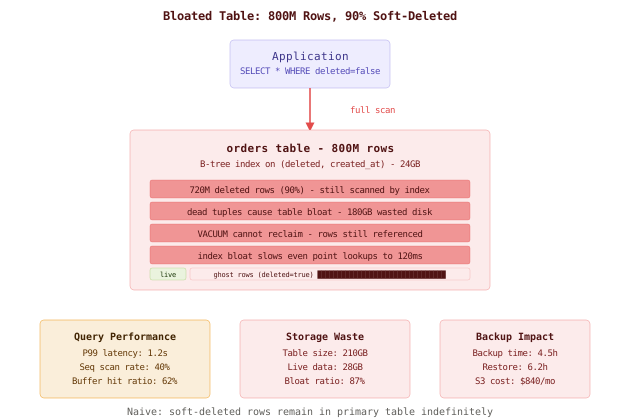
The partial index solves read latency but addresses nothing else:
Partial Index Fix - What it solves vs. what remains:

✓ Read queries use smaller index         ✗ Table still 210GB on disk
✓ P99 drops from 1.2s to 15ms           ✗ Backups still take 4.5 hours
✓ Buffer cache pressure reduced          ✗ VACUUM runs exhaust I/O budget
                                          ✗ Replication lag grows with table size
                                          ✗ Schema migrations take 3x longer
                                          ✗ Storage costs unchanged
                                          ✗ Point-in-time recovery: 14 hours
The table continues growing at 20M deleted rows per month. Within a year, you’ll be at 1.04 billion rows. The partial index itself starts consuming significant memory. pg_repack operations on a 210GB table take hours and require equivalent free disk space. You’ve treated the symptom but the underlying disease - unbounded accumulation of irrelevant data - remains terminal.
Warning
A partial index is a necessary first step, not a solution. Instagram ran into this exact problem with their photos table - partial indexes bought time, but they ultimately had to implement a full archival strategy with partitioning to bring the table under control.
The Better Solution
The real fix is a three-layer archival strategy that moves data through cold storage tiers based on age and access patterns.
Layer 1: Partition the Hot Table by Date
First, restructure the table using partitioning by date. This is the foundation everything else builds on.
-- Convert to partitioned table (use pg_partman for automation)
CREATE TABLE orders_partitioned (
    id BIGINT GENERATED ALWAYS AS IDENTITY,
    customer_id BIGINT NOT NULL,
    total_cents INTEGER NOT NULL,
    status TEXT NOT NULL,
    deleted BOOLEAN DEFAULT false,
    deleted_at TIMESTAMPTZ,
    created_at TIMESTAMPTZ NOT NULL DEFAULT NOW()
) PARTITION BY RANGE (created_at);

-- Create monthly partitions
CREATE TABLE orders_y2025_m01 PARTITION OF orders_partitioned
    FOR VALUES FROM ('2025-01-01') TO ('2025-02-01');
CREATE TABLE orders_y2025_m02 PARTITION OF orders_partitioned
    FOR VALUES FROM ('2025-02-01') TO ('2025-03-01');
-- pg_partman auto-creates future partitions

-- Partial index on each partition (inherited automatically)
CREATE INDEX ON orders_partitioned (customer_id, created_at)
    WHERE deleted = false;
Partitioning gives you two superpowers: partition pruning (queries touching only recent data skip old partitions entirely) and instant DROP (removing an entire month of data is a metadata operation, no vacuum needed).
Real-World
Slack migrated their messages table to range partitioning by workspace and date after hitting similar bloat issues. The partition-per-workspace approach let them drop entire workspace data instantly during account deletions instead of running DELETE statements that took hours.
Layer 2: Archival Worker for Deleted Data
A daily cron job moves soft-deleted rows older than 30 days from the hot table to a dedicated archive:
-- Archival worker: runs daily at 02:00 UTC
-- Move deleted rows older than 30 days in batches

DO $$
DECLARE
    batch_size INT := 10000;
    rows_moved INT := 0;
    total_moved BIGINT := 0;
BEGIN
    LOOP
        WITH candidates AS (
            SELECT id FROM orders_partitioned
            WHERE deleted = true
              AND deleted_at < NOW() - INTERVAL '30 days'
            ORDER BY deleted_at
            LIMIT batch_size
            FOR UPDATE SKIP LOCKED
        ),
        moved AS (
            INSERT INTO orders_archive
            SELECT o.* FROM orders_partitioned o
            JOIN candidates c ON o.id = c.id
            RETURNING 1
        )
        DELETE FROM orders_partitioned
        WHERE id IN (SELECT id FROM candidates);

        GET DIAGNOSTICS rows_moved = ROW_COUNT;
        total_moved := total_moved + rows_moved;

        -- Yield between batches to avoid lock pressure
        PERFORM pg_sleep(0.1);

        EXIT WHEN rows_moved < batch_size;
    END LOOP;

    RAISE NOTICE 'Archived % rows', total_moved;
END $$;
# Kubernetes CronJob definition
apiVersion: batch/v1
kind: CronJob
metadata:
name: orders-archival-worker
spec:
schedule: "0 2 * * *"
concurrencyPolicy: Forbid
jobTemplate:
spec:
template:
spec:
containers:
- name: archiver
image: company/db-tools:1.4
command: ["psql", "-f", "/scripts/archive_deleted_orders.sql"]
env:
- name: DATABASE_URL
valueFrom:
secretKeyRef:
name: db-credentials
key: url
restartPolicy: OnFailure
backoffLimit: 3Real-World
GitHub’s archive jobs use a similar batch-and-sleep pattern. The SKIP LOCKED clause ensures multiple worker instances don’t conflict, and the sleep between batches keeps replication lag under 100ms even during heavy archival runs.
Layer 3: Cold Storage Export and Partition Drops
Data older than one year gets exported to object storage as compressed Parquet files, then the corresponding archive partition is dropped:
# Monthly cold storage export (runs 1st of each month)
import pyarrow.parquet as pq
import psycopg2
import boto3
from datetime import datetime, timedelta

def export_and_drop_partition(target_month: str):
    """Export archive partition to S3 Glacier, then DROP."""
    conn = psycopg2.connect(DATABASE_URL)

    # Export to Parquet with ZSTD compression
    query = f"""
        SELECT * FROM orders_archive
        WHERE created_at >= '{target_month}-01'
          AND created_at < '{target_month}-01'::date + INTERVAL '1 month'
    """
    df = pd.read_sql(query, conn, chunksize=500_000)

    parquet_path = f"/tmp/orders_archive_{target_month}.parquet"
    pq.write_table(
        pa.Table.from_pandas(pd.concat(df)),
        parquet_path,
        compression='zstd'
    )

    # Upload to S3 with Glacier lifecycle
    s3 = boto3.client('s3')
    s3.upload_file(
        parquet_path,
        'company-data-archive',
        f'orders/deleted/{target_month}.parquet',
        ExtraArgs={'StorageClass': 'DEEP_ARCHIVE'}
    )

    # Drop the partition (instant, no vacuum)
    with conn.cursor() as cur:
        cur.execute(f"DROP TABLE IF EXISTS orders_archive_{target_month.replace('-','_')}")
    conn.commit()

    print(f"Exported and dropped partition for {target_month}")
Real-World
This mirrors how Stripe handles payment records. Active transactions live in hot PostgreSQL partitions. After settlement and reconciliation (typically 90 days), records move to a compressed archive. After 18 months, they’re exported to columnar storage for regulatory retention - queryable via Athena/Presto but costing pennies per GB.
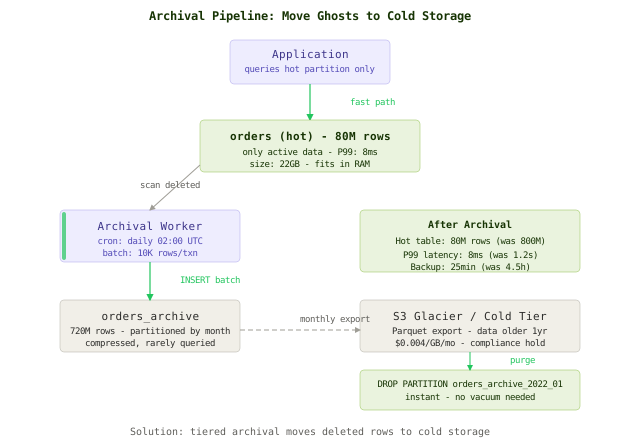
The Full Architecture
The complete system chains all three layers into a continuous data lifecycle management pipeline:
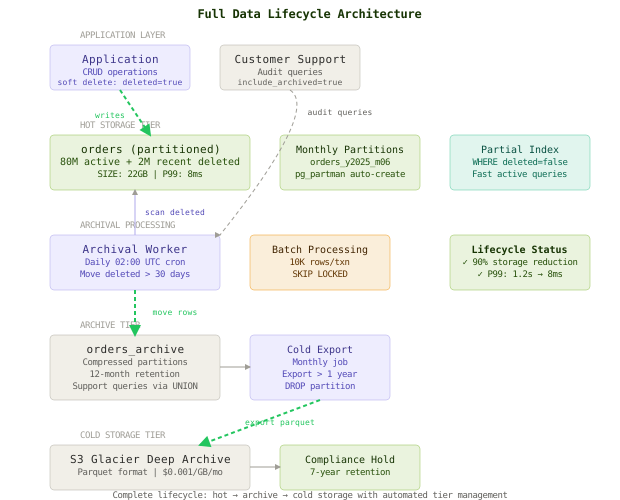
The happy path for a deleted order:
- Application sets
deleted=true, deleted_at=NOW()- row stays in hot partition - For 30 days, the row is still accessible for undo operations or customer support lookups
- Day 31: archival worker moves it to
orders_archive(partitioned by month, ZSTD compressed) - Hot table partition loses the row - VACUUM reclaims the space efficiently
- Month 13: cold storage exporter writes the partition to S3 Glacier as Parquet
DROP TABLE orders_archive_2024_01- instant space reclaim, zero vacuum overhead
The read path never touches archived data unless explicitly requested. The partial index on WHERE deleted = false covers 100% of normal application queries. Customer support queries that need deleted data hit the archive table via a separate endpoint with explicit timeout handling.
Component Deep Dives
Partition Management with pg_partman
-- Install pg_partman extension
CREATE EXTENSION pg_partman;

-- Configure automatic partition management
SELECT partman.create_parent(
    p_parent_table := 'public.orders_partitioned',
    p_control := 'created_at',
    p_type := 'range',
    p_interval := '1 month',
    p_premake := 3  -- create 3 months ahead
);

-- Maintenance: run daily to create new partitions and manage old ones
SELECT partman.run_maintenance();

-- Configure retention: auto-detach partitions older than 3 months
UPDATE partman.part_config
SET retention = '3 months',
    retention_keep_table = true  -- detach but don't drop (archival picks up)
WHERE parent_table = 'public.orders_partitioned';
pg_partman handles the operational burden of partition creation and rotation. The retention_keep_table = true setting detaches old partitions from the parent without dropping them, giving the archival worker time to process them.
VACUUM Tuning for Partitioned Tables
-- Per-partition autovacuum settings (aggressive on hot partitions)
ALTER TABLE orders_y2025_m06 SET (
    autovacuum_vacuum_scale_factor = 0.01,     -- trigger at 1% dead tuples (default 20%)
    autovacuum_vacuum_cost_delay = 2,          -- less sleep between pages
    autovacuum_vacuum_cost_limit = 2000        -- more pages per cycle
);

-- Monitor bloat per partition
SELECT
    schemaname || '.' || relname AS table_name,
    pg_size_pretty(pg_total_relation_size(relid)) AS total_size,
    n_dead_tup,
    n_live_tup,
    ROUND(n_dead_tup::numeric / GREATEST(n_live_tup, 1) * 100, 1) AS dead_pct,
    last_autovacuum
FROM pg_stat_user_tables
WHERE relname LIKE 'orders_y%'
ORDER BY n_dead_tup DESC;
With partitioning, VACUUM operates on smaller chunks. A 2GB monthly partition vacuums in seconds instead of the hours it took on the monolithic 210GB table. Dead tuples from the DELETE operations during archival get reclaimed within minutes.
Monitoring and Alerting
# Prometheus alerting rules for table health
groups:
  - name: database_lifecycle
    rules:
    - alert: TableBloatExcessive
      expr: pg_stat_user_tables_n_dead_tup{relname=~"orders_y.*"} > 1000000
      for: 30m
      labels:
        severity: warning
      annotations:
        summary: "Partition {{ $labels.relname }} has >1M dead tuples"

    - alert: ArchivalWorkerStalled
      expr: time() - orders_archival_last_success_timestamp > 172800
      for: 10m
      labels:
        severity: critical
      annotations:
        summary: "Archival worker has not completed in 48 hours"

    - alert: HotTableSizeExceeded
      expr: pg_total_relation_size{relname="orders_partitioned"} > 50e9
      for: 1h
      labels:
        severity: warning
      annotations:
        summary: "Hot orders table exceeds 50GB target"
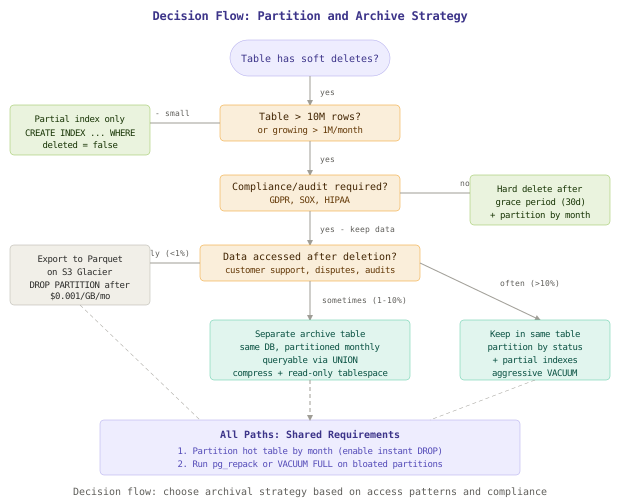
Comparison Table
| Approach | Complexity | Query Impact | Storage Savings | Compliance | Best For |
|---|---|---|---|---|---|
| Partial index only | Low | Fixes reads, nothing else | None | N/A | Tables < 10M rows |
| Hard delete after grace period | Low | Good - fewer rows | High | Poor - data gone | Non-regulated data |
| Partition by date + archive table | Medium | Excellent - partition pruning | High | Good - data queryable | Most production systems |
| Partition + cold storage export | High | Excellent | Maximum | Excellent - Glacier retention | Regulated industries (GDPR, SOX) |
| Separate database per tenant | Very High | Isolated | Varies | Excellent | Multi-tenant SaaS at scale |
Key Takeaways
- Soft deletes are a write-time convenience that becomes a read-time tax. The tax compounds silently until it crosses a performance threshold, usually years after the original decision.
- Partial indexes are a band-aid, not a cure. They fix query latency but leave storage bloat, backup times, and vacuum pressure untouched.
- Partitioning by date is the foundation of any data lifecycle strategy. It enables instant DROP, efficient VACUUM, and clean archival boundaries.
- Cold storage tiers should follow data temperature. Hot (live queries) stays in the primary table. Warm (support/audit) goes to a compressed archive. Cold (compliance) goes to object storage as Parquet.
- VACUUM cannot fix soft-delete bloat because soft-deleted rows aren’t dead tuples - they’re live rows the database is correctly preserving. You must physically move them out.
- Batch archival with SKIP LOCKED prevents the archival worker from competing with application transactions. Sleep between batches keeps replication lag bounded.
- DROP PARTITION is O(1). Deleting 50 million rows takes minutes and generates massive WAL. Dropping a partition is a metadata operation that completes in milliseconds.
The meta-lesson: every deleted=true is a promise that someone will eventually deal with the corpse. If you don’t design the system that keeps that promise, the corpses accumulate until they outnumber the living.
FAQ
Q: Can’t I just add a WHERE clause to all my queries and leave the data in place?
If your table is under 10M rows, yes. A partial index plus disciplined query patterns works fine at small scale. Once you cross 50-100M rows, the secondary effects - backup duration, vacuum overhead, replication lag, schema migration time - make this approach untenable regardless of query performance.
Q: How do I handle queries that need to JOIN across hot and archived data?
Create a view that UNIONs both tables, but never use it for routine application queries. Expose it only through an explicit “include archived” parameter in your API. Customer support dashboards can tolerate 2-3 second queries against the archive; your checkout flow cannot.
Q: What about GDPR right-to-erasure requests against archived data?
For data in the archive table, run targeted DELETEs by customer ID. For data already exported to S3 Glacier, you have two options: maintain a deletion ledger (a list of customer IDs whose data should be filtered at query time) or re-export the Parquet file with those records removed. Most companies choose the ledger approach since Glacier retrieval takes hours.
Q: Should I partition by deleted_at or created_at?
Partition by created_at. Most queries filter by creation date (recent orders, last 90 days of activity). Partitioning by deleted_at would scatter logically related rows across partitions based on when they happened to be deleted, which rarely aligns with query patterns.
Q: How do I migrate an existing 800M-row table to partitioned structure without downtime?
Use pg_partman with its migration utilities or the pg_rewrite approach: create the new partitioned table, set up a trigger on the old table that writes to both, backfill in batches, then swap with a RENAME inside a brief lock. For PostgreSQL 14+, you can use ALTER TABLE ... ATTACH PARTITION on the existing table if you’re converting to declarative partitioning. The process typically takes 2-4 days of background work with zero downtime.
Q: What’s the storage cost comparison between keeping everything in PostgreSQL vs. the tiered approach?
At 800M rows with an average row size of 280 bytes: PostgreSQL (RDS r6g.2xlarge) costs roughly $4,800/month for storage and compute. The tiered approach reduces the hot table to 80M rows (fits on a $1,200/month instance), archive storage adds ~$200/month, and S3 Glacier Deep Archive for historical data costs under $5/month per TB. Total savings: approximately 70% on infrastructure spend.
Interview Questions
Q: You inherit a production database where 85% of rows are soft-deleted. Walk me through your remediation plan.
Expected depth: Start with immediate mitigation (partial index), then discuss assessment (which queries are affected, compliance requirements, access patterns for deleted data). Progress to partitioning strategy, archival worker design, cold storage tier selection. Address the migration path from monolithic to partitioned without downtime. Bonus: mention monitoring for bloat regression and SLOs for the archival pipeline.
Q: Compare partitioning strategies for a table with soft deletes - range by date vs. list by status vs. hash. When would you choose each?
Expected depth: Range by date enables time-based pruning and clean DROP of old partitions. List by status (active/deleted) creates exactly two partitions - simple but doesn’t solve the growing deleted partition. Hash distributes evenly but doesn’t enable meaningful pruning. The candidate should argue for range-by-date as the default, explain when list-by-status works (small tables, equal read patterns), and note that hash is rarely appropriate for soft-delete scenarios.
Q: Design a data lifecycle system that satisfies both GDPR right-to-erasure and a 7-year audit retention requirement.
Expected depth: The candidate should identify the tension (GDPR says delete on request, audit says retain for 7 years). Resolution: separate PII from transactional data. Anonymize the PII columns on erasure request while preserving the transaction record for audit. For cold storage, maintain a deletion ledger that filters PII at query time. Discuss encryption per-customer as an alternative (destroy the key to effectively erase).
Q: Your archival worker is causing replication lag spikes on read replicas. How do you fix it?
Expected depth: Identify the cause (large batches generate WAL faster than replicas can apply). Solutions: reduce batch size, increase sleep between batches, run during low-traffic windows, use SKIP LOCKED to avoid long-held row locks. Advanced: discuss logical replication slots, WAL throttling, and the tradeoff between archival throughput and replica freshness. The best candidates mention monitoring replication lag as a feedback signal to dynamically throttle the worker.
Q: When would you choose hard deletion over soft deletion from day one?
Expected depth: Hard deletion is appropriate when there’s no regulatory retention requirement, no undo feature needed, and no downstream consumers depend on the data existing. Examples: session tokens, temporary upload records, expired OTP codes, rate limit counters. The candidate should discuss the 30-day grace period pattern (soft delete, then hard delete after grace) as a middle ground, and mention that event sourcing provides an alternative audit trail without polluting the primary table.
Premium Content
Unlock the full article along with everything else in the archive — all in one place.