The Single Redis Instance Problem
caching scalability reliability
System Design Scenario
The Single Redis Instance Problem
When your Swiss Army knife becomes your single point of failure
Tuesday, 2:47 AM. Sarah stares at the Slack messages flooding in. “Users getting logged out randomly.” “Shopping carts empty.” “Can’t access dashboard.” The monitoring dashboard shows a clean flatline - Redis memory usage dropped from 8GB to zero in under a minute.
Redis was supposed to simplify everything. Sessions, cache, job queue, rate limiting counters - all stored in one blazingly fast in-memory database. It’s like having a Swiss Army knife for data storage: one tool that handles every job. The convenience was intoxicating. Deploy once, configure once, monitor one service. Until that Swiss Army knife becomes the linchpin holding your entire system together.
The memory monitor had been creeping upward for weeks: 6GB, 7GB, 7.8GB. When it hit the configured 8GB limit, Redis started evicting keys to make room. First the cache keys went - acceptable. Then session keys started disappearing - catastrophic. Sarah restarted Redis to clear the memory pressure, but the damage was done. Every logged-in user across 50,000+ active sessions got booted back to the login screen.
This is the single point of failure problem. When one component serves multiple critical functions, its failure creates a cascade that takes down everything connected to it.
Why This Happens
The instinct is to consolidate similar workloads onto shared infrastructure - it reduces operational complexity and hardware costs. Redis appears perfect for this because it’s fast, simple, and handles multiple data structures elegantly. One instance can serve as a cache, session store, message broker, and counter service simultaneously.
But different workloads have fundamentally different failure characteristics:
cache miss -> slower response (degraded)
session loss -> user logout (catastrophic)
job queue failure -> processing stops (critical)
rate limit counter loss -> security bypass (severe)
The problem compounds when memory pressure forces Redis to make eviction decisions. Redis eviction policies like allkeys-lru don’t distinguish between “nice to have” cache data and “must not lose” session data. When memory fills up, Redis treats a user’s shopping cart with the same priority as a cached database query result.
A system that serves multiple masters serves none of them well - Redis eviction policies can’t distinguish between recoverable cache misses and catastrophic session loss.
The Naive Solution (and where it breaks)
Most engineers first try to scale Redis vertically - throw more RAM at the problem. If 8GB isn’t enough, provision 32GB or 64GB. This is like widening a single bridge to handle more traffic - it delays the problem but doesn’t eliminate it.
The thinking seems sound: more memory means less eviction pressure, which means all workloads can coexist peacefully. But this approach creates three new problems.
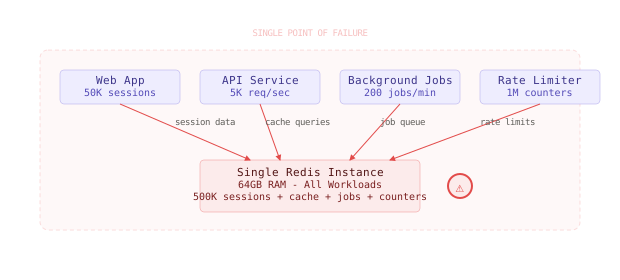
First, the blast radius grows exponentially. A 64GB Redis instance serving 500,000 sessions creates a much more devastating failure than an 8GB instance serving 50,000 sessions. When it goes down, half a million users get logged out simultaneously instead of fifty thousand.
Second, different workloads have incompatible memory patterns. Cache data should be evicted aggressively when memory is tight. Session data should never be evicted - it should either persist or fail fast. Job queue data needs durability guarantees that in-memory storage can’t provide. You end up configuring Redis for the lowest common denominator, which satisfies no workload optimally.
Third, the performance characteristics clash at scale:
Small scale: 10K sessions + 100MB cache -> works fine
Large scale: 500K sessions + 50GB cache -> eviction thrashing
At large scale, the cache workload creates memory pressure that threatens the session workload, which creates eviction pressure that destroys the rate limiting workload. Each component optimized for its own use case would perform better in isolation.
Vertical scaling a multi-purpose Redis increases the blast radius without solving the fundamental mismatch between workload requirements - you’re just building a bigger single point of failure.
The Better Solution
Here’s what actually fixes this: separate Redis instances with workload-specific configurations. Think of it like replacing a Swiss Army knife with dedicated tools - each tool optimized for its specific job.
Redis Cluster for Cache Workloads
Cache data can afford to be lossy and benefits from horizontal scaling. Redis Cluster automatically shards data across multiple nodes and handles node failures gracefully.
# Create a 3-node Redis cluster for cache
redis-cli --cluster create \
  cache-1:6379 cache-2:6379 cache-3:6379 \
  --cluster-replicas 0

# Cache config optimized for throughput
maxmemory 2gb
maxmemory-policy allkeys-lru
save ""  # Disable persistence for cache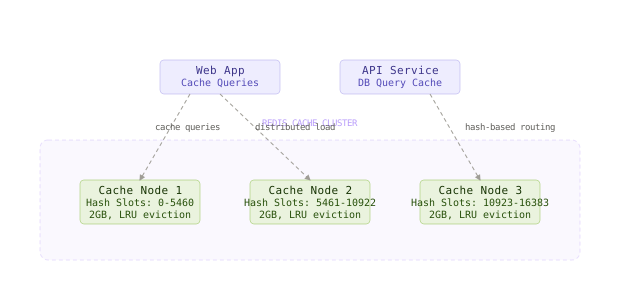
This configuration prioritizes speed over durability. When a cache node fails, applications experience slower responses but don’t lose critical user data.
Twitter’s cache layer uses hundreds of Redis instances in multiple clusters, each tuned for different cache hit rate requirements - timeline cache optimizes for recency, user profile cache optimizes for hit rate.
Redis Sentinel for Session Storage
Session data requires high availability and zero data loss. Redis Sentinel provides automatic failover with a dedicated master-replica setup.
# Redis Sentinel configuration for sessions
sentinel monitor sessions-master 10.0.1.100 6379 2
sentinel failover-timeout sessions-master 10000
sentinel parallel-syncs sessions-master 1

# Session Redis config optimized for durability
maxmemory-policy noeviction  # Never evict session data
save 300 10                  # Persist every 5 minutes if 10+ writes
appendonly yes               # Enable AOF for durability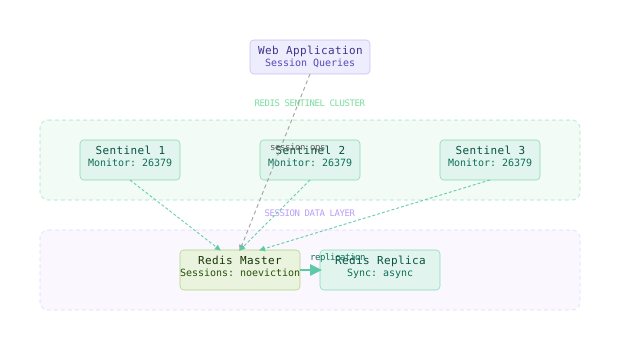
With noeviction policy, Redis will reject writes instead of silently evicting existing sessions. Your application can detect this condition and either scale the session store or implement session overflow handling.
Dedicated Job Queue Infrastructure
Job queues need different guarantees than cache or sessions. Redis works for simple job queues, but dedicated solutions like Amazon SQS or RabbitMQ provide durability guarantees that Redis can’t match.
# Job queue with Redis - simple but limited durability
def enqueue_job(job_data):
    r.lpush('job_queue', json.dumps(job_data))

def process_jobs():
    while True:
        job = r.brpop('job_queue', timeout=30)
        # If Redis crashes here, job is lost

# Job queue with SQS - guaranteed delivery
import boto3
sqs = boto3.client('sqs')

def enqueue_job(job_data):
    sqs.send_message(
        QueueUrl='https://sqs.region.amazonaws.com/account/jobs',
        MessageBody=json.dumps(job_data)
)The core fix is workload separation - each data store should be optimized for one job instead of being a mediocre compromise between multiple jobs.
The Full Architecture
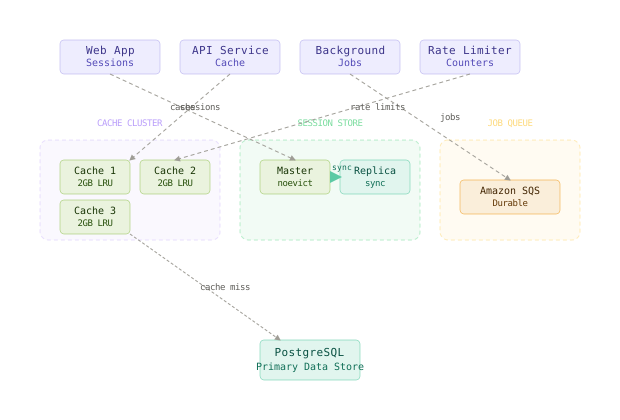
The final architecture separates concerns cleanly. The cache layer uses Redis Cluster for horizontal scaling and can tolerate node failures. The session layer uses Redis Sentinel for high availability and never evicts user data. The job queue uses a purpose-built system like SQS that provides durability guarantees.
When the cache layer experiences memory pressure, it evicts old cache entries without impacting user sessions. When the session layer needs to scale, you can add replica nodes without worrying about cache eviction policies. When the job queue needs to handle traffic spikes, it can leverage cloud-native scaling without forcing you to tune Redis memory limits.
Each component can be monitored, alerted on, and scaled independently. A cache node failure creates a temporary performance impact. A session store failover takes 10-30 seconds but preserves all user state. A job queue outage creates processing delays but doesn’t lose jobs.
The most important design decision is acknowledging that convenience and reliability are often opposites - the easiest solution to deploy is rarely the most reliable solution to operate.
Component Deep Dives
Redis Cache Cluster Configuration
The cache cluster’s job is to absorb database load by serving frequently accessed data from memory. It should prioritize speed and accept some data loss during node failures.
# Optimal cache node configuration
cluster-enabled yes
cluster-config-file nodes.conf
cluster-node-timeout 5000
maxmemory 2gb
maxmemory-policy allkeys-lru
tcp-keepalive 60
timeout 30
save ""  # No persistence - speed over durability
The allkeys-lru policy ensures that when memory fills up, Redis evicts the least recently used keys across all data types. This is perfect for cache workloads where all keys are equally evictable.
Redis Session Store with Sentinel
The session store’s job is to maintain user state with zero data loss and minimal downtime during failures.
# Sentinel configuration
port 26379
sentinel monitor sessions-master 10.0.1.100 6379 2
sentinel auth-pass sessions-master redis-password
sentinel down-after-milliseconds sessions-master 5000
sentinel failover-timeout sessions-master 15000
sentinel parallel-syncs sessions-master 1

# Master Redis configuration for sessions
bind 0.0.0.0
port 6379
maxmemory 4gb
maxmemory-policy noeviction
appendonly yes
appendfsync everysec
auto-aof-rewrite-percentage 100
auto-aof-rewrite-min-size 64mb
save 900 1    # Persist if at least 1 write in 15 minutes
save 300 10   # Persist if at least 10 writes in 5 minutes
save 60 10000 # Persist if at least 10k writes in 1 minute
The noeviction policy is crucial - it forces your application to handle memory pressure explicitly instead of silently losing user sessions. When the session store fills up, Redis returns an error, and your application can implement session cleanup, scale the store, or reject new sessions gracefully.
Application Connection Handling
Your application needs to connect to the right data store for each workload and handle failures appropriately.
import redis.sentinel
import redis
import boto3

class DataStores:
    def __init__(self):
        # Cache cluster - can tolerate failures
        self.cache = redis.RedisCluster(
            host='cache-cluster.redis.local', port=6379,
            skip_full_coverage_check=True,
            socket_connect_timeout=1,
            socket_timeout=1,
            retry_on_timeout=False
        )

        # Session store with Sentinel - high availability
        sentinel = redis.sentinel.Sentinel([
            ('sentinel-1', 26379),
            ('sentinel-2', 26379),
            ('sentinel-3', 26379)
        ], socket_timeout=0.5)
        self.sessions = sentinel.master_for(
            'sessions-master', socket_timeout=1
        )

        # Job queue - guaranteed durability
        self.jobs = boto3.client('sqs')

    def get_cached(self, key):
        try:
            return self.cache.get(key)
        except redis.RedisError:
            # Cache miss due to failure - acceptable
            return None

    def get_session(self, session_id):
        try:
            return self.sessions.get(f"session:{session_id}")
        except redis.RedisError as e:
            # Session failure - critical error
            raise SessionStoreError(f"Cannot retrieve session: {e}")
The connection handling treats cache failures as degraded performance but session failures as critical errors. This reflects the different failure tolerance of each workload.
Comparison Table
| Approach | Write Complexity | Read Complexity | Latency | Storage Cost | Failure Modes | Best Use Case |
|---|---|---|---|---|---|---|
| Single Redis | Low | Low | 0.1ms | Low | Total system failure when instance fails | Development, small apps with less than 10K users |
| Vertical Scaling | Low | Low | 0.1ms | Medium | Larger blast radius on failure | Medium apps willing to accept downtime risk |
| Workload Separation | Medium | Medium | 0.1-0.5ms | Medium | Graceful degradation per workload | Production apps requiring reliability |
| Full Redis Cluster + Sentinel | High | High | 0.2-1ms | High | Complex operational overhead | Large scale apps with dedicated ops team |
| Hybrid (Redis + SQS + RDS) | High | Medium | 0.5-5ms | High | Vendor lock-in, multi-service complexity | Enterprise apps with strict durability requirements |
For most production applications, workload separation with Redis Cluster for cache and Redis Sentinel for sessions provides the best balance. You get reliability where you need it without the operational complexity of managing multiple different technologies.
Key Takeaways
- Single points of failure compound when one service handles multiple critical functions - the blast radius grows exponentially with consolidation
- Workload separation allows each data store to be optimized for its specific reliability, performance, and consistency requirements
- Redis eviction policies can’t distinguish between recoverable cache data and critical user data - separate instances prevent this conflict
- Vertical scaling delays the problem but increases the blast radius when failure eventually occurs
- Cache clusters should optimize for speed and accept data loss - use
allkeys-lruand disable persistence - Session stores should optimize for durability and availability - use
noeviction, enable persistence, and implement Sentinel failover - Operational complexity increases with separation, but each component can be monitored and scaled independently
- Failure modes become predictable and containable when workloads don’t interfere with each other
The hardest lesson in distributed systems is recognizing when convenience becomes a liability. A single Redis instance that handles everything feels elegant until it becomes the reason your entire user base gets logged out at 3 AM. Design for the failure, not the happy path.
Frequently Asked Questions
Q: Why not use Redis persistence to prevent data loss during restarts? A: Persistence helps with planned restarts but doesn’t solve the eviction problem. If Redis runs out of memory and starts evicting session keys, persistence won’t save those sessions. You need workload separation to prevent eviction of critical data in the first place.
Q: Can’t I just increase the memory limit and use noeviction policy on a single instance?
A: This creates a different failure mode - when memory fills up, Redis starts rejecting all writes, including cache writes that should be evictable. You end up with either evicted sessions or a cache that can’t accept new data. Neither is acceptable.
Q: What about using Redis modules like RedisJSON or RedisTimeSeries for different workloads? A: Modules change the data structures but don’t solve the fundamental resource sharing problem. A RedisJSON session document and a RedisTimeSeries cache entry still compete for the same memory pool and are subject to the same eviction policies.
Q: How do I handle connection failures when using separate Redis instances? A: Implement different retry strategies per workload. Cache connections should fail fast and serve stale data. Session connections should retry aggressively and use circuit breakers. Job queue connections should implement exponential backoff to handle temporary outages.
Q: Isn’t this over-engineering for smaller applications? A: For applications with fewer than 10,000 active users, a single Redis instance might be acceptable if you can afford complete user logout during failures. The workload separation approach pays off when the cost of failure exceeds the cost of additional operational complexity.
Q: What about using Redis Enterprise or AWS ElastiCache? A: Managed Redis services reduce operational overhead but don’t solve the workload separation problem. You still need separate clusters/replication groups for different workloads to avoid the resource sharing issues.
Interview Questions
Q: How would you design a session store for a social media app with 10 million daily active users? Expected depth: Discuss Redis Sentinel vs Redis Cluster tradeoffs, session data partitioning strategies, failover time requirements (30 seconds max), data persistence options (AOF vs RDB), and session cleanup policies for inactive users. Consider multi-region scenarios and data locality.
Q: Your Redis cache hit rate dropped from 85% to 12% overnight but memory usage is stable. What happened?
Expected depth: Analyze eviction policies (allkeys-lru vs volatile-lru), workload interference between different data types, possible TTL configuration changes, and memory fragmentation patterns. Distinguish between cache warming issues and structural problems.
Q: Design a rate limiting system that can handle 100,000 requests per second across 50 different endpoints. Expected depth: Compare Redis counters vs sliding window algorithms, key partitioning strategies to avoid hot keys, expiration handling for time-based windows, and fallback strategies when Redis is unreachable. Discuss token bucket vs fixed window tradeoffs.
Q: How would you migrate from a single Redis instance to separated workloads with zero downtime? Expected depth: Plan dual-write phases, data consistency during migration, connection failover strategies, rollback procedures, and monitoring/validation approaches. Address session continuity and cache warming for the new cluster topology.
Q: A Redis Cluster node is consistently running out of memory while other nodes are at 50% usage. How do you fix this? Expected depth: Analyze hash slot distribution, identify hot keys causing uneven sharding, discuss resharding procedures, key naming patterns that create skew, and monitoring approaches for balanced cluster usage. Consider application-level solutions vs infrastructure changes.
Want to see how these patterns hold up when traffic spikes 50x at 3 AM? That's exactly what this Premium deep-dive covers.