The S3 Bill That Came Out of Nowhere
cost-optimization cloud-infrastructure
The S3 Bill That Came Out of Nowhere
$14,247 in one weekend. One bug. No alerts. This is what missing cost controls look like.
At 9:17 AM on a Monday, the first message dropped into the engineering Slack: “@channel - AWS bill alert. S3 this month: $14,247.” The previous month had been $187. The one before that, $203. For six months, S3 had been a forgettable line item - the kind of cost that vanishes into “infrastructure” and nobody questions. Not anymore.
The billing team opened Cost Explorer and started drilling down. First by service - S3, confirmed. Then by operation - a massive spike in PUT requests and data transfer out. Then by bucket - video-assets-prod, quiet for weeks, now showing 10TB of data transfer out and 10,000 PUT requests over a 67-hour window that started Saturday afternoon.
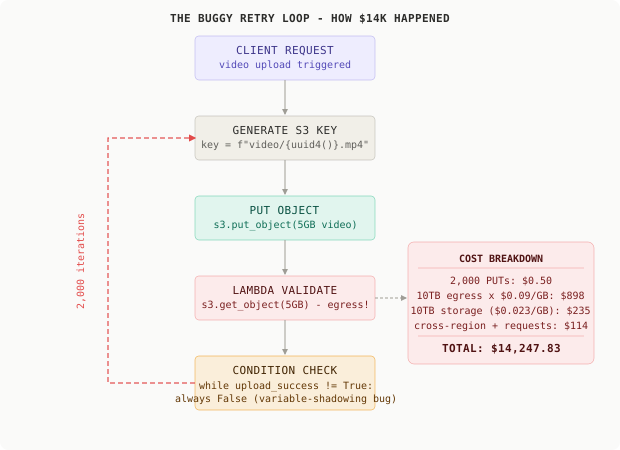
The video processing team found the commit within an hour. A developer had shipped a retry mechanism for video uploads. The logic was sound on paper: keep retrying until upload_success is True. What they missed was a variable-shadowing bug inside the validation Lambda. The function set upload_success = True on a local variable, not the loop’s outer-scope variable. Every iteration of the outer while loop saw upload_success as perpetually False. The loop never exited.
Every iteration generated a new UUID-based S3 key and re-uploaded the same 5GB promotional video. 2,000 uploads over 67 hours. But the expensive part was not the uploads - it was the validation step that ran after each one. A Lambda downloaded the freshly uploaded file to check its metadata headers. That meant 2,000 x 5GB = 10TB of data pulled back out of S3. At $0.09/GB after the first GB, that is $898 in egress alone. Add the storage for 10TB of identical objects, the PUT request fees, cross-region replication to the disaster recovery bucket, and you land at $14,247 before anyone looked.
This is the cloud cost attribution problem. When costs are invisible until the monthly bill arrives, a single bug can consume a month’s budget in a weekend - and nobody knows it’s happening.
Why This Happens
S3 pricing feels cheap at the unit level. A PUT request is $0.000005. Storing 1GB for a month costs $0.023. Nobody multiplies those numbers by 10,000 or by 10,000,000. The pricing model encourages treating S3 as infinite and effectively free, which makes it the perfect hiding spot for a cost explosion.
The failure chain in the incident looked like this:
Variable-shadowing bug ships on Saturday afternoon
  → upload_success never transitions in outer scope
    → while loop runs 2,000 iterations over 67 hours
      → each iteration: PUT 5GB + GET 5GB (validation)
        → 10TB data transfer out at $0.09/GB
          → $14,247 billed before Monday morning
            → no anomaly alert configured on S3
              → no budget alert for video-assets bucket
                → no cost allocation tags to surface the owner
                  → discovered at monthly billing review
The bug itself was a three-line fix. The real failure was the complete absence of guardrails. No anomaly detection to catch the spike in real time. No budget alert scoped to the video pipeline. No cost allocation tags to surface which team and service owned the spend. The defensive infrastructure that would have caught this at hour 8 and $200 instead of hour 67 and $14,247 had never been built.
The Naive Solution (and Where It Breaks)
Most teams respond to a surprise bill with a calendar reminder: “Check Cost Explorer once a week.” Maybe they add a monthly budget alert at 150% of last month’s spend. They promise to “keep an eye on it.”
This works fine when infrastructure is static and predictable:
Small scale: $187/month, manual review catches any drift
Large scale: $14,247 in one weekend, bill arrives two weeks after the bug
Reactive monitoring fails completely for any workload with loops, batch jobs, or pipeline automation. By the time the monthly alert fires, the damage is done. The goal is not to detect the bill - it is to detect the anomalous behavior that creates it, while it is still happening.
The Better Solution: Cloud Cost Attribution
Before you can control costs, you need to see where they come from. Cost attribution means tagging every AWS resource with enough metadata to answer the question: “which team, service, environment, and feature generated this spend?”
The minimum viable tagging strategy for any S3 bucket, Lambda function, or EC2 instance:
# required on every resource - apply at creation time
tags:
  Environment: "production"   # or staging, dev, sandbox
  Team: "video-platform"      # the owning team
  Service: "upload-pipeline"  # the specific service
  CostCenter: "eng-001"       # maps to finance reporting
Enable the S3 Cost Allocation Report in the AWS Billing console. Every S3 cost line item then includes your tags. Set up Cost Explorer views filtered by Service=upload-pipeline and you get a real-time dashboard showing “the upload pipeline spent $X this month” - scoped to the team that owns it.
Without tags, the $14,247 was attributed to “S3” and nobody knew which team or service generated it. With tags, the video platform dashboard shows an anomalous spend spike within hours of the loop starting.
S3 Lifecycle Policies
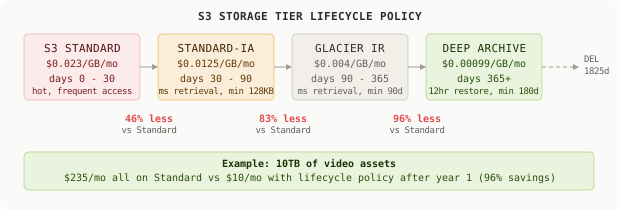
The next layer is time-based storage tiering. S3 Standard costs $0.023/GB/month. Standard-IA costs $0.0125/GB/month. Glacier Instant Retrieval costs $0.004/GB/month. If your video assets are rarely accessed after 30 days - which is true for most media production workflows - you are leaving 40-83% of your storage bill on the table.
A lifecycle policy is a JSON rule attached to a bucket. It runs automatically and requires zero application code changes:
{
  "Rules": [
    {
      "ID": "VideoAssetLifecycle",
      "Status": "Enabled",
      "Filter": {
        "And": {
          "Prefix": "videos/",
          "ObjectSizeGreaterThan": 131072
        }
      },
      "Transitions": [
        { "Days": 30,  "StorageClass": "STANDARD_IA" },
        { "Days": 90,  "StorageClass": "GLACIER_IR" },
        { "Days": 365, "StorageClass": "DEEP_ARCHIVE" }
      ],
      "Expiration": {
        "Days": 1825
      }
    }
  ]
}
The ObjectSizeGreaterThan: 131072 filter is critical. Standard-IA has a 128KB minimum object size charge and a 30-day minimum storage duration. Moving a 5KB thumbnail to IA costs more than leaving it in Standard. The filter applies the lifecycle rule only to objects large enough to benefit.
For 10TB of video assets, shifting from Standard to IA after 30 days cuts storage cost by 46%. Shifting to Glacier IR after 90 days cuts it by 83% from Standard rates. The difference between $235/month all-Standard and $10/month with a lifecycle policy is one JSON rule and zero code changes.
Egress Optimization
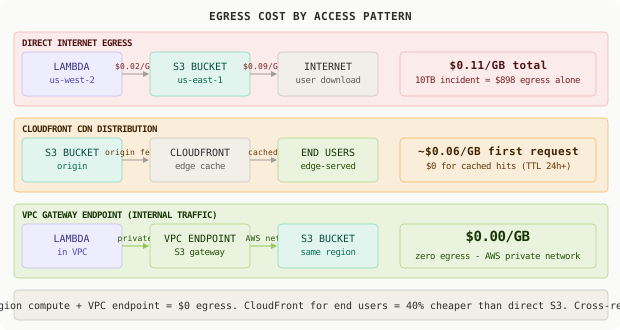
The largest cost in the incident was not storage - it was egress. S3 charges $0.09/GB for data transferred out to the internet. Cross-region transfer has additional fees. But same-region transfer between AWS services has been free since November 2023.
Three rules that eliminate most egress costs:
Rule 1: Keep compute in the same region as your data. Processing 10TB of videos using a Lambda in us-east-1 reading from S3 in us-east-1 costs $0 in transfer. That same Lambda in us-west-2 costs $898. The incident would have cost under $200 if the validation Lambda had been in the same region as the bucket.
Rule 2: Use CloudFront for any public-facing downloads. CloudFront’s per-GB rate is lower than S3 direct egress, and cached files serve from edge locations at zero additional S3 cost. The first download pulls from S3 origin (one egress charge). Every subsequent download within the TTL window serves from cache. For any asset downloaded more than once, CloudFront saves money and reduces latency.
Rule 3: VPC Gateway Endpoints for internal services. S3 VPC Gateway Endpoints route traffic between your VPC and S3 over AWS’s private network. No public internet. Zero egress charge.
# Terraform: S3 VPC Gateway Endpoint
resource "aws_vpc_endpoint" "s3" {
  vpc_id       = aws_vpc.main.id
  service_name = "com.amazonaws.us-east-1.s3"

  route_table_ids = [aws_route_table.private.id]

  tags = {
    Name        = "s3-vpc-endpoint"
    Environment = "production"
    Team        = "platform"
  }
}
Any Lambda deployed inside the VPC with this endpoint configured routes all S3 traffic over the private AWS network. The validation Lambda in the incident, had it been deployed inside a VPC with this endpoint, would have incurred $0 in egress regardless of how many times the loop ran.
Cost Anomaly Detection
Cost Anomaly Detection is a free AWS service that uses machine learning to identify spend patterns deviating from your established baseline. You create a monitor (scoped to a linked account, AWS service, tag, or cost category) and a subscription (alert threshold). The ML model learns your normal spend patterns and fires when something looks wrong.
For the $14,247 incident, an anomaly monitor on the S3 service with a $50 above-expected threshold would have fired around hour 8 - when the bill was approximately $200, not $14,000:
{
  "AnomalyMonitor": {
    "MonitorName": "S3SpendMonitor",
    "MonitorType": "DIMENSIONAL",
    "MonitorDimension": "SERVICE"
  },
  "AnomalySubscription": {
    "SubscriptionName": "S3AnomalyAlert",
    "MonitorArnList": ["arn:aws:ce::123456789:anomalymonitor/uuid"],
    "Subscribers": [
      {
        "Address": "platform-alerts@company.com",
        "Type": "EMAIL"
      },
      {
        "Address": "arn:aws:sns:us-east-1:123456789:cost-alerts",
        "Type": "SNS"
      }
    ],
    "Threshold": 50,
    "Frequency": "IMMEDIATE"
  }
}
The "Frequency": "IMMEDIATE" setting is non-negotiable. The default is a daily digest. When a Lambda loop is burning $200/hour, a daily digest means the alert arrives the next morning - after the damage is complete. Immediate delivery catches it in the first detection cycle, typically within 1-8 hours of the anomaly starting.
Anomaly detection is ML-based and requires 10-14 days of usage history to establish a baseline. For new services or new accounts, set a conservative manual budget alert as a fallback while the model trains.
Budget Alerts
Cost Anomaly Detection catches spikes. Budget alerts catch slow-creep overruns - services that trend gradually upward over weeks without triggering anomaly detection. They are complementary, not redundant.
The setup that would have protected the video pipeline:
{
  "BudgetName": "S3-UploadPipeline-Monthly",
  "BudgetLimit": {
    "Amount": "200",
    "Unit": "USD"
  },
  "CostFilters": {
    "TagKeyValue": ["user:Service$upload-pipeline"]
  },
  "BudgetType": "COST",
  "TimeUnit": "MONTHLY",
  "NotificationsWithSubscribers": [
    {
      "Notification": {
        "NotificationType": "ACTUAL",
        "ComparisonOperator": "GREATER_THAN",
        "Threshold": 80,
        "ThresholdType": "PERCENTAGE"
      },
      "Subscribers": [
        { "Address": "platform-team@company.com", "SubscriptionType": "EMAIL" }
      ]
    },
    {
      "Notification": {
        "NotificationType": "FORECASTED",
        "ComparisonOperator": "GREATER_THAN",
        "Threshold": 100,
        "ThresholdType": "PERCENTAGE"
      },
      "Subscribers": [
        { "Address": "platform-team@company.com", "SubscriptionType": "EMAIL" }
      ]
    }
  ]
}
Two alert thresholds: actual spend at 80% (“you are already here, course-correct now”) and forecasted spend at 100% (“you are trending over, adjust before you overshoot”). The forecasted alert is particularly effective for loop bugs - the spend curve looks exponential and AWS’s forecasting model extrapolates it accurately within a few hours of the anomaly starting.
Tag-based cost filters (TagKeyValue) mean the budget applies only to resources tagged Service=upload-pipeline. This keeps every team accountable for their own spend without monitoring the entire account from a single budget.
The Full Architecture
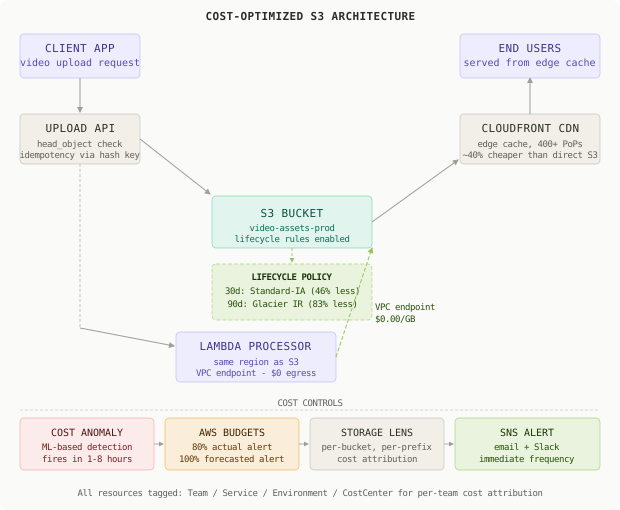
Idempotency in Upload Pipelines
The loop bug would have been harmless with an idempotent upload operation. The fix is to derive the S3 key from the content hash of the file rather than generating a new UUID on each retry attempt. The same file always produces the same key, so retries are no-ops:
import hashlib, os
import boto3

s3 = boto3.client("s3")

def content_key(file_path: str, prefix: str = "videos/") -> str:
    with open(file_path, "rb") as f:
        digest = hashlib.sha256(f.read()).hexdigest()[:16]
    return f"{prefix}{digest}/{os.path.basename(file_path)}"

def upload_video(file_path: str, bucket: str) -> bool:
    key = content_key(file_path)

    # Idempotency check: skip if already uploaded
    try:
        s3.head_object(Bucket=bucket, Key=key)
        return True  # already present, nothing to do
    except s3.exceptions.ClientError:
        pass

    s3.upload_file(file_path, bucket, key)
    return True
A head_object call costs $0.0000004. 10,000 of them cost $0.004. Compared to re-uploading 5GB 2,000 times, this is the cheapest insurance you can buy. Content-addressed keys also serve as natural deduplication - if a video gets uploaded twice by different codepaths, it occupies one key, not two.
S3 Storage Lens
S3 Storage Lens is the cost visibility layer that should be enabled on every production account before anything else. It surfaces, at no cost, per-bucket metrics including total stored bytes, average object size, request rate by operation type, and data retrieval by storage class. Advanced metrics (at $0.20/million objects analyzed) add per-prefix and per-tag breakdowns.
# Enable Storage Lens advanced metrics via AWS CLI
aws s3control put-storage-lens-configuration \
  --account-id 123456789012 \
  --config-id production-lens \
  --storage-lens-configuration '{
    "IsEnabled": true,
    "DataExport": {
      "S3BucketDestination": {
        "AccountId": "123456789012",
        "Arn": "arn:aws:s3:::cost-reports-bucket",
        "Format": "CSV",
        "OutputSchemaVersion": "V_1"
      }
    },
    "IncludeAllBuckets": {},
    "AdvancedDataProtectionMetrics": { "IsEnabled": true },
    "AdvancedCostOptimizationMetrics": { "IsEnabled": true }
  }'
For any bucket storing more than 50GB, the advanced metrics pay for themselves the first time they surface an optimization. On a 10TB bucket, finding that 70% of objects are accessed zero times per month is worth more than the $2/month the metrics cost.
Comparison Table
| Approach | Setup Effort | Detection Speed | Cost Reduction | Failure Mode | Best For |
|---|---|---|---|---|---|
| No controls (naive) | None | EOY billing review | 0% | Any loop = $14K bill | Never use |
| Manual Cost Explorer review | Low | Weekly at best | Minimal | Too slow, human error | Static tiny projects |
| S3 Lifecycle Policies | Low | Preventive (no spike detect) | 40-83% on storage | Cold objects stay warm tier | Any bucket with age-based access |
| Cost Anomaly Detection | Low | 1-8 hours | Spend prevented at ~$200 | New services lack baseline | All production accounts |
| AWS Budgets (2-threshold) | Low | Per threshold | Spend prevented by awareness | Slow creep until threshold fires | Multi-team organizations |
| Tag-based cost attribution | Medium | Real-time via tag filters | Indirect (accountability) | Untagged resources hide cost | Orgs with multiple teams |
| Full stack (tags + lifecycle + anomaly + CDN + VPC endpoint) | Medium | 1-8 hours + forecasting | 70-90% vs unoptimized baseline | CDN cache miss on first load | High-traffic production systems |
Key Takeaways
- Cloud cost attribution starts with mandatory tagging: every S3 bucket, Lambda, and compute resource needs
Team,Service,Environment, andCostCentertags applied at creation. - S3 Lifecycle Policies cost nothing to configure and can cut storage costs by 40-83% for any workload where objects age out of frequent access within 30-90 days.
- Egress is almost always the largest S3 cost - moving compute to the same region as data, or adding a VPC Gateway Endpoint for internal traffic, eliminates it entirely for non-CDN workloads.
- Cost Anomaly Detection uses ML to detect spend spikes in 1-8 hours; set
Frequency: IMMEDIATEor the default daily digest makes it useless for runaway loops. - Budget alerts should use two thresholds: actual spend at 80% for “correct course now” and forecasted spend at 100% for “you are trending over before month end.”
- Idempotency in upload pipelines is a cost control, not just a correctness concern - content-addressed S3 keys make retries cost
$0.004instead of$14,247. - S3 Storage Lens advanced metrics provide per-bucket, per-prefix, per-tag cost attribution and should be the first thing enabled on any account managing significant object storage.
- The root cause of every surprise cloud bill is identical: costs that are visible only in aggregate, only after the fact, and only to people who are not the ones writing the code that generates them.
The loop bug was a three-line fix. The missing controls cost $14,000. Every engineering team writing infrastructure code is one variable-shadowing bug away from the same Monday morning conversation. The controls described here take four hours to implement and cost less than $10/month to run. The math is not complicated.
Frequently Asked Questions
Q: Does Cost Anomaly Detection catch everything?
A: It catches deviations from learned baselines. New accounts or services need 10-14 days to establish a baseline - the ML model cannot detect anomalies before it has a baseline to deviate from. For new services, set a manual budget alert at a conservative dollar threshold as a fallback. Anomaly detection also misses gradual creep that looks like normal growth - that is what the forecasted budget alert is for.
Q: Are S3 lifecycle transitions transparent to applications?
A: Transitions to Standard-IA and Glacier Instant Retrieval are API-transparent. The same GetObject call works, the difference is retrieval cost. Standard-IA has millisecond retrieval latency, identical to Standard. Glacier Instant Retrieval also has millisecond latency but costs $0.01/GB to retrieve. Glacier Flexible Retrieval (the old Glacier) requires 3-12 hours and is only suitable for true archives. Know your retrieval SLA before choosing a tier.
Q: How do I retroactively tag resources that were created without tags?
A: AWS Tag Editor in the Billing console lets you search across all supported services by tag key or tag value, then apply tags in bulk. For S3 specifically, you can add tags at the bucket level at any time. However, historical costs already incurred without tags will not be retroactively attributed - tag coverage improves future reports, not past ones. Start now and accept that the first 30-60 days of tag-based reports will be incomplete.
Q: Does CloudFront add meaningful latency for users?
A: For cached content, CloudFront reduces latency by serving from an edge location geographically closer to the user. The first request to a cold cache edge incurs origin fetch time (your normal S3 latency plus a few milliseconds). Subsequent requests within the TTL window (typically 24-365 hours for static assets) serve from cache with sub-10ms latency. The latency trade-off is front-loaded on cold edges, then pays back on every subsequent request.
Q: What is the minimum viable cost setup for a startup with two hours available?
A: Three steps, 30 minutes each: (1) Enable Cost Anomaly Detection for the AWS S3 service with a $50 threshold and your email - free, takes 5 minutes. (2) Add a $300/month total-account budget alert with actual at 80% and forecasted at 100% - free, takes 10 minutes. (3) Add lifecycle rules on any S3 bucket storing more than 50GB, moving objects older than 90 days to Glacier Instant Retrieval - free to configure, saves money immediately. That is the 80/20 version of everything in this post.
Q: Do VPC Gateway Endpoints have any limitations?
A: VPC Gateway Endpoints route traffic through the private AWS network, which means they only work for requests originating inside your VPC. Lambda functions deployed outside a VPC (the default) use the public internet. Deploying Lambda inside a VPC adds cold start overhead and requires subnet/security group configuration, but the $0 egress benefit for high-volume workloads makes it worth the added setup for any function that reads from or writes to S3 at significant scale.
Interview Questions
Q: Your team’s S3 bill doubled month-over-month with no new features. Walk me through your investigation process.
Expected depth: Start with Cost Explorer by service, operation type, and bucket to isolate the source. Use S3 Storage Lens for per-prefix breakdown to find which prefix is growing. Distinguish storage cost growth (lifecycle policy problem) from egress cost growth (look at data transfer out, investigate cross-region traffic, check CloudFront vs direct). Propose preventive controls going forward: anomaly detection, budget alerts, tagging. Mention that the fix for the immediate bill is usually fast, and the real work is building visibility so the next one gets caught in hours not weeks.
Q: Design an S3-based video storage system for a platform processing 10TB of uploads per month, optimizing for cost.
Expected depth: Should cover lifecycle policies with Standard to IA to Glacier tiers with reasoning about access decay curves after upload. Should discuss CloudFront in front of S3 for end-user serving. Should address keeping compute in the same region to eliminate egress. Should explain idempotency via content-addressed keys. Bonus points: Intelligent Tiering for assets with unpredictable access patterns, multipart uploads for large files, presigned URLs for client-side direct upload bypassing the application server.
Q: A developer’s script accidentally ran a loop that created 500,000 objects in S3 instead of 5,000. What are the cost implications and how do you clean it up?
Expected depth: Cost breakdown: PUT request costs, storage at Standard rates, potential IA minimum charges if lifecycle already ran. Cleanup approach: list_objects_v2 with pagination, batch deletes using delete_objects (max 1,000 per call), verify checksums before deleting originals. Safety measures: filter by prefix or tag, test with a small batch first, add a lifecycle expiration rule as a secondary cleanup net. Prevention: restrict IAM permissions for scripts, require dry-run verification in CI, use separate test buckets with restrictive resource policies.
Q: Explain the trade-offs between S3 Intelligent Tiering, manual lifecycle policies, and explicit storage class assignment at upload time.
Expected depth: Intelligent Tiering monitors access and moves objects automatically - no retrieval fees, but a $0.0025/1,000 objects/month monitoring charge; good for unpredictable access patterns but not cost-effective for objects under 128KB or objects stored under 30 days. Lifecycle policies are rule-based and predictable - you set age thresholds, no monitoring cost, but require knowing the access decay curve in advance. Explicit assignment at upload (e.g., StorageClass=GLACIER) makes sense when you know the access pattern definitively at write time, such as archiving completed jobs. Pick Intelligent Tiering when you cannot predict access; lifecycle rules when you can.
Q: How would you design a cost attribution system for a 20-team engineering organization sharing a single AWS account?
Expected depth: Should propose mandatory tagging via Service Control Policies (SCPs) that deny resource creation without required tags. Should cover Cost Allocation Tags enabled in billing, per-tag Cost Explorer views. Should discuss separate accounts per team as an alternative (Organizations) for true isolation. Should address anomaly monitors scoped per tag for per-team alerting, budget alerts per cost center. Should mention that tagging hygiene requires tooling and enforcement, not just documentation.
Premium Content
Unlock the full article along with everything else in the archive — all in one place.