The Queue That Never Drained
scalability reliability
System Design Scenario
The Queue That Never Drained
When upstream produces faster than downstream can consume and queue depth approaches infinity
It’s 3:14 AM on a Thursday. Your phone buzzes with the kind of alert that makes your stomach drop before your eyes focus: rabbitmq_queue_depth > 1,800,000. You pull up Grafana and the queue depth chart isn’t a line anymore - it’s a wall. Straight vertical, still climbing. The upstream batch service kicked off its nightly reconciliation job twenty minutes ago, dumping 2 million events into a single queue. Your five consumer workers are grinding through messages at 100 per minute each. 500 messages per minute total. The math is brutal and immediate.
Think of it like a single highway off-ramp handling stadium traffic after a concert. Forty thousand cars need to exit through a two-lane ramp that handles 200 cars per minute. The parking lot isn’t getting emptier - it’s getting fuller, because people are still arriving from the late show while the early show crowd hasn’t left yet. The stadium doesn’t stop admitting people just because the exit is backed up. Nobody told it to.
The RabbitMQ broker’s memory alarm trips at 3:31 AM. It starts applying flow control - blocking publishers, which backs pressure into the upstream service, which starts timing out its HTTP connections, which triggers retry logic, which generates more messages. Your five workers haven’t noticed anything unusual. They’re still happily processing 100 messages per minute each, blissfully unaware that they’re 60 hours behind real-time. By the time an engineer wakes up and manually scales the consumer count, half the messages are stale - price updates from 4 hours ago, notifications about events that already happened.
The queue never drained because nobody designed it to handle the case where production rate exceeds consumption rate. Not briefly, not during a spike - structurally. The system had no vocabulary for “I’m overwhelmed.” No mechanism to push back, prioritize, or scale. This is the backpressure problem, and it kills systems that look perfectly healthy at average load.
Why This Happens
Queues are sold as shock absorbers. “Put a queue between services and you get decoupling!” True - but a shock absorber that never rebounds is just a broken spring. The fundamental assumption behind a message queue is that consumption rate will eventually exceed production rate. That the buffer is temporary. The moment that assumption breaks - even temporarily - you’re accumulating debt at compound interest.
The root cause chain typically looks like this:
upstream traffic spike (batch job, viral event, retry storm)
  → messages enqueue faster than workers dequeue
    → queue depth grows linearly: depth += (produce_rate - consume_rate) * time
      → broker memory pressure increases
        → broker applies flow control OR pages to disk (latency spikes)
          → consumer processing slows (disk I/O contention)
            → effective consumption rate drops further
              → positive feedback loop: queue grows exponentially
                → broker OOM / consumer lag → hours behind real-time
The failure isn’t the spike itself. Spikes are normal. The failure is the absence of three things: a mechanism to push back on producers, a mechanism to scale consumers, and a mechanism to shed load intelligently when the first two aren’t enough.
LinkedIn hit this exact pattern in 2013 when their Kafka consumer lag grew to billions of messages during a traffic spike. Their consumers were provisioned for steady-state throughput. The spike lasted 40 minutes. The lag took 14 hours to recover. The fix wasn’t faster consumers - it was consumer group scaling tied to lag metrics.
Core Insight
A queue without backpressure is an unbounded buffer. Unbounded buffers convert transient spikes into permanent backlogs. The queue doesn’t solve the throughput mismatch - it hides it until the broker crashes.
The Naive Solution
The first instinct: add more workers. If 5 workers do 500/min, then 40 workers should do 4000/min. Problem solved, right?
Here’s the naive approach everyone reaches for:
# kubernetes deployment - "just scale it"
apiVersion: apps/v1
kind: Deployment
metadata:
  name: queue-worker
spec:
  replicas: 40  # was 5, now 40. Ship it.
  template:
    spec:
      containers:
      - name: worker
        resources:
          requests:
            cpu: "500m"
            memory: "512Mi"
You scale to 40 workers. Consumption jumps to 4000/min. The queue starts draining. For about three minutes. Then the downstream database - which was sized for 500 writes/min - starts returning connection timeouts. Your 40 workers are now all blocked on database I/O, their effective throughput drops to 200/min total because they’re sharing a connection pool that maxes at 50 connections. The queue grows again. You’ve moved the bottleneck, not fixed it.
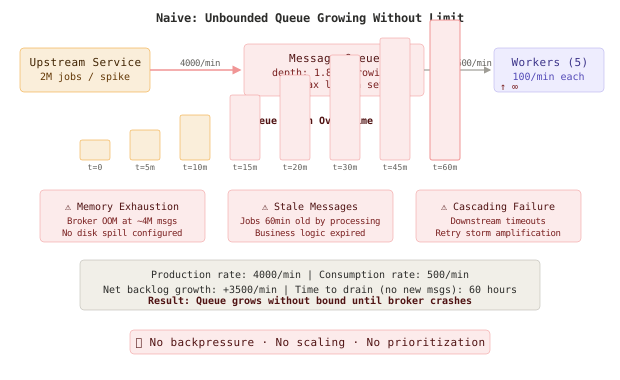
The second problem: cost. Those 40 workers run 24/7 now. The spike happens once a day for 20 minutes. You’re paying for 40 pods to handle a problem that exists 1.4% of the time. And when the next spike is 4M messages instead of 2M? You need 80 workers. Then 160. Static provisioning for peak load is the cloud computing equivalent of buying a bus because you carpooled once.
The third problem is subtler: all messages are treated equally. A payment confirmation and a weekly digest email sit in the same queue, processed in the same order. During the backlog, that payment confirmation - which has a 30-second SLA - waits behind 1.8 million analytics events. The user’s payment page spins for 60 minutes while your workers process batch telemetry.
Warning
Static scaling solves the math but ignores the economics, the downstream dependencies, and the priority inversion. Adding workers without backpressure, priority routing, or auto-scaling creates a system that’s either over-provisioned (expensive) or under-provisioned (broken) - never right-sized.
The Better Solution
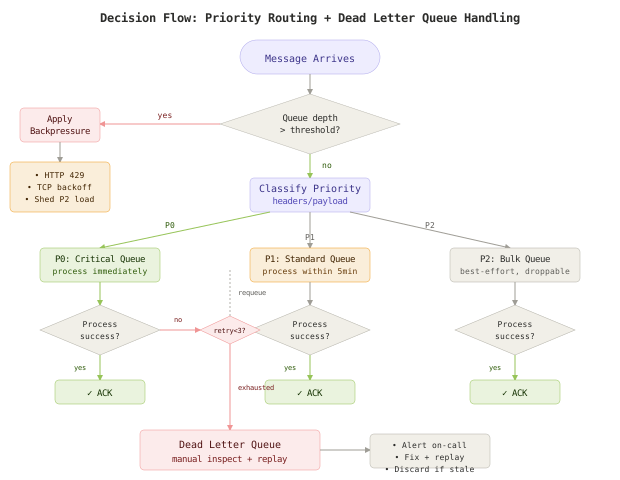
The fix has four layers, each addressing a different failure mode: backpressure to control inflow, priority queues to ensure critical work happens first, consumer group scaling to match capacity to demand, and dead letter queues to handle poison messages without blocking the pipeline.
Layer 1: Backpressure at the Ingestion Boundary
Backpressure means the consumer tells the producer “slow down” rather than silently accepting more work than it can handle. In practice, this is a feedback loop from queue depth to admission control.
import redis
from fastapi import FastAPI, HTTPException

app = FastAPI()
r = redis.Redis(host="localhost", port=6379)

QUEUE_DEPTH_THRESHOLD = 100_000
BACKPRESSURE_QUEUE = "jobs:standard"

@app.post("/jobs")
async def enqueue_job(job: dict):
    current_depth = r.llen(BACKPRESSURE_QUEUE)

    if current_depth > QUEUE_DEPTH_THRESHOLD:
        # Signal backpressure - reject with retry-after header
        raise HTTPException(
            status_code=429,
            detail="Queue depth exceeded threshold",
            headers={"Retry-After": "30"}
        )

    # Classify priority based on job type
    priority = classify_priority(job)
    queue_name = f"jobs:{priority}"

    r.lpush(queue_name, json.dumps(job))
    return {"status": "accepted", "queue": queue_name, "depth": current_depth}


def classify_priority(job: dict) -> str:
    """Route jobs to priority tiers based on type."""
    critical_types = {"payment", "auth", "order_confirm"}
    bulk_types = {"analytics", "digest", "report"}

    if job.get("type") in critical_types:
        return "critical"
    elif job.get("type") in bulk_types:
        return "bulk"
    return "standard"
Real-World
Uber’s Cherami messaging system implements backpressure through credit-based flow control. Consumers grant credits to the broker, which stops delivering messages when credits are exhausted. This prevents the consumer from being overwhelmed regardless of producer rate.
Layer 2: Priority Queues for SLA Guarantees
Instead of a single queue, split traffic into priority tiers. Critical work gets dedicated consumers that never compete with bulk processing.
package main

import (
    "context"
    "log"
    "time"

    "github.com/redis/go-redis/v9"
)

type PriorityConsumer struct {
    client   *redis.Client
    queues   []string // ordered by priority: critical, standard, bulk
    timeout  time.Duration
}

func NewPriorityConsumer(client *redis.Client) *PriorityConsumer {
    return &PriorityConsumer{
        client:  client,
        queues:  []string{"jobs:critical", "jobs:standard", "jobs:bulk"},
        timeout: 5 * time.Second,
    }
}

// Consume uses BRPOP with priority ordering.
// Redis returns from the first non-empty queue in the list.
func (pc *PriorityConsumer) Consume(ctx context.Context) {
    for {
        select {
        case <-ctx.Done():
            return
        default:
        }

        // BRPOP checks queues in order - critical first
        result, err := pc.client.BRPop(ctx, pc.timeout, pc.queues...).Result()
        if err != nil {
            if err == redis.Nil {
                continue // timeout, no messages
            }
            log.Printf("error consuming: %v", err)
            time.Sleep(time.Second)
            continue
        }

        queue := result[0]
        payload := result[1]

        if err := processJob(ctx, queue, payload); err != nil {
            handleFailure(ctx, pc.client, queue, payload, err)
        }
    }
}

func handleFailure(ctx context.Context, client *redis.Client, queue, payload string, err error) {
    retryCount := getRetryCount(payload)
    if retryCount >= 3 {
        // Move to dead letter queue after 3 failures
        client.LPush(ctx, "jobs:dead_letter", payload)
        log.Printf("moved to DLQ after %d retries: %s", retryCount, err)
        return
    }
    // Re-enqueue with incremented retry count
    updated := incrementRetryCount(payload)
    client.LPush(ctx, queue, updated)
}
Real-World
AWS SQS doesn’t natively support priority, so teams at Stripe use multiple queues with weighted polling - their payment processing consumers read from the critical queue 10x more frequently than the batch queue using a token bucket allocation per queue tier.
Layer 3: Consumer Group Auto-Scaling
Static worker counts are a guess. Queue depth metrics should drive scaling decisions. KEDA (Kubernetes Event-Driven Autoscaling) scales pods based on queue length.
apiVersion: keda.sh/v1alpha1
kind: ScaledObject
metadata:
  name: queue-worker-scaler
spec:
  scaleTargetRef:
    name: queue-worker
  minReplicaCount: 3
  maxReplicaCount: 50
  pollingInterval: 10
  cooldownPeriod: 120
  triggers:
  - type: redis
    metadata:
      address: redis:6379
      listName: jobs:standard
      listLength: "500"  # scale up when depth > 500 per worker
  - type: redis
    metadata:
      address: redis:6379
      listName: jobs:critical
      listLength: "50"   # aggressive scaling for critical queue
The critical queue triggers scaling at 50 messages, the standard queue at 500. This means a spike of critical jobs gets immediate attention while bulk work scales more gradually. The cooldownPeriod of 120 seconds prevents thrashing - workers don’t scale down until the queue has been below threshold for two minutes.
Real-World
Shopify’s job infrastructure (powered by Sidekiq Enterprise) auto-scales worker processes based on queue latency rather than depth alone. A queue with 10K messages and 2-second latency needs different treatment than 10K messages with 10-minute latency. Latency-based scaling catches the “slow consumer” problem that depth alone misses.
Layer 4: Dead Letter Queues for Poison Messages
A dead letter queue (DLQ) catches messages that fail repeatedly. Without it, a single malformed message can block an entire queue - the worker picks it up, fails, re-enqueues it, picks it up again, fails again, forever. The queue never drains because one bad message is consuming all the processing capacity.
import json
import time
from dataclasses import dataclass
from typing import Optional

@dataclass
class DeadLetterEntry:
    original_queue: str
    payload: str
    failure_reason: str
    retry_count: int
    first_failure_at: float
    last_failure_at: float

class DLQManager:
    def __init__(self, redis_client, max_retries=3, dlq_key="jobs:dead_letter"):
        self.redis = redis_client
        self.max_retries = max_retries
        self.dlq_key = dlq_key

    def should_dead_letter(self, payload: str, error: Exception) -> bool:
        """Check if message has exhausted retries."""
        meta = json.loads(payload)
        return meta.get("_retry_count", 0) >= self.max_retries

    def send_to_dlq(self, original_queue: str, payload: str, error: str):
        """Move failed message to DLQ with metadata for debugging."""
        entry = DeadLetterEntry(
            original_queue=original_queue,
            payload=payload,
            failure_reason=error,
            retry_count=json.loads(payload).get("_retry_count", 0),
            first_failure_at=time.time(),
            last_failure_at=time.time(),
        )
        self.redis.lpush(self.dlq_key, json.dumps(entry.__dict__))

        # Alert if DLQ is growing - something systematic is wrong
        dlq_depth = self.redis.llen(self.dlq_key)
        if dlq_depth > 100:
            alert_oncall(f"DLQ depth: {dlq_depth} - possible systematic failure")

    def replay(self, count: Optional[int] = None):
        """Replay DLQ messages back to their original queues."""
        replayed = 0
        while True:
            if count and replayed >= count:
                break
            raw = self.redis.rpop(self.dlq_key)
            if not raw:
                break
            entry = json.loads(raw)
            # Reset retry count and re-enqueue
            payload = json.loads(entry["payload"])
            payload["_retry_count"] = 0
            self.redis.lpush(entry["original_queue"], json.dumps(payload))
            replayed += 1
        return replayed
The Full Architecture
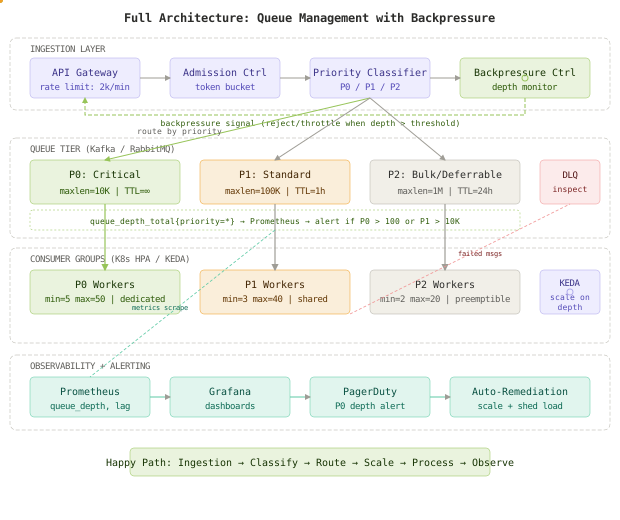
The happy path flows left to right through four layers:
-
Ingestion - The API gateway rate-limits inbound traffic. The admission controller applies token bucket throttling. The priority classifier inspects message headers and routes to the appropriate queue tier. The backpressure controller monitors all queue depths and signals the gateway to reject or throttle when any tier exceeds its threshold.
-
Queue Tier - Three separate queues (P0 critical, P1 standard, P2 bulk) each with bounded max lengths and TTLs. When a queue hits its max length, new messages for that tier are rejected upstream (backpressure) rather than silently dropped. Prometheus scrapes depth metrics every 10 seconds.
-
Consumer Groups - Each queue tier has dedicated consumer groups with independent scaling policies. P0 workers are always running (min=5) and scale aggressively. P2 workers use preemptible/spot instances and scale conservatively. KEDA triggers scaling decisions based on per-queue depth.
-
Observability - Prometheus collects
queue_depth_total,consumer_lag_seconds, andmessage_age_seconds. Grafana dashboards show real-time queue health. PagerDuty alerts fire when P0 depth exceeds 100 or consumer lag exceeds 30 seconds. Auto-remediation scripts can trigger emergency scaling.
Component Deep Dives
Backpressure Controller
The backpressure controller runs as a sidecar that polls queue depths every 5 seconds and adjusts the admission rate using a PID-style control loop:
import time
import redis

class BackpressureController:
    """PID-inspired controller that adjusts admission rate based on queue depth."""

    def __init__(self, redis_client, target_depth=10000, max_rate=5000, min_rate=100):
        self.redis = redis_client
        self.target_depth = target_depth
        self.max_rate = max_rate
        self.min_rate = min_rate
        self.current_rate = max_rate
        self.previous_error = 0

    def compute_rate(self, queue_name: str) -> int:
        """Compute allowed admission rate based on current depth vs target."""
        current_depth = self.redis.llen(queue_name)
        error = current_depth - self.target_depth

        # Proportional: reduce rate as depth exceeds target
        kp = 0.5
        # Derivative: react to rate of change
        kd = 0.1
        derivative = error - self.previous_error

        adjustment = kp * error + kd * derivative
        self.current_rate = max(self.min_rate, min(self.max_rate, self.max_rate - adjustment))
        self.previous_error = error

        # Store rate limit for gateway to read
        self.redis.set(f"rate_limit:{queue_name}", int(self.current_rate))
        return int(self.current_rate)

    def run(self, queues: list, interval: int = 5):
        """Main control loop."""
        while True:
            for queue in queues:
                rate = self.compute_rate(queue)
                depth = self.redis.llen(queue)
                print(f"[{queue}] depth={depth} allowed_rate={rate}/min")
            time.sleep(interval)
Queue Depth Metrics Exporter
Monitoring queue depth isn’t optional - it’s the signal that drives every other component. Without queue depth metrics, auto-scaling is blind and backpressure is deaf.
from prometheus_client import Gauge, start_http_server
import redis
import time

# Prometheus metrics
queue_depth = Gauge(
    'queue_depth_total',
    'Current number of messages in queue',
    ['queue_name', 'priority']
)
consumer_lag = Gauge(
    'consumer_lag_seconds',
    'Time since oldest unprocessed message',
    ['queue_name']
)
message_age_p99 = Gauge(
    'message_age_p99_seconds',
    'P99 age of messages in queue',
    ['queue_name']
)

def export_metrics(redis_client, queues, interval=10):
    """Scrape queue stats and expose to Prometheus."""
    start_http_server(8080)

    while True:
        for queue_name, priority in queues:
            depth = redis_client.llen(queue_name)
            queue_depth.labels(queue_name=queue_name, priority=priority).set(depth)

            # Check age of oldest message (tail of list)
            oldest = redis_client.lindex(queue_name, -1)
            if oldest:
                msg = json.loads(oldest)
                age = time.time() - msg.get("_enqueued_at", time.time())
                consumer_lag.labels(queue_name=queue_name).set(age)

        time.sleep(interval)

# Usage
queues = [
    ("jobs:critical", "P0"),
    ("jobs:standard", "P1"),
    ("jobs:bulk", "P2"),
]
export_metrics(redis.Redis(), queues)
Priority Router with Load Shedding
When all else fails - backpressure is applied, workers are scaled to max, and the queue is still growing - the system needs to shed load. Drop the lowest-priority messages to protect the highest-priority ones.
package router

import (
    "context"
    "encoding/json"
    "fmt"

    "github.com/redis/go-redis/v9"
)

type LoadSheddingRouter struct {
    client     *redis.Client
    thresholds map[string]int64 // queue -> max depth before shedding
}

func NewRouter(client *redis.Client) *LoadSheddingRouter {
    return &LoadSheddingRouter{
        client: client,
        thresholds: map[string]int64{
            "jobs:critical": 10_000,  // never shed critical
            "jobs:standard": 100_000, // shed standard above 100K
            "jobs:bulk":     500_000, // shed bulk above 500K
        },
    }
}

func (r *LoadSheddingRouter) Route(ctx context.Context, job map[string]interface{}) error {
    priority := classifyPriority(job)
    queue := fmt.Sprintf("jobs:%s", priority)

    // Check if we should shed this message
    depth, _ := r.client.LLen(ctx, queue).Result()
    threshold, exists := r.thresholds[queue]

    if exists && depth > threshold && priority != "critical" {
        // Shed load: drop message, increment counter
        r.client.Incr(ctx, fmt.Sprintf("shed_count:%s", queue))
        return fmt.Errorf("load shed: %s queue at %d (threshold: %d)", priority, depth, threshold)
    }

    payload, _ := json.Marshal(job)
    return r.client.LPush(ctx, queue, payload).Err()
}
Comparison Table
| Approach | Throughput Gain | Latency (P0) | Cost | Complexity | Failure Mode |
|---|---|---|---|---|---|
| Static over-provisioning | Fixed at peak capacity | Low (dedicated) | High - paying for idle 98% of time | Low | Downstream saturation when spike exceeds static capacity |
| Manual scaling | Reactive (30-60 min delay) | High during gap | Medium | Low | Human response time is the bottleneck |
| Auto-scaling (KEDA) | Elastic, 10-30s reaction | Medium (scale-up lag) | Low - pay per use | Medium | Cold start latency, scaling ceiling |
| Priority queues + auto-scaling | Elastic with SLA guarantees | Low for P0, variable for P2 | Low-Medium | High | Routing misconfiguration, priority inversion |
| Full backpressure + priority + scaling + DLQ | Elastic with graceful degradation | Low for P0, controlled for all | Optimal | High | Most complex to debug, requires observability |
Key Takeaways
- Queues are not infinite buffers - they’re temporary shock absorbers. If production rate structurally exceeds consumption rate, the queue will grow until something crashes.
- Backpressure is not optional - without a mechanism for consumers to signal “slow down,” producers will happily overwhelm the system. HTTP 429, TCP flow control, or credit-based systems all work.
- Priority queues prevent SLA violations - a payment confirmation should never wait behind 1.8M analytics events. Separate queues with dedicated consumers guarantee critical work happens first.
- Auto-scaling beats static provisioning - KEDA or custom HPA policies scale consumers based on queue depth. Pay for capacity when you need it, not 24/7.
- Dead letter queues prevent poison messages - one malformed message shouldn’t block an entire queue forever. Three retries, then DLQ, then human review.
- Queue depth metrics drive everything - without
queue_depth_totalandconsumer_lag_secondsin Prometheus, auto-scaling is blind and alerting is deaf. Instrument first. - Load shedding is the last resort - when backpressure is maxed and workers are at ceiling, drop bulk messages to protect critical ones. Controlled degradation beats uncontrolled collapse.
- Consumer group scaling needs cooldown - without a cooldown period, workers thrash between scaling up and down. 60-120 seconds of stability before scale-down prevents oscillation.
The queue that never drains isn’t a queue problem - it’s a system design problem. The queue is just where the symptom shows up. The disease is a throughput mismatch without feedback loops. Fix the feedback, and the queue takes care of itself.
FAQ
Q: Should I use Kafka or RabbitMQ for this pattern?
Kafka excels when you need replay capability, strict ordering within partitions, and consumer groups that can independently track offsets. RabbitMQ is better for priority queues natively (it supports them out of the box), complex routing patterns, and lower operational overhead at smaller scale. For the priority queue pattern described here, RabbitMQ’s native priority support is simpler. For consumer group scaling at massive scale, Kafka’s partition-based parallelism wins.
Q: How do I set the queue depth threshold for backpressure?
Start with: threshold = consumption_rate * acceptable_latency. If your workers process 1000/min and your SLA allows 5 minutes of latency, set the threshold at 5000. Monitor the P99 message age in production and adjust. The threshold should be low enough that backpressure kicks in before broker memory pressure, but high enough that normal variance doesn’t trigger unnecessary rejections.
Q: What happens to messages that get rejected by backpressure?
The producer receives an HTTP 429 with a Retry-After header. Well-behaved producers implement exponential backoff and retry. For batch jobs, this means the batch slows down - which is exactly what you want. For real-time user traffic, you need a circuit breaker pattern at the API gateway that returns a graceful error to the user rather than hanging.
Q: How do I handle priority inversion - where P2 messages starve?
Weighted fair queuing prevents starvation. Instead of strict priority (P0 always first), allocate consumption bandwidth: 60% to P0, 30% to P1, 10% to P2. This guarantees P2 makes progress even during spikes. Alternatively, set a max latency SLA for P2 (e.g., 24 hours) and alert if the oldest P2 message exceeds it.
Q: When should messages go to the DLQ vs. be retried?
Retry transient failures (network timeouts, rate limits, temporary unavailability). Dead-letter permanent failures (malformed payload, missing required fields, schema violations). The distinction: will this message ever succeed if we try again with the same payload? If no, DLQ immediately. If maybe, retry with exponential backoff up to your max retry count.
Q: How does KEDA handle scale-to-zero and cold starts?
KEDA can scale to zero pods when the queue is empty (minReplicaCount: 0). The first message triggers a scale-up, but there’s a cold start delay of 5-15 seconds while the pod starts. For P0 critical queues, set minReplicaCount: 3 to avoid cold starts entirely. For P2 bulk queues, scale-to-zero is fine since the latency SLA is relaxed.
Interview Questions
Q: Design a system that handles 2M message spikes while guaranteeing sub-30-second processing for critical messages.
Expected depth: Discuss priority classification at ingestion, separate queues with bounded lengths, dedicated consumer groups for critical work, KEDA-based auto-scaling with aggressive triggers for P0, backpressure to prevent broker OOM, and dead letter queues for failed messages. Mention specific numbers: queue max lengths, scaling thresholds, cooldown periods. Reference Kafka consumer groups or RabbitMQ priority queues as implementation choices.
Q: How would you implement backpressure in a distributed system where producers and consumers are separate services?
Expected depth: Cover multiple backpressure mechanisms: HTTP 429 + Retry-After headers (application layer), TCP window sizing (transport layer), credit-based flow control (message broker layer). Discuss the feedback loop: queue depth metric → controller → admission rate adjustment. Mention the PID controller pattern for smooth rate adjustment vs. binary on/off throttling. Reference Uber’s Cherami or Kafka’s quota system.
Q: A single malformed message is causing your queue to back up. How do you detect and handle this?
Expected depth: Describe the poison message pattern - message fails, gets re-enqueued, fails again, consuming all processing time. Solution: retry counter per message (stored in headers or metadata), max retry policy (3 attempts with exponential backoff), DLQ routing after exhaustion. Detection: monitor message_processing_failures_total grouped by message ID. Mention circuit breaker pattern for systematic failures vs. per-message DLQ for individual failures.
Q: Your consumer lag is growing during a traffic spike. Walk through your decision tree for responding.
Expected depth: Step 1: Check if auto-scaling is responding (KEDA metrics, pod count). Step 2: If workers are at max replicas, check downstream dependencies (DB connections, API rate limits). Step 3: If downstream is saturated, apply backpressure to producers. Step 4: If P0 latency is breaching SLA, enable load shedding for P2. Step 5: If all else fails, scale the downstream bottleneck or activate circuit breakers. Mention the priority: protect P0 SLA above all else.
Q: Compare consumer group scaling in Kafka vs. manual worker scaling with RabbitMQ. When would you choose each?
Expected depth: Kafka: partition count is the parallelism ceiling - you can have at most N consumers for N partitions. Scaling means adding partitions (operational overhead) or redistributing. RabbitMQ: any number of consumers can compete on a queue. Scaling is simpler but ordering isn’t guaranteed. Kafka wins for ordered event streams, audit logs, event sourcing. RabbitMQ wins for task queues, priority routing, and simpler operational model. Mention KEDA supports both.
Want to see how these patterns hold up when traffic spikes 50x at 3 AM? That's exactly what this Premium deep-dive covers.