Secret in the Repo
security devops
Secret in the Repo
Bot scraped the AWS key in 47 seconds. Infra bill: $180K by morning.
Monday at 3:17 AM, PagerDuty fires. The AWS cost anomaly alert - the one set to trigger at $500 over baseline - has been ringing for four minutes without anyone noticing. By the time the on-call engineer opens the billing console, the current-month total reads $181,437. It was $1,200 two days ago.
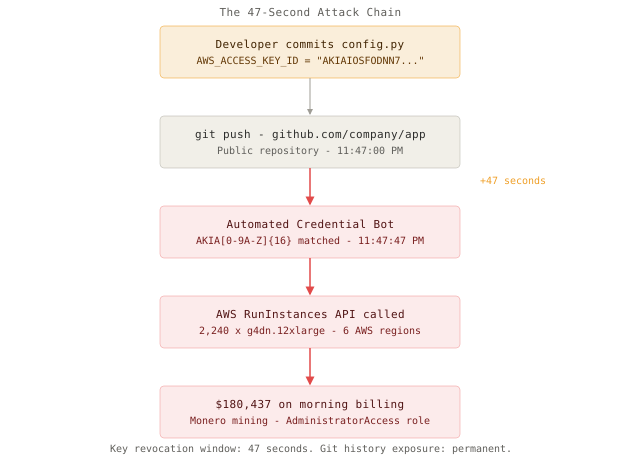
The culprit is 2,240 g4dn.12xlarge instances running across six AWS regions, none of which your company provisioned. They are mining Monero. They spun up at 11:47 PM Sunday, ninety minutes after a junior developer pushed a commit to fix a minor config bug in a public GitHub repository.
That commit contained one extra line: AWS_ACCESS_KEY_ID = "AKIAIOSFODNN7DEADBEEF". The developer planned to clean it up in the next commit. They did not get the chance. At 11:47:47 PM - forty-seven seconds after the push - a bot monitoring GitHub for new commits had already scraped the credential, validated it against the AWS STS API, and begun provisioning the GPU fleet. GitHub’s own secret scanning detected the key at 11:48:01 PM and fired a warning email. The bot had already won by 74 seconds.
The access key belonged to an IAM user with AdministratorAccess. No MFA requirement. No IP restrictions. No service control policy capping RunInstances. The developer had created it six months earlier for a quick local test and never rotated it. It lived in a local .env file that eventually migrated into a committed config block during a refactor.
This is the credential exposure problem - not the cinematic version with sophisticated nation-state attackers, but the mundane one where one extra line and automated tooling produce a six-figure incident by sunrise.
Why This Happens
Credentials feel like configuration. Configuration lives in code. That mental model is wrong, and it is remarkably hard to dislodge through policy alone.
The failure chain follows a predictable pattern:
developer creates IAM key for local testing
  → key stored in local .env file
    → .env.example committed with real values "for convenience"
      OR .gitignore entry missing for nested subdirectory
        → git add . catches the file
          → commit pushed to public repo
            → bot monitors GitHub for AKIA* pattern in new commits
              → credential validated via AWS STS in under 10 seconds
                → unrestricted IAM user provisions GPU fleet
                  → bill exceeds monthly budget in hours
Several factors compound the damage. The key has AdministratorAccess because the developer intended to narrow it down later. There is no CloudTrail alarm for RunInstances calls from unfamiliar IP ranges. There is no AWS Budgets alert with a sub-24-hour evaluation window. Monitoring catches the symptom - the bill - not the cause. By then, the resources have been running for hours.
Git history is permanent. Removing the secret from HEAD does not remove it from history. Every clone of the repo before the cleanup still has the key. Search engines cache the commit. Archive bots save it. The window of exposure is not “until the next commit” - it is “forever, unless the key is revoked.”
The Naive Solution (and Where It Breaks)
The default response is .env files with .gitignore. Create a .env, add it to .gitignore, reference variables from environment. This is a meaningful step up from hardcoded literals, but it fails in four predictable ways at scale.
Small team (2-3 devs): .env + .gitignore - no incidents for months
Large team (10+ devs, 2+ years): several failure modes compound
First, .gitignore is per-directory. A developer adding a config file to a nested subdirectory - say /services/payments/config.py - may not realize the repo-root .gitignore does not cover it unless the pattern explicitly includes subdirectories. Second, someone adds .env.example to document required variables and populates it with real values “because it’s easier for onboarding.” Third, an old commit - from before the .gitignore entry existed - still contains the plaintext secret in history. Fourth, a developer runs git add -f .env to debug a CI issue, the -f flag overrides the ignore rule, and the file lands in the next commit.
None of these require malicious intent. All of them happen regularly on growing teams.
The deeper problem is structural: .env files still mean static, long-lived credentials exist on developer laptops. One phishing attack, one macOS backup syncing to iCloud, one company laptop returned without a wipe - and the key is out regardless of .gitignore.
Pre-commit Prevention
The first line of defense is making the mistake impossible at commit time. git-secrets (AWS Labs) and gitleaks are the two tools most commonly used for this.
git-secrets scans staged files for patterns before allowing a commit. Setup on a repo takes two minutes:
# Install
brew install git-secrets

# Register AWS credential patterns
git secrets --register-aws

# Install the pre-commit hook into .git/hooks/
git secrets --install

# Test it
echo 'AWS_ACCESS_KEY_ID = "AKIAIOSFODNN7EXAMPLE"' > test.py
git add test.py && git commit -m "oops"
# [git-secrets] Matched forbidden pattern in test.py:
# AWS_ACCESS_KEY_ID = "AKIAIOSFODNN7EXAMPLE"
# error: failed to push refs to origin
gitleaks scans the full git history, which matters for repos that already have secrets buried in old commits:
# Scan entire git history (not just working tree)
gitleaks detect --source . --verbose

# Run as a CI gate on every pull request
gitleaks detect --source . --redact --exit-code 1
The critical caveat: pre-commit hooks only fire when installed locally. A new team member who clones the repo and commits without running the setup script bypasses them entirely. This is why you need a server-side layer.
GitHub’s push protection (enabled at the organization level under Security settings) provides exactly that. A push containing a recognized credential pattern is rejected server-side before it enters repository history - regardless of local tooling state. Enable it organization-wide, not just on new repos.
AWS Secrets Manager and Vault
Pre-commit hooks stop future mistakes. They do not solve the underlying architecture problem: applications that need credentials should never hold static keys at all.
AWS Secrets Manager and HashiCorp Vault both solve this by making the application request credentials at runtime from a controlled system, rather than baking them in at build or deploy time.
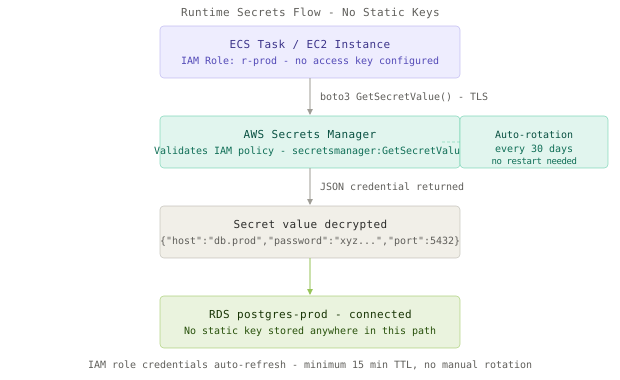
With Secrets Manager, the application has no credentials stored anywhere - it uses an IAM role attached to the EC2 instance or ECS task. That role has exactly one relevant permission:
import boto3
import json
from functools import lru_cache

@lru_cache(maxsize=1)
def get_db_credentials():
    client = boto3.client('secretsmanager', region_name='us-east-1')
    response = client.get_secret_value(SecretId='prod/myapp/db')
    return json.loads(response['SecretString'])

# Called at startup - not embedded in the container image
creds = get_db_credentials()
db = connect(
    host=creds['host'],
    user=creds['username'],
    password=creds['password'],
    port=creds['port']
)
The lru_cache here is intentional - you want to avoid a Secrets Manager API call on every request, but you also want the cache to refresh when a rotation occurs. In practice, pair this with a short TTL (60-300 seconds) rather than lru_cache, so the app picks up rotated credentials without a restart.
IAM Least Privilege
The $180K incident required two simultaneous failures: a credential was exposed, and that credential had AdministratorAccess. Either fix alone reduces the blast radius by orders of magnitude.
A principle of least privilege policy for a backend service looks like this:
{
  "Version": "2012-10-17",
  "Statement": [
    {
      "Effect": "Allow",
      "Action": ["s3:GetObject", "s3:PutObject"],
      "Resource": "arn:aws:s3:::my-app-uploads/*"
    },
    {
      "Effect": "Allow",
      "Action": "secretsmanager:GetSecretValue",
      "Resource": "arn:aws:secretsmanager:us-east-1:123456789:secret:prod/myapp/*"
    }
  ]
}
With this policy, a leaked credential cannot call RunInstances, cannot create IAM users, cannot touch any other S3 bucket. The damage is bounded by design, not by luck.
For workloads running on AWS (EC2, ECS, Lambda, EKS), you can eliminate static keys entirely by using IAM roles. The SDK automatically retrieves temporary credentials from the instance metadata service - no developer involvement, no key to store, no key to rotate manually:
# On EC2 with an IAM role attached, no credentials needed
aws s3 ls s3://my-app-uploads  # Works automatically
aws secretsmanager get-secret-value --secret-id prod/myapp/db  # Also works
For CI/CD pipelines, GitHub Actions supports OIDC federation - eliminating the need for long-lived AWS credentials in GitHub repository secrets entirely:
# .github/workflows/deploy.yml
permissions:
  id-token: write
  contents: read

jobs:
  deploy:
    runs-on: ubuntu-latest
    steps:
      - uses: aws-actions/configure-aws-credentials@v4
        with:
          role-to-assume: arn:aws:iam::123456789012:role/GitHubActionsRole
          aws-region: us-east-1
      - run: aws s3 sync ./dist s3://my-app-bucket
No AWS access key stored in GitHub secrets. No key to rotate. No key to leak if GitHub secrets are ever compromised.
Key Rotation
For legacy systems that still require static credentials, automatic rotation caps the window of exposure. Secrets Manager supports rotation Lambdas that replace credentials on a configurable schedule:
def lambda_handler(event, context):
    arn = event['SecretId']
    step = event['Step']

    if step == 'createSecret':
        new_password = generate_secure_password()
        put_secret_value(arn, new_password, staging_label='AWSPENDING')
    elif step == 'setSecret':
        update_database_user_password(arn)
    elif step == 'testSecret':
        verify_new_credential_connects(arn)
    elif step == 'finishSecret':
        promote_pending_to_current(arn)
AWS handles the scheduling. The rotation runs the four-step lifecycle with both versions active simultaneously during the transition, so running applications continue to work while the new credential is being tested. The application’s TTL-cached credential picks up the new value on the next cache miss - no deployment required.
Rotation schedule by sensitivity: database passwords every 30 days, third-party API keys every 90 days, anything with broad permissions every 7 days.
The Full Architecture
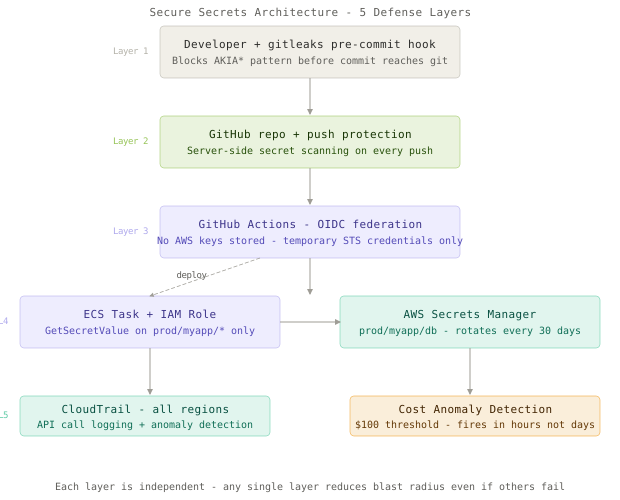
The complete picture is five layers working together:
- Developer workstation:
gitleakspre-commit hook blocks any commit containing a recognized secret pattern. - Repository: GitHub push protection provides server-side enforcement that fires regardless of local tooling.
- CI/CD: GitHub Actions with OIDC federation - no stored AWS credentials anywhere in the pipeline.
- Runtime: IAM roles for all EC2, ECS, and Lambda workloads - the application never holds a static key.
- Secrets store: AWS Secrets Manager for third-party credentials that cannot use IAM roles, with automatic rotation enabled.
CloudTrail and Cost Anomaly Detection
Prevention eventually fails. Monitoring limits the damage when it does.
Enable CloudTrail across all regions (not just us-east-1) and configure a CloudWatch metric filter for root account activity and anomalous RunInstances calls:
aws cloudwatch put-metric-alarm \
  --alarm-name UnusualEC2Launch \
  --namespace CloudTrailMetrics \
  --metric-name EC2InstanceCount \
  --threshold 20 \
  --comparison-operator GreaterThanThreshold \
  --evaluation-periods 1 \
  --period 300 \
  --alarm-actions arn:aws:sns:us-east-1:123456789:security-alerts
AWS Cost Anomaly Detection catches the billing explosion before it compounds. Set both an absolute threshold ($100 over daily baseline) and a percentage threshold (200% of 7-day average). The alert fires within a few hours - not at the end of the billing cycle.
The .git Directory Exposure
One attack vector that pre-commit hooks cannot catch: publicly accessible .git directories on deployed web servers. If you deploy by rsync or FTP and your server exposes https://yourapp.com/.git/config, an attacker can reconstruct your entire repository history, including every secret ever committed.
Block it at the web server level:
location ~ /\.git {
    deny all;
    return 404;
}
Then verify: curl -I https://yourapp.com/.git/config should return 403 or 404, never 200.
Approaches Compared
| Approach | Rotation | Dev Ergonomics | Attack Surface | Failure Modes | Best Use Case |
|---|---|---|---|---|---|
| Hardcoded in source | Manual, high risk | Easiest (worst) | Maximum - any reader | Git history is permanent | Never |
.env + .gitignore | Manual | Easy | High - laptop and backup exposure | git add -f, subdirectory gitignore miss | Local dev only |
| CI/CD environment vars | Per-rotation, manual | Good | Medium - CI system compromise | Static key still exists somewhere | Non-AWS workloads |
| AWS Secrets Manager | Automatic via Lambda | SDK call required | Low - IAM policy scoped | Rotation Lambda failure, SDK dependency | All production AWS services |
| IAM Roles - no static keys | N/A - no keys | Transparent (SDK auto-retrieves) | Minimal - 15-min temp credentials | Instance metadata service unavailable | AWS-hosted workloads |
Key Takeaways
- Pre-commit hooks are a first line of defense, not a complete solution - they require per-developer installation and can be bypassed with
git commit --no-verify. - GitHub push protection provides server-side enforcement that fires regardless of what is or is not installed locally.
- IAM least privilege bounds the blast radius: a leaked key scoped to
s3:GetObjecton one bucket cannot launch a GPU mining fleet. - IAM roles for applications eliminate the root cause entirely - there are no static credentials to leak if the application never holds them.
- GitHub Actions OIDC federation extends this to CI/CD pipelines, replacing long-lived secrets with temporary federated credentials that expire after each workflow run.
- Automatic rotation via Secrets Manager caps the exposure window for any credential that cannot yet be replaced with an IAM role.
- CloudTrail and Cost Anomaly Detection catch the compromise early - the goal is a four-hour bill, not a $180K bill.
- Git history is permanent: removing a secret from HEAD requires a full
git filter-reporewrite plus forcing all collaborators to re-clone; the faster fix is to revoke the key immediately and treat the exposure as complete.
The hard lesson is not about tools - it is about mental models. Credentials are not configuration. Configuration can be committed. Credentials cannot, ever. Once a team internalizes that distinction, the rest of the architecture follows naturally: if you cannot commit it, you need a system that delivers it securely at runtime, scoped to the minimum, with automatic renewal.
Frequently Asked Questions
Q: I just found a live AWS key in a public commit. What do I do right now?
A: Revoke it before doing anything else - open IAM, find the access key, click Deactivate, then Delete. A revoked key is useless to an attacker; an active key in history is a live vulnerability regardless of whether you delete the commit. After revoking, check CloudTrail for API calls made with that key in the past 72 hours, rotate any downstream services using it, and run git filter-repo to scrub the history if the repo must remain public.
Q: Can’t we just rotate credentials manually every 90 days?
A: Manual rotation works until it does not. Teams forget. The rotation touches twelve services and someone updates eleven of them. The twelfth breaks at 2 AM. Automated rotation via Secrets Manager handles the four-step lifecycle, keeps both versions valid during the transition, and does not require a deployment. The operational overhead of setting it up once is far lower than the operational cost of a 3 AM rotation incident.
Q: Our team uses AWS IAM Identity Center (SSO). Do static keys still apply?
A: For humans accessing AWS interactively, no - SSO issues short-lived credentials via aws sso login that expire in hours. For machine workloads, IAM roles eliminate static keys entirely. The remaining case for static keys is third-party integrations that do not support STS AssumeRole - and even there, those keys belong in Secrets Manager with rotation enabled, not in environment variables.
Q: How do I find secrets in a repo that has existed for three years?
A: gitleaks detect --source . scans the full git history. Run it, pipe the output to a file, and triage. Expect false positives - configuration values that look like keys but are not. Any confirmed historical secret should be treated as fully compromised regardless of age; bots cache validated credentials for months. After triaging, enable gitleaks in CI so new commits are caught automatically going forward.
Q: Is AWS Secrets Manager worth the cost?
A: At $0.40 per secret per month plus $0.05 per 10,000 API calls, twenty production secrets cost roughly $8 per month. The $180K incident in this post covers 22,500 years of that Secrets Manager usage. The calculation is not close.
Q: Vault vs Secrets Manager - which should we use?
A: Secrets Manager wins if you are AWS-only and want low operational overhead - it integrates natively with RDS rotation, has no server to manage, and is covered under standard AWS SLAs. Vault wins if you are multi-cloud, need dynamic database credentials (short-lived DB users created on demand), or require a PKI or SSH certificate authority. The deciding factor is usually whether you want to run a Vault cluster or pay AWS to run the equivalent.
Interview Questions
Q: Walk me through how you would handle discovering a live AWS access key in a public GitHub commit from two weeks ago.
Expected depth: Immediate revocation before anything else - explain why order matters (an active key in history is still exploitable; a revoked key is not). CloudTrail audit for all API calls made with that key across all regions. Cost anomaly review. git filter-repo to scrub history, followed by forcing all collaborators to re-clone. IAM audit of what permissions the key had. Postmortem on the process failure - why did pre-commit hooks not catch it, was push protection enabled, was there a .env.example with real values.
Q: Design a secrets management system for a 50-engineer team deploying to AWS.
Expected depth: No static keys for machine workloads - IAM roles for all EC2, ECS, Lambda. AWS Secrets Manager for third-party API keys that require static credentials, with rotation Lambdas. GitHub Actions OIDC federation eliminating all stored AWS credentials from GitHub secrets. gitleaks in pre-commit hooks and as a CI gate on every pull request. GitHub push protection enabled organization-wide. AWS SSO for human access. CloudTrail all-regions with Cost Anomaly Detection thresholds.
Q: What is the difference between IAM users and IAM roles for application authentication?
Expected depth: Users have static long-lived access keys that must be manually rotated and can be leaked. Roles issue temporary credentials (15 minutes to 12 hours) via STS AssumeRole - these expire automatically and cannot be “leaked” the same way. For applications on EC2 or ECS, the instance metadata service delivers role credentials automatically, refreshing them before expiry with no developer involvement. The surface area for a static-key-style incident is zero when roles are used correctly.
Q: A junior engineer asks why they cannot just store the AWS access key in GitHub Actions repository secrets. What do you tell them?
Expected depth: GitHub secrets are encrypted and not visible in logs, which is better than committing. But the key is still static, long-lived, and must be manually rotated. If GitHub’s secret store were compromised, the key is exposed. OIDC federation gives exactly the same result - the workflow has AWS access - with no stored credentials at all. The key cannot be stolen from GitHub because it does not exist there. Walk through the OIDC workflow: GitHub issues a JWT to the workflow, the workflow exchanges it for temporary AWS credentials via STS, those credentials expire when the workflow ends.
Q: How does Secrets Manager rotation work without breaking applications that are actively running?
Expected depth: The rotation Lambda runs four steps: createSecret (creates new credential, stores as AWSPENDING), setSecret (updates the downstream service - e.g., changes the DB user password), testSecret (verifies the new credential actually works), finishSecret (promotes AWSPENDING to AWSCURRENT, demotes old version to AWSPREVIOUS). During the transition, both AWSCURRENT and AWSPENDING are valid. Applications caching the secret with a short TTL (60-300 seconds) pick up AWSCURRENT on the next cache miss. No deployment or restart required. AWSPREVIOUS is kept for one rotation cycle as a rollback option.
Want to see how these patterns hold up when traffic spikes 50x at 3 AM? That's exactly what this Premium deep-dive covers.