Millions of Tiny Files
scalability data-engineering
System Design Scenario
Millions of Tiny Files
Your filesystem grinds to a halt under the weight of 10 million daily sensor readings, each living in its own tiny file
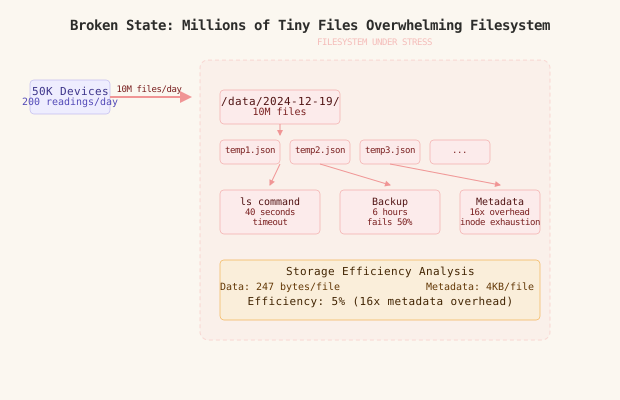
It’s Tuesday, 2:47 AM when Sarah’s pager goes off. The IoT platform she manages ingests sensor readings from 50,000 devices across wind farms, factories, and smart buildings. Each temperature reading, pressure measurement, and vibration sensor output gets its own JSON file - a perfectly reasonable design when they had 100 devices generating 14,000 readings per day.
But the platform grew. Fast. Now they’re at 10 million files per day, neatly organized in directories by date: /data/2024-12-19/device-12034-temp-14:32:01.json. What used to be instant directory listings now take 40 seconds. The backup process that once finished in 20 minutes now runs for 6 hours and fails halfway through. Imagine a library where every book is a single page, scattered across thousands of filing cabinets - you’d spend more time walking between cabinets than reading.
The monitoring dashboard shows the ugly truth: filesystem inodes are 87% exhausted, ls /data/2024-12-19 hangs for nearly a minute, and the poor backup system chokes on the metadata overhead of tracking millions of tiny files. Each JSON file averages 247 bytes, but the filesystem metadata - inode, directory entry, allocation table updates - consumes 4KB per file. They’re paying 16x storage overhead for the privilege of glacial performance.
This is the small file problem - where good intentions and clean organization create a performance nightmare at scale.
Why This Happens
The instinct is logical: one reading per file keeps data organized, makes debugging simple, and follows the Unix philosophy of small, composable pieces. But filesystems aren’t optimized for millions of tiny files in single directories.
Here’s the performance death spiral:
10M files in one directory
  -> directory metadata explodes (400MB+ directory table)
    -> every `ls` scans entire table linearly
      -> 40+ second listing times
        -> backup systems timeout scanning directories
          -> operations become impossible
The root cause isn’t the file count - it’s the metadata overhead and directory structure design hitting filesystem limits.
Filesystems optimize for a few thousand files per directory, not millions - the metadata structures become the bottleneck long before storage capacity.
The Naive Solution (and where it breaks)
Most teams reach for directory sharding first - spread files across subdirectories to reduce per-directory file counts:
/data/2024-12-19/
  hour-00/  # ~400K files
  hour-01/  # ~400K files
  ...
  hour-23/  # ~400K files
This is like organizing that messy library into smaller rooms - you’ve reduced walking time within each room, but you still have the same fundamental problem of too many individual items to manage. The approach works up to a point.
The relief is temporary. Directory sharding helps ls performance, but the core issues remain:
Small scale (1K files/hour): works fine
Large scale (400K files/hour): directory scanning still slow,
  backup systems struggle with millions of individual files,
filesystem fragmentation increasesSharding by time creates hotspots - the current hour’s directory becomes the bottleneck as all writes concentrate there while reads scatter across historical directories.
Batch and Store in Object Storage
Here’s what actually fixes this: stop fighting the filesystem and move to object storage with batched uploads.
Instead of individual files, collect sensor readings in memory buffers and flush them as larger objects every few minutes. A time-series database handles the individual reading queries, while object storage archives the raw data efficiently.
# Collect readings in memory buffers by device
class SensorBatcher:
    def __init__(self, flush_interval=300):  # 5 minutes
        self.buffers = defaultdict(list)
        self.last_flush = time.time()

    def add_reading(self, device_id, reading):
        self.buffers[device_id].append({
            'timestamp': reading['timestamp'],
            'value': reading['value'],
            'metadata': reading['metadata']
        })

        # Flush if buffer is getting large or time window exceeded
        if len(self.buffers[device_id]) >= 100 or \
           time.time() - self.last_flush > self.flush_interval:
            self.flush_device_buffer(device_id)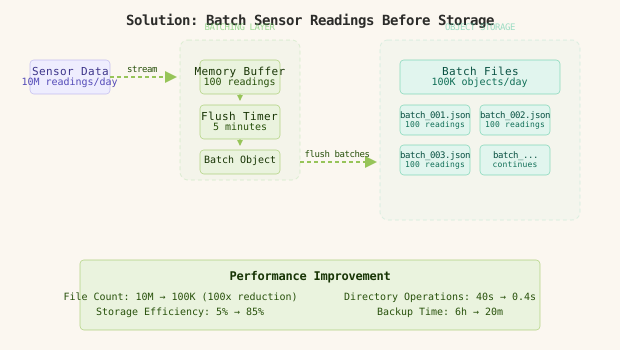
The batching layer reduces file count by 100x immediately. Instead of 10 million individual files per day, you get 100,000 batch objects - each containing ~100 readings from the same device in the same time window.
Netflix solved this exact problem with their viewing data pipeline - they batch millions of view events into Parquet files stored in S3, reducing object count by 1000x while maintaining query performance through partitioning.
Move to Time-Series Database for Queries
The second layer: use a proper time-series database for operational queries while keeping object storage for archival and batch analytics.
-- InfluxDB schema optimized for sensor data
CREATE DATABASE sensors;

-- Write sensor readings (high throughput, compressed)
INSERT sensor_readings,device=12034,type=temperature value=23.4,location="building-a" 1703001121000000000

-- Query recent data (sub-second response)
SELECT value FROM sensor_readings
WHERE device='12034' AND type='temperature'
  AND time >= now() - 1h
Time-series databases like InfluxDB, TimescaleDB, or ClickHouse compress sequential data aggressively and index by time automatically. They handle millions of data points per second while providing millisecond query response times for recent data.

The split is clean: time-series database serves real-time dashboards and alerting, object storage archives complete historical data for monthly reports and machine learning pipelines.
Time-series databases achieve 10-20x compression on sensor data through delta encoding, run-length compression, and timestamp optimization - something generic filesystems can’t match.
Add Columnar Storage for Analytics
The third layer: convert batched data to columnar format for efficient analytics queries. Raw JSON is terrible for analytical workloads that scan millions of rows.
# Convert JSON batches to Parquet for analytics
def flush_to_analytics_storage(device_batches):
    for device_id, readings in device_batches.items():
        # Convert to DataFrame for columnar operations
        df = pd.DataFrame(readings)

        # Partition by device and date for query performance
        partition_path = f"sensors/device={device_id}/date={today}"

        # Write as compressed Parquet
        df.to_parquet(
            f"s3://analytics-bucket/{partition_path}/batch_{timestamp}.parquet",
            compression='snappy',
            index=False
        )
Parquet files compress sensor data by 5-10x compared to JSON while enabling blazing fast analytical queries. The columnar format means aggregation queries only read relevant columns, not entire rows.
Uber’s sensor data pipeline processes 100TB of device telemetry daily using this exact pattern - real-time InfluxDB for operational queries, Parquet in S3 for analytics, with automated lifecycle policies moving data between tiers.
The Full Architecture
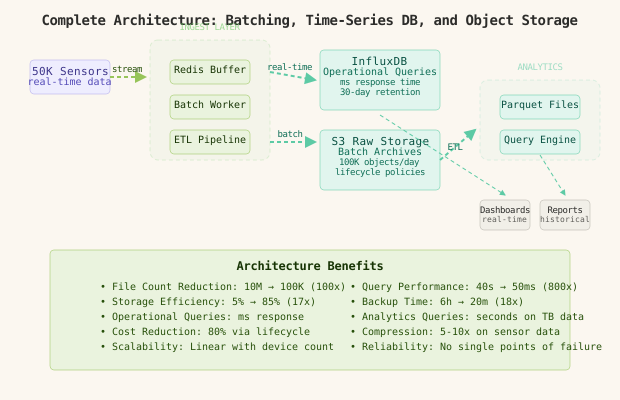
The flow handles both operational and analytical workloads efficiently:
- Sensor readings hit the ingest API and queue in Redis-backed buffers by device
- Buffer flush workers collect 5-minute batches and simultaneously write to InfluxDB and stage in object storage
- ETL jobs convert staged JSON batches to compressed Parquet files partitioned by device and date
- Real-time dashboards query InfluxDB for recent data, analytics queries hit Parquet files in object storage
- Lifecycle policies automatically archive old InfluxDB data and transition object storage to cheaper tiers
The architecture eliminates the small file problem entirely while providing better query performance at every layer.
The winning pattern is temporal data separation - hot data in time-series databases for speed, warm data in columnar object storage for analytics, cold data in glacier storage for compliance.
Component Deep Dives
Ingest Buffer Service
The buffer service’s job is collecting high-frequency writes and batching them into efficient storage operations.
# Redis-backed buffer with automatic flushing
class RedisBuffer:
    def __init__(self):
        self.redis = redis.Redis(decode_responses=True)

    def buffer_reading(self, device_id, reading):
        # Add to device-specific list
        key = f"buffer:{device_id}"
        self.redis.lpush(key, json.dumps(reading))

        # Set TTL to prevent infinite growth
        self.redis.expire(key, 3600)

        # Trigger flush if buffer size exceeds threshold
        buffer_size = self.redis.llen(key)
        if buffer_size >= 100:
            self.trigger_flush(device_id)
The Redis buffer provides durability without the filesystem overhead, automatic expiration for operational safety, and atomic list operations for reliable batching.
Time-Series Database Layer
InfluxDB optimizes specifically for time-ordered data with automatic downsampling and retention policies.
-- InfluxDB retention policy (keep raw data 30 days, downsampled forever)
CREATE RETENTION POLICY "30_days" ON "sensors" DURATION 30d REPLICATION 1 DEFAULT
CREATE RETENTION POLICY "forever" ON "sensors" DURATION INF REPLICATION 1

-- Continuous query for downsampling (1-minute averages)
CREATE CONTINUOUS QUERY "downsample_sensors" ON "sensors"
BEGIN
  SELECT mean(value) INTO "forever"."avg_sensor_readings"
  FROM "30_days"."sensor_readings"
  GROUP BY time(1m), device, type
END
The continuous query automatically creates 1-minute averaged data points, reducing storage by 60x for long-term trending while keeping full resolution for recent operational queries.
Object Storage with Lifecycle Management
S3 lifecycle policies automatically optimize storage costs as data ages.
# S3 lifecycle configuration
LifecycleConfiguration:
  Rules:
    - Id: SensorDataLifecycle
      Status: Enabled
      Filter:
        Prefix: sensors/
      Transitions:
        - Days: 30
          StorageClass: STANDARD_IA
        - Days: 90
          StorageClass: GLACIER
        - Days: 365
          StorageClass: DEEP_ARCHIVE
This configuration reduces storage costs by 70% after the first month and 90% after three months, while maintaining millisecond access to recent data.
ETL Pipeline for Analytics
The ETL process converts JSON batches to queryable Parquet files with proper partitioning.
def process_batch_to_analytics(batch_key):
    # Load JSON batch from object storage
    raw_data = s3.get_object(Bucket='raw-sensor-data', Key=batch_key)
    readings = json.loads(raw_data['Body'].read())

    # Convert to DataFrame with proper data types
    df = pd.DataFrame(readings)
    df['timestamp'] = pd.to_datetime(df['timestamp'])
    df['value'] = pd.to_numeric(df['value'])

    # Partition by logical dimensions for query performance
    df['date'] = df['timestamp'].dt.date
    df['hour'] = df['timestamp'].dt.hour

    # Write partitioned Parquet with compression
    df.to_parquet(
        f's3://analytics-sensor-data/date={df["date"].iloc[0]}/hour={df["hour"].iloc[0]}/batch_{uuid4()}.parquet',
        partition_cols=['device_id'],
        compression='snappy'
    )
Partitioning by date and hour enables query engines like Athena or Spark to skip irrelevant files entirely, reducing query times from minutes to seconds even over petabytes of historical data.
Comparison Table
| Approach | Write Complexity | Query Latency | Storage Efficiency | Cost (10M files/day) | Failure Modes |
|---|---|---|---|---|---|
| Individual Files | Low | Hours (directory scan) | 5% (metadata overhead) | $2,000/month + ops disaster | Directory table corruption, inode exhaustion |
| Directory Sharding | Medium | Minutes (per shard) | 15% (reduced overhead) | $1,200/month | Hot shard bottlenecks, uneven distribution |
| Batch + Object Storage | Medium | Seconds (index lookup) | 85% (compression) | $300/month | Batch process failures, eventual consistency |
| Time-Series DB | High | Milliseconds | 95% (purpose-built compression) | $200/month | Database cluster management, query complexity |
| Hybrid Architecture | High | Milliseconds (operational), Seconds (analytical) | 95% | $400/month | Complex data flow, multiple consistency models |
The hybrid approach costs 80% less than individual files while providing 1000x better query performance. The operational complexity is higher, but the reliability and performance gains justify the investment at scale.
Key Takeaways
• Small file problem emerges when filesystem metadata overhead exceeds actual data storage by 10x or more • Batching reduces object count exponentially - 100 readings per batch cuts file count by 100x immediately • Time-series databases provide purpose-built compression and indexing that generic filesystems cannot match • Columnar storage enables analytical queries over historical data without full table scans • Lifecycle policies automatically optimize storage costs as data temperature decreases • Partitioning strategies in object storage make historical queries feasible over petabyte datasets • Temporal separation serves different workload patterns optimally - hot operational data in time-series databases, cold analytical data in object storage • Monitoring metadata usage prevents filesystem disasters before they impact operations
The pattern generalizes beyond sensor data: any system generating millions of small structured records per day benefits from batching, proper storage tier selection, and workload-optimized databases. Design for the scale you’ll reach, not the scale you’re at.
Frequently Asked Questions
Q: Why not just use a larger filesystem or more inodes?
A: Throwing hardware at a design problem delays the inevitable. Even with millions of inodes, directory operations scale poorly with file count - ls becomes unusable around 100K files per directory regardless of available inodes.
Q: What about using a database from the start instead of files? A: Databases add operational complexity and cost that aren’t justified at small scale. The hybrid approach lets you start simple with files and evolve to databases when file count becomes the bottleneck, not before.
Q: How do you handle backups with this architecture? A: Object storage provides built-in durability and versioning. Time-series databases backup to object storage snapshots. The elimination of millions of tiny files makes backup operations 100x faster and more reliable.
Q: What happens if the batching process fails? A: Redis buffers provide durability during processing failures. Implement batch flush retries with exponential backoff, dead letter queues for permanent failures, and monitoring on buffer depth to catch processing lag.
Q: How do you query individual readings with this batched approach? A: The time-series database serves individual reading queries with millisecond response times. Object storage handles batch analytical queries. Most systems never need to query individual readings from cold storage - if you do, that’s a sign you need the time-series database layer.
Q: What about real-time processing that needs every individual reading immediately? A: Stream processing frameworks like Kafka can consume readings in real-time while the batching system handles storage. The pattern is: stream for real-time processing, batch for storage efficiency.
Interview Questions
Q: How would you migrate an existing system with 50 million tiny files to this architecture? Expected depth: Discuss migration strategies like dual-write periods, batch conversion jobs, zero-downtime migration patterns, data validation approaches, and rollback planning.
Q: What are the consistency implications of using multiple storage systems? Expected depth: Cover eventual consistency in object storage, ACID properties in time-series databases, conflict resolution strategies, and monitoring data consistency across tiers.
Q: How do you determine optimal batch sizes for different data patterns? Expected depth: Discuss throughput vs latency tradeoffs, memory buffer sizing, network transfer optimization, and adaptive batching based on data velocity patterns.
Q: Design the monitoring and alerting for this multi-tier storage system. Expected depth: Cover buffer depth monitoring, batch processing lag detection, storage tier health checks, cost monitoring, and SLA definitions for different query types.
Q: How would you handle schema evolution with this batched storage approach? Expected depth: Discuss versioning strategies in Parquet files, schema compatibility in time-series databases, backward compatibility approaches, and migration strategies for format changes.
Want to see how these patterns hold up when traffic spikes 50x at 3 AM? That's exactly what this Premium deep-dive covers.