JWT Tokens That Never Expired
security api-design
System Design Scenario
JWT Tokens That Never Expired
When “never expires” becomes “never secure” - six months after termination, access remains
It’s Tuesday morning at 9:15 AM when Sarah from InfoSec sends the Slack message that makes everyone’s coffee go cold: “Former employee still accessing production APIs. Token issued six months ago.” The employee had been let go in May. It’s now November. Their JWT token - the digital key to your entire system - is still working like it was their first day on the job.
Think of authentication like a hotel key card. Normal hotels reprogram cards daily and deactivate them when guests check out. But your system is like giving guests a master key that works forever, then hoping they’ll voluntarily return it when they leave. The employee didn’t return anything - they probably forgot they even had it. Meanwhile, that token has been quietly granting access to customer data, internal APIs, and administrative functions for six months.
The root cause isn’t malicious. It’s convenient. Someone on the team set the JWT expiration to "never" during development to avoid dealing with token refresh flows. It shipped to production because tokens worked fine in testing, and the security review focused on encryption, not expiration. This is the eternal token problem.
Why This Happens
The instinct is to think JWT tokens are secure because they’re cryptographically signed. But a signed permanent token is like a signed check with no expiration date - perfectly authentic and permanently valid.
JWT tokens contain three pieces: header, payload, and signature. The payload includes an exp field for expiration timestamp. When this field is absent or set to a far-future date, the token becomes essentially permanent. The signature ensures the token hasn’t been tampered with, but it doesn’t address revocation or lifecycle management.
Initial login
  -> JWT issued with exp: null
    -> Token cached in local storage
      -> Employee terminated
        -> Token remains valid
-> Access continues indefinitelyJWT tokens are self-contained and stateless - they cannot be revoked without additional infrastructure.
The Naive Solution (and where it breaks)
Most engineers reach for one of two quick fixes: set a long expiration (like 1 year) or implement a server-side blacklist.
A long expiration feels like a compromise - not permanent, but long enough to avoid refresh headaches. It’s like giving hotel guests a year-long key card instead of daily ones. The problem persists at scale: a 6-month token still means 6 months of unrevokable access after termination.
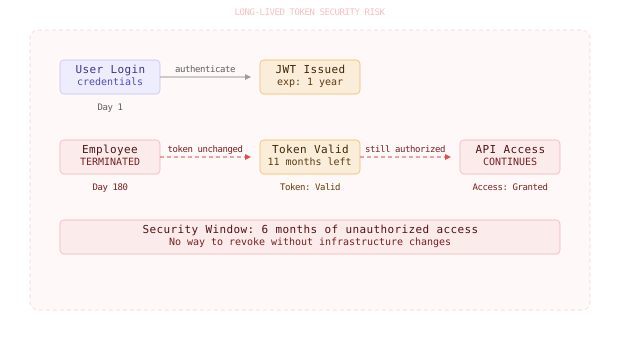
Long-lived tokens (30+ days) create the same security window as permanent tokens - just shorter.
Server-side blacklists seem smarter - maintain a list of revoked tokens and check every request. But this reintroduces state to a stateless system. At 100,000 requests per second, each request hits the blacklist database. The blacklist grows indefinitely (tokens never expire, so they never leave the blacklist), and you’ve essentially rebuilt session management with extra steps.
Small scale: 1000 tokens -> blacklist works fine
Large scale: 10M tokens -> database becomes bottleneck
The Better Solution - Short-Lived Tokens with Refresh
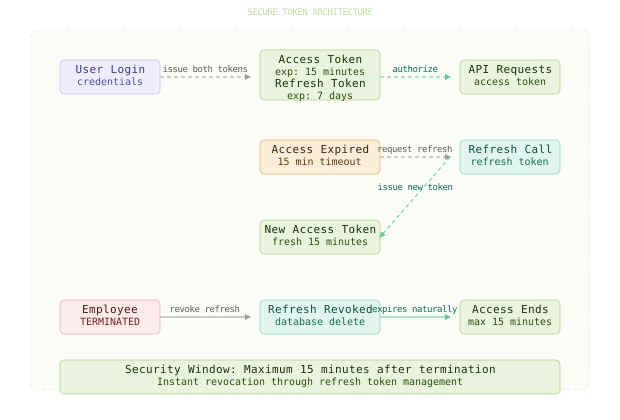
Here’s what actually fixes this: use short-lived access tokens (15 minutes) paired with longer-lived refresh tokens (7 days). It’s like a hotel system where room keys expire every few hours, but the front desk will issue new ones as long as you have a valid guest registration.
The access token handles API requests and expires quickly. The refresh token lives in secure storage and can generate new access tokens. When an employee is terminated, you revoke their refresh tokens, and their access dies within 15 minutes.
// Short-lived access token (15 minutes)
const accessToken = jwt.sign(
  { userId, role, permissions },
  JWT_SECRET,
  { expiresIn: '15m' }
);

// Longer-lived refresh token (7 days)
const refreshToken = jwt.sign(
  { userId, tokenId: uuid() },
  REFRESH_SECRET,
  { expiresIn: '7d' }
);
The refresh token contains minimal information - just user ID and a unique token ID. This token ID gets stored in your database with the user’s active sessions. When the user needs a new access token:
// Token refresh endpoint
app.post('/auth/refresh', async (req, res) => {
  const { refreshToken } = req.body;

  // Verify and decode refresh token
  const decoded = jwt.verify(refreshToken, REFRESH_SECRET);

  // Check if token ID exists in active sessions
  const session = await db.query(
    'SELECT user_id FROM user_sessions WHERE token_id = $1',
    [decoded.tokenId]
  );

  if (!session) {
    return res.status(401).json({ error: 'Invalid refresh token' });
  }

  // Issue new access token
  const newAccessToken = jwt.sign(
    { userId: session.user_id, role: 'user' },
    JWT_SECRET,
    { expiresIn: '15m' }
  );

  res.json({ accessToken: newAccessToken });
});Google’s OAuth 2.0 uses this exact pattern - access tokens expire in 1 hour, refresh tokens in 6 months.
The Better Solution - Token Rotation
For even stronger security, implement refresh token rotation. Every time a refresh token is used to generate a new access token, you also issue a new refresh token and invalidate the old one.
// Refresh with rotation
app.post('/auth/refresh', async (req, res) => {
  const { refreshToken } = req.body;

  const decoded = jwt.verify(refreshToken, REFRESH_SECRET);

  // Check and invalidate old token in one atomic operation
  const result = await db.query(`
    UPDATE user_sessions
    SET token_id = $1, updated_at = NOW()
    WHERE token_id = $2 AND user_id = $3
    RETURNING user_id
  `, [newTokenId, decoded.tokenId, decoded.userId]);

  if (result.rowCount === 0) {
    return res.status(401).json({ error: 'Invalid refresh token' });
  }

  // Issue both new access and refresh tokens
  const newAccessToken = jwt.sign({ userId: result.rows[0].user_id }, JWT_SECRET, { expiresIn: '15m' });
  const newRefreshToken = jwt.sign({ userId: result.rows[0].user_id, tokenId: newTokenId }, REFRESH_SECRET, { expiresIn: '7d' });

  res.json({
    accessToken: newAccessToken,
    refreshToken: newRefreshToken
  });
});
Token rotation means stolen refresh tokens become useless after first use. If an attacker tries to use a stolen refresh token, the rotation fails, alerting you to potential compromise.
Token rotation turns theft into detection - using a stolen token immediately invalidates it and triggers alerts.
The Full Architecture
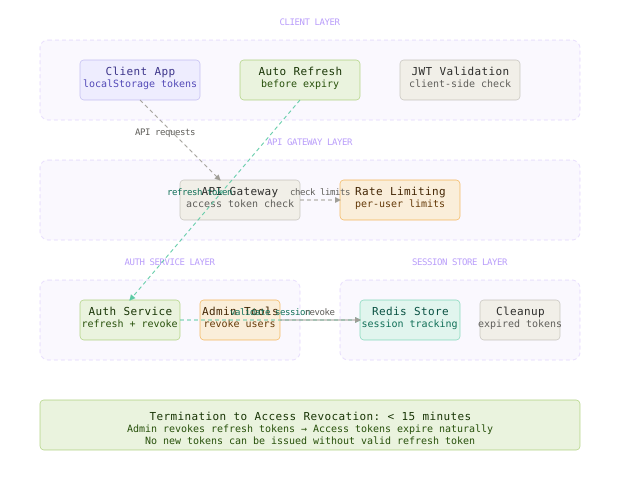
The complete system has four layers: the client application stores both tokens securely, the API gateway validates access tokens on every request, the auth service handles refresh flows and token revocation, and the session store tracks active refresh tokens for instant revocation.
When a user logs in, they receive both tokens. The client automatically refreshes access tokens before expiration. When an employee is terminated, admin tools revoke all their refresh tokens. Within 15 minutes, all access ceases - no matter how many devices they were using or how many tokens were issued.
The session store needs to handle three operations efficiently: token validation (on every refresh), token revocation (immediate), and session cleanup (periodic). Redis works well here - fast lookups, automatic expiration, and atomic operations.
The combination of short access token expiry and revokable refresh tokens gives you both performance and security.
Component Deep Dives
Access Token Handler
The access token handler’s job is to make authorization decisions quickly without database calls. It validates the JWT signature and checks expiration locally.
// Fast access token validation
func ValidateAccessToken(tokenString string) (*Claims, error) {
    token, err := jwt.ParseWithClaims(tokenString, &Claims{}, func(token *jwt.Token) (interface{}, error) {
        return []byte(JWT_SECRET), nil
    })

    if err != nil || !token.Valid {
        return nil, errors.New("invalid token")
    }

    claims := token.Claims.(*Claims)

    // Check expiration locally - no DB call needed
    if claims.ExpiresAt.Time.Before(time.Now()) {
        return nil, errors.New("token expired")
    }

    return claims, nil
}
This handler runs on every API request, so it must be fast. No database lookups, no external calls - just cryptographic verification and timestamp checks.
Refresh Token Manager
The refresh token manager’s job is to securely exchange refresh tokens for new access tokens while detecting theft attempts.
-- Session table for refresh token tracking
CREATE TABLE user_sessions (
    token_id UUID PRIMARY KEY,
    user_id INTEGER NOT NULL,
    created_at TIMESTAMP DEFAULT NOW(),
    updated_at TIMESTAMP DEFAULT NOW(),
    expires_at TIMESTAMP NOT NULL,
    device_info JSONB,
    INDEX (user_id, expires_at)
);
The manager stores minimal data per session - just enough to validate and revoke tokens. Device info helps with forensics but isn’t required for security.
Revocation Service
The revocation service’s job is to instantly terminate access for specific users or tokens. It operates on refresh tokens, which cascade to access tokens through expiration.
// Revoke all sessions for a user (termination scenario)
func RevokeUserSessions(userID int) error {
    _, err := db.Exec(`
        DELETE FROM user_sessions
        WHERE user_id = $1
    `, userID)

    if err != nil {
        return err
    }

    // Optional: publish revocation event for immediate cache invalidation
    publishRevocationEvent(userID)
    return nil
}
For immediate effect across multiple servers, the revocation service can publish events to invalidate any cached tokens or sessions.
Session Cleanup Worker
The cleanup worker’s job is to remove expired refresh tokens and maintain database hygiene. It runs periodically to prevent the session table from growing indefinitely.
-- Cleanup expired sessions (run hourly)
DELETE FROM user_sessions
WHERE expires_at < NOW() - INTERVAL '1 day';
The cleanup worker is defensive - it waits an extra day after expiration to handle clock skew and ensure no valid tokens are accidentally removed.
Comparison Table
| Approach | Write Complexity | Read Complexity | Latency | Storage Cost | Failure Modes | Best Use Case |
|---|---|---|---|---|---|---|
| Permanent tokens | Low | Low | Fastest | Minimal | No revocation possible | Never (security risk) |
| Long-lived tokens | Low | Low | Fast | Minimal | Delayed revocation | Internal tools only |
| Token blacklist | Medium | High | Slow | High (grows forever) | Database bottleneck | Small scale systems |
| Short + refresh | High | Medium | Medium | Medium | Complex refresh logic | Production systems |
| Rotating refresh | High | Medium | Medium | Medium | Token sync issues | High-security systems |
The short-lived token with refresh approach wins for production systems because it balances security, performance, and operational complexity. You get fast API responses, secure revocation, and manageable state.
Key Takeaways
- Token expiry is not optional - permanent tokens are permanent security risks
- Refresh token rotation turns credential theft into immediate detection and mitigation
- Short access tokens minimize the blast radius of any compromise without impacting performance
- Stateless authentication requires stateful session management for proper revocation
- Database sessions are faster and more reliable than growing blacklists for revocation
- Cleanup jobs prevent session storage from growing unbounded over time
- Atomic operations ensure refresh token rotation cannot leave the system in an inconsistent state
- Device tracking helps with forensics and suspicious activity detection
The counterintuitive lesson: making authentication more complex (two token types, refresh flows, session storage) actually makes the system more secure and more performant than simple permanent tokens. Security isn’t about avoiding complexity - it’s about managing complexity in the right places.
Frequently Asked Questions
Q: Why not just make JWT access tokens last 24 hours?
A: Even 24-hour tokens mean a terminated employee has up to 24 hours of continued access. For sensitive systems, that window is unacceptable. The refresh pattern gives you sub-15-minute revocation with the same user experience.
Q: Can’t I just store a “revoked” flag on the JWT payload?
A: No, JWT tokens are immutable once issued. You cannot modify the payload without invalidating the signature. The only way to “revoke” information in a JWT is through external systems like blacklists or session stores.
Q: What if the refresh token is stolen?
A: With rotation, a stolen refresh token becomes useless after the legitimate user refreshes their access token. Without rotation, you need to monitor for unusual refresh patterns and implement device fingerprinting.
Q: How do I handle refresh failures on the client?
A: Treat refresh failures as logout events. Clear local storage, redirect to login, and optionally notify the user. Most failures indicate token theft, revocation, or expiration - all cases where re-authentication is appropriate.
Q: Should refresh tokens be stored in localStorage or httpOnly cookies?
A: HttpOnly cookies are more secure against XSS attacks, but localStorage works better for SPAs and mobile apps. If using cookies, enable SameSite and Secure flags. If using localStorage, implement Content Security Policy.
Q: How long should cleanup jobs retain expired sessions?
A: Retain for 1-7 days after expiration to handle clock skew and provide forensic data. Longer retention helps with incident investigation but increases storage costs.
Interview Questions
Q: Design a JWT authentication system that can instantly revoke access for any user.
Expected depth: Discuss short-lived access tokens, refresh token patterns, session storage design, and revocation mechanisms. Cover the tradeoffs between stateless JWTs and stateful session management.
Q: How would you detect if a refresh token has been stolen and used by an attacker?
Expected depth: Explain token rotation, device fingerprinting, IP address monitoring, and refresh pattern analysis. Discuss how rotation makes theft detection automatic.
Q: A client application goes offline for 2 hours, then comes back online. How does token refresh work?
Expected depth: Cover refresh token expiration, grace periods, background refresh, and user experience during connectivity issues. Discuss exponential backoff and offline token caching.
Q: Your authentication system needs to support both web browsers and mobile apps. How do you handle token storage securely?
Expected depth: Compare httpOnly cookies vs localStorage vs mobile keychain storage. Discuss XSS/CSRF protections, token binding, and platform-specific security considerations.
Q: How do you implement “remember me” functionality with short-lived JWT tokens?
Expected depth: Discuss longer-lived refresh tokens, device trust levels, step-up authentication for sensitive operations, and the security implications of extended sessions.
Want to see how these patterns hold up when traffic spikes 50x at 3 AM? That's exactly what this Premium deep-dive covers.