Certificate Expired at Midnight
cloud-infrastructure devops security
System Design Scenario
Certificate Expired at Midnight
When automation works perfectly on the wrong machine
Friday 12:03 AM. David’s phone explodes with customer support tickets. “Site shows security warning.” “Can’t complete checkout.” “Says connection is not secure.” The monitoring shows green across the board - servers healthy, database responding, CDN cache hit rate at 94%. But 50,000 users are seeing browser warnings about an insecure connection.
SSL certificates are like driver’s licenses - they expire on a fixed schedule, and when they expire, everything stops working instantly. David checks the certificate management dashboard: the cert was auto-renewed successfully at 11:47 PM, thirteen minutes before expiration. The automation worked perfectly. The certificate is valid, signed by a trusted CA, and has another 90 days before the next renewal.
The problem isn’t the certificate. It’s the location. The certificate was renewed on the staging server, not the production load balancer. The automation ran exactly as designed, but it ran on the wrong machine. Production is still serving yesterday’s expired certificate while the valid certificate sits unused on a server that handles 200 requests per day instead of 200,000.
This is certificate lifecycle management failure. When your automation doesn’t account for the distributed nature of modern infrastructure, perfect execution becomes perfectly useless.
Why This Happens
The instinct is to set up certificate auto-renewal on individual servers - it’s the simplest path from manual certificate management to automation. Tools like certbot make this straightforward: install on a server, configure a cron job, and certificates renew themselves every 60 days.
But modern applications aren’t single servers. They’re distributed across load balancers, CDNs, multiple regions, and various cloud services. Each component that terminates TLS connections needs a copy of the certificate, and they all need to be updated when the certificate renews.
The failure chain looks like this:
cert expires at midnight
  -> auto-renewal runs on server-1
    -> new cert generated successfully
      -> server-1 gets updated cert
        -> server-2, server-3, load-balancer still have old cert
          -> users see security warnings
            -> revenue loss, support tickets, trust erosion
The automation solved the wrong problem. It prevented certificate expiration on one server while ignoring the distributed certificate deployment challenge.
Certificate renewal is a two-phase problem: generation (create a new valid certificate) and distribution (deploy it everywhere that needs it) - most automation only solves the first phase.
The Naive Solution (and where it breaks)
Most engineers first try to solve this by running the same renewal automation on every server. If server-1 can renew certificates automatically, why not replicate that process on server-2, server-3, and the load balancer?
This approach is like having multiple people independently renewing the same driver’s license - it creates more problems than it solves.
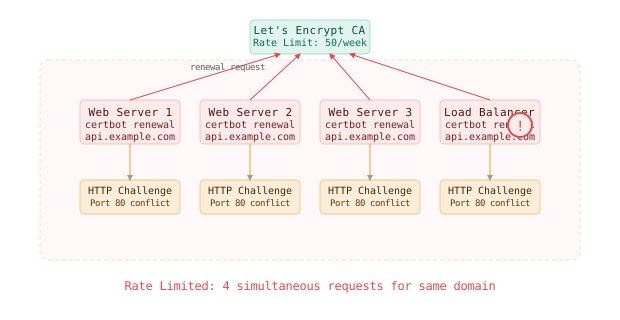
The problems multiply quickly:
First, rate limiting. Certificate Authorities like Let’s Encrypt impose strict rate limits: 50 certificates per registered domain per week, 5 failed validation attempts per hour. When multiple servers simultaneously request certificates for the same domain, you hit these limits and get locked out of certificate renewal entirely.
Second, validation conflicts. ACME challenge validation requires the CA to reach your server on port 80 or 443. When multiple servers claim to handle the same domain, the validation traffic gets routed unpredictably:
Small scale: 1 server handles validation -> renewal succeeds
Large scale: 3 servers + load balancer -> validation fails 75% of the time
Third, certificate consistency. Each renewal request generates a different certificate with different serial numbers and slightly different validity periods. Even if all renewals succeed, your load balancer might serve one certificate while your servers use different ones, creating SSL mismatch errors.
Running identical renewal automation on multiple servers creates race conditions with Certificate Authority rate limits - you’ll lock yourself out of renewals entirely when you need them most.
The Better Solution
Here’s what actually fixes this: centralized certificate management with automated distribution. Think of it like a corporate IT department - one team handles license renewals, then distributes the credentials to everyone who needs them.
Centralized Certificate Management
Use a dedicated service or designated server to handle all certificate lifecycle operations. This becomes your “certificate authority” within your infrastructure.
# cert-manager configuration for Kubernetes
apiVersion: cert-manager.io/v1
kind: ClusterIssuer
metadata:
  name: letsencrypt-prod
spec:
  acme:
    server: https://acme-v02.api.letsencrypt.org/directory
    email: ssl-admin@company.com
    privateKeySecretRef:
      name: letsencrypt-prod
    solvers:
    - http01:
        ingress:
          class: nginx
    - dns01:
        cloudflare:
          apiTokenSecretRef:
            name: cloudflare-api-token
            key: api-token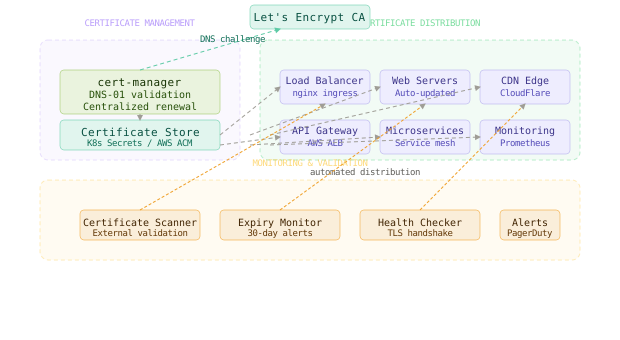
This configuration uses DNS validation instead of HTTP validation, avoiding the conflicts that occur when multiple servers try to respond to ACME challenges.
Cloudflare’s edge infrastructure uses centralized certificate management to handle millions of certificates - they generate certificates in centralized data centers, then distribute them to thousands of edge servers worldwide within minutes.
Automated Distribution Pipeline
Once certificates are generated centrally, they need to be distributed to all services that terminate TLS connections.
# Certificate distribution pipeline
import boto3
import kubernetes
from datetime import datetime, timedelta

class CertificateDistributor:
    def __init__(self):
        self.s3 = boto3.client('s3')
        self.acm = boto3.client('acm')
        self.k8s = kubernetes.client.ApiClient()

    def distribute_certificate(self, domain, cert_data, private_key):
        # Upload to S3 for server access
        self.s3.put_object(
            Bucket='ssl-certificates',
            Key=f'{domain}/fullchain.pem',
            Body=cert_data,
            ServerSideEncryption='AES256'
        )

        # Import to AWS Certificate Manager for load balancers
        self.acm.import_certificate(
            Certificate=cert_data,
            PrivateKey=private_key,
            Tags=[
                {'Key': 'Domain', 'Value': domain},
                {'Key': 'AutoGenerated', 'Value': 'true'},
                {'Key': 'ExpiresAt', 'Value': self.extract_expiry(cert_data)}
            ]
        )

        # Update Kubernetes secrets
        secret_body = {
            'apiVersion': 'v1',
            'kind': 'Secret',
            'metadata': {'name': f'{domain}-tls', 'namespace': 'default'},
            'type': 'kubernetes.io/tls',
            'data': {
                'tls.crt': base64.b64encode(cert_data).decode(),
                'tls.key': base64.b64encode(private_key).decode()
            }
        }
        self.k8s.replace_namespaced_secret(
            name=f'{domain}-tls',
            namespace='default',
            body=secret_body
        )
Monitoring and Validation
Certificate management requires proactive monitoring since failures are often silent until they become user-facing.
# Certificate monitoring script
import ssl
import socket
import datetime
from dataclasses import dataclass
from typing import List

@dataclass
class CertificateStatus:
    domain: str
    expiry_date: datetime.datetime
    days_remaining: int
    issuer: str
    is_valid: bool
    errors: List[str]

def check_certificate_status(domain: str, port: int = 443) -> CertificateStatus:
    try:
        context = ssl.create_default_context()
        with socket.create_connection((domain, port), timeout=10) as sock:
            with context.wrap_socket(sock, server_hostname=domain) as ssock:
                cert = ssock.getpeercert()

        expiry_str = cert['notAfter']
        expiry_date = datetime.datetime.strptime(expiry_str, '%b %d %H:%M:%S %Y %Z')
        days_remaining = (expiry_date - datetime.datetime.now()).days

        return CertificateStatus(
            domain=domain,
            expiry_date=expiry_date,
            days_remaining=days_remaining,
            issuer=cert['issuer'][1][0][1],
            is_valid=days_remaining > 0,
            errors=[]
        )
    except Exception as e:
        return CertificateStatus(
            domain=domain,
            expiry_date=None,
            days_remaining=-1,
            issuer="Unknown",
            is_valid=False,
            errors=[str(e)]
        )

# Monitor all production domains
domains = ['api.company.com', 'app.company.com', 'cdn.company.com']
for domain in domains:
    status = check_certificate_status(domain)
    if status.days_remaining < 7:
alert_pagerduty(f"Certificate for {domain} expires in {status.days_remaining} days")The core mechanism that makes this work is separation of concerns - one system handles certificate lifecycle, another handles distribution, and a third handles monitoring - each can fail independently without breaking the others.
The Full Architecture
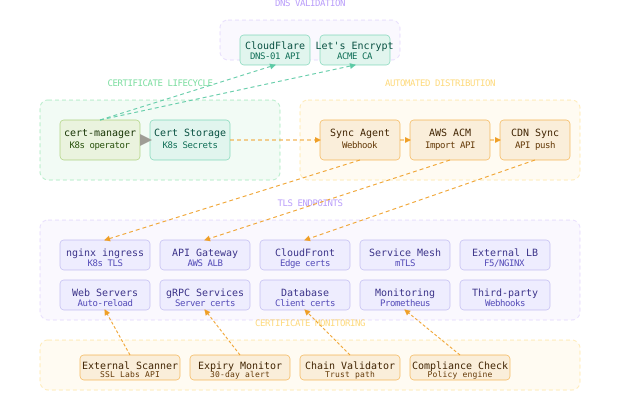
The complete architecture separates certificate operations into distinct, reliable phases. The certificate management service handles renewals and stores certificates in a central location. The distribution pipeline updates all consumers when certificates change. The monitoring system tracks certificate health across all endpoints and alerts before problems become user-visible.
When a certificate approaches expiration, the renewal happens in one place with proper validation. The distribution system detects the new certificate and pushes it to load balancers, servers, CDNs, and any other services that need it. Monitoring verifies that all endpoints are serving the new certificate and alerts if any component missed the update.
Each component has a single responsibility and can be operated independently. Certificate renewal failures don’t cascade to distribution failures. Distribution problems don’t prevent monitoring from detecting issues. The system degrades gracefully instead of failing catastrophically.
The most critical design decision is making certificate operations idempotent and stateless - the same renewal operation should produce identical results regardless of how many times it runs or when it runs.
Component Deep Dives
DNS Challenge Validation
DNS challenges avoid the HTTP validation problems that occur in distributed environments. Instead of proving domain control by serving files over HTTP, you prove control by creating DNS records.
# DNS-01 challenge validation with Cloudflare
# cert-manager automatically creates these TXT records
_acme-challenge.example.com. TXT "xxxxxxxxxxxxxxxxxxxxxxxxx"

# The CA validates by checking DNS, not HTTP
dig TXT _acme-challenge.example.com
# Returns the challenge token, proving domain control
This works reliably in load-balanced environments because DNS is naturally distributed and doesn’t depend on routing HTTP traffic to specific servers.
Certificate Storage Strategy
Store certificates in a secure, accessible location that all consuming services can reach.
# Kubernetes secret for certificate storage
apiVersion: v1
kind: Secret
metadata:
  name: example-com-tls
  namespace: ingress-nginx
type: kubernetes.io/tls
data:
  tls.crt: LS0tLS1CRUdJTi... # base64 encoded certificate
  tls.key: LS0tLS1CRUdJTi... # base64 encoded private key

# AWS Secrets Manager for server access
aws secretsmanager create-secret \
  --name "ssl-certificates/example.com" \
  --description "SSL certificate for example.com" \
  --secret-string '{"certificate": "...", "private_key": "..."}'
Health Check Implementation
Implement health checks that validate certificate status from the user’s perspective, not just from the server’s perspective.
# External certificate validation
import requests
from cryptography import x509
from cryptography.hazmat.backends import default_backend

def validate_certificate_chain(url: str) -> dict:
    try:
        response = requests.get(url, verify=True, timeout=10)
        # If we get here, certificate chain is valid

        cert = ssl.get_server_certificate((url, 443))
        cert_obj = x509.load_pem_x509_certificate(cert.encode(), default_backend())

        return {
            'valid': True,
            'subject': cert_obj.subject.rfc4514_string(),
            'issuer': cert_obj.issuer.rfc4514_string(),
            'expiry': cert_obj.not_valid_after,
            'san_domains': get_san_domains(cert_obj)
        }
    except requests.exceptions.SSLError as e:
        return {'valid': False, 'error': f'SSL validation failed: {e}'}
    except Exception as e:
        return {'valid': False, 'error': f'Connection failed: {e}'}
This validates the complete certificate chain as experienced by actual users, not just the certificate file stored on disk.
Comparison Table
| Approach | Setup Complexity | Renewal Reliability | Distribution Speed | Operational Overhead | Failure Modes | Best Use Case |
|---|---|---|---|---|---|---|
| Manual renewal | Low | Very Low | Immediate | Very High | Human error, forgotten renewals | Development only |
| Server-based certbot | Low | Medium | Slow (manual) | High | Single points of failure | Single server apps |
| Multiple certbot instances | Medium | Low | Medium | Very High | Rate limiting, validation conflicts | Never recommended |
| Cloud certificate services | Medium | High | Fast | Low | Vendor lock-in | Small to medium apps |
| Centralized cert-manager | High | Very High | Very Fast | Medium | Complex initial setup | Production Kubernetes |
| Full automation pipeline | Very High | Very High | Very Fast | Low | Complex debugging | Enterprise multi-cloud |
For most production applications, cloud certificate services like AWS Certificate Manager provide the best balance of reliability and simplicity. For complex multi-cloud or on-premises environments, centralized certificate management becomes worth the operational investment.
Key Takeaways
- Certificate lifecycle has two distinct phases: renewal (generating valid certificates) and distribution (deploying them everywhere needed) - automation must handle both phases
- Centralized renewal prevents Certificate Authority rate limiting and validation conflicts that occur when multiple servers independently request certificates
- DNS validation works more reliably than HTTP validation in distributed environments because it doesn’t depend on request routing to specific servers
- Idempotent operations allow certificate automation to run repeatedly without side effects - the same inputs always produce the same outputs
- External monitoring validates certificates from the user’s perspective, catching issues that internal monitoring might miss
- Automated distribution ensures certificates reach all consuming services within minutes of renewal, preventing the “renewed but not deployed” failure mode
- Security boundaries require certificates to be stored securely but accessible to all services that terminate TLS connections
- Failure isolation means certificate renewal problems shouldn’t prevent distribution, and distribution problems shouldn’t prevent monitoring
The hardest lesson about certificate management is that the technical solution is straightforward - the operational challenge is building reliable processes around an inherently time-sensitive system. A certificate that expires at midnight doesn’t care if your deployment pipeline is down for maintenance.
Frequently Asked Questions
Q: Why not use wildcard certificates to simplify management? A: Wildcard certificates reduce the number of certificates to manage but don’t solve the distribution problem. You still need to deploy the wildcard certificate to all services, and a compromise of the private key affects all subdomains. Use wildcards to reduce complexity, not as a substitute for proper certificate management.
Q: How do I handle certificate renewal during planned maintenance windows? A: Design certificate operations to be independent of application deployments. Use external certificate management services (AWS ACM, Let’s Encrypt with DNS validation) that don’t require application downtime. Schedule certificate renewals well before expiration (30+ days) to avoid emergency renewals during maintenance.
Q: What happens if the certificate management system itself goes down? A: Certificate management should be more reliable than the applications it serves. Use managed services when possible (AWS ACM, GCP Certificate Manager). For self-hosted solutions, implement high availability with backup certificate issuance and monitoring from multiple locations.
Q: How do I rotate certificates without dropping existing TLS connections? A: Most load balancers and reverse proxies support graceful certificate reloading without dropping connections. Configure your distribution system to use reload signals (SIGHUP for nginx) rather than service restarts. Test certificate rotation procedures regularly in staging environments.
Q: Can I mix different Certificate Authorities for different services? A: Yes, but it increases operational complexity. Different CAs have different rate limits, validation requirements, and certificate formats. Standardizing on one CA (usually Let’s Encrypt for cost, or a commercial CA for enterprise support) simplifies operations and monitoring.
Q: How do I handle certificate validation in development environments? A: Use self-signed certificates or internal CAs for development. Don’t use production certificate automation in development - it wastes Certificate Authority quotas and creates unnecessary dependencies. Tools like mkcert generate locally-trusted development certificates easily.
Interview Questions
Q: Design a certificate management system for a company with 200 microservices across 5 AWS regions. Expected depth: Discuss centralized certificate generation using AWS Certificate Manager or cert-manager, certificate distribution via AWS Secrets Manager or Kubernetes secrets, monitoring strategies for certificate expiration across regions, and disaster recovery procedures. Address cross-region certificate replication and service discovery integration.
Q: Your certificate auto-renewal is working but users still report SSL errors. How do you debug this? Expected depth: Analyze the difference between certificate generation and deployment phases, investigate distribution pipeline failures, check load balancer certificate updates, examine CDN certificate caching, and validate external connectivity. Consider certificate chain issues and mixed content scenarios.
Q: How would you implement certificate pinning for a mobile app while maintaining automated certificate renewal? Expected depth: Discuss certificate pinning strategies (pin CA, pin leaf certificate, pin public key), backup pin management, certificate rotation communication to mobile clients, and emergency pin bypass mechanisms. Address the tradeoff between security and operational flexibility.
Q: Design certificate management for a system that needs to support both internal and external traffic with different security requirements. Expected depth: Plan separate certificate authorities for internal vs external traffic, discuss mTLS implementation for internal services, certificate trust chain management, and automated certificate deployment to both edge and internal services. Consider compliance requirements and audit trails.
Q: A certificate expires during a major outage when your primary certificate management system is down. How do you recover? Expected depth: Design emergency certificate issuance procedures, discuss backup certificate authorities, manual certificate generation and distribution processes, communication plans for security-sensitive operations, and post-incident certificate rotation. Address the balance between security and availability during emergencies.
Premium Content
Unlock the full article along with everything else in the archive — all in one place.