Blame the Network (It's Never the Network)
databases observability devops
System Design Scenario
Blame the Network (It’s Never the Network)
When mysterious latency spikes have a perfectly timed explanation
Tuesday 2 AM. Another PagerDuty alert. “API latency spike: p99 response time 4.2 seconds.” The pattern is maddening - every 3 hours, like clockwork, API responses slow to a crawl for exactly 30 seconds. Then everything returns to normal. CPU usage is steady. Memory usage is fine. Network metrics show no anomalies.
Three weeks of investigation. The networking team checked switches, routers, and firewall rules. The application team profiled code paths and optimized database queries. The infrastructure team analyzed load balancer health checks and auto-scaling policies. Everyone blamed everyone else’s layer.
The breakthrough came from a database administrator who ran SELECT * FROM pg_stat_activity during a latency spike. One query was running that wasn’t there during normal operation: VACUUM (ANALYZE, VERBOSE) users;. The database was performing maintenance on the 500-million-row users table. Every three hours. For exactly 30 seconds.
A forgotten cron job, added six months ago by a departed team member, was running VACUUM ANALYZE on the entire database during peak traffic hours. The vacuum process locks tables, forcing all user queries to wait. The mystery latency spikes weren’t mysterious at all - they were scheduled maintenance colliding with live traffic.
This is scheduled job interference. When background maintenance tasks run on shared resources during active workloads, they create predictable performance degradation that appears random until you correlate the timing.
Why This Happens
The instinct is to schedule maintenance jobs for “off-peak” hours like 2 AM or 3 AM. The logic seems sound: fewer users are online, so maintenance won’t impact anyone. Database maintenance gets scheduled with cron, background jobs run with simple time-based triggers, and system administrators choose arbitrary times that feel safe.
But modern applications don’t have true off-peak hours. Global user bases mean someone is always online. Microservices create cascading dependencies where maintenance on one component affects dozens of others. “Low traffic” periods still have enough activity to make maintenance interference noticeable in latency percentiles.
The failure pattern looks like this:
cron job starts at scheduled time
  -> database begins maintenance operation
    -> locks acquire on tables
      -> user queries queue up waiting for locks
        -> response times spike across all endpoints
          -> cascading timeouts in dependent services
            -> user-visible performance degradation
              -> alerts fire, investigation begins
                -> maintenance completes, metrics return to normal
                  -> root cause remains hidden until next occurrence
The problem compounds because maintenance operations scale with data size, not traffic patterns. A vacuum that took 5 seconds on a 1GB table now takes 30 seconds on a 500GB table. The maintenance window that was safe six months ago is now disrupting production traffic.
Scheduled maintenance creates deterministic performance problems that appear random because the timing correlation is hidden - the maintenance schedule exists outside your application monitoring.
The Naive Solution (and where it breaks)
Most teams first try to fix this by moving the maintenance to “more off-peak” hours. If 2 AM causes problems, try 4 AM. If 4 AM still impacts users, try Sunday mornings. The assumption is that there must be some time when maintenance won’t interfere with production traffic.
This approach is like trying to find the perfect time to block a highway for construction. Even the least busy times still have traffic, and that traffic experiences significant delays.
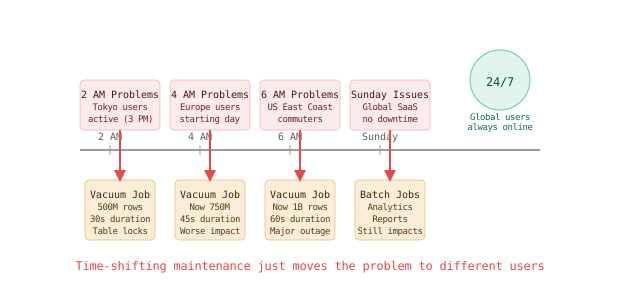
The problems with time-shifting maintenance:
First, global applications have no off-peak hours. When it’s 2 AM in New York, it’s 8 AM in London and 3 PM in Tokyo. Users are always online somewhere, and maintenance during “low traffic” still affects the users who are active.
Second, maintenance duration grows with data size. The vacuum that took 30 seconds on 100 million rows now takes 5 minutes on 1 billion rows. The maintenance window that was acceptable at small scale becomes unacceptable as data grows.
Third, cascading dependencies amplify impact. A 30-second database lock doesn’t just slow database queries - it affects every API endpoint, every background job, and every dependent service that relies on that database.
Small scale: 5-second maintenance, 1000 concurrent users -> brief blip
Large scale: 5-minute maintenance, 50K concurrent users -> widespread outage
At large scale, any maintenance window that touches shared resources becomes a potential outage. Time-shifting just moves the problem to different users in different time zones.
Moving maintenance to different times doesn’t solve the resource contention problem - it just changes which users experience the performance degradation, and growing data sizes make the problem worse over time.
The Better Solution
Here’s what actually fixes this: maintenance strategies that don’t interfere with live traffic. Think of it like highway maintenance that happens in parallel lanes instead of blocking the active roadway.
Online Schema Migrations and Non-Blocking Maintenance
Use database features that perform maintenance without blocking live queries.
-- Bad: traditional VACUUM blocks concurrent operations
VACUUM (ANALYZE, VERBOSE) users;
-- This acquires table locks, blocking all queries

-- Better: configure autovacuum for non-blocking maintenance
-- PostgreSQL autovacuum settings
ALTER SYSTEM SET autovacuum_max_workers = 3;
ALTER SYSTEM SET autovacuum_naptime = 60;  -- Check every minute
ALTER SYSTEM SET autovacuum_vacuum_scale_factor = 0.1;  -- Vacuum at 10% dead tuples
ALTER SYSTEM SET autovacuum_analyze_scale_factor = 0.05;  -- Analyze at 5% changes
ALTER SYSTEM SET autovacuum_vacuum_cost_delay = 2;  -- Throttle to reduce impact
ALTER SYSTEM SET autovacuum_vacuum_cost_limit = 2000;  -- Resource limits

-- Best: online operations for schema changes
-- Non-blocking index creation
CREATE INDEX CONCURRENTLY idx_users_email ON users(email);

-- Non-blocking column addition
ALTER TABLE users ADD COLUMN phone VARCHAR(20);
-- Then populate in small batches
UPDATE users SET phone = calculate_phone() WHERE id >= ? AND id < ? LIMIT 1000;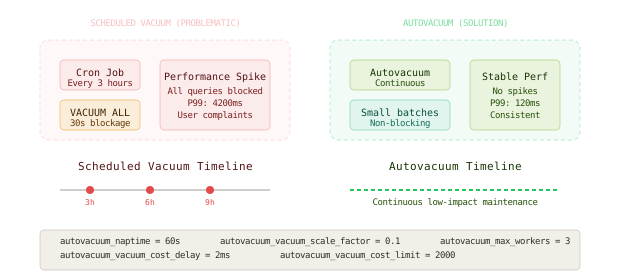
The autovacuum approach spreads maintenance work across time instead of concentrating it in scheduled bursts. This eliminates the periodic performance spikes while keeping database statistics current.
GitHub moved from scheduled maintenance windows to continuous background processing for their Git operations - instead of nightly repository maintenance jobs, they perform incremental optimization throughout the day, eliminating the performance spikes that occurred during their previous maintenance windows.
Traffic-Aware Job Scheduling
Schedule maintenance based on actual system load rather than clock time.
# Traffic-aware maintenance scheduler
import psutil
import time
from typing import Dict, List
from dataclasses import dataclass
from datetime import datetime, timedelta

@dataclass
class SystemMetrics:
    cpu_percent: float
    memory_percent: float
    active_connections: int
    query_queue_length: int
    p95_response_time: float

class TrafficAwareMaintenance:
    def __init__(self, db_connection, metrics_client):
        self.db = db_connection
        self.metrics = metrics_client
        self.maintenance_thresholds = {
            'max_cpu_percent': 70,
            'max_memory_percent': 80,
            'max_active_connections': 100,
            'max_query_queue': 10,
            'max_p95_response_ms': 500
        }

    def get_current_load(self) -> SystemMetrics:
        """Get current system load metrics"""
        cpu_percent = psutil.cpu_percent(interval=1)
        memory = psutil.virtual_memory()

        # Get database-specific metrics
        db_stats = self.db.execute("""
            SELECT count(*) as active_connections,
                   (SELECT count(*) FROM pg_stat_activity WHERE state = 'active') as query_queue
        """).fetchone()

        # Get application response time from metrics
        p95_response = self.metrics.get_percentile('api_response_time', 95)

        return SystemMetrics(
            cpu_percent=cpu_percent,
            memory_percent=memory.percent,
            active_connections=db_stats[0],
            query_queue_length=db_stats[1],
            p95_response_time=p95_response
        )

    def is_safe_for_maintenance(self) -> bool:
        """Check if current load allows for maintenance"""
        current = self.get_current_load()

        return all([
            current.cpu_percent < self.maintenance_thresholds['max_cpu_percent'],
            current.memory_percent < self.maintenance_thresholds['max_memory_percent'],
            current.active_connections < self.maintenance_thresholds['max_active_connections'],
            current.query_queue_length < self.maintenance_thresholds['max_query_queue'],
            current.p95_response_time < self.maintenance_thresholds['max_p95_response_ms']
        ])

    def wait_for_safe_window(self, max_wait_minutes=30) -> bool:
        """Wait for a safe maintenance window"""
        start_time = datetime.now()
        check_interval = 30  # Check every 30 seconds

        while datetime.now() - start_time < timedelta(minutes=max_wait_minutes):
            if self.is_safe_for_maintenance():
                return True

            time.sleep(check_interval)

        return False  # Timeout waiting for safe window

    def run_incremental_maintenance(self, table_name: str, batch_size: int = 10000):
        """Run maintenance in small batches with load monitoring"""
        if not self.wait_for_safe_window():
            raise Exception("Cannot find safe maintenance window")

        # Get total row count for progress tracking
        total_rows = self.db.execute(f"SELECT count(*) FROM {table_name}").fetchone()[0]
        processed_rows = 0

        while processed_rows < total_rows:
            # Check if we should pause due to increased load
            if not self.is_safe_for_maintenance():
                print(f"Pausing maintenance due to high load at {processed_rows}/{total_rows} rows")
                if not self.wait_for_safe_window(max_wait_minutes=10):
                    print("Aborting maintenance due to sustained high load")
                    break

            # Process batch
            self.db.execute(f"""
                UPDATE {table_name}
                SET updated_at = NOW()
                WHERE id >= %s AND id < %s
            """, (processed_rows, processed_rows + batch_size))

            processed_rows += batch_size

            # Brief pause between batches
            time.sleep(0.1)

        print(f"Maintenance completed: {processed_rows}/{total_rows} rows processed")
Read Replica Maintenance Strategy
Perform maintenance operations on read replicas to avoid impacting the primary database.
# Read replica maintenance pattern
class ReplicaMaintenanceManager:
    def __init__(self, primary_db, replica_dbs, load_balancer):
        self.primary = primary_db
        self.replicas = replica_dbs
        self.load_balancer = load_balancer

    def perform_replica_maintenance(self, maintenance_function):
        """Perform maintenance on replicas one at a time"""

        for replica_id, replica_db in enumerate(self.replicas):
            print(f"Starting maintenance on replica {replica_id}")

            # Remove replica from load balancer rotation
            self.load_balancer.remove_replica(replica_id)

            # Wait for active connections to drain
            self.wait_for_connection_drain(replica_db, max_wait_seconds=30)

            try:
                # Perform maintenance on isolated replica
                maintenance_function(replica_db)

                # Verify replica health after maintenance
                if self.verify_replica_health(replica_db):
                    # Add replica back to rotation
                    self.load_balancer.add_replica(replica_id)
                    print(f"Replica {replica_id} maintenance completed successfully")
                else:
                    print(f"Replica {replica_id} failed health check, keeping offline")

            except Exception as e:
                print(f"Maintenance failed on replica {replica_id}: {e}")
                # Replica stays offline for investigation

            # Pause between replicas to avoid cascading issues
            time.sleep(60)

    def rolling_statistics_refresh(self):
        """Refresh database statistics using rolling replica maintenance"""

        def refresh_stats(db_connection):
            # Run ANALYZE on replica (safe operation)
            tables = ['users', 'orders', 'products', 'reviews']
            for table in tables:
                db_connection.execute(f"ANALYZE {table}")
                time.sleep(1)  # Brief pause between tables

        # Apply to each replica in sequence
        self.perform_replica_maintenance(refresh_stats)

        # Finally, refresh primary statistics during low traffic
        traffic_aware = TrafficAwareMaintenance(self.primary, metrics_client)
        if traffic_aware.wait_for_safe_window(max_wait_minutes=10):
refresh_stats(self.primary)The core mechanism that makes this work is decoupling maintenance operations from fixed schedules - maintenance happens when the system can handle it, not when the calendar says it should.
The Full Architecture
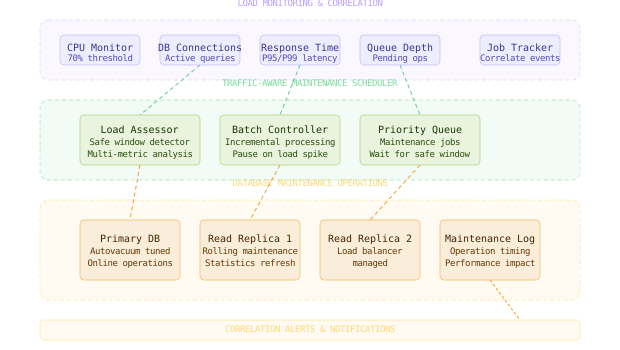
The complete architecture monitors system load continuously and performs maintenance only during safe windows. The maintenance scheduler checks CPU usage, memory consumption, database connection counts, and response time percentiles before starting any maintenance work. When maintenance is needed, the system waits for an appropriate load level, then performs work in small incremental batches. If load increases during maintenance, the process pauses until conditions improve. This eliminates the predictable performance spikes while ensuring maintenance actually gets completed.
The most important design decision is making maintenance operations observable and correlatable - when performance problems occur, you need to quickly identify if they coincide with any background operations.
Key Takeaways
- Scheduled job interference creates predictable performance problems that appear mysterious because the maintenance timing is hidden from application monitoring
- Autovacuum tuning spreads database maintenance work across time instead of concentrating it in scheduled bursts that block live queries
- Traffic-aware scheduling performs maintenance based on actual system load rather than arbitrary clock times
- Rolling replica maintenance allows database maintenance without impacting primary database performance
- Incremental processing breaks large maintenance operations into small batches that can pause when system load increases
- Load correlation requires monitoring both application metrics and background job execution to identify interference patterns
- Growing data amplifies maintenance impact - operations that were safe at small scale become problematic as data size increases
- Global applications have no true off-peak hours - time-shifting maintenance just affects different user populations
The hardest lesson about maintenance scheduling is that “off-peak” is a myth in global, always-on systems. The solution isn’t finding better times to disrupt users - it’s finding ways to maintain systems without disrupting users at all.
Frequently Asked Questions
Q: How do you handle maintenance operations that require exclusive locks? A: Use online schema migration tools (like pt-online-schema-change for MySQL or pg_repack for PostgreSQL) that create shadow tables and swap them atomically. For operations that absolutely require locks, use maintenance windows with user notification and graceful degradation.
Q: What if autovacuum isn’t keeping up with the workload? A: Tune autovacuum more aggressively (lower thresholds, more workers, higher cost limits) or implement application-level cleanup (archiving old data, partitioning large tables). Consider read replicas for reporting queries to reduce primary database load.
Link in comments 👇
#SystemDesign #DatabasePerformance #DevOps #Observability #PostgreSQL
Want to see how these patterns hold up when traffic spikes 50x at 3 AM? That's exactly what this Premium deep-dive covers.